How Chat SSO Integration Powers Membership Platforms

If your membership platform relies on engaged, active communities, then chat SSO integration for membership platforms is one of the highest-leverage investments you can make. Single Sign-On (SSO) chat integration lets your members enter a live group chat room the moment they are already logged in — no second password, no duplicate registration, no friction. RumbleTalk’s SSO-powered chat widget plugs directly into your existing authentication system so that every conversation happens under verified, real member identities from the very first message.

What Is Chat SSO Integration for a Membership Platform?

Single Sign-On is an authentication protocol that lets a user log in once and gain access to multiple connected services without re-entering credentials. When applied to a group chat widget on a membership site, SSO means a member who is already signed into your platform is automatically recognized inside the chat room as a verified, named participant — avatar included.

For membership platforms — whether you run an online course site, a professional association, a subscription community, or a fan club — chat SSO integration for the membership platform transforms your chat from an anonymous public widget into a gated, identity-aware conversation space. Only approved or paying members participate, and each one appears under their real account identity. That single change elevates the quality and trustworthiness of every discussion.

How RumbleTalk’s SSO Flow Works

RumbleTalk uses a token-based SSO mechanism. When a logged-in member loads a page containing the chat embed, your server generates a signed token — typically a JSON Web Token (JWT) or an HMAC hash — encoding that user’s name, avatar, user ID, and optional role. The RumbleTalk widget reads that token, verifies the signature server-side, and opens the chat session automatically. The member never sees a second login screen. This single sign-on chat integration takes less than a day to implement on most platforms, including custom-built sites and popular WordPress membership plugins.

Why Membership Platforms Need SSO-Enabled Chat

Without SSO, your members face a simple but damaging choice: re-authenticate just to post a message, or skip the chat entirely. Research consistently shows that even one extra login step reduces feature adoption significantly. When chat SSO integration for the membership platform is active, the barrier drops to zero for authenticated members — and participation rates follow.

Verified Identity Builds a Better Community

Anonymous chat rooms attract spam, trolling, and low-quality posts. When every participant enters the chat under their verified membership account, the tone of conversation improves immediately. Admins can see real usernames, trace problematic messages to specific accounts, and apply bans that stick — because RumbleTalk ties enforcement to the SSO identity, not just a device or browser session. The result is a chat room that feels like a real community, not a comment section.

Role-Based Access Through the SSO Payload

One of the most powerful capabilities of chat SSO integration for a membership platform is role mapping. Your platform already segments users — free tier, premium, instructor, moderator, enterprise admin. RumbleTalk’s SSO payload accepts a role or admin field, and the chat widget enforces the corresponding permissions automatically.

  • Free members — read-only access or slow-mode posting with a message cooldown
  • Premium members — full messaging rights, file sharing, and emoji reactions
  • Instructors and moderators — admin privileges including message approval and user removal
  • Unauthenticated visitors — blocked from the chat entirely, shown a customizable upgrade prompt

This level of access control is simply impossible without a proper chat SSO integration for the membership platform. It makes the chat widget a natural extension of your access policy rather than a parallel system your team must manage separately.

Key Use Cases for Chat SSO Integration for Membership Platforms

Online Course and E-Learning Communities

Course creators and online academies use RumbleTalk’s SSO-enabled chat to add live discussion rooms to each course module. Students log in to the LMS and immediately see their name and avatar inside the course chat room — no separate registration required. Instructors gain admin rights automatically based on their SSO role, so they can moderate questions, run live Q&A sessions, mute disruptive students, and pin important messages — all from the same interface their learners see. The single sign-on chat integration also means student participation data is tied to real accounts, giving instructors meaningful engagement insight.

Professional Associations and Conference Communities

Professional membership associations hosting annual conferences, webinars, or networking events benefit enormously from chat SSO integration for the membership platform. Every registered attendee lands in the event chat room already identified by name and tier. Networking becomes natural — members see colleague names and titles, not anonymous handles. Organizers can segment rooms by interest group or membership level, with access enforced automatically through the SSO role field. No manual user list management, no ticket-checking at a virtual door.

Subscription Content and Creator Communities

Newsletter publishers, podcasters, and content creators with paid subscriber communities use SSO-enabled chat to give paying members exclusive real-time access. When the chat widget is gated behind SSO authentication, only verified subscribers participate — making the chat room itself a compelling membership benefit that drives upgrades. The chat SSO integration for a membership platform also allows creators to customize the display name format, such as “⭐ Founding Member | Jane”, so community status is visible at a glance and adds social proof to higher-tier memberships.

Corporate Training and Internal Portals

HR teams and corporate trainers embed RumbleTalk chat rooms directly inside internal portals. Employees already authenticated via the company identity provider — Azure AD, Okta, Google Workspace — are passed into the chat room without any additional step. Live training sessions, all-hands events, and project-based team chats run inside the existing intranet with full member identity visible. The SSO layer also means offboarded employees are excluded automatically once their account is deactivated in the identity provider.

Implementation: Setting Up the SSO Chat Integration Step by Step

Step 1 — Generate a Signed Token on Your Server

When a member loads a page containing the chat embed, your backend generates a token. The standard payload includes: username, nickname, avatar_url, user_id, and optionally an admin boolean or a custom role string. The token is signed with your RumbleTalk secret key using HMAC-SHA256. This server-side signing is what makes the integration secure — it cannot be spoofed from the browser.

Step 2 — Inject the Token Into the Embed Code

The RumbleTalk JavaScript embed accepts a userData parameter. Your server injects the signed token into the embed snippet before delivering the page, so the token is never exposed to client-side manipulation. RumbleTalk’s servers receive the token, verify the signature, resolve the user identity and permissions, and open the authenticated chat session — all before the widget appears on screen.

Step 3 — Test Role Mapping and Permissions

Before going live, test the chat SSO integration for your membership platform with accounts representing each role tier. Confirm that the correct permissions appear for each: message rate limits for free tiers, moderation buttons for admins, file-sharing toggles for premium users. RumbleTalk’s admin dashboard shows a live view of connected users and their resolved roles, making this validation quick and reliable.

Step 4 — Enable Members-Only Mode

If the chat should be strictly gated, enable SSO-only mode in your RumbleTalk dashboard settings. Unauthenticated visitors will see a customizable locked-chat message — ideal for prompting non-members to sign up or upgrade. This setting ensures that the value of the chat room is inseparable from the value of the membership itself.

RumbleTalk Features That Amplify Your Membership Chat

Members Chat Widget

RumbleTalk’s Members Chat is purpose-built for authenticated communities. It supports SSO login, custom user avatars sourced from the token payload, role-based moderation, private one-on-one messaging, and full admin controls — all within a single embeddable widget. When paired with your SSO flow, it becomes a fully gated, branded community hub that looks and feels like a native part of your membership platform.

Moderated Q&A for Live Events

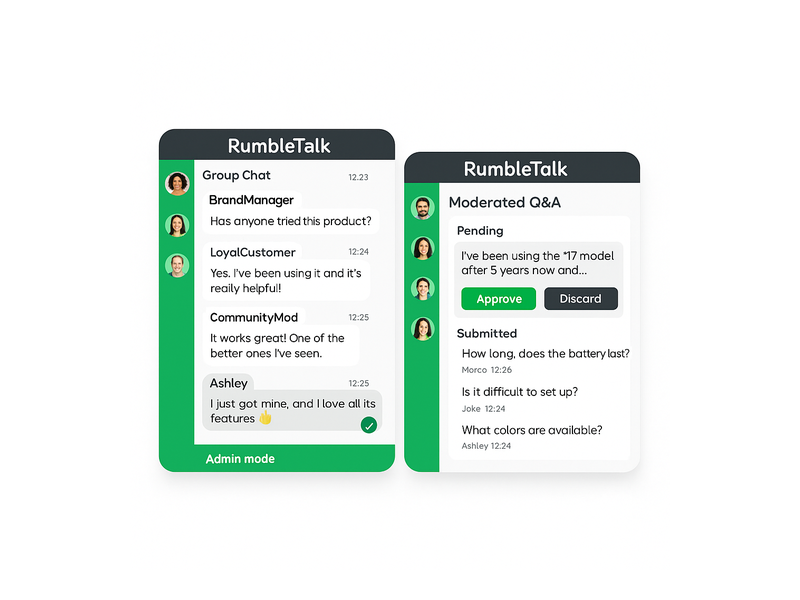
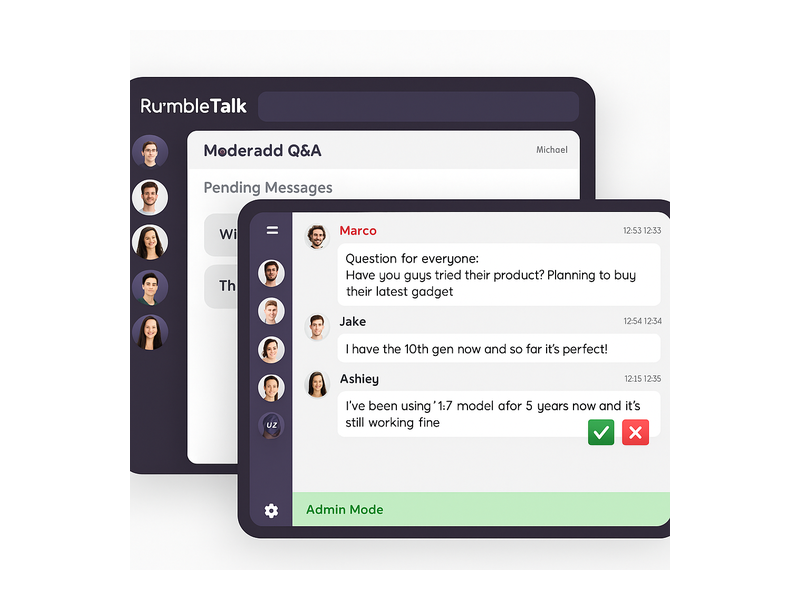
Membership platforms hosting live webinars or town halls can layer RumbleTalk’s Moderated Q&A mode on top of the SSO integration. Members submit questions through the chat; admins review, approve, and feature the best ones on screen. Because SSO identifies each participant by tier and account, moderators know whose question is whose and can prioritize voices from premium or VIP members when appropriate. The result is a structured, high-quality Q&A session rather than a chaotic comment stream.

Private Chat for Member-to-Member Messaging

Private Chat allows SSO-authenticated members to open direct message threads with each other inside the platform. Because every user is already identified by their real membership account, private conversations carry the same accountability as the main chat room. Members can report messages, and admins can investigate with full context — something that is impossible in an anonymous chat environment.

Multiple Rooms with Segment-Based Access

A membership platform with multiple tiers or interest groups can deploy multiple RumbleTalk chat rooms on different pages, each governed by its own SSO rule set. A “Premium Members Lounge” can be restricted to premium-tier SSO tokens; a “General Community” room is open to all verified members; an “Instructor Hub” is admin-only. The chat SSO integration for the membership platform handles all access logic automatically — your team manages one identity system, and the chat rooms inherit the rules.

Security and Compliance Considerations

Membership platforms often handle sensitive subscriber and payment data, and the chat layer must meet the same standards. RumbleTalk’s chat SSO integration for membership platforms uses server-side token signing — user data never passes through the client in plaintext. Signed tokens are short-lived, with a configurable expiry window that prevents replay attacks. RumbleTalk does not store user passwords or OAuth credentials; it receives only the identity payload you choose to include in the token.

For platforms subject to GDPR or CCPA, RumbleTalk supports data minimization. You control exactly which fields appear in the SSO payload — you can pass a pseudonymous display ID rather than a legal name if your privacy policy or terms of service require it. Role-based permissions also mean that member data visible in the chat (such as tier labels or avatars) is limited to what you explicitly configure in the token.

For step-by-step technical setup guidance, visit the RumbleTalk Knowledge Base: Getting Started.

Measuring the Business Impact of SSO Chat on Membership Retention

Adding a frictionless, SSO-enabled chat room to a membership platform is not just a technical improvement — it is a measurable retention strategy. Members who engage in community discussions renew at higher rates. When chat SSO integration for the membership platform removes the authentication barrier, passive members who previously lurked are significantly more likely to post their first message. Even a modest lift in monthly active chat users compounds over time: higher participation leads to stronger community ties, which leads to lower churn and higher lifetime value per member.

Track impact using RumbleTalk’s built-in analytics: messages per session, daily active users, peak concurrent users during live events. These metrics give your growth and community teams concrete evidence of the engagement improvement that followed the SSO-enabled chat integration rollout. Use the data to justify further investment in live events and gated community programming.

To see how SSO chat fits into a broader website strategy beyond membership platforms, read our post on Chat SSO Integration for Websites.

Start Your Chat SSO Integration for Your Membership Platform Today

If you are ready to give your members a seamless, verified chat experience, RumbleTalk makes it straightforward. The chat SSO integration for a membership platform typically goes live in hours — not weeks — and the payoff in member engagement and community quality is immediate. Whether you run an online academy, a professional association, a subscription creator community, or a corporate training portal, RumbleTalk’s SSO-powered chat widget scales alongside your growth without adding operational complexity.

Visit rumbletalk.com to start your free trial, explore the Members Chat widget, and access the SSO integration documentation your development team needs to go live with a fully authenticated, role-aware community chat today.

Discord Alternative for Online Course Creators and Student Communities

A Discord alternative for online course creators is an embedded, moderated community chat tool that integrates directly with your course platform, restricts access to enrolled students, and presents a clean, professional environment that matches the look and feel of your brand rather than a gaming interface designed for a completely different audience.

If you run an online course, you have probably been told to build your student community on Discord. It is free, it has voice channels, it supports text chat, and your students already have accounts. On paper, it makes sense. In practice, it creates a problem that grows worse the more seriously you take your course brand and your student experience.

Discord was built for gamers!!

Its interface reflects that origin: dark backgrounds, dense channel lists, emoji reactions, server boosts, nitro badges, and a visual language that communicates a gaming community rather than a professional learning environment. For a course creator running a business skills program, a design school, a medical education platform, or a corporate training product, this aesthetic mismatch is not a small thing. It signals to students that the community experience is an afterthought, bolted on from a platform built for something else entirely.

This guide covers what online course creators actually need from a student community chat tool, why Discord fails to deliver it, and how a purpose-built embedded chat solution creates the clean, professional, integrated community experience that serious course platforms require.

The Discord Aesthetic Problem for Professional Course Platforms

First impressions in online education matter enormously. A student who pays for a professional course has a mental model of what that experience should look and feel like. Clean design, consistent branding, a focused learning environment. Every touchpoint, from the course platform to the community space, contributes to whether the student perceives they have made a good investment.

Discord’s interface actively works against this perception. The platform is visually busy by design. Multiple server columns, channel lists, notification badges, member status indicators, server boost prompts, and promotional banners create a visual noise level that is appropriate for a gaming community where high stimulation is the point. It is entirely inappropriate for a focused learning environment where clarity and concentration are the goals.

Beyond the visual noise, Discord’s branding is inescapable. The Discord logo, the Wumpus mascot, the unmistakable interface conventions: all of it signals Discord, not your course. Students are not in your learning community. They are in a Discord server that happens to be about your course. The distinction sounds subtle, but students feel it. The platform identity overwhelms the course identity every time.

For course creators who have invested in building a professional brand, a polished course platform, and a considered student experience, sending students to Discord for community is the equivalent of hosting your course videos on a gaming streaming platform. The content might be excellent. The context undermines it.

The Integration Problem: Discord Lives Outside Your Platform

Beyond aesthetics, Discord creates a structural problem for course creators: it exists outside your platform. Students must leave their course environment, open a separate application or tab, log in to Discord separately, and navigate to their server to access the community. Every one of those steps is a friction point that reduces community participation.

The research on online learning engagement is consistent: community participation drops sharply when it requires leaving the learning environment. Students who are mid-lesson and have a question do not want to switch applications, find the right Discord channel, and re-establish context. They want to ask the question of where they are. If the community is embedded in the course platform, they ask. If it requires switching to Discord, most do not bother.

There is also an identity problem. Discord requires a separate account. A student enrolled in your course has an account on your platform. Asking them to create and maintain a second account on Discord introduces an unnecessary friction that disproportionately affects less technically confident students, exactly the learners who most need community support.

The Access Control Problem: Discord Cannot Verify Enrollment

A student community should be restricted to enrolled students. This is both a quality control issue and a revenue protection issue. Non-students in your community dilute the discussion quality, create support obligations you have not been paid for, and, in some cases, access course-adjacent content, assignment discussions, or peer feedback that is part of the paid learning experience.

Discord cannot verify enrollment in your course. You can manually add students to a Discord server, manually remove them when they refund or their access expires, and manually manage role permissions for different course tiers. This works for a course with ten students. It breaks down completely at fifty and becomes a significant operational burden at hundreds or thousands of enrolled learners.

An embedded chat tool that acts as a Discord alternative for online course creators connected to your course platform through an API handles this automatically. When a student enrolls, they gain community access. When their access expires, they lose it. After they upgrade to a higher course tier, they get access to the appropriate community spaces. No manual intervention required. The access control reflects the enrolment state automatically.

What Course Creators Actually Need from a Community Chat

The requirements of an online course community are specific and different from what Discord was built to serve. Understanding them makes it clear why a purpose-built embedded solution that acts as a Discord alternative for online course creators is the right tool.

Discord alternative for online course creators
  • Clean, branded interface. The community space should reflect your course brand: your colours, your logo, your typography. Students should feel they are in your learning environment, not in a gaming platform with your name on a channel.
  • Enrollment-gated access. Only students who have paid and are actively enrolled should have access. Access should be provisioned and revoked automatically based on enrollment status.
  • Embedded in the course platform. The community chat should be accessible without leaving the course. Ideally, it lives alongside the lesson content, not on a separate platform requiring a separate login.
  • Moderated discussion. Student community discussions need oversight. Off-topic content, misinformation about course content, and peer conflicts need to be manageable by the course team without relying on Discord’s basic moderation tools.
  • Instructor presence. The course instructor or teaching assistants need to be clearly identifiable in the community, with tools to post announcements, answer questions, and engage with the student cohort in a structured way.
  • No noise, no gaming culture. The interface should have no features that are irrelevant to learning: no server boosts, no nitro promotions, no gaming status indicators, no visual complexity that distracts from the discussion.

Moderated Chat: Keeping the Learning Community Focused

Student communities have a natural tendency toward off-topic drift. A course on digital marketing will have students sharing memes about their industry. A coding bootcamp community will have threads about tool preferences that have nothing to do with the curriculum. A business skills program will have students discussing current events. Some of this is healthy community building. Too much of it buries the course-relevant discussion that actually helps students learn.

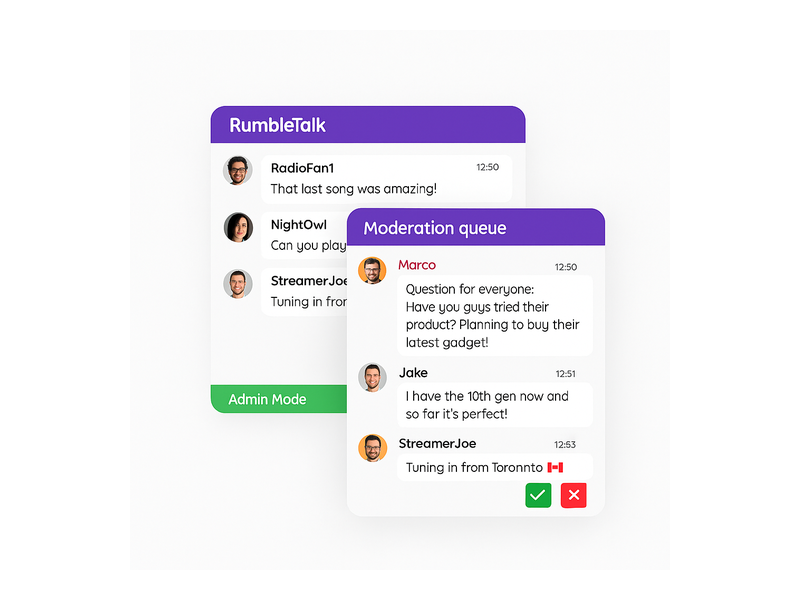
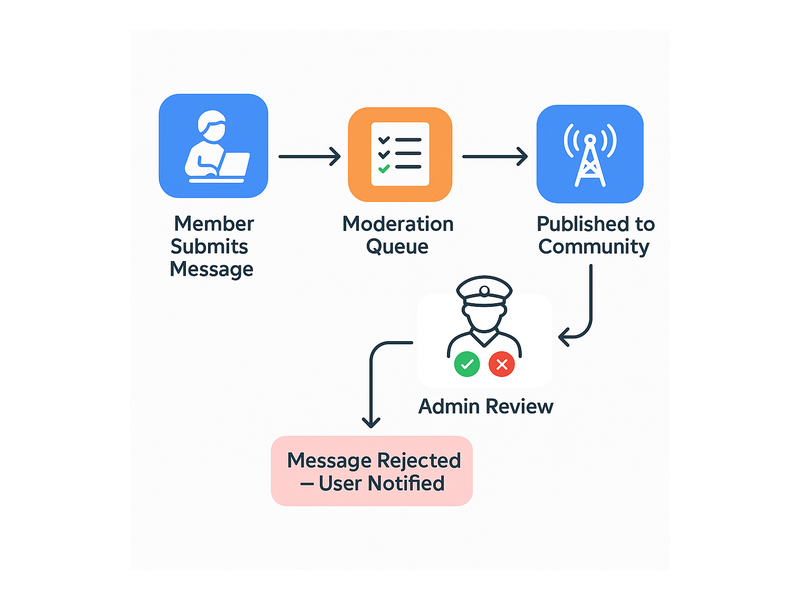
RumbleTalk’s Queued Chat mode gives the course team full control over what appears in the community chat. All messages go to a moderation queue before appearing publicly. A teaching assistant reviews submissions and approves the ones that contribute to the learning community. Off-topic content, duplicate questions already answered in the course FAQ, and anything else that adds noise rather than value are rejected before it reaches other students.

For live webinar sessions and Q&A calls: Queued Chat is particularly valuable. Students submit questions throughout the session. The instructor or their assistant manages the queue, surfacing the best questions at the right moment in the session rather than managing a live fire hose of unfiltered student messages. The result is a structured, high-quality Q&A that serves the whole cohort rather than the fastest typers.

For community spaces where more open discussion is appropriate, Social Chat mode allows free conversation with moderation tools available when needed: keyword filters, instant user management, and admin oversight without pre-approving every message.

Members Chat: Enrollment-Gated Access That Actually Works

Members Chat restricts the community to authenticated users only. Connected to your course platform through the SDK auto-login, the authentication uses your existing student accounts rather than requiring a separate Discord login. A student who is enrolled and logged into your course platform is automatically present in the community chat under their student name. A student whose enrollment has expired cannot access the chat at all.

For multi-course platforms, this extends to course-specific communities. A student enrolled in Course A has access to Course A’s community room. They do not have access to Course B’s community unless they are also enrolled there. Each community space is automatically populated by the correct enrolled cohort and gated away from everyone else.

This is the access control that Discord cannot provide. The manual effort of adding and removing Discord server members is replaced entirely by automatic enrollment-based provisioning. The course team focuses on teaching. The platform handles access.

The Admin Panel: Instructor and TA Tools for Community Management

Course instructors and teaching assistants need community management tools that match their role. They are not Discord server administrators. They are educators who need to post announcements, answer questions, and manage student interactions without learning a complex platform configuration.

Discord alternative for online course creators

What the course team manages from the admin panel:

  • Pinned announcements: course updates, assignment deadlines, live session links, and instructor messages are posted at the top of the chat and are visible to all students immediately.
  • Question moderation queue: reviewing student questions during live sessions and surfacing the best ones to the instructor in sequence, creating a structured Q&A without chat chaos.
  • Student management: muting or removing students who are disruptive to the learning environment, with immediate effect across all community spaces.
  • Cohort monitoring: seeing which students are active in the community, identifying learners who are disengaged and may need outreach, and tracking community health across the enrolled cohort.
  • Post-session archive: the complete chat history from each live session is available for students who missed the session and for the course team to review common questions for future curriculum improvements.

Clean Design: What a Professional Course Community Should Look Like

RumbleTalk’s visual editor allows complete customization of the chat interface. The community chat can match your course platform’s color scheme, display your logo, use your typography, and present a visual identity that is entirely yours. There are no Discord brand elements, no gaming interface conventions, no visual noise from platform features that are irrelevant to learning.

The result is a community space that students experience as part of their course rather than as an external tool they are redirected to. The design continuity between your course content and your community space reinforces the perception that the entire learning experience is considered and professional. This matters for student confidence in their investment and for the premium positioning that serious course creators work to establish.

For corporate training programs and professional certification courses, this is not just a preference. A gaming platform that resembles a community space creates a genuine credibility problem when professionals position the learning content for development. Clean, branded, purpose-built is not a luxury in this context. It is a baseline requirement.

Real-World Use Cases for Course Community Chat

Cohort-Based Online Course

A cohort-based course running over eight weeks uses Members Chat restricted to enrolled students for that cohort. Each weekly live session uses Queued Chat mode for the Q&A segment, with a teaching assistant managing the question queue throughout the session. Between sessions, the chat remains open for peer discussion and assignment questions. At the end of the cohort, the community space archives automatically and a new room opens for the next intake. The course brand is consistent throughout. No student ever sees a Discord interface.

Multi-Course Platform with Separate Student Communities

A platform offering five different courses uses separate Members Chat rooms for each course community, all connected to the platform’s central authentication system via auto-login. Students enrolled in multiple courses can access multiple community rooms. Students enrolled in one course cannot access any other. The team applies the platform’s visual branding consistently across all community rooms. Instructors manage their course community from the admin panel without needing technical access to the platform backend.

Corporate Training Program

A corporate L&D team runs a professional development program for client companies. Each client company has a separate, branded community space for their participants. The clean interface is essential. The company sells the program to senior professionals who would find a Discord-style gaming interface jarring and off-brand for a premium corporate training product. The moderated chat keeps discussions focused on the program content. The REST API creates and archives cohort communities automatically as new client groups enroll.

How to Set Up Your Course Community Chat

  1. Create a RumbleTalk account at rumbletalk.com and configure a Members Chat room for your first course community.
  2. Apply your course branding using the visual editor: your colors, logo, and design language, creating a seamless extension of your course platform.
  3. Connect auto-login via the SDK to your course platform’s authentication system so enrolled students join the community automatically without a separate registration.
  4. Configure access by enrolment: map each course community room to the corresponding enrolled student group. Therefore, access is automatically provisioned and revoked based on enrolment status.
  5. Set up Queued Chat for your live session Q&A segments and Social Chat for between-session community discussion.
  6. Assign teaching assistants to the admin panel as moderators for each course community room.
  7. Embed the chat widget directly on your course platform page so students access the community without leaving the learning environment.
  8. Use the REST API to automate community room creation for each new course cohort as it opens for enrolment.

Frequently Asked Questions

Why is Discord not the best for online course communities?

Developers designed Discord for gaming communities, and its interface reflects that origin: dark, visually noisy, and full of gaming-culture features that are irrelevant and off-brand for professional learning environments. It also requires a separate login, cannot verify course enrollment automatically, and lives outside your course platform, creating friction that reduces student community participation. For course creators investing in a professional brand and student experience, Discord sends the wrong signal about the quality of the product.

What is the best Discord alternative for online course creators?

The best Discord alternative for online course creators is an embedded chat tool that integrates with your existing course platform authentication, restricts access to enrolled students automatically, presents a clean branded interface with no gaming-platform visual noise, and gives instructors and teaching assistants practical moderation tools for managing student discussions and live session Q&A. RumbleTalk provides all of these through Members Chat, SDK auto-login, and a fully customisable chat interface.

How do I restrict my course community to enrolled students only?

Use Members Chat connected to your course platform via the SDK auto-login. Students who enroll and log into your platform automatically authenticate themselves in the community chat. Students whose enrolment has expired lose access automatically. Non-enrolled visitors cannot read or participate in the community. The system fully automates access control based on your enrolment status in the existing course management system.

Can I brand this Discord alternative for online course creators to match my course platform?

Yes. RumbleTalk’s visual editor allows complete customisation of the chat interface: your colour scheme, logo, and design language. There are no Discord brand elements or gaming interface conventions. The result is a community space that looks and feels like part of your course platform rather than a third-party tool. This reinforces the professional brand you have built around your course content.

How do I manage Q&A during a live course session without Discord noise?

Use Queued Chat mode for live session Q&A segments. Student questions go to a moderation queue rather than appearing immediately in the chat. A teaching assistant reviews submissions throughout the session and surfaces the best questions to the instructor in sequence. The instructor receives a curated stream of pre-selected questions at the right moments in the session, rather than trying to read and respond to a live flood of simultaneous student messages.

Does the course community chat work on mobile?

Yes. The RumbleTalk chat widget is fully responsive and works on smartphones and tablets without a separate app download. Students accessing your course on mobile have the same full community chat experience as desktop users. With auto-login enabled, this Discord alternative for online course creators automatically authenticates enrolled students on any device they use to access your course platform.

Ready to replace Discord with a Discord alternative for online course creators that actually fits your course brand? Create your free RumbleTalk account at rumbletalk.com and have your first enrolled-student community running before your next cohort opens.

Give Your Members a Trading Chat Widget They’ll Open Every Session

A trading chat widget is the difference between a platform your members check once a day and one they keep open all session long. When traders can talk in real time, share signals, react to price moves, and ask questions, your platform becomes the place they work from. Not just the place they log into.

Most trading platforms are built around data: charts, watchlists, screeners, and alerts. What they often miss is the human layer. Traders do not make decisions in isolation. They watch how others react to the same data. They share observations. They ask whether anyone else is seeing what they are seeing. That conversation happens somewhere. If it does not happen on your platform, it happens on Discord, on Telegram, or in a private group your members built without you.

A trading chat widget embedded directly in your platform keeps that conversation where it belongs. It stays inside your product, visible to your community, and under your moderation.

Why Traders Keep Chat Open All Session

Trading is a time-sensitive activity. A signal that matters at 9:35 AM is irrelevant by 9:50. The conversation around that signal, including who saw it, who acted, and what happened, must occur in real time. This is fundamentally different from a forum post or comment thread, where replies arrive hours after the moment has passed.

A live trading chat widget feeds that real-time need. Members post observations as the market moves. They tag each other on setups. They share screenshots of charts mid-session. As a result, the chat becomes a live feed of collective attention. That feed is inherently sticky. Once a trader is in the habit of watching it, they do not close it.

This is why platforms with embedded chat see higher session length and return visit frequency than those without it. The chart might be the reason a member signs up. However, the chat is the reason they stay.

RumbleTalk trading chat widget showing live member discussion with stock signals and file sharing

Members-Only Access: Your Community, Your Rules

Not every trading chat should be open to the public. If your platform serves a paid subscriber base, a private trading club, or a members-only research service, your chat room should reflect that exclusivity. RumbleTalk’s trading chat widget gives you full control over who can enter the room.

You can configure the chat to accept only registered users. Anyone who tries to open the widget without an active account on your platform is blocked at the door. In addition, when combined with SSO integration, your existing login system becomes the key. Members who are logged into your platform are automatically logged into the chat. No second account. No separate password. No friction.

This matters more than it might seem. A trading community is only as valuable as the quality of its participants. When you control who is in the room, you control the signal-to-noise ratio. Every message comes from a verified member of your platform, someone with skin in the game and a reason to contribute meaningfully.

Share Charts, Files, and Market Data Right in the Chat

Text is not enough for traders. The most useful contributions in a trading chat are visual. For example, members share a chart showing a breakout pattern, a screenshot of an options chain, a PDF of a research report, or a pie chart of portfolio allocation. RumbleTalk’s trading chat widget supports file sharing natively. Members can attach images, documents, and charts directly to their messages without leaving the platform.

This turns the chat from a conversation into a working environment. Members are not just talking about trades. They are showing their reasoning, in real time, to the whole room. That transparency builds trust and speeds up learning. Junior members learn by watching how experienced traders communicate their setups. Furthermore, experienced traders benefit from the accountability of sharing their thinking publicly.

The result is a chat room that functions more like a trading desk than a social feed. That is exactly the kind of environment members return to every single session.

Comparison showing platform without trading chat widget versus with it showing engagement and retention difference

Moderation: Keep the Room Focused on What Matters

A trading chat without moderation quickly becomes noise. Off-topic messages, promotional spam, and low-quality posts degrade the experience for serious members. Serious members leave. RumbleTalk gives platform administrators three tools to keep the room productive.

Message Pre-Approval

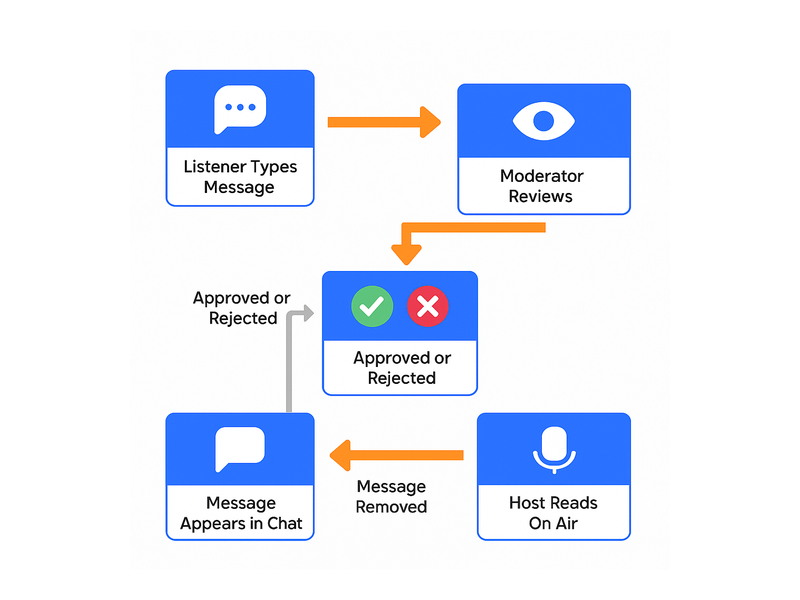
Every message a member posts goes into a moderation queue before it appears in the room. Moderators see the message and approve or reject it with a single click. This is the highest level of control. Nothing reaches the room that has not been reviewed first. This approach is particularly useful for platforms where the chat is used for live trade recommendations or regulated financial advice.

Admin Mode

When a host or expert is presenting, such as during a live trading session, a market open commentary, or an earnings reaction, you can activate Admin Mode. This silences all regular members and allows only administrators and designated speakers to post. As a result, the room stays focused on the presenter without interruption. Members can still read and follow along. They just cannot post until the presentation ends and Admin Mode is lifted.

Slow-Down Chat

During high-volatility periods, such as a major earnings announcement, a Fed decision, or a sudden market move, chat rooms can flood with rapid-fire posts. These posts scroll past too fast to read. Slow-Down Chat lets you set a cooldown period between messages from each member. Every member can still participate, but the pace of the conversation stays readable. In other words, the signal stays visible in the noise.

Private Chat: One-on-One for Deeper Conversations

Not every trading conversation belongs in the group room. A member who wants to ask a detailed question about a specific setup, a subscriber who wants to discuss their portfolio with an advisor, or a mentor working through a trade with a student, these conversations are better handled privately.

RumbleTalk’s private chat feature allows any two members to open a direct conversation from within the platform. The private chat supports text, file sharing, and audio and video calls. Therefore, deeper discussions can move from text to a face-to-face conversation without switching apps. Everything stays inside your platform.

For trading advisory services, this is particularly valuable. Members who pay for premium access can get direct time with advisors through the same interface they use for the group chat. The platform becomes the complete communication environment. No more Zoom links, WhatsApp threads, or email chains.

Trading community concept illustration showing traders connected through a chat hub with market data and discussion

Embedding the Widget: Simpler Than You Think

The technical lift for adding a trading chat widget to your platform is minimal. RumbleTalk provides an embed code, which is a short HTML snippet, that you paste into any page on your website. The chat room loads inside your existing layout, inheriting your site’s look through customizable themes. There is no server infrastructure to set up, no database to manage, and no maintenance overhead on your end.

For WordPress-based platforms, the RumbleTalk plugin handles the embed automatically. For custom platforms built on React, Angular, Vue, or any server-rendered stack, the JavaScript SDK gives developers full control over placement, sizing, and user authentication. Moreover, most development teams complete the full integration, including SSO, in under a day.

Once embedded, the widget scales automatically. Whether your community has 50 active members or 5,000 in the room at once, the infrastructure handles the load. No action is required on your part.

What Your Members Actually Get

From the member’s perspective, a well-implemented trading chat widget feels like a natural part of the platform. It is not a bolt-on addition. They log in, and the chat is already there. It already shows their name. It is already populated with the morning’s activity from other members who joined early.

They can watch the pre-market discussion while reviewing their watchlist. They can drop a chart into the room when they spot a setup and get immediate reactions from other members. They can follow the admin’s live commentary during the market open. They can also slip into a private conversation with a mentor for five minutes and come back to the group room. All of this happens without switching tabs, apps, or platforms.

That seamless experience is what turns a chat widget from a feature into a habit. A habit is what brings members back every session. Not just when the market is interesting, but every day, as part of how they trade.

Building the Platform Traders Choose Over Discord

The trading communities that migrate to Discord or Telegram do so for one reason. The platform they paid for does not have a place to talk. They want a live conversation with other traders. Since their broker or analytics platform does not offer one, they build it somewhere else. Eventually, that is where their attention lives.

Embedding a trading chat widget closes that gap. Your members do not need to go anywhere else to find the community around your platform. The community is inside your platform. The conversation about your signals, your research, and your calls happens in your product, where you can see it, moderate it, and benefit from it.

The platforms that win member loyalty in the trading space are not necessarily the ones with the best data. They are the ones that combine good data with a live community. The chart keeps members informed. The chat keeps them engaged. Together, they keep them subscribed.

Get Started Today

RumbleTalk’s trading chat widget is ready to embed in your platform today. Whether you run a paid subscription service, a members-only investment club, a day trading education platform, or a financial content site with an active audience, the widget gives your community a real-time home inside your product.

Sign up for RumbleTalk and have your trading chat room live before your next session opens.