
If you run a radio show, audio stream, or broadcast station, radio audience chat is no longer an optional feature — it is a core part of what keeps listeners tuned in and coming back. Today’s audiences expect to participate, not just listen. Whether you host a talk program, a music station, a live news show, or a podcast recorded in front of a live online audience, giving your listeners a dedicated space to chat in real time transforms your broadcast from a one-way transmission into a living, breathing conversation.
RumbleTalk is a group chat platform built for websites and live events. It gives broadcasters, media companies, radio producers, and content creators everything they need to run a professional, moderated, and deeply engaging radio audience chat — embedded directly on their own website, with no app download required for listeners.
Why Radio Shows Need a Dedicated Radio Audience Chat
Social media comment sections and third-party platforms like Twitter or Discord are noisy, fragmented, and difficult to control during a live broadcast. When your listeners are scattered across five different platforms, you lose control of the conversation, the data, and ultimately the community you are trying to build. A dedicated radio audience chat keeps your community in one place — on your own website, under your own brand, with full administrative control over who speaks and what gets displayed.
When your listeners can chat alongside the show in real time, three measurable things happen. Engagement climbs: people stay on your website longer because they are active participants in the experience rather than passive consumers. Social proof builds: new visitors who land on your site mid-broadcast see an active, lively chat and are far more likely to stay and explore. And you gain immediate, unfiltered feedback — listener questions, topic reactions, and suggestions you can act on during the broadcast itself.
For radio stations and independent show producers, this is also a significant business opportunity. A live audience chat creates natural inventory for sponsorships, on-air shoutouts, and branded contests. The engagement data it generates — who your most active listeners are, which topics spark the most conversation, what time slots drive peak chat activity — is valuable to advertisers and useful for your own programming decisions.
RumbleTalk Products Built for Radio Audience Chat
RumbleTalk was designed with live events and broadcast audiences in mind. Its product suite covers every scenario a radio producer or station manager is likely to encounter, from open-floor listener chats to tightly controlled on-air Q&A sessions.
Group Chat for Live Broadcasts
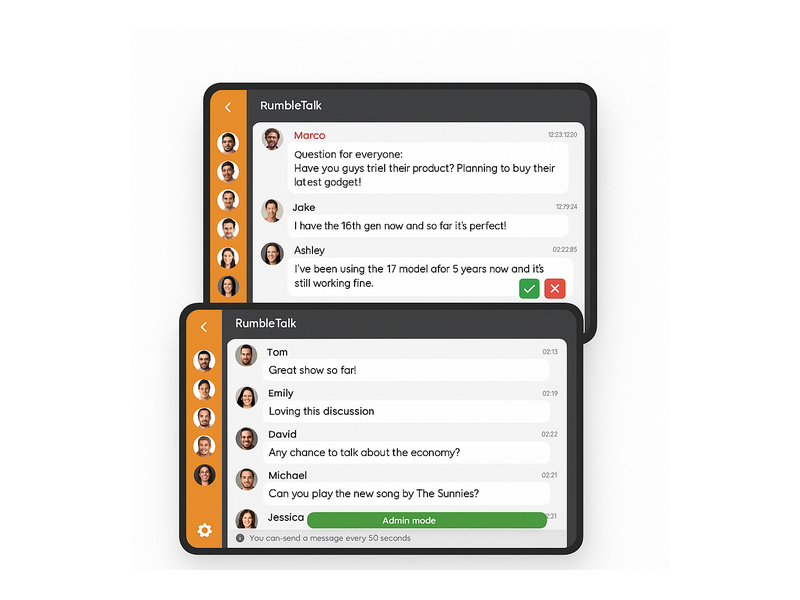
The Group Chat product is the foundation of any radio audience chat setup. It supports hundreds or thousands of simultaneous users, making it suitable for everything from a small community radio station to a large syndicated talk show. Messages appear in real time with minimal latency. Listeners can set screen names, upload avatars, and use emoji reactions. Administrators can see the full room from a dedicated moderator view, with one-click controls to approve, block, or remove messages and users without disrupting the flow of the chat.
The chat widget is fully brandable. You can match it to your station’s colors, fonts, and logo so that the chat experience feels like an integral part of your website rather than a generic third-party tool bolted on as an afterthought. This brand consistency matters to listeners — it signals that you take your community seriously.
Moderated Q&A for Structured Listener Interaction
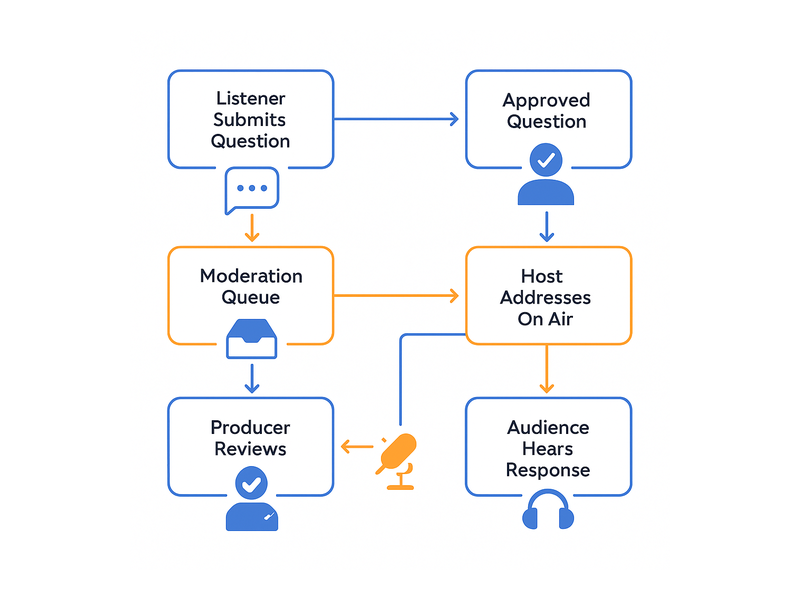
One of the most popular features among radio hosts and producers is RumbleTalk’s Moderated Q&A, also known as Queued Chat. With this product, listener questions are held in a private moderation queue before they ever appear publicly in the chat. The host or producer reviews each submission and approves only the messages they want to surface on air.
This is invaluable for talk radio and interview formats, where the host needs to keep the conversation tightly focused. Instead of wading through hundreds of messages during a broadcast to find the two or three worth addressing, the producer curates a queue in advance. The host sees only approved messages, which leads to more polished, higher-quality broadcasts. Listeners also benefit: they know their question was seen and seriously considered by a human being, which creates a far stronger sense of connection than a generic social media comment thread ever could.
Members Chat for Premium Listener Communities
Many radio stations and podcast producers offer premium membership tiers — paid subscribers, Patreon supporters, newsletter members, or registered community accounts. RumbleTalk’s Members Chat lets you create a gated radio audience chat room that is only accessible to authenticated users. You control who gets in, and members enjoy an exclusive space that functions like a VIP backstage pass to your show.
This is a powerful listener retention tool. When your most loyal audience members have a private community attached to your brand, they are far less likely to drift toward a competitor. Members Chat integrates with SSO (Single Sign-On), so you can authenticate users against your existing subscriber database without requiring them to create yet another separate account. The result is a frictionless experience for your paying audience and zero extra administrative overhead for your team.
Social Chat for Maximum Open Participation
For shows that want to maximize open participation without imposing a registration barrier, Social Chat lets listeners log in using their existing social media accounts — no new account creation required. This dramatically lowers the barrier to entry and increases the number of people who actively participate in your radio audience chat, rather than simply reading it passively. Lower friction means more voices, more energy, and more of the community feel that makes live chat so compelling.
Setting Up Radio Audience Chat on Your Website
Getting started with RumbleTalk takes minutes rather than days. The entire setup process is designed to be accessible to non-technical producers and station managers, while also offering deep customization options for developers who need them.
- Create your chat room — Sign up at rumbletalk.com, choose the product that best fits your use case (Group Chat, Moderated Q&A, Members Chat, or another option from the suite), and configure your basic settings including room name, capacity, and moderation preferences.
- Customize the appearance — Use the visual theme editor to match the chat widget to your station’s brand colors, font choices, and layout preferences. Upload your station logo if desired.
- Embed the widget — RumbleTalk provides a short JavaScript snippet that you paste into your website’s HTML. It works seamlessly with WordPress, Squarespace, Wix, Webflow, custom HTML sites, and virtually every major CMS platform on the market.
- Configure show scheduling — Set the chat room to open automatically a few minutes before airtime and close after the show ends, so new visitors never land on a dead, empty chat between broadcasts.
- Assign a moderator — Designate a producer or community manager as the chat room admin and grant them access to the moderation panel before your first live show.
The entire process — from signing up to having a live, branded radio audience chat embedded on your website — can realistically be completed in under an hour on your first attempt, and in minutes once you are familiar with the platform.
Real-World Use Cases for Radio Audience Chat
Understanding how other broadcasters and media companies use a radio audience chat solution can help you identify the right configuration and features for your own show or station.
Talk Radio and News Programs
Talk radio is arguably the broadcast format that benefits most from a structured radio audience chat. The host can reference listener opinions on-air, pull questions directly from the moderation queue, or run real-time polls asking listeners to weigh in on a topic being discussed. Some stations display the chat on a secondary screen in the studio so the host can react spontaneously to listener messages, creating an authentic call-and-response dynamic that radio phone-ins used to provide but at far greater scale and speed.
News programs use chat rooms to source eyewitness accounts and local tips. A community member who witnessed a local event or has relevant expertise on a breaking story can submit information directly through the chat, which a producer can then follow up on. This is a cost-effective way to extend your reporting reach without additional editorial staff.
Music Radio Stations
Music stations have long relied on listener participation for song requests, dedications, and shoutouts. A radio audience chat embedded on the station website handles all of these naturally while keeping listeners on your platform rather than routing them to a phone line or a third-party social media page. Contests and prize giveaways are particularly effective in a live group chat format — the visible energy of dozens of people simultaneously entering a competition is contagious and drives significantly more entries than a passive web form ever could.
Stations that have migrated from phone-in request lines to website-based audience chat consistently report higher participation rates. The reason is simple: sending a chat message takes three seconds; calling a request line takes three minutes. Lowering the participation barrier increases the number of listeners who engage, which in turn makes your on-air product more dynamic and your website stickier.
Live Podcast Recordings and Audio Streams
Live podcast recordings have become one of the fastest-growing audience-building strategies in audio content. When podcasters stream their recording sessions on their own website with a radio audience chat running alongside, they transform a static download into a scheduled community event. Listeners can submit questions the host answers in real time, react to controversial opinions, vote on topics for future episodes, or simply enjoy the social experience of watching something be made alongside other fans.
RumbleTalk’s Moderated Q&A product is especially well-suited to live podcast formats because it lets the host and producer manage the flow of audience questions without interrupting the natural rhythm of the conversation. Questions accumulate in the queue, the producer surfaces the best ones at the right moment, and the host addresses them seamlessly — creating the impression of a polished, well-orchestrated live experience even when the show is running lean on production resources.

Best Practices for Managing Your Radio Audience Chat
A live chat room with hundreds of active listeners during a broadcast requires preparation and clear processes. The following practices are used by successful broadcasters to keep their radio audience chat productive, on-brand, and enjoyable for everyone involved.
Assign a Dedicated Chat Moderator
The on-air host almost never has the bandwidth to moderate a live chat room while simultaneously running a broadcast. Assign a producer, assistant, or community manager to manage the chat room during every live show. RumbleTalk’s admin panel makes moderation fast and intuitive — a single click to mute, remove, or approve. A skilled moderator keeps conversations on topic, removes spam or inappropriate content before it disrupts other listeners, and surfaces the best questions or reactions for the host to reference on air.
Publish Clear Community Guidelines
Post your chat community rules in the room description or as a pinned message at the top of the room before every show. Listeners who see clear expectations are significantly more likely to stay within them, which reduces the moderation burden considerably. Effective guidelines typically cover: no personal attacks, no promotional spam, stay on the topic of the current broadcast, and keep language respectful. Short, specific rules work better than long policy documents that no one reads.
Use Cooldown and Rate-Limiting Features
For large audiences during peak broadcasts, enable RumbleTalk’s message cooldown feature. This prevents any single user from flooding the radio audience chat with rapid-fire messages, which can overwhelm moderators and make the chat unreadable for everyone else. A 15–30 second cooldown per user is generally sufficient to keep the room legible and energetic without frustrating active participants.
Archive and Repurpose Your Chat Transcripts
After the show ends, your chat transcript is a content asset. Frequently asked listener questions become the basis for FAQ pages or future show segments. Popular discussion topics reveal what your audience cares about most, informing your editorial calendar. Particularly insightful listener comments can be quoted in show notes, newsletters, or social media posts. The engagement data — peak concurrent users, most active segments, message volume by topic — gives you concrete numbers to share with potential sponsors and advertising partners.
Why RumbleTalk Is the Right Platform for Radio Audience Chat
Many generic chat tools exist, but very few are designed specifically for live broadcast audiences at scale. RumbleTalk combines the ease of a simple embed with professional-grade moderation controls and infrastructure that can handle the burst traffic that comes with a popular live show. It is trusted by broadcasters, media companies, event organizers, and online communities across the globe.
Unlike customer support or one-on-one messaging tools, RumbleTalk is purpose-built for many-to-many conversations. It handles the high-volume, fast-moving dynamics of a live radio audience chat without performance degradation. The admin panel is intuitive enough for a non-technical producer to master in a single session, yet powerful enough for a large media organization running multiple simultaneous shows with thousands of concurrent listeners. Flexible pricing means there is an option for an independent podcaster with a few hundred dedicated fans and for a national radio network managing a community of hundreds of thousands.
Start Building Your Radio Audience Chat Today
Your listeners are already talking about your show — on social media timelines you do not control, in private messages you cannot see, and in comment sections that belong to someone else’s platform. A dedicated radio audience chat brings that conversation onto your website, inside your brand, where you own the experience and the relationship.
When you give your audience a real home on your website — a place where they can connect with each other and with you in real time during every broadcast — you stop being just a show they consume and start being a community they belong to. That shift in relationship is the difference between a listener who tunes in occasionally and a loyal advocate who never misses an episode.
Ready to make your next broadcast interactive? Visit rumbletalk.com to create your free chat room, embed it on your site in minutes, and deliver the radio audience chat experience your listeners have been waiting for. No coding required, no long-term contracts, no complicated onboarding — just a live, engaged community built around your show.