Member Engagement Tools to Grow Your Online Community

The right member engagement tools can transform a passive audience into an active, loyal community. Whether you run a membership website, an online learning platform, a virtual events business, or a B2B community hub, giving members real-time ways to connect is no longer a nice-to-have — it is a core product requirement. Platforms that invest in structured, interactive member engagement tools consistently outperform those that rely on content alone when it comes to retention, satisfaction, and long-term revenue.

RumbleTalk is a group chat platform built for exactly this purpose. Its suite of chat products gives website owners and community managers a full set of member engagement tools that are easy to embed, fully customizable, and designed to scale — from a hundred members to tens of thousands of simultaneous users.

Why Member Engagement Tools Are Essential for Online Communities

Every online community faces the same fundamental challenge: most members are passive. Research on online communities consistently shows that a small percentage of members generate the vast majority of activity. Without deliberate, well-designed member engagement tools, even well-funded platforms struggle to break this pattern.

The solution is to reduce the friction between arriving on a platform and participating in it. When members can jump into a live group discussion, ask a question during a webinar, or send a direct message to a peer — all without leaving your website — they are far more likely to engage repeatedly. This is the core promise of effective member engagement tools: turning the act of participation into something natural, immediate, and rewarding.

For B2B platform operators, the business case is straightforward. Engaged members churn at lower rates, refer more new users, and assign higher perceived value to their subscriptions. Investing in member engagement tools is therefore both a retention strategy and a growth lever.

The Hidden Cost of Low Engagement

Platforms that offer only static content — articles, videos, downloadable resources — typically see engagement drop sharply after the first few weeks of a new membership. Without interactive elements, there is no social stickiness. Members have no reason to return daily or weekly because nothing new is happening that requires their participation.

Adding real-time chat and discussion capabilities changes this dynamic entirely. Members come back because of the conversations they are part of, the relationships they are building, and the live events they do not want to miss. These social incentives are among the most powerful member engagement tools available — and RumbleTalk makes them accessible to any website in minutes.

RumbleTalk’s Member Engagement Tools: A Complete Overview

RumbleTalk offers several distinct chat products, each tailored to a specific engagement use case. Together, they form a comprehensive set of member engagement tools for websites and live events.

Members Chat

The Members Chat is RumbleTalk’s purpose-built tool for membership-based platforms. It creates a private, authenticated chat room where only registered, logged-in members can participate. This exclusivity reinforces the value of a paid membership and creates a sense of belonging that generic public forums cannot replicate.

Members Chat integrates with popular SSO providers and membership plugins, so your existing user accounts carry directly into the chat environment. Admins can assign roles, set permissions by tier, and monitor conversations in real time. For subscription platforms, it is one of the most impactful member engagement tools in the RumbleTalk suite.

Group Chat

RumbleTalk’s Group Chat is a versatile, open chat room that works across virtually any website type. Whether you want an open community discussion board, a gated group for registered users, or a topic-specific channel, Group Chat handles it. It supports file sharing, image sharing, audio messages, and emoji reactions — making it one of the richest interactive member engagement tools for communities that thrive on media-driven conversations.

Moderated Q&A

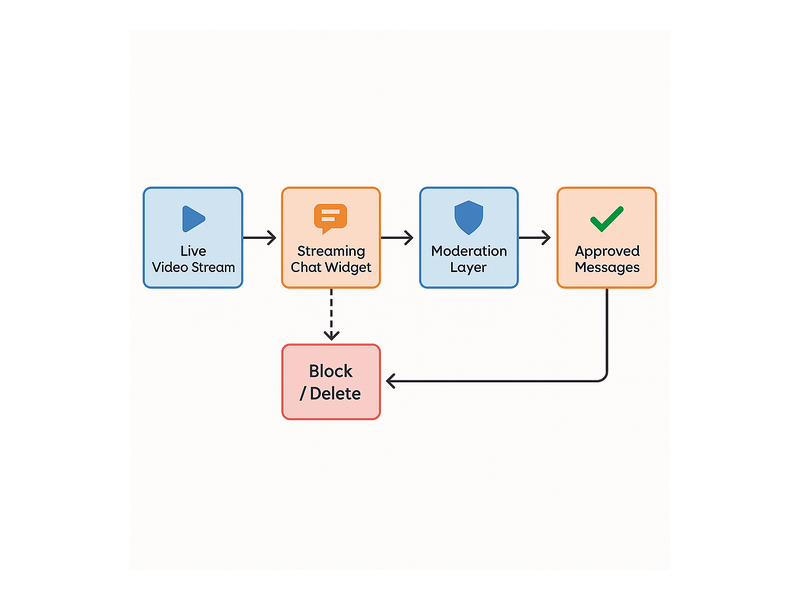
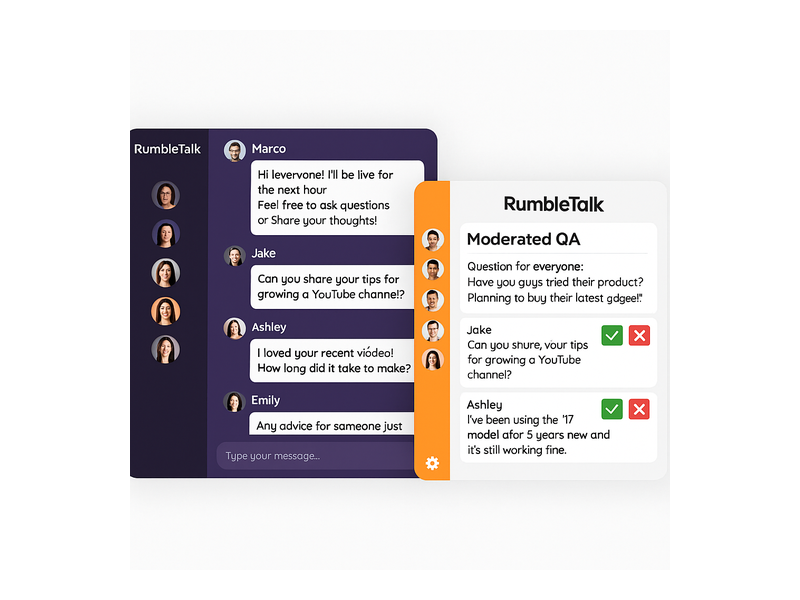
For live events, webinars, and expert panels, Moderated Q&A is a critical tool. Audience members submit questions that enter a moderation queue before being approved for public display. This keeps sessions focused and on-brand — an essential feature for enterprise clients and educational platforms that cannot afford a disruptive live chat experience.

Paired with a livestream or virtual event platform, Moderated Q&A is one of the most effective member engagement tools for converting passive viewers into active participants.

Social Chat

Social Chat allows members to authenticate using their existing social accounts (Google, Facebook, and others). This eliminates registration friction — one of the biggest barriers to first-time engagement — and makes it easy for casual visitors to become participating community members. For platforms targeting broad consumer audiences, Social Chat is among the simplest-to-deploy member engagement tools in the market.

Private Chat

Private Chat enables members to start direct, one-on-one conversations without leaving your platform. This is particularly valuable for mentorship programs, coaching platforms, and professional communities where direct communication is core to the member experience. Keeping private conversations on your platform — rather than pushing users to WhatsApp or email — increases session time and strengthens platform loyalty.

Queued Chat

Queued Chat is designed for high-volume, structured interactions such as expert Q&A sessions, customer support, and virtual office hours. Members are placed in a queue and served in order, ensuring a fair and organized experience. It is one of the more specialized member engagement tools in the RumbleTalk portfolio, but for platforms running expert-access programs or support functions, it is genuinely irreplaceable.

How to Choose the Right Member Engagement Tools for Your Platform

Not every platform needs every chat product. The right combination of member engagement tools depends on your audience type, your business model, and your engagement goals. Here is a practical framework for making that decision.

Map Your Members’ Interaction Patterns

Start by asking: how do your members currently want to interact? Are they looking for group discussions with peers, direct access to experts, or live participation in scheduled events? A professional association will prioritize Members Chat and Private Chat. A live event company will lead with Moderated Q&A and Group Chat. An online course platform may want all three.

Matching your member engagement tools to actual member behavior — rather than guessing — dramatically increases adoption rates after launch.

Prioritize Moderation and Community Safety

Any platform that enables real-time interaction needs strong moderation capabilities. RumbleTalk’s engagement tools include admin mode, message approval queues, user banning, mute controls, profanity filters, and configurable message rate limits. These features protect your community’s culture and ensure that engagement stays constructive and on-topic.

For a step-by-step guide to configuring your chat environment, visit the RumbleTalk knowledge base.

Evaluate Integration Simplicity

The best member engagement tools are the ones your team can actually deploy and maintain without a dedicated engineering sprint. RumbleTalk embeds via a single JavaScript snippet that works on any website, CMS, or web application. WordPress users have a dedicated plugin. Most platforms are live within a day — no server-side infrastructure required.

Plan for Traffic Peaks

If your community runs large live events or experiences sudden spikes in activity — product launches, seasonal campaigns, viral content moments — your member engagement tools need to handle the load. RumbleTalk’s infrastructure is built for scale, with load balancing and message throttling that keep the chat experience smooth even when thousands of members are active simultaneously.

Member Engagement Tools for Live Events and Virtual Conferences

Live events represent one of the highest-ROI use cases for member engagement tools. When attendees can participate in real time — asking questions, reacting to presentations, and connecting with other attendees — event satisfaction scores improve and post-event community growth accelerates measurably.

RumbleTalk is used by event producers, virtual conference organizers, broadcasters, and corporate training teams to add a live interaction layer to their events. A typical live event setup might include:

  • Group Chat for an open networking lounge accessible to all attendees
  • Moderated Q&A for each speaker session to keep questions focused
  • Private Chat for one-on-one sponsor or exhibitor conversations
  • Queued Chat for structured expert access sessions
  • Admin controls for real-time moderation across all rooms

The most forward-thinking event organizers go one step further: they keep their chat rooms open between events, creating a persistent community hub that drives engagement year-round. This is where member engagement tools evolve from event features into core community infrastructure. For a deeper look at this strategy, see our guide on community building playbooks for website chat.

Real-World Use Cases for Member Engagement Tools

The practical value of RumbleTalk’s member engagement tools becomes clearest when you see them in context. Here is how different platform types are deploying them:

E-Learning and Online Courses

Online educators use Group Chat and Members Chat to power live office hours, peer study groups, and instructor-led Q&A sessions. When students can ask a question and get an answer in real time — rather than waiting days for an email reply — course completion rates improve and learner satisfaction scores go up. Moderated Q&A is particularly effective for large cohort webinars where open chat would be too chaotic.

Membership Sites and Subscription Platforms

Subscription platforms that add a Members Chat room to their existing content library consistently report lower churn rates among members who participate in chat versus those who do not. When subscribers can connect with peers who share their interests, the platform becomes a destination rather than a content archive. This is the defining characteristic of member engagement tools that drive long-term retention.

Virtual Conferences and Trade Shows

Conference organizers use Moderated Q&A for speaker sessions, Group Chat for networking lounges, and Queued Chat for exhibitor consultations. Together, these tools replicate the interactivity of an in-person event in a fully virtual format — without requiring any specialized AV or event tech infrastructure beyond RumbleTalk’s embeddable widgets.

Corporate Training and Internal Communities

HR and L&D teams deploy RumbleTalk to add live discussion to training sessions, enabling participants to ask questions, share insights, and reflect collectively. Private Chat supports coaching and mentoring relationships. For distributed workforces, these member engagement tools help build cohesion and knowledge-sharing culture across geographies.

Measuring the ROI of Member Engagement Tools

Deploying member engagement tools is the first step. Tracking their impact is what separates platforms that optimize engagement from those that set and forget. Key metrics to monitor after launching RumbleTalk include:

  • Daily and monthly active chat users — what percentage of your total members are participating?
  • Message volume per session — are conversations substantive or superficial?
  • Average session duration — do members stay on the platform longer when chat is active?
  • Retention rate by engagement segment — do chat-active members renew at higher rates?
  • Event attendance trends — does promoting live chat increase repeat event registration?

Platforms that integrate effective member engagement tools typically see measurable improvements across all of these metrics within 60 to 90 days of launch. The key is to make chat a natural part of the member journey — embedded in the pages and moments where members are most receptive — rather than an isolated feature that members have to seek out.

Getting Started with RumbleTalk Member Engagement Tools

Deploying RumbleTalk on your platform takes minutes, not months. Here is the basic process:

  1. Create your account — Sign up at RumbleTalk.com and select the chat products that match your use case.
  2. Customize your chat room — Use the admin panel to set brand colors, fonts, member permissions, and moderation rules.
  3. Embed with one snippet — Copy the JavaScript embed code and paste it into your website, WordPress site, or web application.
  4. Configure moderation — Assign admin roles, enable message approval where needed, and set rate limits for high-traffic scenarios.
  5. Launch and iterate — Open the chat to your members, monitor activity, and adjust settings based on real usage patterns.

Because RumbleTalk is a fully hosted SaaS solution, there is no backend infrastructure to manage. Your team can focus entirely on community strategy and member experience — not server uptime or database maintenance.

Conclusion: Build a More Connected Community with the Right Tools

Great content attracts members. Great member engagement tools keep them. If your platform is experiencing high churn, low participation, or underwhelming live event experiences, the root cause is often a lack of structured interactivity — and that is a problem RumbleTalk is purpose-built to solve.

From Members Chat and Group Chat to Moderated Q&A, Private Chat, Queued Chat, and Social Chat, RumbleTalk provides a complete suite of member engagement tools that scale with your community and integrate seamlessly into your existing technology stack. Whether you are launching a new membership platform or upgrading the interactivity of an established one, RumbleTalk gives you everything you need to turn passive visitors into active, loyal members.

Ready to take your community to the next level? Visit RumbleTalk to explore the full platform and start a free trial — your most engaged community ever is one embed away.

Chat on Your Domain: Boost Visitor Engagement Live

Adding chat on your domain is one of the most powerful ways to transform passive website visitors into active, engaged participants. Whether you run a media outlet, an e-learning platform, a membership community, or a live events site, embedding a real-time group chat directly on your own domain keeps your audience where they belong — on your property, under your brand, in your ecosystem. RumbleTalk makes it straightforward to deploy a fully hosted, fully customizable chat widget on any website in minutes, with no coding experience required.

Why You Should Add Chat on Your Domain

Modern audiences expect more than static content. A one-way publishing model — write an article, publish it, wait for page views — no longer generates the loyalty and return visits that sustain a digital business. When you put chat on your domain, you give visitors a reason to stay longer, return more frequently, and feel emotionally connected to your platform.

The business case is straightforward. Longer session durations reduce bounce rate, which signals quality to search engines and improves organic rankings. Return visitors build habit loops, which increases lifetime value. And communities — real communities with ongoing conversations — create network effects that are nearly impossible for competitors to replicate. A chat on your domain is not just an engagement tool; it is a competitive moat.

There is also an ownership argument. When your community lives on a third-party social platform — a Facebook Group, a Discord server, a Twitter thread — you are at the mercy of that platform’s algorithm, moderation policies, and business decisions. Platforms change their terms, throttle organic reach, or disappear entirely. When you run chat on your domain, you own the conversation. Your audience data, your moderation rules, your brand, your control.

Engagement That Compounds Over Time

A chat on your domain creates micro-communities around your content. People return not just for what you publish, but for the conversations happening around it. Over time, regulars become advocates. They answer questions from newcomers, share the chat room with their networks, and generate user content that enriches your platform without any additional effort on your part. This compounding engagement is one of the most underrated benefits of building community chat directly into your website.

How RumbleTalk Puts Chat on Your Domain

RumbleTalk is purpose-built for websites and live events that need a reliable, scalable, and moderated group chat experience. The setup process is genuinely fast: create an account, choose a chat type, copy a two-line embed code, and paste it into your site. The widget renders as a responsive iframe or JavaScript component and works on any CMS or custom-built platform — WordPress, Webflow, Wix, Squarespace, Shopify, or raw HTML.

Within minutes of embedding, your branded chat on your domain is live. Visitors see your colors, your logo, and a chat interface that feels native to your site — not a generic third-party widget bolted on as an afterthought.

Group Chat for Live Events and Communities

The core Group Chat product handles audiences of any size, from a niche community of 30 members to a live event with thousands of concurrent users. When you run chat on your domain during a webinar, product launch, sports broadcast, or online conference, every participant shares one real-time conversation thread. The result is a shared event experience that keeps viewers engaged and emotionally invested in what is happening on screen.

Members Chat for Subscription and Gated Platforms

If your website has registered users, a paywall, or a subscription tier, Members Chat restricts access to verified participants only. Users authenticate via SSO, OAuth, or your existing user database, and their verified display name appears in the chat. This eliminates anonymous trolling and builds a trusted, name-based community environment — all within your own domain chat, without sending members to an external platform.

Moderated Q&A for Professional Sessions

Moderated Q&A is the right tool for webinars, executive town halls, investor briefings, and panel discussions where the quality of questions matters. Audience members submit questions that go into a private queue. Moderators review each submission and publish only the ones that meet the standard. The audience only sees approved content, keeping the session professional, on-topic, and legally safe. For organizations that need chat on your domain without the risk of inappropriate public messages, Moderated Q&A is the solution.

Queued Chat for One-on-One Conversations

Queued Chat turns your domain chat into a structured support or consultation channel. Visitors enter a waiting queue, and an available agent or expert picks them up for a private one-on-one session. This model works well for customer support desks, financial advisory platforms, healthcare consultations, and virtual job fair booths — any scenario where personalized attention needs to be delivered at scale through a chat on your domain.

Private Chat for Networking and Direct Messaging

Alongside any public group room, you can enable Private Chat so participants can initiate one-on-one direct messages with each other. This is especially valuable at virtual conferences and networking events, where attendees want to follow up on a conversation without leaving the chat environment. Private Chat operates entirely within your domain — no external messaging app required.

Key Features of RumbleTalk’s Chat on Your Domain

Robust Moderation Tools

Running an open chat on your domain without strong moderation is a liability, not an asset. RumbleTalk gives administrators a comprehensive set of moderation controls: mute individual users, ban accounts or IP addresses, delete specific messages, activate a keyword-based profanity filter, and switch the room into Admin-only broadcast mode with a single click. During high-traffic live events, a configurable slow-mode cooldown — for example, one message every 30 seconds — prevents message floods and keeps the conversation readable for everyone.

The moderation dashboard is accessible from any browser, so your team can manage the chat room from a laptop backstage while a speaker is presenting live on screen. Real-time moderation is what separates a professional community experience from an uncontrolled free-for-all.

Full Custom Branding

A chat on your domain should look like it belongs there, not like a white-labeled tool from a different company. RumbleTalk’s design editor lets you change colors, fonts, header text, chat bubble shapes, background images, and the overall color theme — all through a visual interface, with no CSS required. For enterprise clients, a white-label option removes all RumbleTalk branding entirely, creating a seamless on-brand experience for end users.

Persistent Chat History

Many live chat tools vanish when a session ends. RumbleTalk stores chat history by default, so users who join late can scroll up and read the full conversation from the beginning. For community pages and evergreen content, this means your chat on your domain accumulates value over time — a searchable archive of discussions, questions, and shared resources that enriches the experience for every new visitor who discovers your site.

Rich Media, Polls, and File Sharing

Text-only chat is a limiting format for engaged communities. RumbleTalk supports image sharing, file attachments, live polls, emoji reactions, and YouTube video embeds directly inside your domain chat. Course instructors can drop a PDF syllabus mid-session. Trading community members can share a chart screenshot. Event organizers can run a live audience poll between speakers. These features make the chat experience richer and more interactive without requiring any additional tools or integrations.

Scalability for Any Traffic Volume

One of the most common concerns about adding chat on your domain is whether the widget will hold up when traffic spikes. A viral article, a celebrity guest, or a product launch announcement can send thousands of concurrent users into your chat room in minutes. RumbleTalk is cloud-hosted with auto-scaling infrastructure specifically designed for event-level traffic. The platform manages load balancing, server resources, and connection management automatically — you focus on the event, not the infrastructure.

Analytics and Audience Insights

Every message sent through your domain chat is a data point. RumbleTalk’s admin dashboard provides real-time and historical analytics: concurrent user counts, peak engagement windows, total message volume, active user trends, and more. These insights help you schedule live sessions at optimal times, identify your most engaged community members for ambassador programs, and measure the direct impact of chat on key business metrics like session duration and return visit rate.

Use Cases: Who Benefits from Chat on Your Domain?

Media Publishers and Content Creators

News sites, sports media brands, and entertainment platforms use domain-hosted chat to transform one-way publishing into two-way dialogue. Readers comment in real time during a breaking news liveblog. Fans react during a championship game stream. Subscribers debate a long-form investigative piece. All of this activity happens inside a moderated, on-brand environment on your site — keeping traffic, data, and community value with you instead of leaking to Twitter or Reddit.

Online Educators and Course Platforms

E-learning platforms that embed chat on your domain see measurable improvements in course completion rates. Students ask questions during recorded lessons, form study groups in dedicated chat rooms, and receive real-time guidance from instructors or teaching assistants. Unlike a separate Discord server or a Facebook Group, a chat widget built into the learning platform keeps learners inside the educational environment — reducing distraction and reinforcing the value of the subscription.

Event Organizers and Conference Platforms

Virtual and hybrid event platforms need a reliable, moderated audience chat that integrates with their streaming setup without requiring attendees to open a separate app. With RumbleTalk embedded directly on the event page, participants stay in one tab for the entire session. Sponsors can be featured in the chat header, session-specific rooms can be created for breakouts, and the Moderated Q&A product ensures that speaker Q&A sessions remain focused and professional.

Financial Communities and Trading Platforms

Trading education platforms and financial communities use gated group chat to deliver real-time value to paying subscribers. Members share trade ideas, discuss market conditions, and post live alerts — all within a private, verified environment on the platform’s own domain. The Members Chat authentication layer ensures that only active subscribers access premium rooms, protecting the value of the community and the platform’s revenue model.

Healthcare and Telehealth Services

Healthcare providers and telehealth platforms need secure, controllable communication channels for patient communities and professional education sessions. A moderated chat on your domain — with admin controls, user verification, slow mode, and the ability to restrict posting — creates a safer environment for sensitive discussions than any open social media platform. Patient support groups, CME webinars, and provider Q&A sessions all benefit from the structure and control that a professional domain chat solution provides.

Getting Started: Add Chat on Your Domain in Minutes

Deploying RumbleTalk on your website follows a simple, repeatable process regardless of your technical background or CMS platform:

  • Create your chat room — Sign up at RumbleTalk, name your room, and select the chat type that matches your use case: Group Chat, Members Chat, Moderated Q&A, Queued Chat, or Private Chat.
  • Customize the design — Use the visual editor to match your brand colors, upload your logo, set a background, and configure room permissions such as who can post, who can upload files, and whether chat history is visible to newcomers.
  • Copy the embed code — A two-line HTML snippet is generated automatically. Paste it into any page on your website — a WordPress post, a Webflow section, a custom HTML block, or a landing page template.
  • Configure admin settings — Set up moderators, enable the profanity filter, configure slow mode if needed, and connect your user authentication system for gated rooms.
  • Go live — Your chat on your domain is active immediately. Announce it to your audience, promote it before your next live event, and start collecting engagement data from day one.

For teams with more complex requirements — SSO integration, REST API access, white-label branding, multi-room management, or enterprise SLAs — RumbleTalk offers business and enterprise plans with dedicated onboarding support. You can explore step-by-step setup instructions in the RumbleTalk Getting Started knowledge base article, which walks through embedding the widget, managing users, and running your first moderated session.

If you’re evaluating platforms, the post Why Do Websites Choose RumbleTalk? provides a detailed breakdown of the features and use cases that make RumbleTalk the preferred choice for businesses that need a scalable, embeddable group chat solution.

Why RumbleTalk Is the Right Choice for Chat on Your Domain

Most chat tools on the market are designed for one of two purposes: customer support live chat (agent-to-visitor, one-on-one) or internal team messaging (Slack, Teams). RumbleTalk occupies a different and underserved category — audience and community chat — the kind that powers a live event room, a gated membership forum, a trading community, or a live Q&A session on a media platform.

That focus shapes every product decision. Moderation tools are built for public-facing rooms, not just internal Slack channels. Scalability targets event-level traffic spikes, not just day-to-day office messaging. The embed model is designed for websites, not enterprise intranets. When you add chat on your domain with RumbleTalk, you get a platform optimized for exactly the challenges you face.

Key differentiators that set RumbleTalk apart:

  • No app download required — participants join in any browser, no account or installation needed for public rooms
  • Multi-room support — create separate channels for different topics, sessions, or audience segments, all embedded on the same domain
  • White-label availability — remove RumbleTalk branding entirely for a fully seamless on-domain experience
  • Cross-platform compatibility — works on every major CMS and custom-built site without plugin conflicts
  • Enterprise-grade uptime — cloud infrastructure with auto-scaling, designed for peak event loads

Discover how RumbleTalk’s Social Chat can power open community conversations directly on your website, giving your visitors a branded, moderated space to connect in real time.

Conclusion

If there is one feature that reliably increases visitor engagement, session duration, and community loyalty, it is real-time chat embedded directly on your site. A chat on your domain — fully branded, moderated, and optimized for your specific use case — turns your website from a content destination into a living, breathing community hub. RumbleTalk gives you every tool you need to build that experience, from simple open group chat rooms to advanced moderated Q&A, private messaging, and queued support sessions.

The setup takes minutes. The impact lasts for the lifetime of your platform. Ready to add chat on your domain? Get started with RumbleTalk for free and have your first live chat room running today — no long-term contract, no coding required, and full customization from the moment you sign up.

Alumni Network Chat Room: Connect and Engage Graduates

An alumni network chat room gives universities, professional associations, and alumni organizations a powerful way to keep graduates connected long after commencement day. When alumni can interact in real time — sharing job leads, celebrating milestones, and joining live events — they stay engaged with your institution and with each other. RumbleTalk’s embeddable group chat platform makes it simple to launch a fully featured alumni network chat room directly on your website, without requiring graduates to download a third-party app or create yet another social media account.

Why Your Alumni Network Needs a Dedicated Chat Room

Email newsletters and social media posts keep alumni informed, but they rarely spark genuine conversation. A dedicated alumni network chat room creates a two-way channel where graduates can respond, react, and connect in real time. That interactivity is what transforms a passive mailing list into an active, self-sustaining community.

Consider a university alumni association that sends a monthly newsletter to 30,000 graduates. The open rate might be 20%, and replies are almost nonexistent. Now imagine embedding an alumni network chat room directly on the association’s website, where graduates can discuss career moves, share industry news, post job openings, and help each other navigate professional challenges. Suddenly the alumni portal becomes a destination — a reason to visit and return, week after week.

Organizations that host vibrant alumni chat communities consistently report higher event attendance, stronger donation rates, and better mentorship program participation. The chat room becomes the connective tissue that holds the network together between in-person reunions and annual giving campaigns. For many organizations, a well-moderated alumni chat room is the single highest-ROI investment they can make in graduate engagement.

Key Features of a RumbleTalk Alumni Network Chat Room

RumbleTalk was built for communities that need structure and moderation alongside open conversation. Here are the features that make it an ideal fit for any alumni network chat room:

Members-Only Access with SSO Support

Alumni communities need to stay exclusive. RumbleTalk’s Members Chat lets you restrict access to verified graduates using single sign-on (SSO) integration. Alumni authenticate through your existing membership portal or CRM, and are automatically recognized in the chat room. No public strangers, no spam accounts — just your verified alumni community interacting in a trusted space.

This authentication layer is critical for professional associations where members pay dues and expect a curated peer environment. It is equally important for universities where alumni share sensitive career information and expect discretion. With SSO, the alumni network chat room feels like a natural extension of your secure membership portal rather than a public forum.

Moderated Q&A for Panels and Webinars

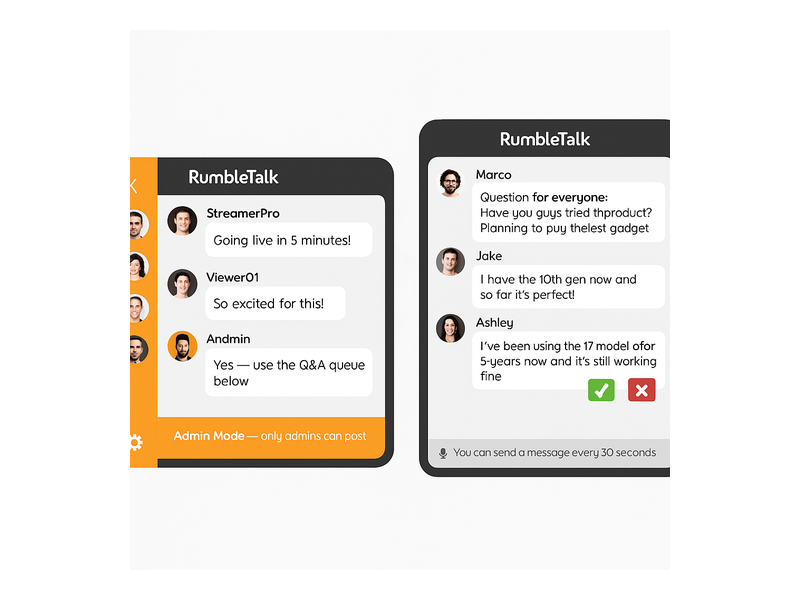
Alumni networks regularly host speaker panels, career workshops, and virtual webinars. RumbleTalk’s Moderated Q&A mode lets administrators pre-approve questions before they appear in the chat stream, keeping sessions focused and professional. Moderators use green checkmarks to approve questions or red X buttons to dismiss off-topic submissions — all without interrupting the flow of the event.

This feature is particularly valuable for alumni panels featuring senior executives, board members, or celebrity graduates. You can run a polished, broadcast-quality Q&A session while still giving every alumni member the chance to participate and feel heard.

Private Chat for One-on-One Networking

Sometimes alumni want a private conversation — a mentorship introduction, a job referral discussion, or a confidential catch-up with a former classmate. RumbleTalk’s Private Chat feature lets network members open direct message threads within the same interface, without leaving your website or switching to a consumer messaging app. This keeps all alumni networking activity within your branded platform.

Admin Controls and Real-Time Moderation

Running an alumni network chat room means managing diverse personalities, conversation topics, and occasionally difficult interactions. RumbleTalk gives community managers full moderation power: mute disruptive members, ban bad actors, set message cooldown timers (such as “you can send a message every 30 seconds” to prevent flooding), and toggle admin mode to broadcast announcements during important events. These controls ensure the chat room remains a welcoming, professional environment that reflects well on your organization.

Multiple Simultaneous Chat Rooms

A single chat room cannot serve every alumni segment equally well. RumbleTalk lets you create multiple simultaneous rooms within the same account — a general alumni lounge, a class-year channel, an industry-specific networking room, and a careers channel, all running at the same time. Members can move between rooms based on their interests, and moderators can manage all rooms from a single dashboard.

Embed on Any Website Platform

RumbleTalk drops into any website with a single code snippet — WordPress, Squarespace, Webflow, custom HTML, or any CMS. Your alumni network chat room lives inside your existing portal, reinforcing your brand and keeping graduates on your domain rather than redirecting them to a third-party platform where you lose visibility and control.

Use Cases: How Organizations Use Alumni Network Chat Rooms

The versatility of an alumni network chat room means it can serve many different functions across the alumni engagement lifecycle. Here are some of the most impactful use cases organizations are running today:

Virtual Reunions and Homecoming Events

In-person reunions are expensive to organize and hard for geographically dispersed graduates to attend. A virtual alumni network chat room lets your community gather online without travel costs or scheduling conflicts. Stream a keynote, open the group chat for real-time reactions, then direct attendees into class-year breakout rooms — all without leaving your website.

RumbleTalk’s multi-room setup means you can simultaneously run a “Class of 2010” room, a “Business School Alumni” room, and a “Faculty Meet and Greet” room. Each cohort gets their own space, and the event coordinator monitors all rooms from a single view. This structure mirrors an in-person reunion experience far more closely than a single group video call ever could.

Mentorship Programs at Scale

Connecting recent graduates with experienced alumni is one of the highest-value services an alumni network can offer. An alumni network chat room makes mentorship scalable: senior alumni can host open office hours in a group chat, answer career questions publicly, and spark discussions that benefit hundreds of members — not just a single mentee in a one-on-one email chain.

For more structured mentorship relationships, moderators can create dedicated private rooms where mentor-mentee pairs meet on a regular schedule. The conversation history stays on your platform, giving both parties a searchable record of their sessions and preventing the relationship from drifting to a personal messaging app where your organization has no visibility.

Career Services and Peer Referral Networks

Alumni are often each other’s best recruiters. A dedicated careers channel within your alumni network chat room lets hiring managers post openings, and job-seeking graduates ask questions directly — creating a warm, peer-driven referral network that outperforms generic job boards. When a graduate lands a position through a network connection, both parties become more loyal advocates for the alumni community.

Pairing the chat room with a live “Meet the Hiring Manager” session or a “Tech Career Panel” creates an interactive career event that drives real placement outcomes. Alumni who find jobs or hire top talent through the network become its strongest long-term supporters.

Continuing Education and Professional Development

Many alumni associations offer workshops, certification programs, and online courses to help graduates stay current in their fields. Embedding an alumni network chat room alongside educational content transforms a passive viewing experience into an active learning community. Participants ask questions, share resources, and collaborate in real time — turning a static webinar into a community event that generates genuine discussion and peer learning.

For accreditation bodies and professional associations, this model works equally well for member education sessions, exam prep groups, and certification review workshops. The alumni chat room becomes the discussion space that makes your educational programming sticky and memorable.

Fundraising Campaigns and Annual Giving Days

Alumni giving campaigns benefit enormously from real-time social proof. A live alumni network chat room during a fundraising event — “Giving Day,” “Challenge Grant Hour,” or “Annual Fund Drive” — creates a dynamic, public feed of participation. Alumni can see classmates donating, cheer each other on, and share personal stories about why they give. That live social energy consistently outperforms silent email-only campaigns, particularly among younger alumni cohorts who expect interactive digital experiences.

Setting Up Your Alumni Network Chat Room

Getting started with RumbleTalk is straightforward. Here is the typical setup path for an alumni organization launching its first alumni network chat room:

Step 1 — Create Your Chat Group

Sign up at rumbletalk.com and create a new group chat. Choose a name that reflects your alumni community — “Stanford Alumni Network,” “Marketing Association Members,” or “Class of 2015 Chat.” Upload your organization’s logo and customize the chat theme to match your brand colors. The entire setup takes under thirty minutes.

Step 2 — Configure Access and Authentication

For a private alumni network chat room, connect RumbleTalk to your membership system via SSO or API-based user authentication. Verified alumni log in once through your portal and are automatically recognized in the chat. Non-members see a login prompt rather than the live chat interface, protecting the exclusivity of your alumni community without requiring manual gating.

Step 3 — Set Moderation Rules and Admin Roles

Define your community guidelines and configure RumbleTalk’s moderation tools. Set message cooldown timers to prevent spam, designate community managers and class representatives as chat admins, and enable the admin moderation bar so your team can take control during live events. For panels and speaker sessions, pre-configure the Moderated Q&A mode so your team can flip to it instantly without disrupting the event flow.

Step 4 — Embed on Your Alumni Portal

Copy your RumbleTalk embed code and paste it into your alumni portal page. On WordPress, this takes approximately two minutes using the RumbleTalk plugin or a simple HTML block. On other platforms, drop the snippet wherever you want the chat to appear. The chat loads responsively on desktop and mobile, ensuring alumni can participate from any device.

Step 5 — Promote the Launch

Announce the new alumni network chat room via email, social media, and your alumni newsletter. Anchor the launch to an upcoming event — a virtual panel, an online reunion, or a career fair — to drive initial traffic and give early adopters a compelling reason to visit. Alumni who have a great first experience become organic advocates who invite classmates to join.

Moderation Best Practices for Alumni Chat Communities

A thriving alumni network chat room requires active community management, especially in the early months when norms are still being established. Here are the moderation practices that experienced alumni community managers recommend:

  • Appoint class or chapter representatives as co-moderators. Peer moderation scales better than top-down administration. Class presidents, chapter leaders, and active alumni volunteers make natural moderators who are trusted by their peers and invested in the community’s quality.
  • Pin welcome messages and community guidelines. New members who join the alumni network chat room should immediately see what the space is for and how to participate respectfully. Pinned messages set the tone without requiring constant repetition from administrators.
  • Use the message cooldown timer during high-traffic events. When hundreds of alumni join a virtual reunion or career fair simultaneously, message volume can spike dramatically. A 15–30 second cooldown prevents the chat from becoming unreadable without silencing the community’s energy.
  • Schedule recurring moderated sessions. Monthly “Alumni Ask Me Anything” sessions or weekly industry-specific chats give graduates a reason to return regularly. Recurring events build the habit of visiting the alumni network chat room, turning occasional visitors into active regulars.
  • Archive and repurpose key conversations. Valuable discussions — mentorship advice, job referrals, event recaps — can be repurposed as content for your alumni newsletter or knowledge base, extending their value beyond the live session and giving absent members a reason to care about what they missed.

For detailed guidance on running live moderated events and using admin controls effectively, see this knowledge base article on admin mode and moderation controls from the RumbleTalk support team.

Why RumbleTalk Is the Right Platform for Alumni Organizations

There are many chat tools available, but few are designed specifically for communities that need moderation, member authentication, and website embedding as core requirements rather than afterthoughts. RumbleTalk was built for exactly this use case — structured group conversations on your own platform, under your control, with your branding.

Unlike consumer apps such as WhatsApp groups or Discord servers, a RumbleTalk alumni network chat room lives on your website, inside your brand, with your data. You are not directing your community to a third-party platform where you have no control over privacy settings, advertising algorithms, or sudden policy changes. Your alumni stay engaged with your institution, not with a chat app’s ecosystem. When that app pivots its business model or shuts down, your community does not disappear with it.

For organizations that have already explored broader community-building strategies and want to understand how a chat room fits into a larger engagement framework, see Community Building Playbooks: How to Turn Your Website Chat into a Loyal Audience — a practical guide to transforming passive website visitors into active community members.

Measuring the ROI of Your Alumni Network Chat Room

Like any community initiative, your alumni network chat room should be tracked against clear success metrics. The right KPIs depend on your organization’s goals, but most alumni teams find value in measuring:

  • Monthly active users — how many unique alumni participate in the chat each month, and how that number grows over time
  • Messages per session — a proxy for conversation quality and how deeply engaged members are when they visit
  • Event attendance via chat — how many alumni join virtual events through the embedded chat room versus passive registration
  • Mentorship and career connections — for alumni networks with career services, track introductions and placements that originated from chat interactions
  • Donation correlation — compare giving rates for alumni who regularly use the chat room versus those who do not; most organizations find a significant positive correlation

Alumni who regularly participate in a network chat room tend to show measurably higher engagement across all other alumni programs — events, annual giving, mentorship, and volunteer advocacy. The chat room does not just serve its own purpose; it elevates the performance of every other alumni engagement channel you run.

Start Building Your Alumni Network Chat Room Today

An alumni network chat room is one of the most cost-effective investments an alumni organization can make. It scales to thousands of simultaneous users, costs far less than in-person events, and creates the kind of real-time connection that email and social media simply cannot replicate. Whether you are building your first online alumni community or upgrading a fragmented mix of Facebook groups and email lists into a unified, branded experience, RumbleTalk gives you the tools, the moderation controls, and the flexibility to create a chat environment your graduates will actually use and return to.

Visit rumbletalk.com to start your free trial and launch your alumni network chat room today. Our team is ready to help you configure the right setup for your organization’s size, goals, and technical environment — so your alumni community can start connecting in real time from day one.