Alumni Network Chat Room: Connect and Engage Graduates

An alumni network chat room gives universities, professional associations, and alumni organizations a powerful way to keep graduates connected long after commencement day. When alumni can interact in real time — sharing job leads, celebrating milestones, and joining live events — they stay engaged with your institution and with each other. RumbleTalk’s embeddable group chat platform makes it simple to launch a fully featured alumni network chat room directly on your website, without requiring graduates to download a third-party app or create yet another social media account.

Why Your Alumni Network Needs a Dedicated Chat Room

Email newsletters and social media posts keep alumni informed, but they rarely spark genuine conversation. A dedicated alumni network chat room creates a two-way channel where graduates can respond, react, and connect in real time. That interactivity is what transforms a passive mailing list into an active, self-sustaining community.

Consider a university alumni association that sends a monthly newsletter to 30,000 graduates. The open rate might be 20%, and replies are almost nonexistent. Now imagine embedding an alumni network chat room directly on the association’s website, where graduates can discuss career moves, share industry news, post job openings, and help each other navigate professional challenges. Suddenly the alumni portal becomes a destination — a reason to visit and return, week after week.

Organizations that host vibrant alumni chat communities consistently report higher event attendance, stronger donation rates, and better mentorship program participation. The chat room becomes the connective tissue that holds the network together between in-person reunions and annual giving campaigns. For many organizations, a well-moderated alumni chat room is the single highest-ROI investment they can make in graduate engagement.

Key Features of a RumbleTalk Alumni Network Chat Room

RumbleTalk was built for communities that need structure and moderation alongside open conversation. Here are the features that make it an ideal fit for any alumni network chat room:

Members-Only Access with SSO Support

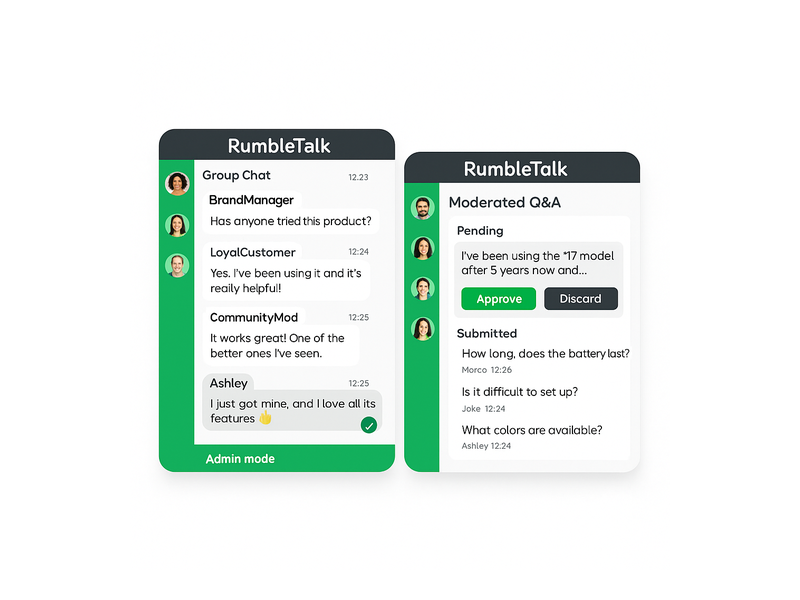
Alumni communities need to stay exclusive. RumbleTalk’s Members Chat lets you restrict access to verified graduates using single sign-on (SSO) integration. Alumni authenticate through your existing membership portal or CRM, and are automatically recognized in the chat room. No public strangers, no spam accounts — just your verified alumni community interacting in a trusted space.

This authentication layer is critical for professional associations where members pay dues and expect a curated peer environment. It is equally important for universities where alumni share sensitive career information and expect discretion. With SSO, the alumni network chat room feels like a natural extension of your secure membership portal rather than a public forum.

Moderated Q&A for Panels and Webinars

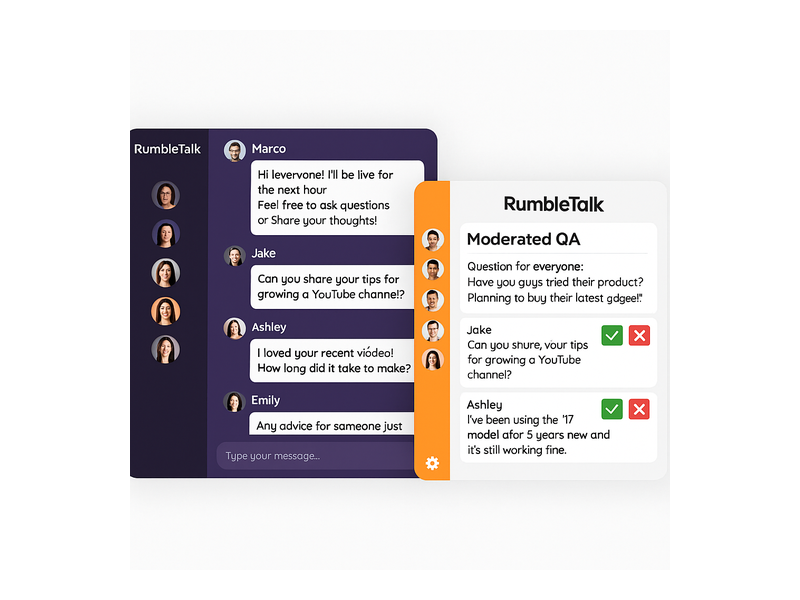
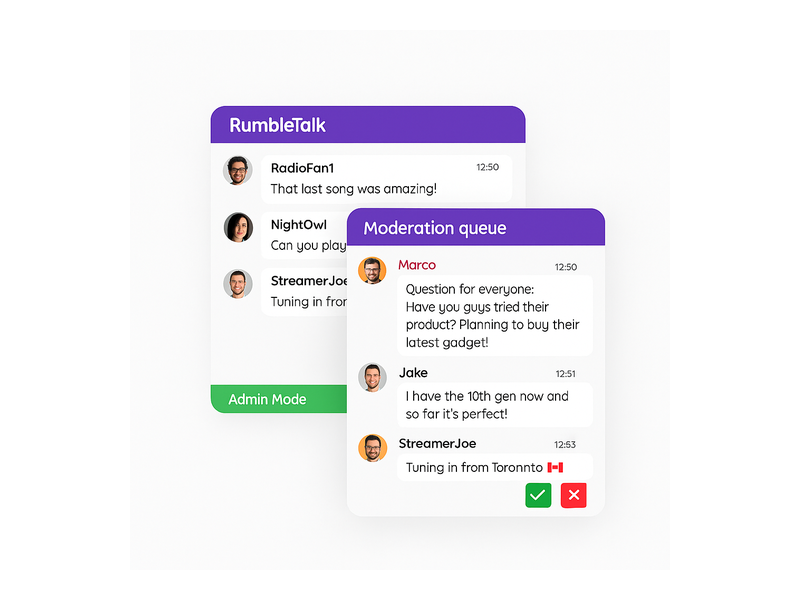
Alumni networks regularly host speaker panels, career workshops, and virtual webinars. RumbleTalk’s Moderated Q&A mode lets administrators pre-approve questions before they appear in the chat stream, keeping sessions focused and professional. Moderators use green checkmarks to approve questions or red X buttons to dismiss off-topic submissions — all without interrupting the flow of the event.

This feature is particularly valuable for alumni panels featuring senior executives, board members, or celebrity graduates. You can run a polished, broadcast-quality Q&A session while still giving every alumni member the chance to participate and feel heard.

Private Chat for One-on-One Networking

Sometimes alumni want a private conversation — a mentorship introduction, a job referral discussion, or a confidential catch-up with a former classmate. RumbleTalk’s Private Chat feature lets network members open direct message threads within the same interface, without leaving your website or switching to a consumer messaging app. This keeps all alumni networking activity within your branded platform.

Admin Controls and Real-Time Moderation

Running an alumni network chat room means managing diverse personalities, conversation topics, and occasionally difficult interactions. RumbleTalk gives community managers full moderation power: mute disruptive members, ban bad actors, set message cooldown timers (such as “you can send a message every 30 seconds” to prevent flooding), and toggle admin mode to broadcast announcements during important events. These controls ensure the chat room remains a welcoming, professional environment that reflects well on your organization.

Multiple Simultaneous Chat Rooms

A single chat room cannot serve every alumni segment equally well. RumbleTalk lets you create multiple simultaneous rooms within the same account — a general alumni lounge, a class-year channel, an industry-specific networking room, and a careers channel, all running at the same time. Members can move between rooms based on their interests, and moderators can manage all rooms from a single dashboard.

Embed on Any Website Platform

RumbleTalk drops into any website with a single code snippet — WordPress, Squarespace, Webflow, custom HTML, or any CMS. Your alumni network chat room lives inside your existing portal, reinforcing your brand and keeping graduates on your domain rather than redirecting them to a third-party platform where you lose visibility and control.

Use Cases: How Organizations Use Alumni Network Chat Rooms

The versatility of an alumni network chat room means it can serve many different functions across the alumni engagement lifecycle. Here are some of the most impactful use cases organizations are running today:

Virtual Reunions and Homecoming Events

In-person reunions are expensive to organize and hard for geographically dispersed graduates to attend. A virtual alumni network chat room lets your community gather online without travel costs or scheduling conflicts. Stream a keynote, open the group chat for real-time reactions, then direct attendees into class-year breakout rooms — all without leaving your website.

RumbleTalk’s multi-room setup means you can simultaneously run a “Class of 2010” room, a “Business School Alumni” room, and a “Faculty Meet and Greet” room. Each cohort gets their own space, and the event coordinator monitors all rooms from a single view. This structure mirrors an in-person reunion experience far more closely than a single group video call ever could.

Mentorship Programs at Scale

Connecting recent graduates with experienced alumni is one of the highest-value services an alumni network can offer. An alumni network chat room makes mentorship scalable: senior alumni can host open office hours in a group chat, answer career questions publicly, and spark discussions that benefit hundreds of members — not just a single mentee in a one-on-one email chain.

For more structured mentorship relationships, moderators can create dedicated private rooms where mentor-mentee pairs meet on a regular schedule. The conversation history stays on your platform, giving both parties a searchable record of their sessions and preventing the relationship from drifting to a personal messaging app where your organization has no visibility.

Career Services and Peer Referral Networks

Alumni are often each other’s best recruiters. A dedicated careers channel within your alumni network chat room lets hiring managers post openings, and job-seeking graduates ask questions directly — creating a warm, peer-driven referral network that outperforms generic job boards. When a graduate lands a position through a network connection, both parties become more loyal advocates for the alumni community.

Pairing the chat room with a live “Meet the Hiring Manager” session or a “Tech Career Panel” creates an interactive career event that drives real placement outcomes. Alumni who find jobs or hire top talent through the network become its strongest long-term supporters.

Continuing Education and Professional Development

Many alumni associations offer workshops, certification programs, and online courses to help graduates stay current in their fields. Embedding an alumni network chat room alongside educational content transforms a passive viewing experience into an active learning community. Participants ask questions, share resources, and collaborate in real time — turning a static webinar into a community event that generates genuine discussion and peer learning.

For accreditation bodies and professional associations, this model works equally well for member education sessions, exam prep groups, and certification review workshops. The alumni chat room becomes the discussion space that makes your educational programming sticky and memorable.

Fundraising Campaigns and Annual Giving Days

Alumni giving campaigns benefit enormously from real-time social proof. A live alumni network chat room during a fundraising event — “Giving Day,” “Challenge Grant Hour,” or “Annual Fund Drive” — creates a dynamic, public feed of participation. Alumni can see classmates donating, cheer each other on, and share personal stories about why they give. That live social energy consistently outperforms silent email-only campaigns, particularly among younger alumni cohorts who expect interactive digital experiences.

Setting Up Your Alumni Network Chat Room

Getting started with RumbleTalk is straightforward. Here is the typical setup path for an alumni organization launching its first alumni network chat room:

Step 1 — Create Your Chat Group

Sign up at rumbletalk.com and create a new group chat. Choose a name that reflects your alumni community — “Stanford Alumni Network,” “Marketing Association Members,” or “Class of 2015 Chat.” Upload your organization’s logo and customize the chat theme to match your brand colors. The entire setup takes under thirty minutes.

Step 2 — Configure Access and Authentication

For a private alumni network chat room, connect RumbleTalk to your membership system via SSO or API-based user authentication. Verified alumni log in once through your portal and are automatically recognized in the chat. Non-members see a login prompt rather than the live chat interface, protecting the exclusivity of your alumni community without requiring manual gating.

Step 3 — Set Moderation Rules and Admin Roles

Define your community guidelines and configure RumbleTalk’s moderation tools. Set message cooldown timers to prevent spam, designate community managers and class representatives as chat admins, and enable the admin moderation bar so your team can take control during live events. For panels and speaker sessions, pre-configure the Moderated Q&A mode so your team can flip to it instantly without disrupting the event flow.

Step 4 — Embed on Your Alumni Portal

Copy your RumbleTalk embed code and paste it into your alumni portal page. On WordPress, this takes approximately two minutes using the RumbleTalk plugin or a simple HTML block. On other platforms, drop the snippet wherever you want the chat to appear. The chat loads responsively on desktop and mobile, ensuring alumni can participate from any device.

Step 5 — Promote the Launch

Announce the new alumni network chat room via email, social media, and your alumni newsletter. Anchor the launch to an upcoming event — a virtual panel, an online reunion, or a career fair — to drive initial traffic and give early adopters a compelling reason to visit. Alumni who have a great first experience become organic advocates who invite classmates to join.

Moderation Best Practices for Alumni Chat Communities

A thriving alumni network chat room requires active community management, especially in the early months when norms are still being established. Here are the moderation practices that experienced alumni community managers recommend:

  • Appoint class or chapter representatives as co-moderators. Peer moderation scales better than top-down administration. Class presidents, chapter leaders, and active alumni volunteers make natural moderators who are trusted by their peers and invested in the community’s quality.
  • Pin welcome messages and community guidelines. New members who join the alumni network chat room should immediately see what the space is for and how to participate respectfully. Pinned messages set the tone without requiring constant repetition from administrators.
  • Use the message cooldown timer during high-traffic events. When hundreds of alumni join a virtual reunion or career fair simultaneously, message volume can spike dramatically. A 15–30 second cooldown prevents the chat from becoming unreadable without silencing the community’s energy.
  • Schedule recurring moderated sessions. Monthly “Alumni Ask Me Anything” sessions or weekly industry-specific chats give graduates a reason to return regularly. Recurring events build the habit of visiting the alumni network chat room, turning occasional visitors into active regulars.
  • Archive and repurpose key conversations. Valuable discussions — mentorship advice, job referrals, event recaps — can be repurposed as content for your alumni newsletter or knowledge base, extending their value beyond the live session and giving absent members a reason to care about what they missed.

For detailed guidance on running live moderated events and using admin controls effectively, see this knowledge base article on admin mode and moderation controls from the RumbleTalk support team.

Why RumbleTalk Is the Right Platform for Alumni Organizations

There are many chat tools available, but few are designed specifically for communities that need moderation, member authentication, and website embedding as core requirements rather than afterthoughts. RumbleTalk was built for exactly this use case — structured group conversations on your own platform, under your control, with your branding.

Unlike consumer apps such as WhatsApp groups or Discord servers, a RumbleTalk alumni network chat room lives on your website, inside your brand, with your data. You are not directing your community to a third-party platform where you have no control over privacy settings, advertising algorithms, or sudden policy changes. Your alumni stay engaged with your institution, not with a chat app’s ecosystem. When that app pivots its business model or shuts down, your community does not disappear with it.

For organizations that have already explored broader community-building strategies and want to understand how a chat room fits into a larger engagement framework, see Community Building Playbooks: How to Turn Your Website Chat into a Loyal Audience — a practical guide to transforming passive website visitors into active community members.

Measuring the ROI of Your Alumni Network Chat Room

Like any community initiative, your alumni network chat room should be tracked against clear success metrics. The right KPIs depend on your organization’s goals, but most alumni teams find value in measuring:

  • Monthly active users — how many unique alumni participate in the chat each month, and how that number grows over time
  • Messages per session — a proxy for conversation quality and how deeply engaged members are when they visit
  • Event attendance via chat — how many alumni join virtual events through the embedded chat room versus passive registration
  • Mentorship and career connections — for alumni networks with career services, track introductions and placements that originated from chat interactions
  • Donation correlation — compare giving rates for alumni who regularly use the chat room versus those who do not; most organizations find a significant positive correlation

Alumni who regularly participate in a network chat room tend to show measurably higher engagement across all other alumni programs — events, annual giving, mentorship, and volunteer advocacy. The chat room does not just serve its own purpose; it elevates the performance of every other alumni engagement channel you run.

Start Building Your Alumni Network Chat Room Today

An alumni network chat room is one of the most cost-effective investments an alumni organization can make. It scales to thousands of simultaneous users, costs far less than in-person events, and creates the kind of real-time connection that email and social media simply cannot replicate. Whether you are building your first online alumni community or upgrading a fragmented mix of Facebook groups and email lists into a unified, branded experience, RumbleTalk gives you the tools, the moderation controls, and the flexibility to create a chat environment your graduates will actually use and return to.

Visit rumbletalk.com to start your free trial and launch your alumni network chat room today. Our team is ready to help you configure the right setup for your organization’s size, goals, and technical environment — so your alumni community can start connecting in real time from day one.

How Chat SSO Integration Powers Membership Platforms

If your membership platform relies on engaged, active communities, then chat SSO integration for membership platforms is one of the highest-leverage investments you can make. Single Sign-On (SSO) chat integration lets your members enter a live group chat room the moment they are already logged in — no second password, no duplicate registration, no friction. RumbleTalk’s SSO-powered chat widget plugs directly into your existing authentication system so that every conversation happens under verified, real member identities from the very first message.

What Is Chat SSO Integration for a Membership Platform?

Single Sign-On is an authentication protocol that lets a user log in once and gain access to multiple connected services without re-entering credentials. When applied to a group chat widget on a membership site, SSO means a member who is already signed into your platform is automatically recognized inside the chat room as a verified, named participant — avatar included.

For membership platforms — whether you run an online course site, a professional association, a subscription community, or a fan club — chat SSO integration for the membership platform transforms your chat from an anonymous public widget into a gated, identity-aware conversation space. Only approved or paying members participate, and each one appears under their real account identity. That single change elevates the quality and trustworthiness of every discussion.

How RumbleTalk’s SSO Flow Works

RumbleTalk uses a token-based SSO mechanism. When a logged-in member loads a page containing the chat embed, your server generates a signed token — typically a JSON Web Token (JWT) or an HMAC hash — encoding that user’s name, avatar, user ID, and optional role. The RumbleTalk widget reads that token, verifies the signature server-side, and opens the chat session automatically. The member never sees a second login screen. This single sign-on chat integration takes less than a day to implement on most platforms, including custom-built sites and popular WordPress membership plugins.

Why Membership Platforms Need SSO-Enabled Chat

Without SSO, your members face a simple but damaging choice: re-authenticate just to post a message, or skip the chat entirely. Research consistently shows that even one extra login step reduces feature adoption significantly. When chat SSO integration for the membership platform is active, the barrier drops to zero for authenticated members — and participation rates follow.

Verified Identity Builds a Better Community

Anonymous chat rooms attract spam, trolling, and low-quality posts. When every participant enters the chat under their verified membership account, the tone of conversation improves immediately. Admins can see real usernames, trace problematic messages to specific accounts, and apply bans that stick — because RumbleTalk ties enforcement to the SSO identity, not just a device or browser session. The result is a chat room that feels like a real community, not a comment section.

Role-Based Access Through the SSO Payload

One of the most powerful capabilities of chat SSO integration for a membership platform is role mapping. Your platform already segments users — free tier, premium, instructor, moderator, enterprise admin. RumbleTalk’s SSO payload accepts a role or admin field, and the chat widget enforces the corresponding permissions automatically.

  • Free members — read-only access or slow-mode posting with a message cooldown
  • Premium members — full messaging rights, file sharing, and emoji reactions
  • Instructors and moderators — admin privileges including message approval and user removal
  • Unauthenticated visitors — blocked from the chat entirely, shown a customizable upgrade prompt

This level of access control is simply impossible without a proper chat SSO integration for the membership platform. It makes the chat widget a natural extension of your access policy rather than a parallel system your team must manage separately.

Key Use Cases for Chat SSO Integration for Membership Platforms

Online Course and E-Learning Communities

Course creators and online academies use RumbleTalk’s SSO-enabled chat to add live discussion rooms to each course module. Students log in to the LMS and immediately see their name and avatar inside the course chat room — no separate registration required. Instructors gain admin rights automatically based on their SSO role, so they can moderate questions, run live Q&A sessions, mute disruptive students, and pin important messages — all from the same interface their learners see. The single sign-on chat integration also means student participation data is tied to real accounts, giving instructors meaningful engagement insight.

Professional Associations and Conference Communities

Professional membership associations hosting annual conferences, webinars, or networking events benefit enormously from chat SSO integration for the membership platform. Every registered attendee lands in the event chat room already identified by name and tier. Networking becomes natural — members see colleague names and titles, not anonymous handles. Organizers can segment rooms by interest group or membership level, with access enforced automatically through the SSO role field. No manual user list management, no ticket-checking at a virtual door.

Subscription Content and Creator Communities

Newsletter publishers, podcasters, and content creators with paid subscriber communities use SSO-enabled chat to give paying members exclusive real-time access. When the chat widget is gated behind SSO authentication, only verified subscribers participate — making the chat room itself a compelling membership benefit that drives upgrades. The chat SSO integration for a membership platform also allows creators to customize the display name format, such as “⭐ Founding Member | Jane”, so community status is visible at a glance and adds social proof to higher-tier memberships.

Corporate Training and Internal Portals

HR teams and corporate trainers embed RumbleTalk chat rooms directly inside internal portals. Employees already authenticated via the company identity provider — Azure AD, Okta, Google Workspace — are passed into the chat room without any additional step. Live training sessions, all-hands events, and project-based team chats run inside the existing intranet with full member identity visible. The SSO layer also means offboarded employees are excluded automatically once their account is deactivated in the identity provider.

Implementation: Setting Up the SSO Chat Integration Step by Step

Step 1 — Generate a Signed Token on Your Server

When a member loads a page containing the chat embed, your backend generates a token. The standard payload includes: username, nickname, avatar_url, user_id, and optionally an admin boolean or a custom role string. The token is signed with your RumbleTalk secret key using HMAC-SHA256. This server-side signing is what makes the integration secure — it cannot be spoofed from the browser.

Step 2 — Inject the Token Into the Embed Code

The RumbleTalk JavaScript embed accepts a userData parameter. Your server injects the signed token into the embed snippet before delivering the page, so the token is never exposed to client-side manipulation. RumbleTalk’s servers receive the token, verify the signature, resolve the user identity and permissions, and open the authenticated chat session — all before the widget appears on screen.

Step 3 — Test Role Mapping and Permissions

Before going live, test the chat SSO integration for your membership platform with accounts representing each role tier. Confirm that the correct permissions appear for each: message rate limits for free tiers, moderation buttons for admins, file-sharing toggles for premium users. RumbleTalk’s admin dashboard shows a live view of connected users and their resolved roles, making this validation quick and reliable.

Step 4 — Enable Members-Only Mode

If the chat should be strictly gated, enable SSO-only mode in your RumbleTalk dashboard settings. Unauthenticated visitors will see a customizable locked-chat message — ideal for prompting non-members to sign up or upgrade. This setting ensures that the value of the chat room is inseparable from the value of the membership itself.

RumbleTalk Features That Amplify Your Membership Chat

Members Chat Widget

RumbleTalk’s Members Chat is purpose-built for authenticated communities. It supports SSO login, custom user avatars sourced from the token payload, role-based moderation, private one-on-one messaging, and full admin controls — all within a single embeddable widget. When paired with your SSO flow, it becomes a fully gated, branded community hub that looks and feels like a native part of your membership platform.

Moderated Q&A for Live Events

Membership platforms hosting live webinars or town halls can layer RumbleTalk’s Moderated Q&A mode on top of the SSO integration. Members submit questions through the chat; admins review, approve, and feature the best ones on screen. Because SSO identifies each participant by tier and account, moderators know whose question is whose and can prioritize voices from premium or VIP members when appropriate. The result is a structured, high-quality Q&A session rather than a chaotic comment stream.

Private Chat for Member-to-Member Messaging

Private Chat allows SSO-authenticated members to open direct message threads with each other inside the platform. Because every user is already identified by their real membership account, private conversations carry the same accountability as the main chat room. Members can report messages, and admins can investigate with full context — something that is impossible in an anonymous chat environment.

Multiple Rooms with Segment-Based Access

A membership platform with multiple tiers or interest groups can deploy multiple RumbleTalk chat rooms on different pages, each governed by its own SSO rule set. A “Premium Members Lounge” can be restricted to premium-tier SSO tokens; a “General Community” room is open to all verified members; an “Instructor Hub” is admin-only. The chat SSO integration for the membership platform handles all access logic automatically — your team manages one identity system, and the chat rooms inherit the rules.

Security and Compliance Considerations

Membership platforms often handle sensitive subscriber and payment data, and the chat layer must meet the same standards. RumbleTalk’s chat SSO integration for membership platforms uses server-side token signing — user data never passes through the client in plaintext. Signed tokens are short-lived, with a configurable expiry window that prevents replay attacks. RumbleTalk does not store user passwords or OAuth credentials; it receives only the identity payload you choose to include in the token.

For platforms subject to GDPR or CCPA, RumbleTalk supports data minimization. You control exactly which fields appear in the SSO payload — you can pass a pseudonymous display ID rather than a legal name if your privacy policy or terms of service require it. Role-based permissions also mean that member data visible in the chat (such as tier labels or avatars) is limited to what you explicitly configure in the token.

For step-by-step technical setup guidance, visit the RumbleTalk Knowledge Base: Getting Started.

Measuring the Business Impact of SSO Chat on Membership Retention

Adding a frictionless, SSO-enabled chat room to a membership platform is not just a technical improvement — it is a measurable retention strategy. Members who engage in community discussions renew at higher rates. When chat SSO integration for the membership platform removes the authentication barrier, passive members who previously lurked are significantly more likely to post their first message. Even a modest lift in monthly active chat users compounds over time: higher participation leads to stronger community ties, which leads to lower churn and higher lifetime value per member.

Track impact using RumbleTalk’s built-in analytics: messages per session, daily active users, peak concurrent users during live events. These metrics give your growth and community teams concrete evidence of the engagement improvement that followed the SSO-enabled chat integration rollout. Use the data to justify further investment in live events and gated community programming.

To see how SSO chat fits into a broader website strategy beyond membership platforms, read our post on Chat SSO Integration for Websites.

Start Your Chat SSO Integration for Your Membership Platform Today

If you are ready to give your members a seamless, verified chat experience, RumbleTalk makes it straightforward. The chat SSO integration for a membership platform typically goes live in hours — not weeks — and the payoff in member engagement and community quality is immediate. Whether you run an online academy, a professional association, a subscription creator community, or a corporate training portal, RumbleTalk’s SSO-powered chat widget scales alongside your growth without adding operational complexity.

Visit rumbletalk.com to start your free trial, explore the Members Chat widget, and access the SSO integration documentation your development team needs to go live with a fully authenticated, role-aware community chat today.

Discord Alternative for Online Course Creators and Student Communities

A Discord alternative for online course creators is an embedded, moderated community chat tool that integrates directly with your course platform, restricts access to enrolled students, and presents a clean, professional environment that matches the look and feel of your brand rather than a gaming interface designed for a completely different audience.

If you run an online course, you have probably been told to build your student community on Discord. It is free, it has voice channels, it supports text chat, and your students already have accounts. On paper, it makes sense. In practice, it creates a problem that grows worse the more seriously you take your course brand and your student experience.

Discord was built for gamers!!

Its interface reflects that origin: dark backgrounds, dense channel lists, emoji reactions, server boosts, nitro badges, and a visual language that communicates a gaming community rather than a professional learning environment. For a course creator running a business skills program, a design school, a medical education platform, or a corporate training product, this aesthetic mismatch is not a small thing. It signals to students that the community experience is an afterthought, bolted on from a platform built for something else entirely.

This guide covers what online course creators actually need from a student community chat tool, why Discord fails to deliver it, and how a purpose-built embedded chat solution creates the clean, professional, integrated community experience that serious course platforms require.

The Discord Aesthetic Problem for Professional Course Platforms

First impressions in online education matter enormously. A student who pays for a professional course has a mental model of what that experience should look and feel like. Clean design, consistent branding, a focused learning environment. Every touchpoint, from the course platform to the community space, contributes to whether the student perceives they have made a good investment.

Discord’s interface actively works against this perception. The platform is visually busy by design. Multiple server columns, channel lists, notification badges, member status indicators, server boost prompts, and promotional banners create a visual noise level that is appropriate for a gaming community where high stimulation is the point. It is entirely inappropriate for a focused learning environment where clarity and concentration are the goals.

Beyond the visual noise, Discord’s branding is inescapable. The Discord logo, the Wumpus mascot, the unmistakable interface conventions: all of it signals Discord, not your course. Students are not in your learning community. They are in a Discord server that happens to be about your course. The distinction sounds subtle, but students feel it. The platform identity overwhelms the course identity every time.

For course creators who have invested in building a professional brand, a polished course platform, and a considered student experience, sending students to Discord for community is the equivalent of hosting your course videos on a gaming streaming platform. The content might be excellent. The context undermines it.

The Integration Problem: Discord Lives Outside Your Platform

Beyond aesthetics, Discord creates a structural problem for course creators: it exists outside your platform. Students must leave their course environment, open a separate application or tab, log in to Discord separately, and navigate to their server to access the community. Every one of those steps is a friction point that reduces community participation.

The research on online learning engagement is consistent: community participation drops sharply when it requires leaving the learning environment. Students who are mid-lesson and have a question do not want to switch applications, find the right Discord channel, and re-establish context. They want to ask the question of where they are. If the community is embedded in the course platform, they ask. If it requires switching to Discord, most do not bother.

There is also an identity problem. Discord requires a separate account. A student enrolled in your course has an account on your platform. Asking them to create and maintain a second account on Discord introduces an unnecessary friction that disproportionately affects less technically confident students, exactly the learners who most need community support.

The Access Control Problem: Discord Cannot Verify Enrollment

A student community should be restricted to enrolled students. This is both a quality control issue and a revenue protection issue. Non-students in your community dilute the discussion quality, create support obligations you have not been paid for, and, in some cases, access course-adjacent content, assignment discussions, or peer feedback that is part of the paid learning experience.

Discord cannot verify enrollment in your course. You can manually add students to a Discord server, manually remove them when they refund or their access expires, and manually manage role permissions for different course tiers. This works for a course with ten students. It breaks down completely at fifty and becomes a significant operational burden at hundreds or thousands of enrolled learners.

An embedded chat tool that acts as a Discord alternative for online course creators connected to your course platform through an API handles this automatically. When a student enrolls, they gain community access. When their access expires, they lose it. After they upgrade to a higher course tier, they get access to the appropriate community spaces. No manual intervention required. The access control reflects the enrolment state automatically.

What Course Creators Actually Need from a Community Chat

The requirements of an online course community are specific and different from what Discord was built to serve. Understanding them makes it clear why a purpose-built embedded solution that acts as a Discord alternative for online course creators is the right tool.

Discord alternative for online course creators
  • Clean, branded interface. The community space should reflect your course brand: your colours, your logo, your typography. Students should feel they are in your learning environment, not in a gaming platform with your name on a channel.
  • Enrollment-gated access. Only students who have paid and are actively enrolled should have access. Access should be provisioned and revoked automatically based on enrollment status.
  • Embedded in the course platform. The community chat should be accessible without leaving the course. Ideally, it lives alongside the lesson content, not on a separate platform requiring a separate login.
  • Moderated discussion. Student community discussions need oversight. Off-topic content, misinformation about course content, and peer conflicts need to be manageable by the course team without relying on Discord’s basic moderation tools.
  • Instructor presence. The course instructor or teaching assistants need to be clearly identifiable in the community, with tools to post announcements, answer questions, and engage with the student cohort in a structured way.
  • No noise, no gaming culture. The interface should have no features that are irrelevant to learning: no server boosts, no nitro promotions, no gaming status indicators, no visual complexity that distracts from the discussion.

Moderated Chat: Keeping the Learning Community Focused

Student communities have a natural tendency toward off-topic drift. A course on digital marketing will have students sharing memes about their industry. A coding bootcamp community will have threads about tool preferences that have nothing to do with the curriculum. A business skills program will have students discussing current events. Some of this is healthy community building. Too much of it buries the course-relevant discussion that actually helps students learn.

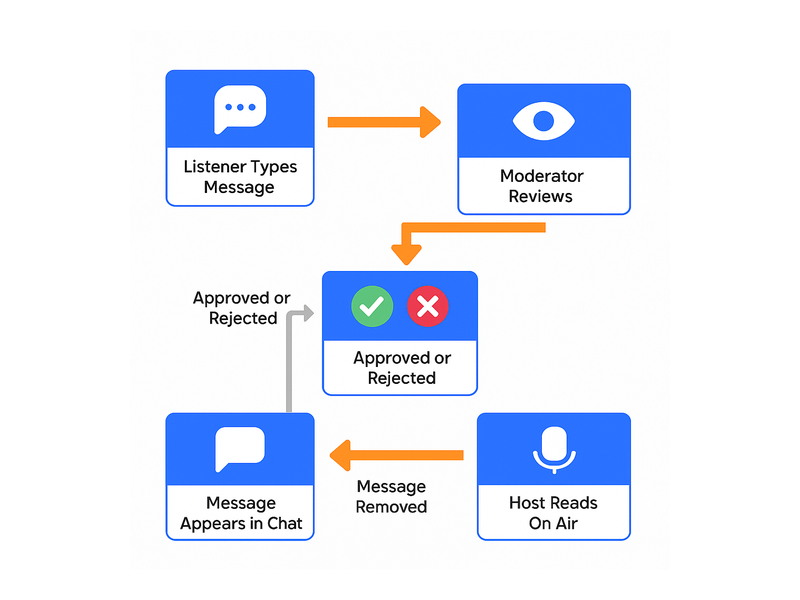
RumbleTalk’s Queued Chat mode gives the course team full control over what appears in the community chat. All messages go to a moderation queue before appearing publicly. A teaching assistant reviews submissions and approves the ones that contribute to the learning community. Off-topic content, duplicate questions already answered in the course FAQ, and anything else that adds noise rather than value are rejected before it reaches other students.

For live webinar sessions and Q&A calls: Queued Chat is particularly valuable. Students submit questions throughout the session. The instructor or their assistant manages the queue, surfacing the best questions at the right moment in the session rather than managing a live fire hose of unfiltered student messages. The result is a structured, high-quality Q&A that serves the whole cohort rather than the fastest typers.

For community spaces where more open discussion is appropriate, Social Chat mode allows free conversation with moderation tools available when needed: keyword filters, instant user management, and admin oversight without pre-approving every message.

Members Chat: Enrollment-Gated Access That Actually Works

Members Chat restricts the community to authenticated users only. Connected to your course platform through the SDK auto-login, the authentication uses your existing student accounts rather than requiring a separate Discord login. A student who is enrolled and logged into your course platform is automatically present in the community chat under their student name. A student whose enrollment has expired cannot access the chat at all.

For multi-course platforms, this extends to course-specific communities. A student enrolled in Course A has access to Course A’s community room. They do not have access to Course B’s community unless they are also enrolled there. Each community space is automatically populated by the correct enrolled cohort and gated away from everyone else.

This is the access control that Discord cannot provide. The manual effort of adding and removing Discord server members is replaced entirely by automatic enrollment-based provisioning. The course team focuses on teaching. The platform handles access.

The Admin Panel: Instructor and TA Tools for Community Management

Course instructors and teaching assistants need community management tools that match their role. They are not Discord server administrators. They are educators who need to post announcements, answer questions, and manage student interactions without learning a complex platform configuration.

Discord alternative for online course creators

What the course team manages from the admin panel:

  • Pinned announcements: course updates, assignment deadlines, live session links, and instructor messages are posted at the top of the chat and are visible to all students immediately.
  • Question moderation queue: reviewing student questions during live sessions and surfacing the best ones to the instructor in sequence, creating a structured Q&A without chat chaos.
  • Student management: muting or removing students who are disruptive to the learning environment, with immediate effect across all community spaces.
  • Cohort monitoring: seeing which students are active in the community, identifying learners who are disengaged and may need outreach, and tracking community health across the enrolled cohort.
  • Post-session archive: the complete chat history from each live session is available for students who missed the session and for the course team to review common questions for future curriculum improvements.

Clean Design: What a Professional Course Community Should Look Like

RumbleTalk’s visual editor allows complete customization of the chat interface. The community chat can match your course platform’s color scheme, display your logo, use your typography, and present a visual identity that is entirely yours. There are no Discord brand elements, no gaming interface conventions, no visual noise from platform features that are irrelevant to learning.

The result is a community space that students experience as part of their course rather than as an external tool they are redirected to. The design continuity between your course content and your community space reinforces the perception that the entire learning experience is considered and professional. This matters for student confidence in their investment and for the premium positioning that serious course creators work to establish.

For corporate training programs and professional certification courses, this is not just a preference. A gaming platform that resembles a community space creates a genuine credibility problem when professionals position the learning content for development. Clean, branded, purpose-built is not a luxury in this context. It is a baseline requirement.

Real-World Use Cases for Course Community Chat

Cohort-Based Online Course

A cohort-based course running over eight weeks uses Members Chat restricted to enrolled students for that cohort. Each weekly live session uses Queued Chat mode for the Q&A segment, with a teaching assistant managing the question queue throughout the session. Between sessions, the chat remains open for peer discussion and assignment questions. At the end of the cohort, the community space archives automatically and a new room opens for the next intake. The course brand is consistent throughout. No student ever sees a Discord interface.

Multi-Course Platform with Separate Student Communities

A platform offering five different courses uses separate Members Chat rooms for each course community, all connected to the platform’s central authentication system via auto-login. Students enrolled in multiple courses can access multiple community rooms. Students enrolled in one course cannot access any other. The team applies the platform’s visual branding consistently across all community rooms. Instructors manage their course community from the admin panel without needing technical access to the platform backend.

Corporate Training Program

A corporate L&D team runs a professional development program for client companies. Each client company has a separate, branded community space for their participants. The clean interface is essential. The company sells the program to senior professionals who would find a Discord-style gaming interface jarring and off-brand for a premium corporate training product. The moderated chat keeps discussions focused on the program content. The REST API creates and archives cohort communities automatically as new client groups enroll.

How to Set Up Your Course Community Chat

  1. Create a RumbleTalk account at rumbletalk.com and configure a Members Chat room for your first course community.
  2. Apply your course branding using the visual editor: your colors, logo, and design language, creating a seamless extension of your course platform.
  3. Connect auto-login via the SDK to your course platform’s authentication system so enrolled students join the community automatically without a separate registration.
  4. Configure access by enrolment: map each course community room to the corresponding enrolled student group. Therefore, access is automatically provisioned and revoked based on enrolment status.
  5. Set up Queued Chat for your live session Q&A segments and Social Chat for between-session community discussion.
  6. Assign teaching assistants to the admin panel as moderators for each course community room.
  7. Embed the chat widget directly on your course platform page so students access the community without leaving the learning environment.
  8. Use the REST API to automate community room creation for each new course cohort as it opens for enrolment.

Frequently Asked Questions

Why is Discord not the best for online course communities?

Developers designed Discord for gaming communities, and its interface reflects that origin: dark, visually noisy, and full of gaming-culture features that are irrelevant and off-brand for professional learning environments. It also requires a separate login, cannot verify course enrollment automatically, and lives outside your course platform, creating friction that reduces student community participation. For course creators investing in a professional brand and student experience, Discord sends the wrong signal about the quality of the product.

What is the best Discord alternative for online course creators?

The best Discord alternative for online course creators is an embedded chat tool that integrates with your existing course platform authentication, restricts access to enrolled students automatically, presents a clean branded interface with no gaming-platform visual noise, and gives instructors and teaching assistants practical moderation tools for managing student discussions and live session Q&A. RumbleTalk provides all of these through Members Chat, SDK auto-login, and a fully customisable chat interface.

How do I restrict my course community to enrolled students only?

Use Members Chat connected to your course platform via the SDK auto-login. Students who enroll and log into your platform automatically authenticate themselves in the community chat. Students whose enrolment has expired lose access automatically. Non-enrolled visitors cannot read or participate in the community. The system fully automates access control based on your enrolment status in the existing course management system.

Can I brand this Discord alternative for online course creators to match my course platform?

Yes. RumbleTalk’s visual editor allows complete customisation of the chat interface: your colour scheme, logo, and design language. There are no Discord brand elements or gaming interface conventions. The result is a community space that looks and feels like part of your course platform rather than a third-party tool. This reinforces the professional brand you have built around your course content.

How do I manage Q&A during a live course session without Discord noise?

Use Queued Chat mode for live session Q&A segments. Student questions go to a moderation queue rather than appearing immediately in the chat. A teaching assistant reviews submissions throughout the session and surfaces the best questions to the instructor in sequence. The instructor receives a curated stream of pre-selected questions at the right moments in the session, rather than trying to read and respond to a live flood of simultaneous student messages.

Does the course community chat work on mobile?

Yes. The RumbleTalk chat widget is fully responsive and works on smartphones and tablets without a separate app download. Students accessing your course on mobile have the same full community chat experience as desktop users. With auto-login enabled, this Discord alternative for online course creators automatically authenticates enrolled students on any device they use to access your course platform.

Ready to replace Discord with a Discord alternative for online course creators that actually fits your course brand? Create your free RumbleTalk account at rumbletalk.com and have your first enrolled-student community running before your next cohort opens.