
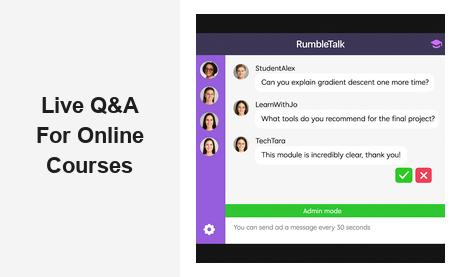
If you run online courses or manage an e-learning platform, adding live Q&A chat for online courses e-learning to your live sessions is one of the highest-impact improvements you can make. When students can submit real-time questions, receive instant responses from instructors, and interact with peers during a live lecture or webinar, learning outcomes improve measurably — and so do course completion rates and satisfaction scores. RumbleTalk’s Moderated Q&A and Group Chat tools are purpose-built for exactly this use case, giving educators and platform operators an embeddable, fully managed chat layer that works across any website, LMS, or course platform without requiring a separate app or login for learners.
Why Live Q&A Chat for Online Courses and E-Learning Matters
The biggest challenge facing online educators today isn’t content quality — it’s engagement. Learners enrolled in self-paced or even live-streamed courses frequently feel isolated: there’s no instructor to raise a hand to, no classmate to turn to when a concept doesn’t click, and no immediate feedback loop to confirm understanding. This isolation is a primary driver of the notoriously high dropout rates in online education, which can exceed 80% for open-enrollment courses.
Live Q&A chat for e-learning solves this problem by introducing structured, real-time interactivity into otherwise passive sessions. When an instructor fields live questions during a class, learners feel seen and heard. When peers can discuss concepts together in a chat sidebar, a classroom community effect emerges even in a fully virtual environment. Research consistently shows that interactive live sessions produce higher completion rates, stronger knowledge retention, and better course ratings compared to passive video consumption alone.
For B2B course platforms — corporate training providers, professional development networks, and bootcamp operators — the stakes are even higher. Enterprise clients paying for training licenses expect a polished, professional learning environment. Offering a live Q&A chat capability signals that your platform is built for serious, results-oriented education. It also creates a data trail: the questions students ask during live sessions reveal exactly where your curriculum needs strengthening, giving you a continuous improvement engine baked directly into every class you run.
That said, deploying any chat widget into a live session without the right moderation infrastructure can backfire badly. A raw, unmoderated group chat with hundreds of attendees quickly degrades into noise — irrelevant comments, repeated questions, and off-topic tangents that derail the lesson and frustrate participants. This is why RumbleTalk’s live Q&A chat solution is designed moderation-first, giving instructors and teaching assistants full control over the chat feed before anything reaches the public view.
Core Features of Live Q&A Chat for Online Courses E-Learning
Moderated Q&A Queue
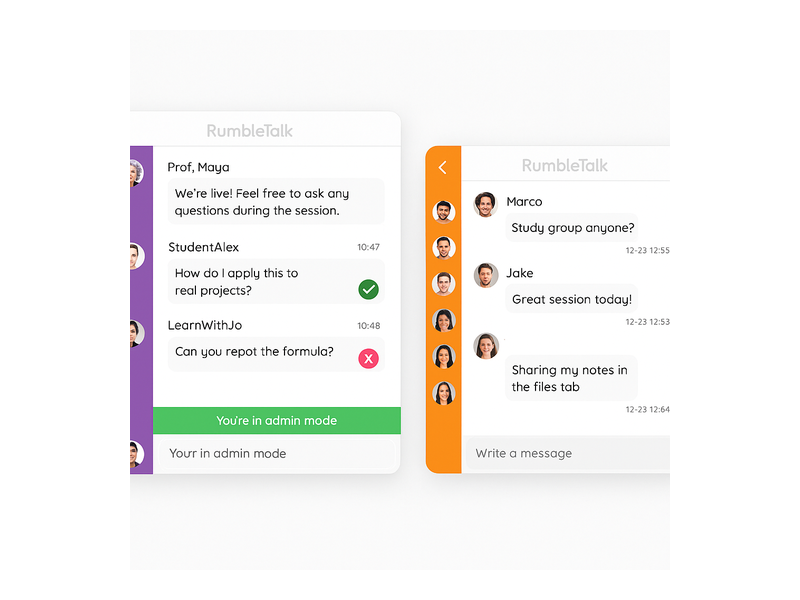
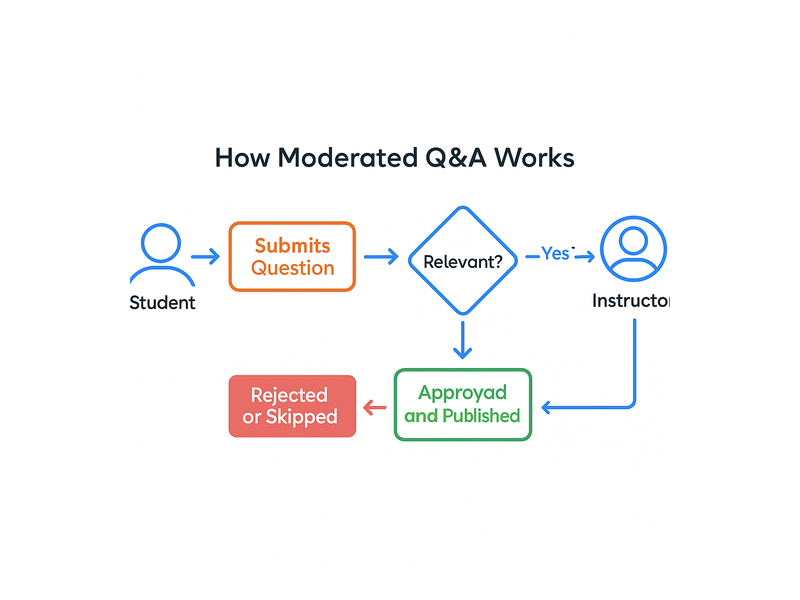
RumbleTalk’s Moderated Q&A mode is the foundation of professional live Q&A chat for e-learning platforms. Every message a student submits is held in a private moderation queue — invisible to the rest of the class — until a designated moderator reviews and approves it. Moderators can approve, reject, or edit messages before they go live. For busy instructors running large sessions, this workflow is transformative:
- Eliminates noise: Duplicate questions, off-topic comments, and spam never reach the main feed.
- Allows prioritization: Moderators can reorder the queue, surfacing the most frequently asked or strategically important questions first.
- Reduces cognitive load: Instructors focus entirely on teaching while a teaching assistant handles the moderation queue in parallel.
- Maintains professionalism: The public-facing chat remains clean, focused, and on-brand — exactly what high-value course platforms demand.
Group Chat for Cohort-Based Learning
Moderated Q&A handles the instructor-to-student interaction; Group Chat facilitates peer-to-peer learning. For cohort-based courses where a fixed group of students progresses through a curriculum together, the Group Chat creates an ongoing community space between live sessions. Students share notes, ask each other follow-up questions, and build the social accountability bonds that increase completion. Many online course creators report that a thriving chat community is the single biggest differentiator between students who finish their program and those who drop off halfway through.
Admin Controls and Session Management
Running live Q&A chat for online courses at scale requires robust administrative controls. RumbleTalk’s admin panel lets you mute or ban disruptive users instantly, set message cooldown timers to prevent message flooding, assign multiple moderator roles to teaching assistants, and configure individual chat rooms for specific courses or sessions independently. These controls give platform operators the confidence to run live Q&A chat with audiences ranging from intimate 20-person workshops to MOOC-style events with thousands of simultaneous learners.
SSO and Member Authentication
For platforms with registered learners, Single Sign-On (SSO) authentication automatically identifies students in the chat using their existing course account credentials. This eliminates anonymous participation, creates accountability, and allows administrators to match chat activity to specific enrolled learners. It is especially valuable for professional certification programs where attendance and participation records must be tracked. You can explore SSO setup details and other configuration options in the RumbleTalk knowledge base.
Fully Embeddable Widget
RumbleTalk’s live Q&A chat integrates into any existing course platform, LMS, or website via a simple embed code. There is no app for students to download, no separate platform for them to navigate to, and no friction at the point of participation. Students see the chat panel directly inside their learning environment — right alongside the video player or course content — making participation as natural as raising a hand in a physical classroom.
How to Run an Effective Live Q&A Chat Session for Online Courses
Having the right live Q&A chat infrastructure for e-learning is essential, but how you run the session matters just as much as the technology you choose. Here is a framework used by professional online educators to maximize the value of every live Q&A session:
Set Clear Ground Rules Before the Session Starts
Before your live session begins, communicate the chat norms to students. Explain that questions go through moderation, that only relevant and substantive submissions will be approved, and when during the session Q&A segments will occur. Setting these expectations upfront reduces frustration — students understand why their message does not appear immediately — and encourages higher-quality question submissions rather than casual chatter.
Assign a Dedicated Moderator
For sessions with more than 30 to 50 attendees, never ask the instructor to moderate the chat themselves. Assign a teaching assistant, community manager, or co-host as the dedicated moderator for the live Q&A chat. Their sole job during the session is to review incoming submissions, approve the best questions, reject duplicates, and flag high-priority questions for the instructor. This division of labor allows the instructor to focus completely on teaching — which is where their expertise and energy belong.
Use Structured Q&A Segments
Rather than allowing open questions throughout an entire session, build structured Q&A segments into your agenda. For a 60-minute class, consider a 5-minute Q&A break at the 30-minute mark and a 10-minute block at the end. During the lecture, the moderator queues up and ranks submitted questions in priority order so they are ready to address the moment Q&A time arrives. This approach respects the instructor’s teaching flow while ensuring students’ questions receive proper attention.
Mine Q&A Transcripts for Curriculum Insights
Every question submitted through your live Q&A chat for online courses is a signal worth analyzing. The most common questions reveal gaps in your curriculum — concepts your course materials do not explain clearly enough, or prerequisite knowledge your learner base lacks. After each session, review the full transcript and look for recurring patterns. Use these insights to update course content, add supplementary resources, or create targeted FAQ materials. Over time, this feedback loop makes your curriculum increasingly aligned with what learners actually need.
Gamify Participation to Build Culture
Encourage students to engage with the live Q&A chat by publicly acknowledging great questions. A simple “Excellent question from Sarah — let me address that now” creates positive reinforcement that motivates others to participate. Over time, this approach builds a culture of active, curious engagement that sets your live sessions apart from passive video-only alternatives and dramatically increases the perceived value of attending live rather than watching a recording.
Real-World Use Cases: Live E-Learning Chat Across Industries
Live Q&A chat for online courses and e-learning is not limited to traditional academic settings. It is rapidly becoming standard practice across a wide range of B2B and professional education contexts:
Corporate Training and Compliance Programs
HR teams and L&D departments running large-scale onboarding or compliance training use live Q&A chat to make otherwise dry mandatory sessions genuinely interactive. Employees can ask role-specific questions, managers can observe participation levels, and trainers can identify which policies generate the most confusion — enabling continuous improvement of training materials and reducing compliance risk.
Coding Bootcamps and Technical Education
Technical instructors field highly specific questions that often require back-and-forth clarification. The moderated Q&A format is ideal for this context: a student submits a question about a specific bug or algorithmic concept, the moderator flags it, and the instructor addresses it live while screen-sharing. This mirrors the dynamics of pair programming or code review in a scalable group setting without overwhelming the instructor with dozens of simultaneous chat messages.
Professional Certification and Continuing Education
Professional certification programs in finance, law, healthcare, and technology use live Q&A chat for e-learning review sessions, exam prep workshops, and expert panels. Credentialed instructors can field nuanced practitioner questions in real time, and the moderation queue ensures that session time is spent on substantive professional content rather than repetitive or off-topic submissions.
Virtual Summits and Expert-Led Webinars
Event organizers hosting educational summits or expert-led webinars rely on live Q&A chat to transform passive viewership into genuine dialogue. When audience members can ask speakers questions in real time, the event feels exclusive and high-value — driving registrations for future events and deepening the organizer’s community relationships. This is a natural extension of the community-building strategies that successful creators and platform operators use to turn one-time attendees into loyal, recurring participants.

Choosing the Right Live Chat Configuration for Your E-Learning Platform
Not every online course session calls for the same chat setup. RumbleTalk gives platform operators the flexibility to configure live Q&A chat for online courses in multiple ways depending on session format and audience size:
- Large webinars (100+ attendees): Enable Moderated Q&A as the primary mode. All student questions go through the moderation queue, ensuring the instructor only sees curated, relevant questions during Q&A segments.
- Small group workshops (10–30 students): Enable Group Chat with light moderation. The smaller cohort makes it feasible for the instructor to monitor the stream directly, and peer discussion adds significant learning depth.
- Hybrid courses (live sessions plus async community): Run live Q&A chat during scheduled sessions and keep the Group Chat open 24/7 for ongoing peer engagement and questions between sessions.
- Corporate training environments: Use Members Chat with SSO authentication to create secure, role-based rooms where employees in the same department collaborate privately during and after training sessions.
RumbleTalk’s e-learning chat solution supports all of these configurations from a single embeddable widget. You embed once and configure the experience through the admin dashboard — no separate integrations, no additional subscriptions, no development work required beyond the initial embed code.
Why E-Learning Platforms Choose RumbleTalk for Live Q&A
There are dozens of chat widgets on the market, so why do online course platforms and e-learning operators consistently choose RumbleTalk for their live Q&A chat needs? Several reasons stand out consistently:
- Moderation-first architecture: Most chat tools treat moderation as an afterthought — a bolt-on feature added after the fact. RumbleTalk was built with moderation as a core product pillar. The queue-based moderation workflow is intuitive and fast, designed specifically for live session contexts where instructors need to move quickly.
- Zero friction for learners: Students access the live Q&A chat directly in their browser inside your platform. There is no app to download, no separate account to create, and no barrier to participation. This frictionless access is critical for maximizing engagement rates, especially with less tech-savvy learner demographics.
- Scalable from 10 to 10,000: Whether you are running an intimate workshop or a MOOC-style event with thousands of concurrent learners, RumbleTalk handles the load without degrading the user experience for participants or moderators.
- Full session transcripts: After each live Q&A session, instructors and administrators can review complete chat transcripts, identify recurring questions, and use that data to improve future sessions and course content.
- Customizable branding: The chat widget’s visual appearance — colors, fonts, header branding — is fully customizable to match your course platform’s design, so it feels like a native feature rather than a third-party add-on.
Getting Started: Adding Live Q&A Chat to Your Online Courses
Setting up RumbleTalk for live Q&A chat on an e-learning platform is straightforward. From the admin dashboard, you create a chat room, select Moderated Q&A mode, configure your moderator roles, customize the widget’s appearance, and copy the embed code into your course platform or LMS. Most platforms are live within 30 minutes of initial setup.
RumbleTalk supports multiple chat rooms under a single account, each with independent settings, moderators, and user lists. This makes it easy to scale from a single flagship course to a full catalog of programs — each with its own dedicated live Q&A chat environment — without managing separate tools or subscriptions per course. For platforms with authenticated learners, SSO connects the chat to your existing user accounts automatically, eliminating the need for students to create separate credentials or remember additional passwords.
Conclusion: Transform Your Live Sessions with E-Learning Q&A Chat
The gap between an average online course and an exceptional one often comes down to how effectively instructors can engage learners in real time. Live Q&A chat for online courses and e-learning is one of the highest-leverage tools available for closing that gap — reducing dropout rates, surfacing curriculum insights, and building the kind of active learning community that keeps students returning session after session.
RumbleTalk gives you the infrastructure to run live Q&A chat for e-learning professionally — with moderation-first workflows built for scale, admin controls that protect the session experience, SSO authentication for secure enterprise environments, and a fully embeddable widget that integrates with any platform. Ready to bring professional-grade live Q&A chat to your online courses? Visit RumbleTalk to explore plans, request a live demo, and see how easy it is to transform your next class session into a genuinely interactive learning experience.