
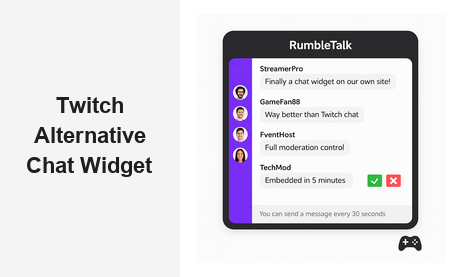
If you’re searching for a Twitch alternative chat widget that works natively on your own website, you’re not alone. Thousands of businesses, creators, and event organizers are moving away from Twitch’s locked ecosystem and looking for solutions that give them full control, stronger moderation, and seamless embedding on their own domain. RumbleTalk is the leading Twitch alternative chat widget built specifically for websites, live events, online communities, and professional B2B platforms — and it solves every limitation that makes Twitch chat the wrong choice for business use.
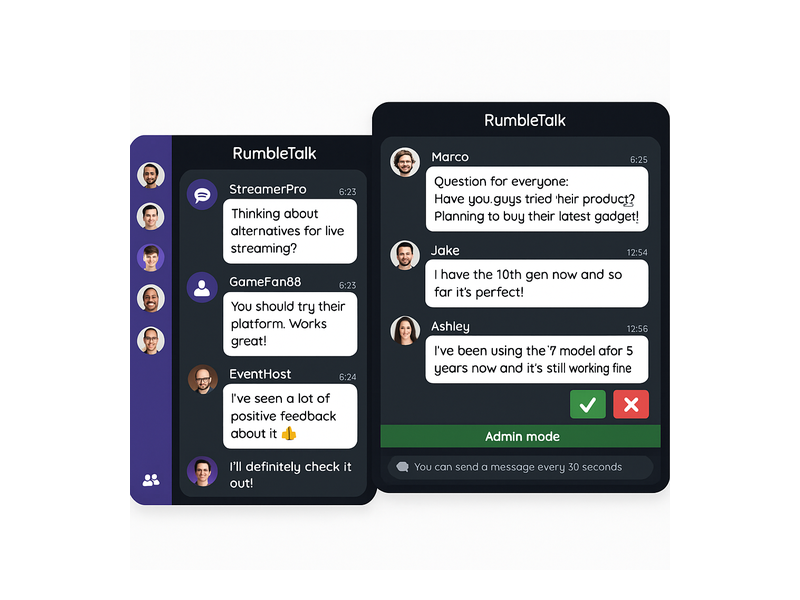
Why Businesses Look for a Twitch Alternative Chat Widget
Twitch chat was designed for gaming streamers, not for businesses running webinars, live product launches, or virtual conferences. While Twitch chat has brand recognition in gaming culture, it carries significant limitations for professional use that make it a poor fit for most business engagement scenarios.
- No embeddability on your own domain — Twitch chat is locked to Twitch’s platform. Your audience has to leave your website to participate, costing you traffic, session time, and conversions.
- Weak moderation tools — Twitch’s moderation is basic and public-facing, making it unsuitable for environments where you need fine-grained control over who speaks and when.
- No white-label branding — Every Twitch chat carries Twitch’s branding, not yours. There is no way to match it to your website’s design or your event’s visual identity.
- Limited audience segmentation — Twitch does not let you separate VIP attendees, registered members, or Q&A participants from general viewers.
- No SSO or membership integration — Connecting Twitch chat to your CRM, membership platform, or authentication system is either impossible or prohibitively complex.
For businesses that run live events, virtual conferences, online courses, or community platforms, these limitations make Twitch chat the wrong tool. A purpose-built Twitch alternative chat widget solves every one of these problems while delivering a far richer engagement experience and keeping your audience where they belong — on your platform.
What Makes RumbleTalk the Best Twitch Alternative Chat Widget
RumbleTalk is a professional group chat platform designed from the ground up for websites and live events. Unlike Twitch chat, RumbleTalk’s alternative chat widget embeds directly on your domain, integrates with your existing tools, and gives you complete control over the conversation. Here is what sets it apart from every other chat embed on the market.
One-Line Embed on Any Website
RumbleTalk generates a simple embed code — a single JavaScript snippet — that you paste into any website, CMS, or landing page. Whether you’re running WordPress, Webflow, Squarespace, or a custom-built platform, the chat widget is live in minutes. There is no app install required for your audience, and the widget works on desktop and mobile browsers without friction.
This is a fundamental advantage over Twitch chat, which requires your audience to have or create a Twitch account just to participate. With RumbleTalk, you control the authentication experience entirely — from anonymous guest access to full SSO-based login that ties directly into your membership platform or identity provider.
Advanced Moderation for Professional Events
One of the most common reasons businesses seek a Twitch alternative chat widget is moderation depth. RumbleTalk offers a comprehensive set of moderation tools designed for professional use:
- Admin mode — Lock the chat so only admins can broadcast messages. Ideal for announcements, keynote sessions, or tightly controlled segments where you want zero audience interruption.
- Message approval queue — Hold all incoming messages for review before they go public. Admins approve or reject each message individually — essential for Moderated Q&A sessions where off-topic or inappropriate submissions must be filtered.
- Mute and ban — Instantly silence disruptive users or ban them permanently from the chat with a single click from the admin panel.
- Slow mode — Restrict how frequently users can post, preventing message floods during high-traffic live events where hundreds of attendees join simultaneously.
- Keyword filtering — Automatically block or flag messages containing specific words or phrases, keeping the conversation brand-safe and professionally appropriate.
These tools are built for brands and event organizers who need to maintain a professional, on-brand conversation throughout every session — a level of control that Twitch chat was never designed to support.
Multiple Chat Formats for Every Engagement Scenario
RumbleTalk’s Twitch alternative chat widget comes in six distinct formats, each optimized for a different type of audience interaction:
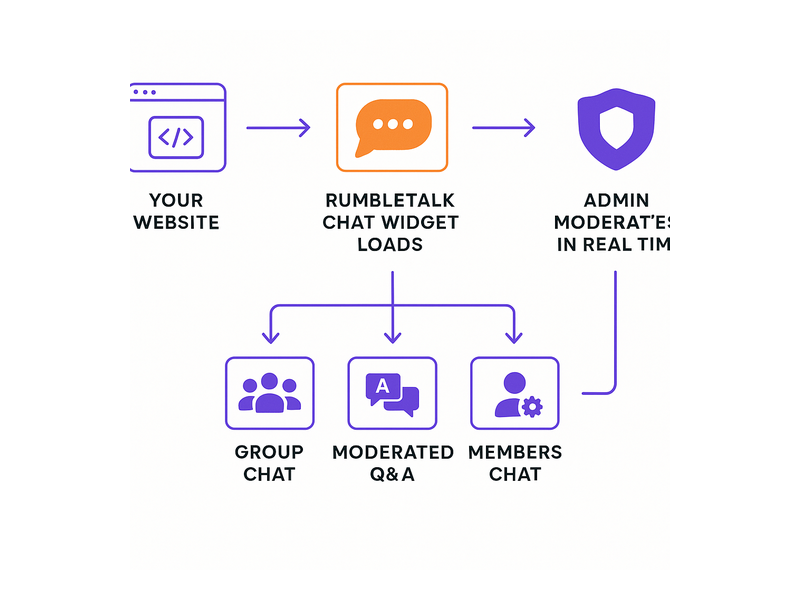
- Group Chat — Open group conversation for live events and community engagement. Everyone can see and participate in real time with no barriers.
- Moderated Q&A — Audience members submit questions that enter a moderation queue. Admins select which questions appear, keeping sessions focused and professionally controlled.
- Members Chat — Restrict the chat to verified or paying members. Integrates with your authentication system so only the right people get access to the conversation.
- Social Chat — Users log in via social media accounts, reducing anonymous participation while keeping entry frictionless for your audience.
- Private Chat — One-on-one or small-group private messaging within your platform. Great for networking events, mentorship programs, or VIP sessions alongside a main event.
- Queued Chat — Messages are delivered in sequence, preventing chaos during high-volume interactions like live product reveals or virtual auctions.
This variety of formats means RumbleTalk serves as the right Twitch alternative chat widget for virtually any live or asynchronous engagement scenario — from webinars and virtual conferences to e-learning platforms and trading communities.
White-Label Branding and Full Customization
With RumbleTalk, your chat widget looks like it belongs on your website — because it does. You can customize colors, fonts, backgrounds, and themes to perfectly match your brand identity. There is no RumbleTalk branding visible to your audience unless you choose to include it. This white-label capability is critical for businesses that want to present a polished, professional experience to their audience — a feature that is entirely absent from Twitch chat.
Analytics and Audience Insights
Unlike Twitch chat, which gives you almost no useful analytics, RumbleTalk’s admin dashboard surfaces key engagement data: active user counts, message volumes, peak activity windows, and moderation actions taken. For event organizers and community managers, these insights are invaluable for understanding audience behavior and continuously improving the live engagement experience from one event to the next.
Top Use Cases for a Twitch Alternative Chat Widget
RumbleTalk’s professional chat platform serves a wide range of industries and live engagement scenarios. Here are the most common situations where businesses choose a Twitch alternative chat widget like RumbleTalk over platform-locked or generic chat solutions:
Virtual Events and Conferences
Virtual event organizers need chat embedded directly in their event platform — not redirected to a third-party site where attendees can get distracted or lost. RumbleTalk integrates seamlessly with virtual event platforms and custom conference websites, providing attendees with a smooth live engagement experience that never pulls them away from the main content. Moderators manage the conversation from a dedicated admin panel, approve Q&A questions, and keep sessions on track — all in real time without leaving the event interface. Explore RumbleTalk’s broadcast and podcast chat solution to see how it powers live streaming and virtual conference chat at scale.
Live Webinars and Online Courses
E-learning platforms and webinar hosts frequently look for a Twitch alternative chat widget because they need chat that integrates with their LMS or webinar software rather than redirecting learners to an external platform. RumbleTalk embeds inside any web page, so participants never leave the course or webinar environment to join the live discussion. The Moderated Q&A format is especially popular for online educators running structured sessions where the quality and relevance of audience questions matters as much as the volume of engagement.
Media Publishers and Broadcast Platforms
Radio stations, podcast networks, and media publishers use RumbleTalk as a Twitch alternative chat widget to engage audiences in real time during live broadcasts and simulcasts. Unlike Twitch, which is locked to its own platform, RumbleTalk embeds directly on the publisher’s website — keeping the audience on the brand’s domain, supporting SEO performance, and driving higher advertising revenue by maintaining session time. See how broadcasters are putting this into practice with our guide on Radio Show Chat: Engage Your Live Audience in Real Time.
Gaming Communities and Esports Platforms
One of the most compelling use cases for a Twitch alternative chat widget is gaming communities that want to engage their audience on their own terms. Gaming news websites, esports organizations, and tournament platforms all benefit from embedding a professional chat widget on their own domain rather than depending on Twitch. RumbleTalk delivers the live audience engagement experience that gaming communities expect — but with full branding control, enterprise-grade moderation, and no dependency on a third-party platform that could change its terms or policies at any time.
Online Trading and Finance Communities
Financial communities and trading platforms use RumbleTalk’s group chat and members-only chat to facilitate real-time market discussions among verified subscribers. The ability to restrict chat access to paying or credentialed members — and to moderate or immediately remove users who post misleading information — makes RumbleTalk an ideal professional chat solution for regulated industries where the quality of conversation directly affects user trust and platform credibility.

How to Set Up Your Twitch Alternative Chat Widget with RumbleTalk
Getting started with RumbleTalk as your Twitch alternative chat widget is straightforward. Here is the typical setup process from account creation to a live embedded chat on your website:
- Create your RumbleTalk account — Sign up at rumbletalk.com and select the chat format that fits your use case: Group Chat, Moderated Q&A, Members Chat, or one of the other available formats.
- Customize your chat widget — Use the admin panel to configure colors, themes, moderation rules, and access permissions that match your brand and your specific event requirements.
- Copy the embed code — RumbleTalk generates a JavaScript snippet that you paste directly into your website’s HTML. No developer involvement is required for a basic setup on most platforms.
- Configure moderation settings — Set up admin accounts, keyword filters, slow mode intervals, and message approval queues before your first event goes live.
- Launch and engage — Your chat widget is embedded and ready. Your audience joins directly on your website with no Twitch account required, no app download, and no friction.
For teams that need more advanced configuration — including SSO integration, custom membership tier access, or API-level control — RumbleTalk’s knowledge base covers every scenario in detail. Begin with the admin mode and moderation guide to understand how to keep your chat professional and on-brand from the moment your first session goes live.
RumbleTalk vs. Twitch Chat: Key Differences for Business Users
Here is a direct comparison of why businesses consistently choose a RumbleTalk Twitch alternative chat widget over Twitch chat for professional use cases:
- Platform independence — RumbleTalk embeds directly on your website; Twitch chat is permanently locked to Twitch’s platform.
- Branding control — RumbleTalk is fully white-label and customizable; Twitch chat always displays Twitch’s branding regardless of your preferences.
- Moderation depth — RumbleTalk offers message approval queues, admin mode, keyword filters, and slow mode; Twitch offers basic bans and temporary timeouts.
- Access control — RumbleTalk supports members-only gating, SSO authentication, and open guest access; Twitch requires every participant to hold a Twitch account.
- Chat format variety — RumbleTalk provides six distinct formats optimized for different engagement goals; Twitch offers a single open chat format for all contexts.
- Analytics — RumbleTalk surfaces detailed engagement analytics through its admin dashboard; Twitch provides minimal data about chat activity.
- Monetization alignment — RumbleTalk keeps your audience on your domain where your ads, subscriptions, and conversions happen; Twitch keeps your audience on Twitch, benefiting Twitch’s platform, not yours.
Ready to Replace Twitch Chat on Your Website?
If your business runs live events, hosts webinars, manages an online community, or operates a media platform, a professional Twitch alternative chat widget is not a nice-to-have feature — it is essential infrastructure for audience engagement. Twitch chat was built for one specific context that does not map to most professional and B2B engagement scenarios. RumbleTalk gives you everything Twitch chat lacks: full embeddability on your own domain, powerful moderation tools across six chat formats, white-label branding, SSO integration, and actionable analytics that actually help you improve your events over time.
Whether you are replacing Twitch chat on an existing platform or building live audience engagement into your website for the first time, RumbleTalk’s Twitch alternative chat widget is the most flexible, feature-rich, and professionally designed solution available for business use cases. Visit RumbleTalk.com to explore plans, start a free trial, and embed your first professional chat widget in minutes.