Community Platform for Websites: Engage Your Audience

A robust community platform for websites is no longer a nice-to-have feature — it is the single most effective tool for turning anonymous visitors into an active, loyal audience. Whether you run a media outlet, an e-commerce store, an educational platform, or a live events business, giving your users a place to connect, share ideas, and engage in real time directly on your site creates a competitive advantage that no algorithm or social network can replicate. RumbleTalk is built precisely for this purpose: a fully embeddable, fully moderatable, and enterprise-ready community platform that lives inside your website and works from day one.

What Is a Community Platform for Websites?

A community platform for websites is an integrated suite of real-time communication and engagement tools — primarily group chat, moderated Q&A, and private messaging — embedded directly into a web property so visitors can interact with one another and with your brand without ever leaving your domain. Unlike social media groups that pull your audience away from your site and hand ownership of that relationship to a third-party platform, an on-site community keeps engagement, behavioral data, and audience attention firmly in your control.

The difference between a basic comments section and a true community platform is depth and immediacy. A comments section is asynchronous and passive. A community platform enables many-to-many real-time conversations, peer-to-peer discovery, moderated expert access, and persistent community identity. When implemented well, it becomes the social infrastructure that transforms a content site into a destination people return to daily — not just when you publish something new.

For B2B operators, the stakes are especially high. Community platforms for websites in B2B contexts serve double duty: they build brand credibility and keep customers engaged between purchases, while also functioning as a real-time support and onboarding channel that reduces churn and accelerates time-to-value for new users.

Why Businesses Invest in a Community Platform for Websites

Before evaluating features, it helps to understand the business case. Organizations that deploy a community platform for websites consistently report measurable improvements across several key performance indicators:

  • Longer session durations — users who participate in live chat or community Q&A stay on-site two to four times longer than passive content readers.
  • Higher return visit rates — community members come back because the conversation continues, not only because new content was published.
  • Improved conversion rates — for e-commerce and SaaS sites, live chat and community discussions reduce purchase hesitation by answering questions in real time, at the moment of intent.
  • First-party audience data — every interaction on your own community platform generates insight you own, rather than behavioral data locked inside a social network’s walled garden.
  • Brand differentiation — a well-moderated, vibrant on-site community is a competitive moat that competitors cannot easily replicate by copying your content strategy alone.
  • Reduced support load — peer-to-peer community answers frequently-asked questions before they reach your support inbox, cutting ticket volume for growing teams.

These benefits apply across industries, from online news publishers hosting reader discussions during breaking news events to fintech platforms running real-time trading communities where members share signals and analysis.

Core Features of an Effective Community Platform for Websites

Not every chat tool or forum plugin qualifies as a true community platform for websites. The most effective solutions combine several functional layers that work together to create a sustainable, scalable engagement space. RumbleTalk delivers each of these layers in a single embeddable product.

Group Chat

RumbleTalk’s Group Chat is the foundation of any website community. It supports simultaneous conversations among hundreds of concurrent users with real-time message delivery, rich media sharing, emoji reactions, and optional file attachments. Administrators can brand the chat panel to match their site’s design language — colors, fonts, header text, and panel dimensions are all configurable through the admin dashboard without touching a line of code.

Group chat is ideal for live event commentary, product launch conversations, sports watch parties, community AMAs, and any scenario where real-time collective discussion adds energy and value. Because the widget loads asynchronously via a lightweight JavaScript snippet, it does not degrade page performance or affect Core Web Vitals scores.

Moderated Q&A

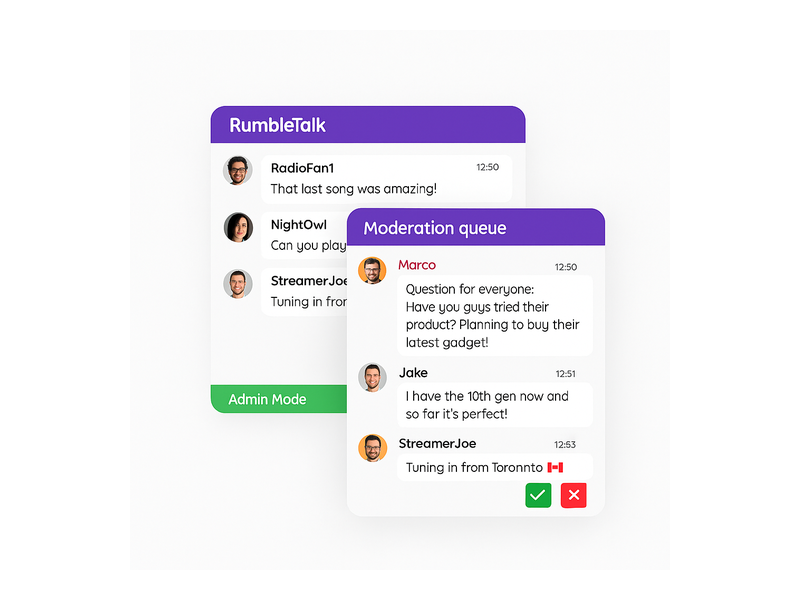
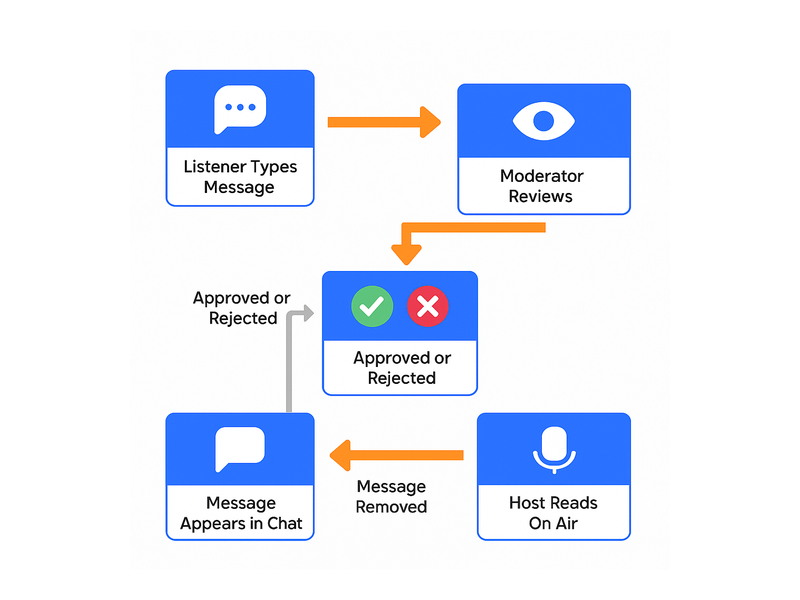
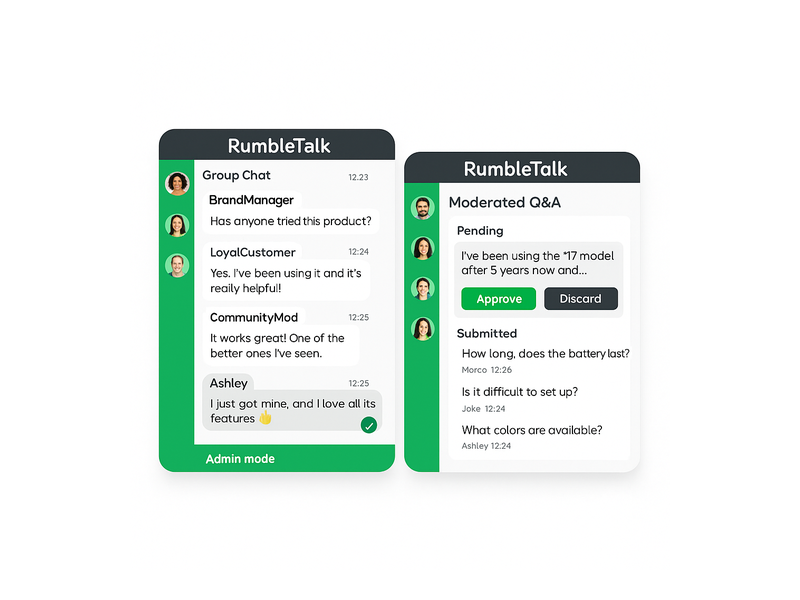
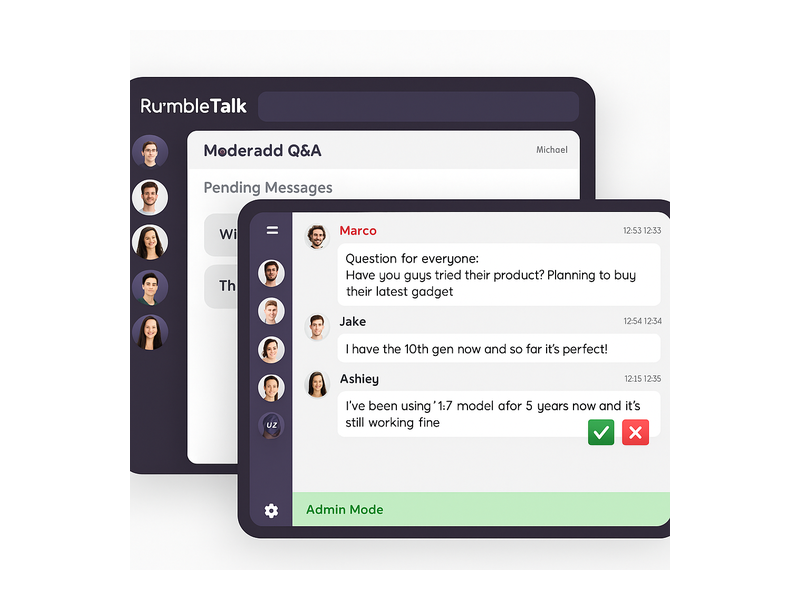
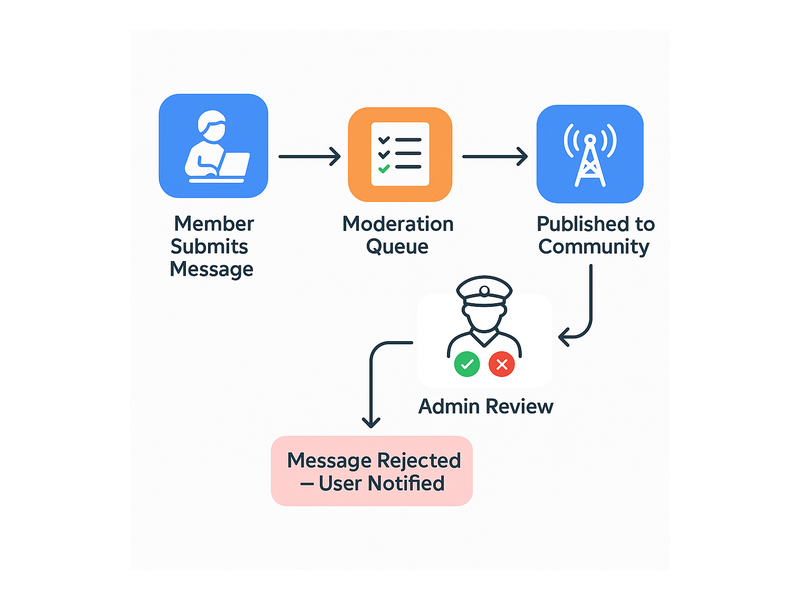
For B2B publishers, educators, and event organizers, unmoderated open chat can quickly become a liability. RumbleTalk’s Moderated Q&A feature solves this by routing all incoming messages through an admin approval queue before they appear publicly. Administrators can approve, edit, or discard individual messages — giving the host complete control over what the audience sees at all times.

This makes Moderated Q&A the default choice for webinars, expert panels, investor calls, product demos, and any live session where brand reputation is on the line. It also supports anonymous question submission, which consistently drives higher participation rates because users feel comfortable asking without attaching their public identity to the question.

Members Chat

RumbleTalk’s Social & Communities solution includes Members Chat, purpose-built for subscription platforms and registered-user communities. Members Chat authenticates participants against your existing login system via single sign-on (SSO), so there are no separate accounts to create or manage. Only verified members can enter the community space, maintaining the quality, exclusivity, and trust that premium membership communities require.

Members Chat integrates naturally with WordPress membership plugins, custom authentication backends, and major identity providers including OAuth 2.0 and SAML. If your community model depends on paid memberships or gated access tiers, this feature is essential for preserving the perceived value of that access.

Private Chat and Social Chat

Beyond group conversations, a complete community platform for websites needs one-to-one and small-group communication options. RumbleTalk’s Private Chat enables direct messaging between community members within the same embeddable interface — no separate inbox or third-party messaging tool required. Social Chat allows users to authenticate with their existing social media accounts, dramatically lowering the barrier to entry while still building your owned, on-site audience rather than someone else’s.

How RumbleTalk Works as a Community Platform for Websites

One of the most practical advantages of RumbleTalk as a community platform for websites is the deployment speed. Building a community platform from scratch typically requires weeks of custom engineering — WebSocket infrastructure, database design, authentication integration, moderation tooling, and front-end UI work. RumbleTalk compresses that entire process to a single afternoon, with no DevOps overhead and no server to maintain.

The setup process is straightforward:

  1. Create a chat room in the RumbleTalk admin dashboard — no server configuration or infrastructure provisioning required.
  2. Customize the appearance — select colors, fonts, panel dimensions, and available features to match your site’s brand identity.
  3. Copy the embed code — a lightweight JavaScript snippet that drops into any HTML page, WordPress post, React component, or CMS template.
  4. Configure moderation settings — set profanity filters, per-user rate limits, admin roles, SSO parameters, and feature toggles.
  5. Go live — the community panel is fully operational the moment the page loads.

For teams new to deploying real-time chat tools, the Getting Started knowledge base guide walks through every configuration step with annotated screenshots and practical examples for common CMS environments.

Community Platform for Websites: Real-World Use Cases

The versatility of RumbleTalk as a community platform for websites becomes clear when you survey the range of businesses and content creators who have deployed it successfully across very different industries.

Media and Publishing

News sites and digital magazines embed live community chat alongside breaking stories, enabling readers to react and discuss events as they unfold. This transforms passive content consumption into an active social experience, increasing time-on-site metrics and driving repeat visits from readers who want to follow the community conversation rather than just the editorial. Editors use Moderated Q&A during live blogs and expert interview streams to field verified reader questions without opening the floor to abuse or off-topic noise.

E-Commerce and Retail

Online retailers leverage community chat during product launches, flash sales, and live shopping events to create social proof organically. When a customer sees real users actively discussing a product in the live chat, purchase confidence increases. Support staff can simultaneously monitor the same channel to answer pre-purchase questions in real time, reducing cart abandonment at the critical decision moment. For niche categories — sneaker drops, collectibles, limited-edition releases — the community platform becomes a micro-social space that attracts enthusiasts repeatedly, not just when they are ready to buy.

E-Learning and Corporate Training

Educational platforms use RumbleTalk to replicate the energy of a live classroom in digital environments. Students ask questions during live lectures, instructors address common confusions across the entire cohort simultaneously, and classmates build social bonds through shared discussion spaces between sessions. The community platform for websites becomes the connective tissue that makes asynchronous course content feel genuinely synchronous and human. Corporate training teams use the same infrastructure for onboarding cohorts, internal knowledge sharing, and live skills workshops.

Live Events and Virtual Conferences

Virtual and hybrid events represent perhaps the highest-impact deployment context for a community platform for websites. Attendees who can chat with each other and interact with speakers in real time feel dramatically more present than passive video viewers. RumbleTalk powers live Q&A sessions, networking rooms, sponsor interaction panels, and speaker chat for events ranging from small webinars to large-scale virtual summits with thousands of concurrent participants. For broadcasters and radio-format shows, community chat transforms a one-way broadcast into an ongoing two-way conversation — a dynamic explored in depth in Radio Audience Chat: Turn Listeners Into a Community.

Financial Services and Trading Communities

Fintech platforms and trading education sites use RumbleTalk’s community features to power real-time discussion rooms around market movements, trading signals, and investment thesis sharing. Admin controls ensure that conversations remain professional and within regulatory guidelines, while the real-time infrastructure matches the speed and urgency of financial markets where timing is everything.

Moderation: The Engine Behind Every Healthy Online Community

Any community platform for websites will succeed or fail based on the quality of its moderation infrastructure. Toxic conversations, spam, coordinated abuse, and off-topic noise erode trust and drive away your most valuable community members if left unchecked. RumbleTalk’s moderation toolkit is designed for the operational realities of managing a live, public-facing community at scale.

Key moderation capabilities include:

  • Admin Mode — a green admin status bar displays at the bottom of the chat panel, clearly communicating moderator presence and signaling to users that the space is actively managed and safe.
  • Approve/Reject message queue — in Moderated Q&A mode, every incoming message passes through admin review before it is visible to the broader audience.
  • Mute and ban controls — moderators can silence individual users temporarily or permanently without interrupting the broader conversation flow for other participants.
  • Configurable rate limiting — cooldown periods between messages (displayed as a visible timer bar, e.g., “You can send a message every 30 seconds”) prevent flooding and encourage more considered contributions.
  • Automated profanity filtering — keyword-level content filtering intercepts the most common violations before they ever reach the audience.
  • IP and device-level banning — for persistent bad actors, deep-level bans prevent re-entry even after account deletion or VPN switching.

These tools give community managers the confidence to open their community platform to public participation without sacrificing the content quality standards their brand requires. The result is a community that feels safe and on-topic — the conditions under which genuine engagement thrives.

Customization and Integration for Your Website Community

A community platform for websites that looks visually inconsistent or out of place undermines the user trust that makes community engagement possible. RumbleTalk’s theming engine lets you match every visual element to your site’s design system: background colors, font families, message bubble styles, header text, sidebar accent colors, and overall panel dimensions are all configurable through the admin dashboard without touching CSS or custom code.

For technically sophisticated teams, RumbleTalk also exposes a JavaScript API that enables programmatic control of the community panel: open or close it in response to user actions, pass authenticated user identity tokens automatically via SSO, or trigger chat panel events based on page-level behavior such as scroll depth or time-on-page. This level of integration allows the community platform to be woven naturally into your site’s user experience architecture rather than feeling like a bolted-on widget.

White-label deployment options are available for platforms that want to present their community features entirely under their own brand identity, with no visible RumbleTalk attribution — ideal for enterprise SaaS products and managed service providers building community tools for their own clients.

Choosing the Right Community Platform for Your Website

When evaluating a community platform for websites, the criteria that matter most for B2B deployments extend well beyond feature checklists. The five dimensions that most reliably predict whether a platform will succeed in production are:

  • Scalability under load — can the platform absorb concurrent user spikes during live events without latency degradation or dropped messages?
  • Moderation depth and control — does it give administrators enough granular control to manage a public-facing audience responsibly at scale?
  • Integration simplicity — how much engineering effort is required to embed, authenticate, and maintain the platform across your tech stack?
  • SSO and identity support — can the community platform authenticate against your existing user management system without requiring duplicate accounts?
  • Reliability and support SLA — what happens when you experience an issue during your most important live event of the quarter?

RumbleTalk scores strongly across all five dimensions. Its infrastructure is purpose-engineered for real-time group communication at scale. Its moderation feature set is among the most comprehensive available in any embeddable community solution. Its embed code is compatible with every web environment — vanilla HTML, WordPress, React, Vue, Angular, and any CMS that allows script tag injection. And its support team is experienced with the unique operational demands of live events where downtime is not an option.

For teams specifically building communities around broadcast content, live radio, or audio streaming, RumbleTalk’s Broadcast & Podcast chat solution offers a pre-configured feature set tuned for listener engagement, call-in simulation, and co-host interaction — demonstrating the platform’s breadth across community use cases beyond standard web chat.

Getting Started with Your Website Community Platform

Whether you are launching a brand-new community from zero or migrating from a forum tool, a Facebook Group, or a Slack workspace that no longer fits your audience’s needs, RumbleTalk offers a clear, low-risk path to a live community platform for websites within a single business day. A free tier is available for teams that want to validate community engagement with real users before committing to a paid plan, and pricing scales with the size of your community and the feature depth you require.

The most successful community deployments follow a consistent pattern: start with a single high-traffic page or live event, measure engagement from real users in real conditions, and then expand the community platform to additional pages, product areas, and use cases. This incremental rollout reduces implementation risk, builds internal confidence, and generates concrete engagement data to justify broader organizational investment in community as a growth channel.

The community you build on your own domain — moderated by your team, branded to your identity, and generating first-party data you own — is a durable asset that compounds in value over time. Social media followings can disappear with an algorithm change. An on-site community, managed well, becomes one of the most defensible moats in your entire marketing strategy.

Ready to build a thriving, engaged community directly on your website? Visit RumbleTalk to explore plans, start a free trial, and discover why leading publishers, event organizers, e-learning platforms, and online communities around the world trust RumbleTalk as their community platform for websites — no third-party social network required.

Community Platform for Creators: Engage Your Fans

Building a community platform for creators has never been more important than it is today. Content creators, educators, live streamers, and influencers are increasingly looking for ways to bring their audiences together in one place — not just on social media platforms they don’t own, but on their own websites, where they control the experience. RumbleTalk offers a fully embeddable group chat solution that serves as a powerful community platform for creators, enabling real-time conversation, fan engagement, and audience loyalty directly on any site you own and operate.

Whether you run a podcast, a YouTube channel, an online course, or a newsletter, your audience craves connection — not just with you, but with each other. A true creator community platform goes beyond comments and likes. It provides live group discussions, private messaging, moderated Q&A sessions, and member-only spaces that transform passive viewers into active, invested participants who keep coming back.

Why Creators Need a Community Platform for Creators

The creator economy has grown into a multi-billion-dollar industry, and with it, the demand for deeper audience engagement has surged. A community platform for creators solves one of the most critical challenges in the space: audience fragmentation. Most creators rely on a patchwork of YouTube comments, Discord servers, Instagram DMs, and Patreon posts to communicate with fans — but none of these channels sit on the creator’s own domain or serve as a unified community hub.

Owning your community means owning the conversation. When fans gather in a chat room embedded directly on your website, you gain full control over the environment. You decide who gets moderated, which messages are highlighted, and how the entire experience looks and feels. This level of control is simply not possible on third-party social platforms, where algorithm changes and policy shifts can disrupt your community overnight with no warning and no recourse.

RumbleTalk’s Social Communities solution is purpose-built for exactly this use case. Creators can deploy a fully branded group chat experience, filter messages through real-time moderation, and host live events where the audience participates actively — all without sending fans off-site to a platform you don’t control.

Beyond control, a community platform for creators also directly drives monetization. Engaged communities convert better. When fans feel part of an inner circle, they are more likely to subscribe, purchase courses, or support your work financially. Chat rooms create the psychological environment of belonging — a core driver of long-term loyalty and recurring revenue that standalone content can never generate on its own.

Core Features of RumbleTalk as a Community Platform for Creators

Real-Time Group Chat

At the heart of any community platform for creators is real-time communication. RumbleTalk’s Group Chat lets audiences join instantly — no app download, no account creation required unless you choose to gate access. Visitors connect with a username and avatar, drop into the live conversation, and engage immediately. For product launches, live streams, or weekly community calls, this friction-free experience makes a significant difference in participation rates. The lower the barrier to entry, the larger the engaged audience you capture at the moment it matters most.

Moderated Q&A for Live Creator Sessions

One of the most popular formats for creators is the live Q&A session. RumbleTalk’s Moderated Q&A product is designed specifically for this scenario. Audience members submit their questions, and the creator — or a dedicated moderator — approves which ones appear publicly in the chat. This eliminates spam, off-topic noise, and inappropriate messages, allowing the creator to focus entirely on delivering value to their audience without managing a firehose of unfiltered text.

The approval-based workflow also creates a more professional experience for the audience. They see only curated, relevant questions, making the session feel polished and deliberately organized. For creators who run weekly AMAs, product demos, or expert panels, this feature alone justifies adopting RumbleTalk as their community platform for creators.

Members Chat for Exclusive Creator Communities

Creators who offer premium membership tiers — through Patreon, Substack, or their own subscription platforms — can use RumbleTalk’s Members Chat to create gated community spaces accessible only to paying members. This provides an exclusive perk that strengthens the value proposition of every membership tier. This feature turns your community platform for creators into a direct monetization mechanism, where chat room access becomes a tangible, differentiated benefit that members actively seek out and renew for.

Private Chat for VIP Fan Engagement

High-value supporters and top-tier fans often want a more personal connection with the creators they love. RumbleTalk’s Private Chat feature enables one-on-one conversations within the same platform, so creators can reward their most loyal community members without switching to a separate tool or giving out personal contact information. This direct personal connection deepens the creator-fan relationship significantly and creates memorable experiences that fans talk about and share with others.

Setting Up Your Creator Community Chat

Getting started with RumbleTalk as your community platform for creators is straightforward and requires no coding expertise. The setup process typically takes less than an hour from signup to a fully functional, branded chat room embedded on your website. Here is how the process works:

  • Create your chat room on the RumbleTalk admin dashboard and choose your room type
  • Configure your branding — colors, logo, and font styling to match your existing website identity
  • Set your moderation rules — who can post, message rate limits, banned word lists, and admin access permissions
  • Copy the embed snippet and paste it into your website’s HTML or CMS page builder
  • Announce the launch to your audience via email newsletter, social posts, or a pinned community update

The RumbleTalk getting-started knowledge base guide walks through each step with screenshots and real examples, making onboarding straightforward even for creators with no technical background. Most creators go live within 30 minutes of completing their account setup.

Once your creator community platform is live, the admin panel gives you full visibility into everything happening in the room: who is online, what messages are being sent, and which content requires moderation attention. Admin Mode lets you or a team member manage the room in real time — pinning important announcements, muting disruptive participants, and enabling message cooldown timers during high-traffic live events to keep the quality of conversation high.

Use Cases: Who Benefits from a Community Platform for Creators

Live Streamers and Video Creators

For video creators, a community platform for creators embedded on their own website creates a compelling second-screen experience. While fans watch a live stream on YouTube or Twitch, they can simultaneously join a synchronized chat room on the creator’s site — giving the creator ownership over the conversation rather than relying entirely on platform-controlled comment sections that can be shut down, restricted, or simply overwhelmed by scale. This approach also drives website traffic, captures first-party analytics data, and helps build an email list the creator actually owns independent of any platform.

Podcasters and Audio Content Creators

Podcasters can use RumbleTalk to host live episode recording sessions or dedicated community listening events. A community platform for creators in the podcast space means listeners can ask questions during live recordings, vote on future episode topics, or gather in between episode releases to discuss show themes and share key takeaways with one another. This transforms a traditionally one-way audio format into an interactive, two-way community dialogue that keeps fans engaged and invested throughout the week — not just during episode release days.

For a deeper look at building loyal audiences through structured real-time engagement, check out our post on Community Building Playbooks for Creators, Educators, and Platform Owners — it outlines specific, actionable strategies for growing a thriving fanbase through well-designed chat experiences.

Online Course Creators and Educators

E-learning platforms and online educators benefit enormously from a community platform for creators. Students who can discuss lessons in real time with peers and ask instructors questions during live office hours retain information better and complete courses at significantly higher rates than those learning in isolation. RumbleTalk’s group chat integrates directly into course pages, transforming isolated individual learners into a collaborative, mutually supportive learning community that adds compounding value to the educational experience.

With full moderation controls, course creators can ensure discussions remain on-topic and constructive, while Members Chat access ensures only enrolled, paying students can participate — protecting the integrity and exclusivity of the learning environment you have built.

Newsletter Writers and Content Curators

Newsletter creators often struggle to turn passive subscribers into active community participants. A community platform for creators embedded on a newsletter’s companion website bridges this gap effectively. Readers gather to discuss each issue, share their own perspectives and reactions, and connect with like-minded people — all within a space the creator fully controls and brands. Over time, this transforms a subscriber list into a genuine, self-reinforcing community with shared identity and ongoing dialogue that extends the shelf life of every piece of content you publish.

Moderation and Safety in Your Creator Community

A thriving community platform for creators depends fundamentally on safety and content quality. Without effective moderation, even the most passionate communities can deteriorate rapidly — toxic messages, spam, and off-topic content drive engaged members away and damage the creator’s brand reputation in ways that are difficult to repair.

RumbleTalk offers several layers of moderation purpose-built for creator communities at every scale:

  • Real-time message approval — every message can be held in a moderation queue before it is published, giving the creator full editorial control over what the community sees
  • Profanity filters and banned word lists — automated filtering removes problematic content the moment it is submitted, before it ever surfaces in the chat
  • User banning and muting — moderators can remove disruptive participants immediately and block them permanently if repeat violations occur
  • Message rate limiting — configurable cooldown timers prevent spam floods during high-activity live events where hundreds of messages might arrive per minute
  • Admin mode — creators or designated team members can take full operational control of the room during live sessions, controlling message flow and visibility in real time

These moderation capabilities make RumbleTalk a community platform for creators that scales gracefully — from intimate communities of 50 dedicated fans to major live events with thousands of simultaneous participants. The platform is engineered to handle significant scale without ever sacrificing the quality, safety, or warmth of the community environment you have worked hard to create.

Why RumbleTalk Stands Out as a Community Platform for Creators

The market for creator tools is crowded and competitive, but most available chat solutions either lack the depth of moderation features that professional creators require, demand complex technical integrations that consume development resources, or force creators to send their audience to a third-party platform where they lose both control and attribution. RumbleTalk solves all three of these problems in a single, well-designed, embeddable package.

Because RumbleTalk embeds directly on your website, your audience never leaves your domain. Your brand stays front and center throughout every community interaction. Your analytics platform captures every visit and engagement signal. And your creator community grows on a foundation you own entirely — not one that can be shut down, restricted, or suddenly monetized by a third-party platform making decisions you have no influence over.

RumbleTalk’s pricing model scales based on concurrent users rather than total member count, making it accessible for growing creator communities without requiring a large upfront financial commitment as your audience expands. The platform also supports SSO integration, so creators with existing membership management systems can authenticate users automatically and seamlessly — creating a frictionless experience for subscribers who already have accounts on your platform.

For creators who host regular live events, virtual meetups, or premium subscriber sessions, RumbleTalk’s full product suite — Group Chat, Members Chat, Moderated Q&A, Social Chat, Private Chat, and Queued Chat — provides the complete infrastructure for a professional, scalable community platform for creators at every stage of audience growth, from first hundred fans to first hundred thousand.

Turning Your Audience Into a Community

The difference between an audience and a community comes down to conversation. An audience watches, listens, or reads. A community discusses, debates, celebrates, and supports one another. A community platform for creators gives you the infrastructure and tools to make that shift — from passive content consumption to active, participatory engagement that compounds over time.

Every feature in RumbleTalk is designed to enable exactly that transition. Real-time group chat sparks discussion the moment a new piece of content drops. Moderated Q&A focuses the conversation and ensures quality and relevance. Members Chat rewards your most loyal supporters with exclusive, gated access. Private Chat deepens individual connections between creator and fan. Together, these tools create a living ecosystem where your audience becomes your community — and your community becomes your most durable, most valuable long-term business asset.

Creators who invest in building genuine owned communities see measurable, compounding results: higher content completion rates, stronger subscription retention, more organic word-of-mouth referrals, and deeper brand loyalty that no algorithm change can erode. The community you build is the competitive moat that truly differentiates you in a crowded creator landscape.

Start Building Your Creator Community Today

Building a loyal, engaged fanbase is the foundation of long-term success in the creator economy. A community platform for creators that you own and control — embedded on your own website, branded to your identity, and managed with professional-grade moderation tools — is no longer a luxury reserved for large media companies and enterprise brands. It is an accessible, achievable competitive advantage for independent creators at every level of their career.

RumbleTalk makes it simple to launch your creator community today. Whether you are a podcaster, educator, live streamer, or newsletter writer, the platform adapts to your content format and your audience’s communication preferences. You get the full stack of engagement tools — group chat, live Q&A, members-only rooms, and private messaging — in a single embeddable solution that goes live on your site in under an hour with no developer required.

Ready to build your community? Visit rumbletalk.com to start your free trial and discover how RumbleTalk’s community platform for creators can transform the way your audience connects — with you, and meaningfully with each other.

Own Your Audience Chat: Build a Community You Control

If you want to build a lasting brand online, the smartest move you can make is to own your audience chat — not rent it from a social network you don’t control. Every time you rely on Facebook groups, Discord servers, or third-party messaging apps to connect with your community, you are building on borrowed land. Algorithms shift. Platforms remove features. Accounts get suspended. And when that happens, the audience relationships you spent years building can vanish overnight. The only way to future-proof your community is to bring real-time conversation directly onto your website, where you set the rules, own the data, and control the experience from day one.

What Does It Mean to Own Your Audience Chat?

Owning your audience chat means hosting live group conversation on your own website — not on a third-party platform you depend on. When you own your audience chat, you decide who can join, what they can say, how the interface looks, and what happens to every data point generated inside the room. It is the difference between being a tenant in someone else’s building and being the landlord of your own.

For B2B brands, creators, media companies, and event organizers, this distinction matters enormously. Your audience members are your most valuable asset. They have chosen to engage with your content, subscribe to your updates, or attend your events. That relationship deserves a dedicated space — one that reflects your brand identity and keeps the conversation anchored to your domain, not scattered across a dozen external apps.

With a platform like RumbleTalk Members Chat, you can build a private, branded chat community where only registered users participate. Members log in with their existing credentials, and every interaction happens on your site. No third-party distractions. No data handed off to a social network. Just you, your audience, and a live conversation you fully own.

Why Businesses Are Moving Toward Own-Your-Audience Chat Models

The shift toward owning your audience chat is not just a trend — it is a direct response to real business risks that have hurt brands significantly in recent years. Here is why more organizations are making the move now.

The Platform Dependency Problem

When you build your community on someone else’s platform, you are subject to their terms. Facebook can throttle organic reach and cut your visibility in half. Twitter can remove features or suspend accounts without warning. Discord can update its terms of service in ways that restructure your entire community. These are platforms you do not own, and audiences housed there are never truly yours.

Brands that have experienced sudden platform changes firsthand know the cost: years of community-building effort erased by a policy update or a product pivot. Moving to an own-your-audience chat approach eliminates that risk. Your chat lives on your site. Your community remains connected regardless of what happens in the broader social media landscape.

Data Ownership and First-Party Insights

Every message sent in your community is a data point — who is engaging, what topics generate the most discussion, which segments of your audience are most active. When you own your audience chat infrastructure, you own that data. You can use it to improve your products, personalize your marketing, and understand your community at a depth that third-party platforms will never share with you.

This matters especially for businesses operating under GDPR, CCPA, or other data privacy regulations. When your chat data stays on your platform, you control consent, retention, and access — a compliance advantage as much as a competitive one. Owning your audience chat is not just about engagement; it is about building a proprietary asset that grows in value the longer you run it.

How RumbleTalk Helps You Own Your Audience Chat

RumbleTalk is purpose-built for organizations that want to own their audience chat experience without the complexity of building a custom solution. It is not a standalone app your users have to download and install — it is an embeddable chat widget that lives directly on your website. Set it up once, paste in an embed snippet, and your community can start chatting immediately without ever leaving your domain.

Here is what makes RumbleTalk the right foundation for an own-your-audience chat strategy.

Full White-Label Branding

RumbleTalk’s chat widget is fully customizable to match your brand identity. Change the colors, fonts, and layout. Add your logo. Configure a welcome message. When visitors arrive at your chat room, they see your brand — not RumbleTalk’s. This seamless integration reinforces audience trust and makes the chat feel like a native, integral part of your website experience.

Robust Moderation and Admin Controls

One of the most powerful reasons to own your audience chat is the ability to moderate it on your terms. RumbleTalk gives administrators a complete toolkit: mute users, ban bad actors, delete individual messages, or activate Admin-Only mode to restrict posting during sensitive moments. For live events and high-traffic sessions, the admin mode feature lets your team control the conversation flow while keeping the audience visible and engaged in real time.

You can also appoint multiple moderators, making large communities and busy live events manageable at any scale.

Multiple Chat Formats for Every Use Case

RumbleTalk offers a range of chat formats so you can match the own-your-audience chat experience to your specific audience needs:

  • Group Chat — Open conversation for communities and live events where everyone can read and participate.
  • Members Chat — Restricted to registered, authenticated users. Ideal for paid communities and subscriber-only audiences.
  • Moderated Q&A — Audience members submit questions; admins approve and publish them in sequence. Perfect for webinars, AMAs, and panel discussions.
  • Social Chat — Allows users to log in via social accounts, lowering the participation barrier while keeping engagement on your own platform.
  • Private Chat — One-to-one conversations between users within your own platform ecosystem.
  • Queued Chat — Messages are held and released in a controlled sequence, ideal for high-stakes Q&A sessions and live expert calls.

Whether you are running a membership community, a live stream, a virtual conference, or a brand forum, RumbleTalk has an own-your-audience chat format that fits the context.

Real-World Use Cases: Who Benefits from Own Your Audience Chat

Understanding the strategy is one thing — seeing how organizations apply own-your-audience chat in practice is where the real insight lives. Here are the most impactful use cases.

Content Creators and Media Brands

Podcasters, video creators, and newsletter publishers are increasingly aware that social platforms do not prioritize their long-term interests. Building an own-your-audience chat room on your website gives your most loyal fans a direct, dedicated line to you and to each other. This drives repeat visits, increases time-on-site, and creates the kind of sticky engagement that social feeds cannot replicate.

A media brand running a weekly live Q&A, for example, can use RumbleTalk’s Moderated Q&A format to collect audience questions before the session, approve the strongest submissions, and deliver a structured high-quality conversation — all on their own domain, with a full archive they control.

Online Communities and Membership Sites

If you run a membership site or a subscription community, the decision to own your audience chat is not optional — it is foundational. Your members are paying for access and connection. Hosting the conversation on your platform through RumbleTalk Members Chat keeps that value locked to your product. Members never have to leave your site to engage with each other, and you retain the full relationship data generated by every exchange.

For a deeper look at how brands are building lasting communities through embedded chat, see the strategies covered in our post on community building playbooks for websites.

Live Events and Virtual Conferences

Live events are among the highest-stakes environments for an own-your-audience chat platform. Attendees are active, engaged, and generating conversation in real time. If that conversation happens in a Slack workspace or a Twitter hashtag, you lose the data, the moderation control, and the audience relationship the moment the event ends.

By embedding RumbleTalk directly on your event website or virtual conference platform, you keep the entire live chat experience inside your ecosystem. Moderators can manage the room, surface key questions, and archive the full conversation for attendees who joined late or want to review highlights. The Social & Communities chat solution is particularly effective for events where you want broad participation with structured, admin-controlled moderation.

E-Commerce Brands and Product Communities

Product communities are among the most underutilized assets in e-commerce. When customers can own-your-audience chat directly on your storefront — sharing tips, answering questions, and celebrating purchases together — you create organic social proof and brand loyalty that no paid ad campaign can generate. Keeping that conversation on your website rather than in a Facebook group you do not control is the difference between building equity and building on sand.

Getting Started: How to Own Your Audience Chat Today

Transitioning to an own-your-audience chat model is simpler than most organizations expect. Here is how to get started with RumbleTalk in five straightforward steps:

  1. Create your RumbleTalk account — Sign up and choose the chat format that matches your audience type and engagement goals.
  2. Customize your chat room — Set brand colors, upload a logo, configure a welcome message, and define your moderation rules before going live.
  3. Embed the widget on your site — Copy the embed snippet and paste it into your website. RumbleTalk works with WordPress, Wix, Squarespace, custom HTML, and most major CMS platforms with no developer dependency.
  4. Invite your audience — Share the link or redirect existing audience members to the new own-your-audience chat room. For Members Chat, connect your existing authentication system via SSO to keep the login experience seamless.
  5. Go live and moderate — Use the admin dashboard to manage users, monitor conversations in real time, and engage your community directly from your own platform.

Most teams have their own-your-audience chat room live in under an hour. The technical investment is minimal. The long-term strategic payoff is significant.

The Long-Term Value of Owning Your Audience Chat

Every week you spend growing a community on a third-party platform is a week you are not building an asset you own. When you own your audience chat, you are compounding relationship capital in a space that belongs entirely to your brand. Audience members who engage inside your chat room visit your site more frequently, stay longer per session, and are measurably more likely to convert — whether that conversion is a purchase, a subscription renewal, or a referral.

The data generated inside an own-your-audience chat tool also compounds in value over time. As you learn what your community discusses, what questions surface repeatedly, and which topics generate the highest engagement, you gain a feedback loop that informs your content calendar, your product roadmap, and your customer success strategy. None of that insight is available when the conversation happens somewhere else.

And because RumbleTalk is fully white-label, your own-your-audience chat experience grows with your brand at every stage. Whether you have a hundred active users or a hundred thousand, the chat room looks, feels, and functions as a native extension of your product — because it is.

Conclusion

The case for investing in an own-your-audience chat strategy has never been more compelling. Platform risk is real, first-party data is a competitive advantage, and real-time community engagement is one of the highest-leverage tools available to digital brands today. RumbleTalk gives you the infrastructure to own your audience chat without building a custom solution from scratch — and without surrendering your community to platforms that do not share your priorities.

Whether you are a creator looking to deepen audience relationships, a B2B brand running live events, or a membership platform building long-term community value, the time to own your audience chat is now. Your audience is already ready to engage. The only question is where that engagement lives.

Ready to move your community off rented land and onto a platform you control? Visit RumbleTalk to set up your own-your-audience chat room today and start building a community asset that compounds in value for years to come.