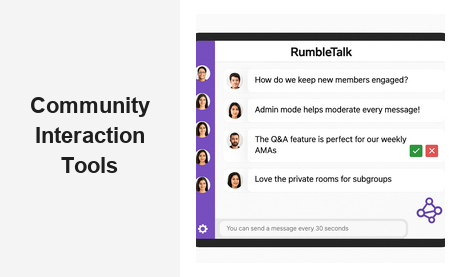
If you are building an online audience and want them to stay, choosing the right community interaction tools is one of the highest-leverage decisions you can make. Whether you manage a virtual event platform, a membership website, an e-learning hub, or a brand community, the tools you use to facilitate real-time conversation directly shape how engaged your audience becomes — and whether they return. RumbleTalk is a group chat platform built specifically to provide community interaction tools that work seamlessly within any website or live event environment, giving platform owners the control and flexibility they need to grow thriving, active audiences.
What Are Community Interaction Tools?
Community interaction tools are software features or platforms that allow groups of people to communicate, collaborate, and engage with each other in real time — typically embedded directly on a website, event page, or digital platform. They go far beyond static comment sections or traditional forums. The most effective community interaction tools combine live group chat, moderation controls, private messaging, structured Q&A, and audience participation features within a single integrated experience.
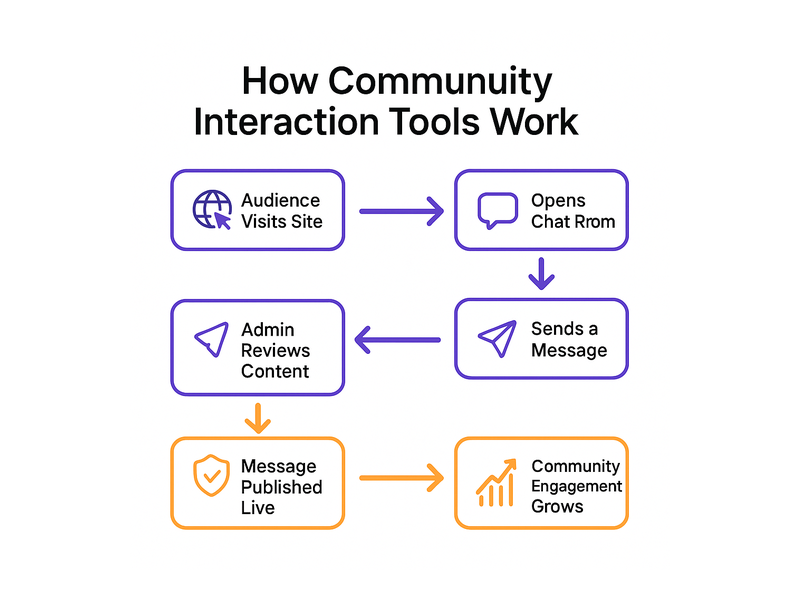
For businesses and platform owners, these tools serve one specific purpose: they transform passive visitors into active participants. A reader who can ask a question, join a live discussion, or respond to a prompt is far more likely to return to your platform than someone who simply consumes content and leaves. This shift from passive consumption to active participation is the foundation of community-building — and it starts with the right audience engagement infrastructure.
RumbleTalk offers a suite of community interaction tools designed for diverse B2B use cases: from live events and virtual conferences to membership platforms, e-learning hubs, and brand communities. Each tool embeds via a simple JavaScript snippet or WordPress plugin, making it accessible to teams without dedicated development resources. Setup takes minutes, not months.
Why Community Interaction Tools Matter for Your Business
The modern web audience has high expectations. People want to feel heard, connected, and part of something larger than themselves. Static content alone no longer drives the kind of loyalty that sustainable online communities require. Strong community interaction tools bridge the gap between content delivery and genuine human connection — and that gap has never been wider.
From a B2B perspective, this investment translates into measurable outcomes. Platforms that deploy real-time audience engagement tools consistently see higher session durations, lower bounce rates, increased return visits, and stronger conversion rates. When users feel they belong to a community, they advocate for it — they share it with colleagues, invite teammates, and convert into paying customers or long-term members.
For live event organizers, the impact is even more immediate. An online summit or webinar without live chat is a one-way broadcast. Add a social community chat layer and suddenly attendees become participants. They ask questions, react to speakers, network with peers, and experience the event as a shared moment rather than a passive viewing session. Event producers who deploy robust community interaction tools consistently report higher attendee satisfaction scores and significantly improved repeat attendance rates.
The data is clear: audience engagement drives platform loyalty. And platform loyalty drives revenue. Investing in community interaction tools is not just a product decision — it is a growth strategy.
Key Features to Look for in Community Interaction Tools
Not all community interaction tools deliver the same value. When evaluating platforms for your website or live event, here are the capabilities that matter most in B2B environments:
Real-Time Group Chat
The cornerstone of any community interaction platform is real-time group chat. This is the open forum where your audience can communicate with each other and with your team simultaneously, in the moment. Look for low-latency messaging, support for multiple concurrent chat rooms, and the ability to handle high user concurrency — especially critical for live events where hundreds or thousands of participants may be active at once.
RumbleTalk’s Group Chat supports all of these requirements natively. Administrators can create multiple rooms, customize the interface to match their brand identity, and scale seamlessly as audiences grow. Admins can broadcast announcements to all participants, pin important messages for visibility, and configure rooms to allow or restrict various types of interaction based on event context and audience profile.
Moderation and Admin Controls
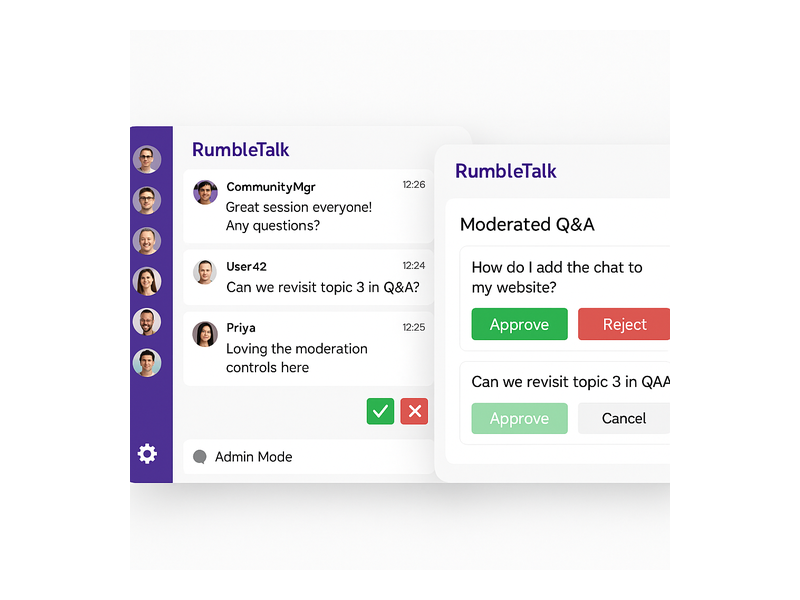
Healthy communities require active moderation. Community interaction tools must give administrators the ability to mute, ban, or remove disruptive participants without interrupting the conversation flow for everyone else. Features like pre-moderation — where messages are reviewed and approved before publishing — and automated word filters are essential for high-stakes events, educational environments, and brand communities where professional tone matters.
RumbleTalk’s admin panel provides granular moderation capabilities. Admins can activate “Admin Mode” to approve each message before it goes live, use the Moderated Q&A feature to collect and curate audience questions, or configure message cooldown timers to prevent spam. These admin chat controls are accessible from both desktop and mobile admin interfaces, giving hosts and moderators full oversight regardless of where they manage their event.
Private and Members-Only Chat
Not every conversation should be public. For membership platforms, corporate training environments, and premium communities, private chat and members-only rooms are critical components of a complete audience engagement strategy. These features ensure that your most engaged or highest-value users have a dedicated, exclusive space to connect — directly reinforcing the perceived value of their membership or subscription tier.
RumbleTalk’s Members Chat and Private Chat products address this need directly. Members Chat creates a persistent, login-gated chat room where registered users can connect over time, building relationships and ongoing dialogue beyond scheduled sessions. Private Chat enables one-on-one or small-group conversations between specific participants. Together, these tools give platform owners the flexibility to design tiered community experiences that serve different audience segments with different levels of access and intimacy.
Structured Q&A for Live Events
Live events especially benefit from structured community interaction tools that go beyond free-form chat. A moderated Q&A feature allows event hosts to collect questions from the audience, review and approve the most relevant ones, and present them to speakers in an organized sequence. This eliminates the noise of unmoderated live chat during presentations while still making attendees feel genuinely heard and actively involved in the session.
RumbleTalk’s Moderated Q&A is built for exactly this scenario. Audience members submit questions that enter an admin review queue. Approved questions are published to the broader audience in real time, and hosts can mark questions as answered as the session progresses. This structured format works exceptionally well for panel discussions, product launches, investor Q&As, educational webinars, and town halls where conversation quality matters as much as participation volume.
Queued Chat for High-Volume Interactions
When your audience is large and messages are arriving rapidly, unstructured open chat can become overwhelming for both hosts and participants. Queued Chat solves this by organizing incoming messages into a sequential review queue, allowing hosts or moderators to respond to each message in order. This is particularly valuable for customer support integrations, live shopping events, and hosted AMA sessions where every participant question deserves a thoughtful response.
The Queued Chat product ensures that no message goes unanswered and that interactions remain structured and manageable even during peak traffic moments — making it one of the most powerful community interaction tools in the RumbleTalk suite for organized, high-volume live engagement.
RumbleTalk: Community Interaction Tools Built for Scale
RumbleTalk was designed from the ground up as a community interaction platform for websites and live events. Unlike generic messaging apps or comment tools retrofitted onto content management systems, RumbleTalk’s tools are purpose-built for the specific challenges of hosting live, moderated, multi-user conversations at scale. The platform handles the infrastructure complexity so your team can focus on facilitating great conversations.
Here is what distinguishes RumbleTalk as a provider of community interaction tools for B2B platforms:
- Easy embedding: A JavaScript snippet or WordPress plugin gets your chat live in minutes — no backend development required.
- Full visual customization: Match the chat interface to your brand colors, fonts, and layout using the built-in theme editor.
- Scalable cloud infrastructure: RumbleTalk manages server load so your audience engagement tools stay fast and reliable even when thousands of users are online simultaneously.
- Multi-room support: Create multiple chat rooms for different topics, event sessions, or audience segments within a single deployment.
- SSO integration: Connect your existing user authentication system so members participate without a separate login step.
- Analytics and reporting: Track participation rates, message volume, and active user counts to measure community engagement impact over time.
For event organizers, the combination of Group Chat, Moderated Q&A, and Queued Chat means all the community interaction tools needed for every phase of an event — from pre-event networking to live Q&A to post-event discussion — are available from a single integrated platform, without stitching together multiple vendors.
Use Cases: Who Benefits from Community Interaction Tools?
Community interaction tools serve a wide range of industries and platform types. Here are the most common B2B scenarios where RumbleTalk’s engagement tools deliver measurable, lasting impact:
Live Events and Virtual Conferences
Virtual and hybrid events have become a permanent fixture in the B2B calendar. Attendees expect more than a passive viewing experience — they want to network, ask questions, and connect with speakers and peers in real time. RumbleTalk’s community interaction tools give event producers the infrastructure to deliver that experience at any scale. Live group chat keeps energy high during sessions. Moderated Q&A ensures speakers receive the most relevant audience questions. Breakout rooms let attendees network in focused smaller groups. For a related example of how live audience communities build loyalty in real time, see our post on Radio Audience Chat: Turn Listeners Into a Community — the same principles apply across every live engagement format.
Online Educators and Course Creators
E-learning platforms thrive when students feel genuinely connected — to their instructor and to each other. Community interaction tools enable live office hours, peer discussion channels, and real-time feedback loops during lessons. RumbleTalk’s Members Chat is ideal for education platforms: it creates a persistent space where enrolled students can discuss course material, share resources, and form study groups outside of scheduled sessions. Instructors benefit from granular moderation controls that keep discussions focused, constructive, and on-topic throughout the course lifecycle, without requiring constant manual oversight.
Brands and Content Creators
For brands running live product launches, influencer activations, or community-driven marketing campaigns, the ability to host structured, moderated conversations in real time is a genuine competitive advantage. Community interaction tools let marketing teams facilitate live discussions around product announcements, collect audience feedback instantly, and create participatory experiences that drive social sharing and deepen brand loyalty beyond the event itself. RumbleTalk’s Social Chat product is particularly well-suited here, enabling open, fast-paced public conversations that are still fully admin-controlled and brand-safe.
Membership Platforms and Subscription Communities
For subscription-based communities and paid membership platforms, community interaction tools are part of the core value proposition that members pay for. Subscribers join for access, expertise, and connection — and all three are delivered through live chat, private messaging, and structured group discussion. RumbleTalk integrates with membership platforms via SSO, making the transition from login to community participation seamless. Administrators can segment members into different rooms based on subscription tier, interest area, or geography to create highly relevant, high-value engagement experiences for each audience segment.

How to Embed Community Interaction Tools on Your Website
One of the most common barriers to adopting new community interaction tools is the perceived complexity of implementation. RumbleTalk is designed to eliminate that barrier entirely. Here is the basic process for going live:
- Create your RumbleTalk account: Sign up and select your plan based on expected concurrent users and the specific features your community requires.
- Configure your chat room: Choose your room type (Group Chat, Members Chat, Moderated Q&A, Queued Chat, or Social Chat), set your moderation rules, and customize the visual theme to match your brand.
- Copy the embed code: RumbleTalk generates a JavaScript snippet that you paste directly into your website’s HTML, CMS template, or event page.
- Launch and invite your audience: Your community interaction tool goes live instantly. Share the link or embed it in your registration confirmation email and begin engaging your audience in real time.
For WordPress users, the process is even simpler: install the RumbleTalk plugin, authenticate with your account, and configure your room from within the WordPress admin dashboard — no custom code required. Advanced configurations such as SSO integration or multi-room event setups may involve some developer time, but RumbleTalk’s documentation and support team guide teams through every step. Most deployments go from initial signup to a live, functioning chat room in under an hour.
Measuring the Impact of Your Community Interaction Strategy
Deploying audience engagement tools is only the first step. To continuously improve your community interaction approach, you need visibility into what is working and what is not. Key metrics to track once your community interaction tools are live include:
- Active users per session: How many visitors are sending messages versus passively observing the conversation?
- Messages per active user: Are participants engaging deeply across a session, or contributing just once and going quiet?
- Peak concurrency windows: When are your chat rooms most active during events or recurring weekly sessions?
- Moderation action rate: How frequently are messages being flagged or removed? Elevated rates may signal that moderation settings need adjustment for your audience.
- Return visit rate: Are users who participated in community chat more likely to return to your platform compared to those who did not engage?
RumbleTalk provides built-in analytics to help platform owners monitor these metrics over time. This data enables you to refine your community interaction strategy continuously — identifying the room formats, moderation configurations, and session structures that drive the highest levels of sustained, meaningful engagement from your audience.
Build Your Audience With the Right Community Interaction Tools
The platforms that earn lasting audience loyalty are those that invest in genuine, real-time connection. Community interaction tools are not optional add-ons for modern digital platforms — they are the infrastructure that makes meaningful engagement possible at scale. Whether you are running a virtual conference, an e-learning hub, a subscription community, or a live brand event, the right tools will determine how deeply your audience connects with your content and with each other.
RumbleTalk offers a complete suite of community interaction tools — Group Chat, Moderated Q&A, Members Chat, Social Chat, Private Chat, and Queued Chat — all designed to embed seamlessly into your existing website or event platform with minimal technical lift. If you are ready to transform your audience from passive viewers into an active, thriving community, visit RumbleTalk to explore the full platform and start your free trial today.