
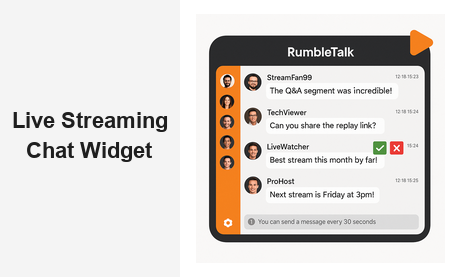
A streaming chat widget is the fastest way to turn passive viewers into an active, engaged community. Whether you are running a live webinar, a virtual conference, a fitness class, or a branded product launch, embedding a real-time chat directly alongside your stream changes the entire viewer experience. Instead of broadcasting into the void, you create a two-way conversation that keeps audiences tuned in longer, drives meaningful interaction, and delivers measurable business value for your organization.
What Is a Streaming Chat Widget?
A streaming chat widget is a lightweight, embeddable chat room that sits alongside — or overlays on top of — your live video content. Viewers can type messages, ask questions, react to moments, and talk to each other in real time, all without leaving your page. For broadcasters and platform owners, this means you own the conversation rather than pushing audiences to third-party platforms like Twitch or YouTube Live, where your brand has to compete for attention.
Unlike social media comment sections or generic chat tools, a purpose-built streaming chat widget for business gives you full control over moderation, branding, user permissions, and data. You decide who can speak, how fast messages appear, and under what rules the conversation operates. That level of control is critical when your live stream represents your brand in front of customers, prospects, or paying members.
RumbleTalk’s streaming chat widget is designed precisely for this use case — giving businesses, media companies, and event organizers an embeddable, fully managed group chat that enhances any live broadcast without requiring development resources or complex integrations.
Why Your Live Stream Needs a Streaming Chat Widget
The data is clear: live content with interactive chat generates significantly higher engagement than static video alone. Viewers who actively participate in a live chat stay on the page longer, share content more frequently, and are more likely to convert. A well-implemented streaming chat widget does far more than add a comment box — it creates a genuine sense of community that keeps your audience returning to every broadcast you produce.
For B2B companies, the stakes are even higher. A product launch webinar, an investor Q&A session, or a virtual trade show booth is not just entertainment — it is a live business touchpoint. When attendees can ask questions in real time, share reactions, and engage directly with your team, they feel heard and valued. That experience builds trust and shortens sales cycles in ways that passive video simply cannot replicate.
Here are the core reasons businesses are adding a streaming chat widget to their live video strategy:
- Audience retention: Interactive participants drop off significantly later than passive viewers, improving average watch time across your streams.
- Lead qualification: Chat questions reveal genuine buying intent and specific pain points that your sales team can follow up on after the event.
- Brand ownership: Hosting the conversation on your own domain keeps your audience engaged with your brand rather than a third-party platform.
- Community building: Regular streamers who use live chat consistently build loyal audience communities that return week after week.
- Real-time feedback: Instant audience reactions allow hosts to adjust stream content and pacing on the fly, without waiting for post-event surveys.
Key Features of an Effective Streaming Chat Widget
Not all live chat solutions are built for streaming environments. A general-purpose chat tool may work fine for customer support but will struggle under the load and fast-paced interaction patterns of a live broadcast with hundreds or thousands of simultaneous viewers. When evaluating a streaming chat widget for your platform, look for these essential capabilities before committing to a solution.
Real-Time Message Delivery at Scale
Latency kills engagement. A streaming chat widget must deliver messages in under a second across all viewer devices, regardless of geographic location. RumbleTalk uses WebSocket-based connections that ensure every message appears instantly for all participants, whether you have 10 viewers or 10,000. This low-latency architecture is a non-negotiable requirement for any live streaming context where the chat must keep pace with the video.
Robust Moderation Tools
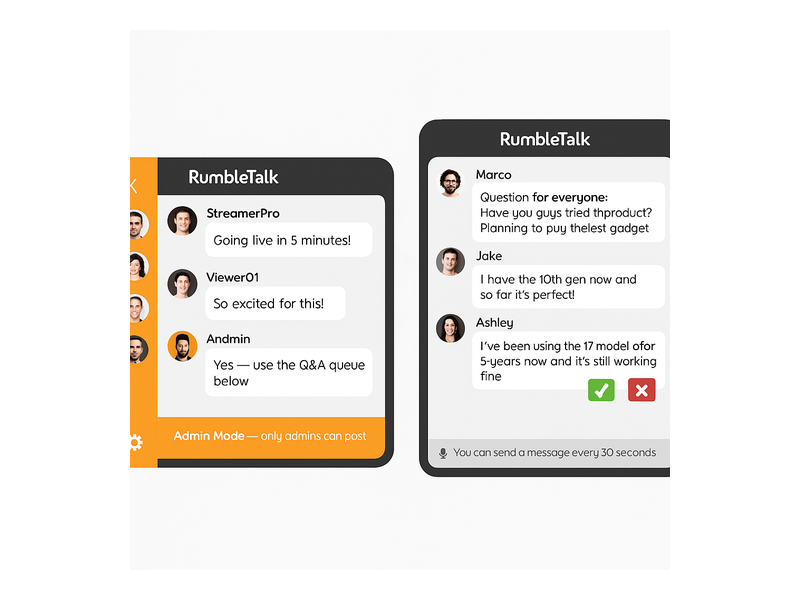
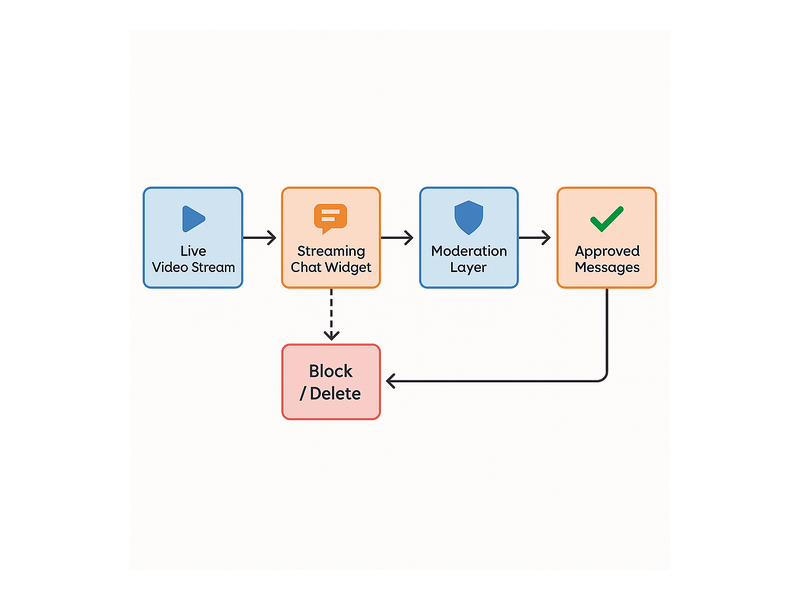
Live audiences can be unpredictable. Without robust moderation capabilities, a single bad actor can derail your entire broadcast. Look for a live chat solution that includes one-click user banning, message deletion, keyword filters, and admin mode — a broadcast-style setting where only hosts can post while viewers read. RumbleTalk’s moderation panel lets hosts approve messages before they appear publicly, mute disruptive individuals, or lock the chat entirely with a single click, all without interrupting the stream.
Configurable Message Rate Limits
During high-traffic streams, message floods can make the chat completely unreadable within seconds. A quality live chat solution lets you configure cooldown periods between posts — for example, requiring that users wait 30 seconds between messages — ensuring the conversation stays valuable and legible rather than becoming a chaotic wall of text that no viewer can follow.
Frictionless Embed Experience
Your live chat embed should take minutes to set up, not days of development work. A single JavaScript snippet or iframe that works alongside any video player — YouTube Live, Vimeo, Zoom webinar pages, or a native HTML5 player — is the standard you should expect. RumbleTalk generates a ready-to-paste embed code from its admin panel that is compatible with WordPress, Squarespace, Wix, and any custom HTML page.
Multiple Chat Modes for Different Formats
Different streaming formats call for different interaction structures. A product demo needs open group chat where anyone can participate freely. A live Q&A session needs a moderated queue where questions are submitted and approved before going public. A members-only stream needs authentication so only paying subscribers can participate. The best live chat platforms for streaming offer all of these modes under a single, unified dashboard that you can switch between mid-broadcast.
How RumbleTalk’s Streaming Chat Widget Works
RumbleTalk was built from the ground up for group communication in live, high-stakes environments. Its approach combines the simplicity of a drop-in embed with the power of enterprise-grade moderation, role-based user management, and flexible chat modes — giving you everything you need to run a professional live chat alongside any video stream from day one.
Setup in Under Five Minutes
After creating your RumbleTalk account, you create a chat room, configure your settings, and copy the embed code. The entire process takes under five minutes for a first-time user. The chat can be placed in a sidebar next to your video player, below the stream, or in a floating overlay — wherever fits your page layout best. No backend development, no API integrations, and no ongoing maintenance are required from your engineering team.
Role-Based Access and Authentication
RumbleTalk’s streaming chat widget supports multiple user roles: Admin, Host, and Guest. Admins control all room settings and configurations. Hosts can moderate messages, mute users, and switch between chat modes mid-stream without pausing the broadcast. Guests participate within the limits you set. For gated content, you can require users to log in or enter a verified nickname before accessing the chat, preventing anonymous spam while keeping the entry barrier low for legitimate viewers.
Queued Chat for Structured Q&A
One of RumbleTalk’s standout features for streaming contexts is Queued Chat — a format where audience questions are submitted to a private queue and approved by a host before appearing publicly in the chat feed. This is ideal for expert panels, executive Q&A sessions, investor calls, and any broadcast where you need to filter questions before they reach the presenter. Instead of drowning in a fast-moving flood of messages, the host works through a calm, ordered queue of relevant, approved questions at their own pace.
Broadcast Mode for Announcements and Presentations
For presentations and important announcements, you can enable broadcast mode directly from the chat interface. In this state, only the admin or host can post messages, while all other participants are in read-only mode. This is perfect for opening segments, closing announcements, or delivering sensitive information without the noise of audience comments — and you can toggle in and out of this mode live without interrupting the video feed at all.
Post-Stream Analytics and Chat Logs
After every broadcast, RumbleTalk provides a complete, downloadable chat log from your streaming session. This transcript is a valuable asset for B2B teams: it reveals exactly what questions your audience asked, what objections came up organically, and which topics generated the most conversation — intelligence you can feed directly into your content marketing, product roadmap, and sales enablement workflows.
Use Cases: Who Benefits from a Streaming Chat Widget?
The range of organizations successfully deploying a streaming chat widget is broader than most people expect. Here are the most impactful real-world applications across industries and event formats that are already driving results today.
Webinar and Online Event Platforms
SaaS companies, consultancies, and professional training providers who run regular webinars rely on embedded live chat to maintain engagement throughout the session. Instead of a presenter speaking for 45 minutes with no feedback loop, the audience actively participates — asking questions, reacting to demos, and connecting with peers. RumbleTalk’s embed works alongside all major webinar video players, making it easy to add a professional streaming chat widget without replacing your existing video infrastructure or disrupting your current workflow.
Media Companies and Live Broadcasters
News outlets, sports networks, radio stations, and podcast networks embed a streaming chat widget to give their digital audience a dedicated place to react in real time. Rather than losing the conversation to Twitter or Facebook, they host it on their own domain — growing their registered user base and first-party data with every broadcast. The live media vertical is one of RumbleTalk’s most established use cases, with broadcasters using the platform for live listener Q&A, audience polls, and shoutout queues during active shows.
Online Education and E-Learning Platforms
Live online classes and instructor-led training sessions benefit enormously from a dedicated live chat window. Students can ask questions without interrupting the instructor, peers can share additional context and resources, and teaching assistants can field common queries in a parallel thread — all simultaneously. The result is a richer learning experience that closely approaches the collaborative feel of a physical classroom. Platforms using RumbleTalk consistently report higher session completion rates and stronger learner satisfaction scores compared to video-only delivery.
Corporate Training and Internal Broadcasts
Internal company broadcasts — all-hands meetings, executive town halls, and leadership training sessions — need a chat channel that is private, authenticated, and professionally moderated. RumbleTalk’s streaming chat widget can be configured for verified employees only, ensuring every participant is confirmed before they can post, while still allowing open discussion, live Q&A, and real-time audience feedback for leadership to act on immediately after the broadcast ends.
Live Commerce and Product Launch Events
Live shopping events and product launch streams have grown rapidly as a direct engagement channel for both B2B and consumer brands. A real-time chat window transforms these events from one-way product showcases into interactive buying experiences. Hosts can answer questions about product specifications and pricing in real time, highlight compelling viewer comments on screen, and drive purchase decisions through authentic, visible social proof — all while the stream is actively broadcasting and viewers are primed to act.

Setting Up Your Streaming Chat Widget: Step by Step
Getting RumbleTalk’s streaming chat widget live alongside your video broadcast takes just a few straightforward steps. Here is the quick-start process that most website owners and platform teams complete in a single afternoon.
- Create your chat room: Sign up at RumbleTalk and create a Group Chat or Queued Chat room depending on your moderation requirements and stream format.
- Configure your settings: Set the message cooldown period, keyword filters, login requirements, and admin account credentials from the intuitive admin panel — no technical knowledge required.
- Style the widget: Choose a color theme that matches your brand identity, or upload a custom background image. The chat widget’s visual appearance is fully customizable through the admin panel with no CSS or developer involvement needed.
- Copy the embed code: RumbleTalk provides a JavaScript snippet or iframe you paste directly into your streaming page. Position it in a sidebar next to the video, below the player, or in a separate tab — wherever your audience will find it most natural.
- Go live and moderate: Start your stream. Your audience joins the chat immediately, and you or your moderation team manage the conversation from the admin panel in real time throughout the entire broadcast.
For a detailed walkthrough of every configuration option, the RumbleTalk getting-started knowledge base guide covers everything from login settings and word filters to embed customization and user role permissions.
Why RumbleTalk Outperforms Generic Chat Tools for Streaming
There are dozens of chat tools available, but most are not engineered for the streaming use case. Generic customer support chats are designed for one-to-one conversations. Social media comment sections are unmoderated and off-brand. Building a custom WebSocket implementation in-house requires significant engineering resources and ongoing maintenance that most teams cannot sustain. RumbleTalk sits in the ideal middle ground: a purpose-built, fully hosted chat platform for live streaming that requires zero development work and delivers enterprise-level control from your very first broadcast.
Compared to other embeddable chat platforms, RumbleTalk stands out for the depth of its moderation tools, the flexibility of its multi-mode chat architecture, and the quality of its white-label customization options. You get a fully branded, embeddable live chat experience that lives on your own domain, under your own rules, with your own data — not a rented conversation hosted on someone else’s platform where you have no control over what happens next.
For growing media brands and B2B event platforms, the return on investment is direct and measurable: higher audience engagement per stream, more qualified leads surfaced through chat interactions, and a reusable infrastructure that scales seamlessly from a 50-viewer product demo to a 10,000-person virtual summit without changing a single line of code or upgrading your plan mid-event.
To see how live broadcasters are already using this approach to drive real audience engagement, explore how radio show hosts use RumbleTalk to engage their live audiences in real time and apply the same proven strategy to your own streaming events and broadcasts.
Conclusion: Make Every Stream a Two-Way Conversation
The era of passive live video is over. Today’s audiences expect to be part of the broadcast — to ask questions, share reactions, and connect with fellow viewers in real time. A streaming chat widget is no longer optional for serious live content producers — it is the difference between a forgettable broadcast and a memorable live experience that builds genuine community and drives tangible business outcomes session after session.
RumbleTalk’s streaming chat widget gives you everything you need in a single, easy-to-embed solution: real-time group chat, moderated Q&A queues, role-based access control, broadcast mode for announcements, and a seamless embed that works with any video player on any website. Setup takes minutes, and the engagement results compound with every stream you run.
Ready to add a professional streaming chat widget to your next live event, webinar, or broadcast? Visit RumbleTalk to start your free trial and see the difference that real-time audience chat makes from your very first session.