
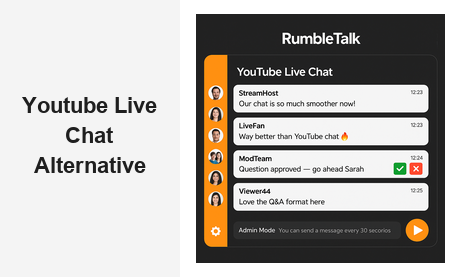
If you are searching for a YouTube live chat alternative that gives your organization real control over audience interaction, you are in the right place. YouTube’s built-in live chat was designed for content creators streaming to mass audiences — and it shows. For businesses hosting webinars, virtual conferences, live Q&A sessions, or community-driven broadcasts, its limitations become deal-breakers quickly. RumbleTalk is a group chat platform built specifically for websites and live events, and it has become the preferred YouTube live chat alternative for organizations that need a professional, embeddable, and fully controlled chat experience.
Why Businesses Are Moving Away from YouTube’s Built-In Live Chat
YouTube live chat has three core problems that matter most to business users: weak moderation, no branding control, and platform dependency.
Weak moderation. YouTube’s moderation tools are limited to banning users and deleting messages after they appear. You cannot queue incoming questions, require message approval before posts go public, or set per-user cooldown timers to slow a fast-moving conversation. For a product launch, expert panel, or investor webinar, that gap is serious. One disruptive user can derail the experience for hundreds of attendees before any moderator can respond.
No branding control. When your audience uses YouTube’s live chat, they interact with YouTube’s interface — not yours. Your logo, your color palette, your design language are absent. For organizations that have invested in building a consistent brand experience, that is a meaningful cost to bear at every live event.
Platform dependency. When your chat lives on YouTube, you are subject to YouTube’s policies, YouTube’s uptime, and YouTube’s algorithm. A policy change or account issue can disrupt your event without warning. Owning your chat infrastructure means owning your relationship with your audience — something a YouTube live chat alternative built on your domain makes possible.
These three problems explain why so many organizations are actively looking for a YouTube live chat alternative they can embed on their own website, moderate with precision, and style to match their brand identity.
What to Look for in a YouTube Live Chat Alternative
Not every live chat tool qualifies as a true YouTube live chat alternative for business use. When evaluating your options, look for a platform that delivers on these six criteria:
- Embeddability — The chat must run directly on your website. Your audience should never have to leave your domain to participate in the conversation.
- Advanced moderation — Look for message approval workflows, word filters, per-user muting, cooldown timers, and role-based admin controls.
- Engagement features — Live polls, Q&A queues, file sharing, and private messaging all add value that basic chat cannot provide.
- Scalability — The platform must handle simultaneous connections ranging from dozens to tens of thousands without performance degradation.
- Custom branding — Colors, fonts, logos, and layout should all be configurable to match your website and event design.
- Access control — SSO integration, registration-gated rooms, and role-based permissions are essential for professional and members-only events.
RumbleTalk was built with every one of these requirements in mind, which is why it has become the YouTube live chat alternative of choice for media companies, virtual event platforms, e-learning providers, and B2B software brands.
How RumbleTalk Works as a YouTube Live Chat Alternative
RumbleTalk is an embeddable group chat platform that you deploy directly on your own website. Rather than sending your audience to YouTube’s chat interface, you keep them on your domain — inside a fully branded, fully controlled chat environment that reflects your organization’s standards and voice.
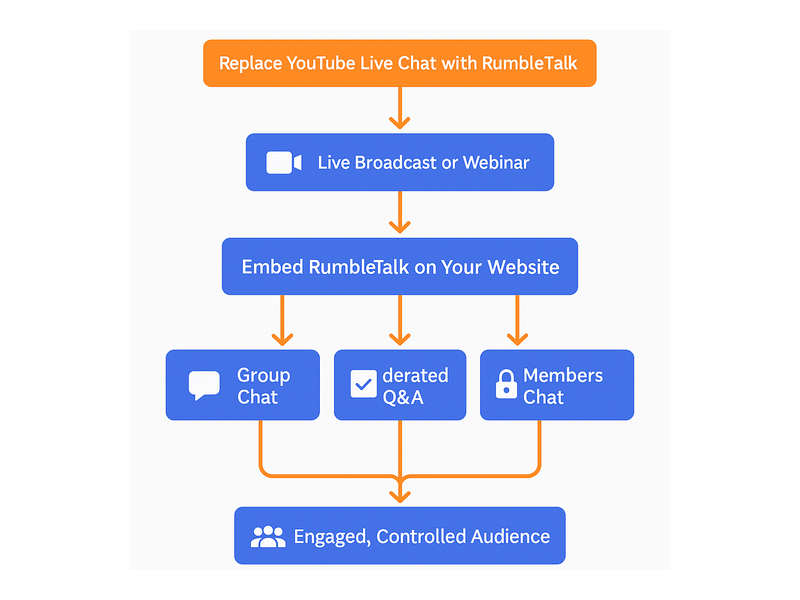
As a YouTube live chat alternative, RumbleTalk offers six distinct chat types, each suited to a different audience interaction model:
- Group Chat — An open, real-time group room ideal for live broadcasts, virtual events, and community discussions where broad participation is welcome.
- Moderated Q&A — A structured format where audience members submit questions and admins approve or reject each one before it appears publicly. Perfect for panels, webinars, and expert sessions where conversation quality matters.
- Members Chat — A registration-gated room accessible only to verified members. Ideal for paid communities and subscription-based platforms where access must be earned or purchased.
- Social Chat — A social-login-enabled room that reduces friction for first-time visitors while maintaining order and identity transparency.
- Queued Chat — Messages are delivered one at a time in a controlled sequence, giving hosts the ability to manage the pace of conversation during high-volume events without chaos.
- Private Chat — Enables direct, one-on-one messaging between users, adding a personal connection layer to your platform or event experience.
This range of chat types means RumbleTalk can serve as your YouTube live chat alternative across many different event formats — from free public broadcasts to gated paid experiences — all running on your own domain under your own brand.
Moderation Tools That Put You in Command
YouTube’s live chat moderation is reactive by design. Comments appear the moment they are posted, and by the time a moderator catches an inappropriate message, hundreds of people may have already seen it. For businesses running professional events, that exposure is unacceptable.
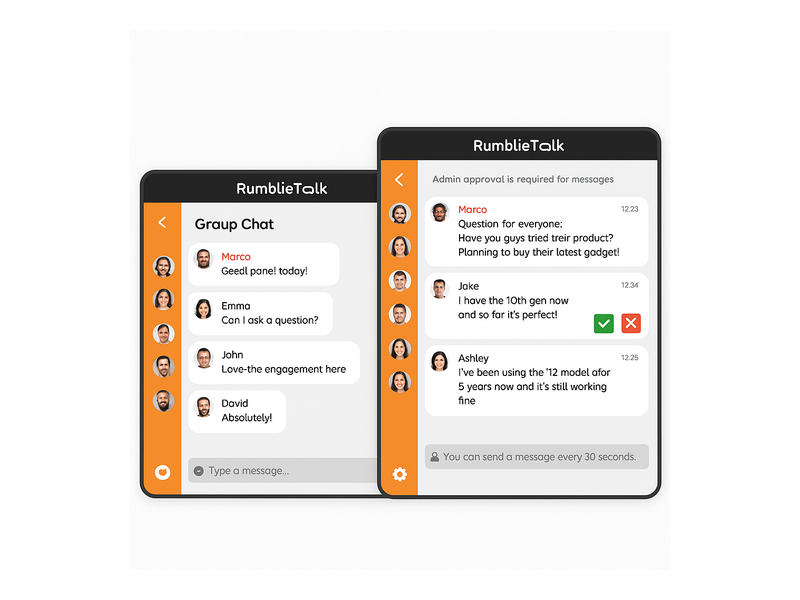
RumbleTalk takes a proactive approach. The Admin Mode feature gives chat administrators full, real-time control over every message in the room. You can switch the entire chat to an approval-only mode — meaning no message goes public until a moderator reviews it. A green checkmark approves the message; a red X rejects it. The workflow is fast, intuitive, and built to handle high-volume moderation without slowing down your event.
Beyond message approval, RumbleTalk admins can mute individual users or ban them permanently from the room, set message cooldown timers so users can only post once every 30 seconds to prevent flooding, apply word and phrase filters to automatically block inappropriate content, restrict who can post images or share links, and assign moderator roles to trusted team members so the moderation workload is distributed across your staff.
This level of control simply does not exist in YouTube’s live chat. For any organization serious about its brand reputation and audience experience, these tools are not optional — they are foundational.
Embedding RumbleTalk Alongside Your Live Stream
Switching to a YouTube live chat alternative sounds technically complex, but the reality is straightforward. RumbleTalk provides a JavaScript embed snippet that you paste into any webpage. Within minutes, a fully functional chat room appears on your site — no server configuration, no plugin required for most platforms, no technical expertise needed beyond basic HTML access.
The chat room is fully responsive, adjusting automatically to desktop, tablet, and mobile screens. Users join directly from their browser. No app download is required, and account creation is optional — you decide the access model based on your event’s needs.
A popular approach for organizations already using YouTube for video delivery is the hybrid setup: embed the YouTube video player and the RumbleTalk chat window on the same event page. Your attendees watch the stream through YouTube’s video infrastructure — which handles delivery well — while all audience interaction happens through RumbleTalk. This hybrid model gives you the best of both platforms and is one of the fastest ways to upgrade to a better YouTube live chat alternative without rebuilding your entire streaming setup.
Audience Engagement Features Beyond Basic Chat
When you switch to RumbleTalk as your YouTube live chat alternative, you are not just getting a better version of what YouTube offers — you are gaining capabilities that YouTube’s live chat does not support at all.
Live polls let you gauge audience opinion in real time. Pose a question, display the results instantly in the chat, and use the data to steer your presentation or discussion dynamically.
Structured Q&A sessions let hosts surface the best audience questions from a moderated queue. Instead of a scrolling wall of comments, speakers receive a curated list of the most relevant, approved questions in sequence.
Audience segmentation allows event organizers to create multiple simultaneous chat rooms — one for VIP attendees, one for general participants, one for speakers and sponsors — each with its own access rules, moderation settings, and branding.
Chat session logs give you a complete record of every conversation after the event ends. Review questions that were asked but not answered, identify trending topics, and use the data to improve future events and content strategy.
These features turn your live event from a one-way broadcast into a genuine two-way experience. That transformation is the core value a professional YouTube live chat alternative delivers — and it is something YouTube’s native tools were never designed to provide at a business level.
Real-World Use Cases: Who Needs a YouTube Live Chat Alternative
The answer covers a wide range of organizations. Here are the most common use cases where RumbleTalk consistently outperforms YouTube’s built-in live chat:
Media Companies and Broadcasters
Television networks, podcast studios, and radio broadcasters that stream live programming online need a chat tool that production teams can control in real time. RumbleTalk’s moderated formats — including its purpose-built solution for broadcast and podcast chat — give producers the ability to engage audiences without losing control of the conversation on air. For a real-world look at how live broadcasters are applying these tools, see our guide to Radio Show Chat: Engage Your Live Audience in Real Time.
Virtual Event Organizers
Conference planners, webinar hosts, and trade show producers need a chat that scales to thousands of simultaneous connections, supports structured speaker-to-audience interaction, and can be themed to match their event brand. YouTube’s live chat fails on all three fronts. RumbleTalk handles all three as core platform capabilities, making it the natural YouTube live chat alternative for large-scale virtual events.
E-Learning Platforms
Online educators running live classes need structured, distraction-free interaction. An open, unmoderated chat environment undermines the learning experience and creates liability for educators. RumbleTalk’s Moderated Q&A and Members Chat formats create the focused, orderly interaction that educational contexts require — and that YouTube’s live chat cannot deliver.
Membership Communities and Subscription Platforms
Subscription-based platforms and paid communities need a chat that is gated — accessible only to paying or verified members. YouTube’s live chat is open to anyone with a Google account. RumbleTalk’s access controls and SSO integration let you limit participation precisely to the subscribers who have earned entry, protecting the value of your community.
B2B SaaS and Enterprise Teams
Product launches, investor briefings, and customer onboarding webinars all require a professional, controlled environment. A single unmoderated comment from an external user during a high-stakes business event can undermine weeks of preparation. RumbleTalk gives your team the admin tools to prevent that from happening — making it the obvious YouTube live chat alternative for enterprise-grade live experiences.

Security and Access Control Built for Professional Events
YouTube’s live chat is open by default — accessible to anyone with a Google account. For many business contexts, that openness is a significant security and reputational risk that cannot be managed after the fact.
RumbleTalk gives you granular access control from the start. You can require registration before any user enters a chat room, integrate with your existing authentication system via SSO so only verified users from your platform can participate, and assign role-based permissions that clearly separate admin capabilities from standard user capabilities.
Data privacy is an equally important consideration. When your audience interacts via YouTube’s live chat, their behavioral data passes through YouTube’s systems and may be leveraged for advertising purposes. With RumbleTalk embedded on your domain, interaction data remains within your control and is not exposed to third-party advertising algorithms. For organizations in regulated industries — healthcare, finance, legal, education — this distinction has compliance implications that make RumbleTalk the responsible choice as a live chat solution.
Why RumbleTalk Is the Right YouTube Live Chat Alternative for Your Business
To summarize: RumbleTalk gives you everything that YouTube’s live chat does not. Full moderation control. Custom branding. Embeddable directly on your domain. Scalable to any audience size. Multiple chat formats for different event types — Group Chat, Moderated Q&A, Members Chat, Social Chat, Queued Chat, and Private Chat. Advanced access controls for gated experiences. And audience engagement features — polls, Q&A queues, segmented rooms, and chat logs — that YouTube simply does not offer.
Whether you are hosting a weekly webinar, producing a live broadcast, running a paid membership community, or launching a product to thousands of simultaneous viewers, RumbleTalk is the YouTube live chat alternative that matches the professional standards your brand demands. It is not a workaround built on top of YouTube’s limitations — it is a purpose-built platform designed for exactly the kind of controlled, branded, scalable audience engagement that modern businesses need from their live events.
The hybrid approach is available if you need it: run RumbleTalk alongside your YouTube stream and get the control you need without changing your video infrastructure. Or go all-in with a fully owned chat and streaming stack on your own domain. Either way, RumbleTalk gives you the foundation to build live experiences that reflect your brand, respect your audience, and grow with your business.
Ready to move beyond the limitations of YouTube’s built-in chat? Explore RumbleTalk today and discover how a dedicated group chat platform can transform the way your audience connects with your live events, your brand, and each other.