
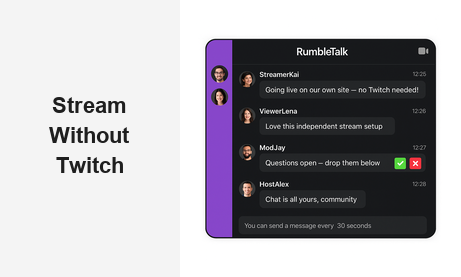
If you want to stream without Twitch, you are not alone. A growing wave of creators, broadcasters, and businesses is moving away from big platforms to host live streams directly on their own websites — keeping full control of their community, their content, and their revenue. But independent streaming comes with one critical challenge: audience engagement. Without a real-time chat layer, your viewers have nowhere to interact, ask questions, or feel like part of the broadcast. That is exactly the problem RumbleTalk solves.
RumbleTalk is a group chat platform purpose-built for live events and streaming websites. Whether you run a podcast, a financial newsletter, a radio show, or a corporate training session, RumbleTalk gives you a fully embeddable, moderatable chat widget that works on any website — no Twitch account required.
Why More Creators Choose to Stream Without Twitch
Twitch built its empire on gaming, but its reach has expanded to IRL streams, podcasts, music, and business content. Despite its scale, many serious creators find the platform limiting in ways that matter for professional use cases.
When you stream without Twitch, you immediately gain:
- Audience ownership — Your viewers come to your domain, not Twitch’s. You control the email list, the registration data, and the long-term relationship.
- Brand consistency — No distracting sidebars, competitor ads, or platform notifications pulling viewers away from your content.
- Revenue flexibility — Keep 100% of subscription or ticket revenue. No platform cut, no partner program requirements, no revenue share.
- Moderation authority — On Twitch, community standards are set by the platform. On your own site, you define the rules and enforce them on your terms.
- Algorithm independence — Your stream’s visibility is not at the mercy of a recommendation engine you cannot influence or predict.
These advantages are especially compelling for B2B broadcasters — companies running corporate events, training sessions, investor calls, or product launches. If your audience is professionals rather than casual gamers, broadcasting on your own terms makes far more sense than competing for algorithmic attention on a platform designed for entertainment.
What You Need to Stream Without Twitch
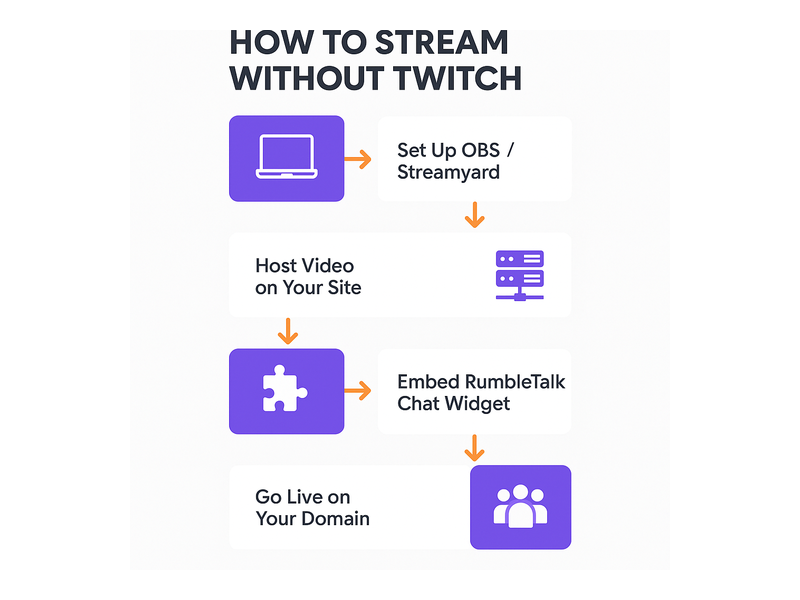
Building a self-hosted live stream does not require a large technical team. The core stack is straightforward, and most of the components are available off the shelf:
- Streaming software — OBS Studio, Streamyard, or Restream to capture and broadcast your video and audio feed.
- Video delivery — A hosting service such as Cloudflare Stream, Mux, or Wowza to transcode and deliver the video to viewers at scale.
- Your website or landing page — The destination where viewers watch the stream, with the video player embedded via iframe or a native player component.
- Live chat — A real-time communication layer so your audience can interact with you and each other during the broadcast.
The first three pieces are widely available and well-documented. The fourth — live chat — is where many independent streamers fall short. Embedding a Twitch chat widget on your own site still ties you to Twitch’s ecosystem. Building a custom chat system from scratch is expensive and time-consuming. RumbleTalk solves this cleanly with a purpose-built chat widget you can embed on any page in minutes.
RumbleTalk: The Chat Layer for Independent Streamers
RumbleTalk offers several chat formats suited to different streaming use cases. When you decide to stream without Twitch, pairing your video player with RumbleTalk gives your audience the interactivity they expect from a polished live event — all under your brand and your control.
Group Chat for High-Energy Live Broadcasts
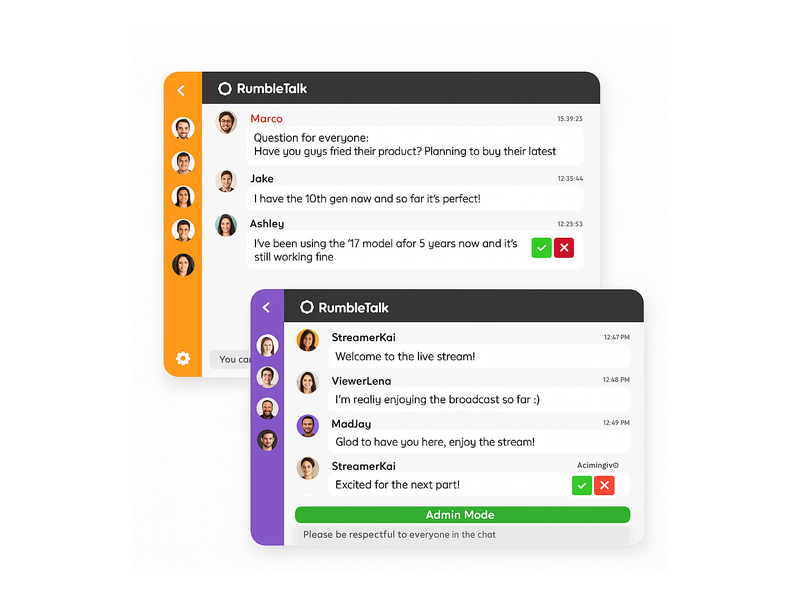
Group Chat is RumbleTalk’s core product — a moderated, multi-user chat room that scales to thousands of concurrent viewers. It includes message cooldown timers, avatar images, emoji reactions, file sharing, and real-time admin controls. During a live stream, a moderator can mute, ban, or highlight messages without interrupting the broadcast. This makes streaming without Twitch feel just as interactive as any major platform — but under your brand and your rules.
Moderated Q&A for Professional Broadcasts
For business-focused streams — investor briefings, product demos, educational webinars — the Moderated Q&A format gives presenters full control over what the audience sees. Viewers submit questions, and a moderator approves them before they appear on screen. This prevents off-topic or inappropriate submissions from derailing a professional presentation. It is an essential feature for anyone serious about independent live streaming in a corporate or regulated context.
Members Chat for Premium Subscriber Communities
If you monetize your stream through subscriptions or paid memberships, Members Chat restricts participation to authenticated users only. Integrate with your existing login system via SSO, and only verified members or registered attendees can join the conversation. This exclusivity is a major draw for premium content communities that have moved beyond relying on Twitch’s native subscriber system.
Queued Chat for Expert-Led Sessions
Queued Chat lets viewers submit questions that are held in a managed queue until the host is ready to respond one at a time. This is ideal for live expert panels, financial commentary sessions, health and wellness Q&As, or any format where interactions need to be paced and curated rather than free-flowing.
How to Stream Without Twitch Using RumbleTalk — Step by Step
Setting up RumbleTalk alongside your independent video stream takes less time than most people expect. Here is how it works in practice:
- Create a RumbleTalk account — Sign up and select your chat type based on your streaming format (Group Chat for open broadcasts, Moderated Q&A for professional events, Members Chat for gated communities).
- Customize the widget — Set brand colors, enable or disable features like file sharing and emoji, configure the message cooldown timer, and establish moderation policies before going live.
- Embed the widget — Copy the embed code snippet and paste it into your website’s HTML alongside your video player. The widget is fully responsive and integrates into any layout without custom development.
- Go live — Start your stream using OBS or your preferred broadcasting software. Viewers land on your site, watch the video, and engage in real time through the RumbleTalk chat widget on the same page.
- Moderate live — Use the RumbleTalk admin panel during the broadcast to manage messages, promote trusted users to moderator roles, enable Admin Mode to lock down the room during sensitive moments, and keep the conversation on topic throughout.
This workflow is used today by radio stations, online educators, financial analysts, and event organizers who want the engagement quality of a major streaming platform without depending on Twitch or any third-party ecosystem. The Broadcast & Podcast solution from RumbleTalk is purpose-built for exactly this kind of independent streaming setup.
Key Features That Make Independent Streaming Viable
When you stream without Twitch, you give up some of the platform’s built-in community tooling — but you gain the ability to replace it with professional-grade alternatives tailored to your specific audience. RumbleTalk provides features that most platform-native chat tools simply do not offer:
Real-Time Moderation Controls
Admins can ban, mute, or shadow-ban any user in a single click. The Admin Mode feature lets moderators lock the chat so only pre-approved users can post — invaluable during high-stakes presentations or events where message quality is non-negotiable. For anyone who has dealt with Twitch chat spam during a popular broadcast, Admin Mode changes everything.
Slow Mode and Cooldown Timers
Configure a cooldown interval between messages — for example, one message every 30 seconds — to prevent spam and give moderators time to read and respond. This is especially critical for large events where hundreds or thousands of concurrent viewers are actively chatting.
Private Chat for Networked Conversations
Viewers can initiate private one-on-one conversations within the chat widget. For streams where audience members want to connect with each other or ask sensitive questions outside the public feed, Private Chat adds a dimension of interaction that public group rooms cannot replicate.
Custom Branding Throughout
Every visual element of the chat widget — colors, fonts, widget name, logo placement — can be customized to match your brand. When you stream on your own domain, your chat should look like your product, not a third-party tool. RumbleTalk’s customization options let it disappear as a vendor while delivering enterprise-grade functionality beneath the surface.
Who Should Stream Without Twitch?
Independent streaming is not just for disenchanted gamers looking for an alternative. A broad range of professional communities and business verticals are choosing to stream without Twitch for very deliberate strategic reasons:
Radio Stations and Podcast Networks
Radio hosts who stream their shows online want a chat environment that is professional and on-brand. A Twitch channel does not align with the audience expectations most radio stations cultivate. Embedding RumbleTalk directly on the station’s website gives listeners a live chat experience tied to the show’s identity. You can see this use case explored in depth in our post on Radio Show Chat: Engage Your Live Audience in Real Time.
Online Educators and E-Learning Platforms
Educational content creators running live classes or tutoring sessions need an orderly, focused chat environment. Twitch’s gaming culture does not translate well to a virtual classroom. RumbleTalk’s Moderated Q&A and Group Chat formats create a professional learning environment that both students and instructors trust — especially when integrated with existing LMS authentication.
Financial and Trading Content Creators
Traders, analysts, and financial educators streaming live market commentary need a compliant, controlled communication channel. Regulatory considerations often prevent financial firms from using unmoderated public platforms. When you stream without Twitch and route your audience through RumbleTalk instead, your communications stay within a controlled, auditable environment that your compliance team can actually approve.
Corporate Events and Virtual Conferences
Companies running virtual all-hands meetings, product launches, or partner summits cannot afford the informal atmosphere of a Twitch stream. RumbleTalk’s professional chat tools — moderation, Q&A queuing, role-based access, SSO integration — make it the right infrastructure for business events at any scale, from a 50-person internal briefing to a 10,000-person public conference.
Faith Communities and Nonprofits
Houses of worship and nonprofits that stream services, fundraising events, or community meetings want a respectful, inclusive experience. Independent streaming on their own website, with a moderated RumbleTalk chat room, keeps the focus on the mission and the community — not a gaming platform’s visual identity.
Stream Without Twitch and Own Your Community Data
One of the most underrated benefits of choosing to stream without Twitch is data ownership. On Twitch, every piece of viewer data belongs to Amazon. You can see aggregate view counts and clip metrics, but you do not know who your viewers are, where they came from, or how to reach them outside of Twitch’s ecosystem.
When you stream independently and host your chat through RumbleTalk on your own domain, the registration and authentication data stays under your control. Combined with your email list, analytics platform, and CRM, every live broadcast becomes a data-rich touchpoint that compounds your audience relationship over time. Every viewer who creates a RumbleTalk account on your site is a named contact you can re-engage for the next event.
This data ownership is especially valuable for B2B brands. Every person who registers for your Members Chat or submits a question via Moderated Q&A is a demonstrably engaged lead — someone who has invested attention in your content. That is audience intelligence you simply cannot extract from a Twitch channel or a YouTube live comment section.
For technical guidance on configuring authenticated chat rooms and connecting RumbleTalk to your user database, visit the RumbleTalk Knowledge Base for step-by-step setup documentation and integration examples.
Build a Loyal Streaming Community on Your Own Terms
The long-term strategic benefit of deciding to stream without Twitch is not just about avoiding platform fees or algorithm anxiety — it is about compounding brand equity that belongs to you. Every stream you run on your own site reinforces your domain, your brand name, and your direct relationship with your audience. Viewers bookmark your URL, not a Twitch channel. Your content lives in your archive, under your control, not in a library that a platform could demonetize, restrict, or shut down without warning.
RumbleTalk accelerates this community-building process by making your live chat as engaging and interactive as anything the major platforms offer — while keeping you in complete control of the experience. Features like emoji reactions, avatar display, threading, file sharing, and real-time admin tools keep audiences active and entertained throughout a broadcast. The admin panel gives you the power to enforce community standards without relying on a platform’s (often slow and inconsistent) enforcement policies.
When you pair a reliable video stream with a professional RumbleTalk chat widget, your independent broadcast feels like a premium product — because it is. That perception keeps viewers coming back, converts casual watchers into committed community members, and gives sponsors or advertisers a compelling reason to pay a premium for access to a known, verified audience.
Start Streaming on Your Own Terms Today
Making the decision to stream without Twitch is the first step. The second is equipping your stream with the tools to make it genuinely engaging. RumbleTalk handles the real-time chat layer so you can focus entirely on your content and your audience.
Whether you are launching your first independent broadcast or migrating an existing audience away from a platform you have outgrown, RumbleTalk scales with your needs — from a small members-only community to a public broadcast serving thousands of concurrent viewers. As your stream grows, the moderation tools, concurrency capacity, and integration options grow with you.
Ready to go live on your own terms? Visit RumbleTalk to explore chat plans, watch live demos, and start building the streaming experience your audience deserves — with no platform in between.