
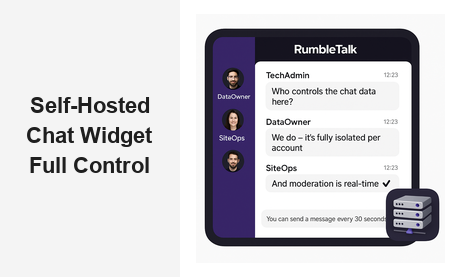
If your business is evaluating a self-hosted chat widget for your website or platform, you already understand that control matters. Whether you run a membership community, a live trading room, a corporate training portal, or a virtual events platform, the way your chat is hosted directly affects your data privacy, uptime reliability, and the quality of experience your users receive. A self-hosted chat widget is not just a technical preference — it is a strategic business decision with real implications for compliance, brand trust, and audience retention.
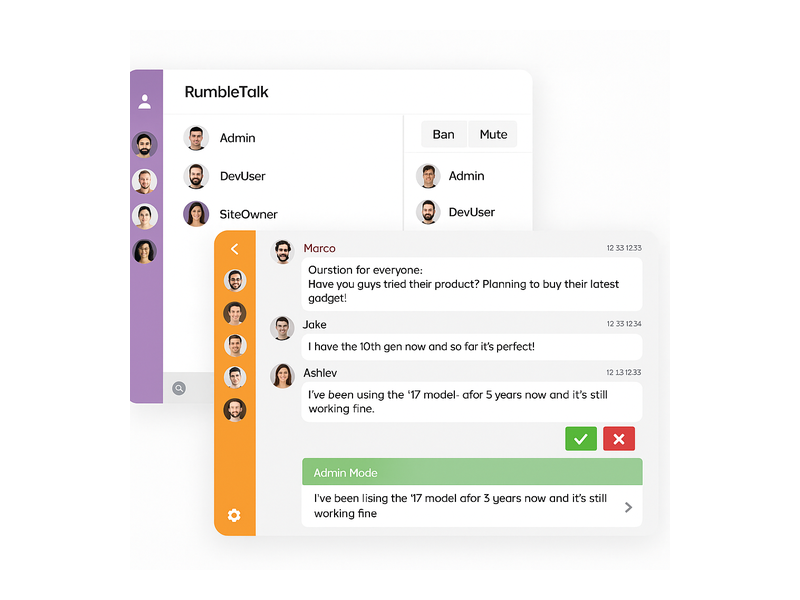
RumbleTalk offers businesses a powerful group chat platform that functions like a true self-hosted solution: you control the configuration, the moderation rules, the branding, and the user experience — without the overhead of managing your own servers. In this guide, we break down everything you need to know about implementing a self-hosted chat widget and how RumbleTalk delivers the best of both worlds for B2B operators.
What Is a Self-Hosted Chat Widget?
A self-hosted chat widget is a chat tool that runs on infrastructure you own or manage, rather than relying on a shared third-party cloud. Traditionally, this meant installing open-source chat software on your own server and handling updates, backups, security patches, and scaling yourself. The appeal is obvious: full ownership of conversation data, complete control over how the chat behaves, and no dependency on a vendor’s uptime or pricing decisions.
However, the definition of “self-hosted” has evolved considerably. Modern platforms like RumbleTalk offer what is often called a dedicated hosted or privately configured chat solution — where each client’s chat environment is isolated, fully configurable, and branded entirely as their own. For most B2B buyers, this delivers the same practical outcomes as a true self-hosted chat widget without the infrastructure headaches of running your own server.
The key questions to ask when evaluating any self-hosted chat option:
- Who owns the conversation data, and where is it stored?
- Can you customize the chat UI to match your brand completely?
- Do you have full admin control over users, roles, and moderation?
- Does it scale reliably during peak live events?
- Is the embed process simple enough for your development team?
Why Businesses Choose a Self-Hosted Chat Widget
The push toward self-hosted or privately controlled chat solutions is accelerating across industries. Here are the most common drivers B2B organizations cite when making the switch.
Data Privacy and Regulatory Compliance
If you operate in a regulated industry — financial services, healthcare, education, or enterprise SaaS — the question of where your chat data lives is not optional. A self-hosted chat widget ensures that user conversations, login identifiers, and behavioral data stay within an infrastructure environment you control or can audit. This is increasingly critical for GDPR compliance in Europe, HIPAA considerations in healthcare platforms, and SOC 2 requirements for enterprise vendors.
With RumbleTalk, conversation data and user registration information are stored in a secured, isolated environment per account. You are not sharing infrastructure with thousands of other chat rooms on a pooled database — your data stays segregated, which is the practical equivalent of a self-hosted setup from a compliance standpoint.
Complete Brand Control
Third-party chat tools frequently impose their own branding — logos, “Powered by” badges, color schemes that clash with your design system. A self-hosted chat widget or white-label solution removes all of that. Your chat looks like a native part of your product, not a bolted-on plugin from a vendor your users have never heard of.
RumbleTalk’s Members Chat is fully white-labeled, offering custom colors, fonts, avatar styles, header text, and room names — so your community experiences a seamless, branded chat environment from the moment they log in. No RumbleTalk badge. No third-party footprint. Just your product.
Moderation at Scale
Public chat rooms without proper moderation become unusable within minutes. Spam, off-topic messages, and disruptive users can derail a live event, damage a community’s culture, or expose your brand to reputational risk. A self-hosted or fully controlled chat widget gives administrators the tools to act in real time: mute users, remove messages, enable admin-only broadcast mode, or switch the room to a fully moderated Q&A format where all questions require approval before they appear publicly.
RumbleTalk’s built-in moderation suite includes message approval queues, user ban management, slow-mode cooldown timers, multi-moderator role assignment, and a dedicated admin panel — all engineered for fast-moving live events where decisions need to happen in seconds, not minutes.
Reliable Performance During High-Traffic Events
Shared chat tools often throttle performance during usage spikes. If you are running a live product launch, a high-attendance webinar, or a trading room during market open, a sluggish chat widget is a brand liability that reflects directly on your platform. A self-hosted or dedicated chat infrastructure gives you predictable, isolated performance regardless of what other customers are doing on the same platform.
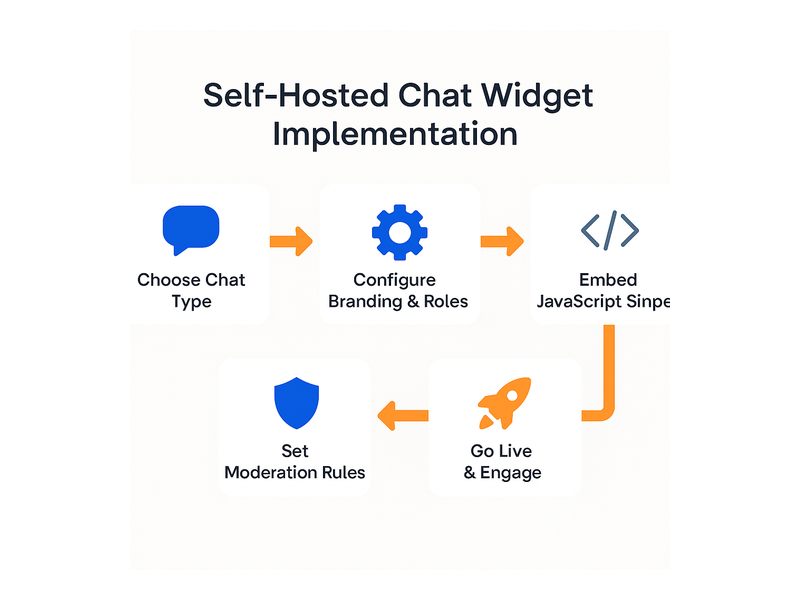
How to Implement a Self-Hosted Chat Widget on Your Website
Whether you are setting up a true self-hosted deployment or adopting a fully managed alternative, the implementation process follows a consistent pattern. Here is how it works with RumbleTalk.
Step 1: Define Your Use Case
Before selecting any self-hosted chat widget, clarify how you will use it. Is your primary use case:
- A persistent community forum where members engage daily?
- A live event with thousands of concurrent users over a few hours?
- A moderated Q&A session during a webinar or broadcast?
- A private trading room or members-only discussion space?
- A corporate training session with role-based participation?
Each scenario has different requirements for moderation, scalability, authentication, and feature set. RumbleTalk offers Group Chat, Moderated Q&A, Members Chat, Social Chat, Private Chat, and Queued Chat — because one format genuinely does not fit every use case.
Step 2: Configure Your Chat Room
Once you have chosen your chat format, configure the experience: set the color scheme and brand assets, define user roles such as admin, moderator, and member, enable or disable file sharing, set message cooldown timers to prevent spam, and connect your authentication system if applicable. RumbleTalk supports Chat SSO Integration so your existing login system can automatically authenticate users into the chat — no separate registration flow, no duplicate account management.
Step 3: Embed the Widget
Embedding a self-hosted chat widget should be straightforward. With RumbleTalk, you receive a standard JavaScript snippet that drops into any HTML page, WordPress site, or web application. No complex server configuration. No database setup. The chat is live within minutes, with your branding and settings already applied. The embed also works via iframe for event platforms, webinar tools, and third-party integrations where direct script injection is not available.
Step 4: Configure Moderation Before Going Live
A self-hosted chat widget without a moderation layer is a liability, not an asset. Before launch, configure who can post messages, what content gets auto-filtered, which users hold admin or moderator rights, and what happens when a participant violates community guidelines. For large events, assign multiple moderators with tiered permission levels so no single person becomes a bottleneck during a live session.
Step 5: Test, Then Launch
Run an internal load test before any significant event. Invite team members to stress-test the chat room, verify that your SSO integration authenticates users correctly, confirm moderation controls respond as expected, and check that your branding renders correctly across desktop and mobile browsers. RumbleTalk’s knowledge base article on Getting Started walks through the complete setup checklist so nothing is missed before go-live.
Self-Hosted Chat Widget vs. Managed SaaS Chat — The Real Difference
The distinction between a true self-hosted chat widget and a well-configured managed chat platform has narrowed significantly. Here is a practical comparison to help you assess which model fits your business:
- Infrastructure control: True self-hosted gives full server access; managed platforms like RumbleTalk offer dedicated, isolated environments per account with no shared database risk.
- Data ownership: Both can provide strong data isolation — the deciding factor is the vendor’s contractual data ownership terms and audit rights, not just the hosting model.
- Maintenance burden: Self-hosted requires your engineering team to handle patching, scaling, and incident response. Managed SaaS absorbs this entirely.
- Feature velocity: Managed platforms ship new features faster because updates deploy centrally. Self-hosted deployments require you to pull and apply each release manually.
- Total cost: Self-hosted carries higher upfront infrastructure and engineering cost. SaaS converts that into a predictable subscription that scales with your usage.
For most B2B businesses, a managed platform with strong data isolation, full white-labeling, and deep admin control delivers the practical outcomes of a self-hosted chat widget — without committing engineering resources to infrastructure operations that are not core to your product.
Use Cases Where a Self-Hosted Chat Widget Delivers Maximum Value

Live Events and Virtual Conferences
Event organizers need a self-hosted chat widget that absorbs thousands of concurrent users without degrading the experience. During keynotes, live panels, or product launches, attendees expect instant message delivery and a moderated environment that keeps the conversation focused and on-brand. RumbleTalk’s Moderated Q&A mode is purpose-built for this: hosts approve audience questions before they appear publicly, keeping the discussion high-signal and preventing the chat from devolving into noise.
Membership Communities and Subscription Platforms
Membership platforms need chat that feels native to their product — not a visible third-party integration that undermines perceived value. A self-hosted or white-labeled chat widget creates persistent chat rooms where paying members engage with each other and with your team, strengthening retention and community identity. Integration with your platform’s authentication ensures only verified subscribers access the space.
RumbleTalk’s Members Chat supports SSO, role-based access control, persistent chat history, and full white-labeling — everything a membership platform needs to make chat a genuine retention driver rather than a feature checkbox.
Financial Platforms and Trading Communities
Trading rooms and investment communities have strict requirements around data handling, user verification, and content oversight. A self-hosted chat widget in this context must support permissioned access for verified traders only, content moderation to prevent coordinated manipulation, and logging for compliance review. RumbleTalk’s group chat with admin controls and message moderation gives trading platform operators the oversight they need without building a custom chat solution from scratch.
Corporate Training and Internal Communications
Enterprises running live training sessions, all-hands meetings, or internal knowledge-sharing events need a self-hosted chat widget that integrates with their existing identity management, keeps conversation data off consumer cloud platforms, and gives HR or training facilitators full control over who speaks and when. RumbleTalk’s Queued Chat format — where participants submit questions that moderators release in order — is particularly effective for structured training sessions and expert-led workshops.
What to Look For in a Self-Hosted Chat Widget Solution
When evaluating self-hosted chat options for your organization, prioritize these capabilities:
- White-label branding: Your logo, colors, and room identity — zero vendor footprint
- Real-time moderation controls: Message approval, user bans, broadcast-only mode
- SSO and authentication integration: Connect to your existing login infrastructure
- Concurrent user scalability: Handles audience spikes during live events without throttling
- Multiple chat formats: Group chat, moderated Q&A, private messaging, queued responses
- Simple embed process: JavaScript snippet or iframe — not a server deployment
- Admin analytics: Active user counts, message volume, moderation activity reporting
- Data isolation: Your account’s data is not co-mingled with other clients
RumbleTalk addresses every item on this list. Because the platform is built specifically for group chat on websites and live events — not adapted from a general-purpose messaging tool — you are not paying for capabilities you will never use, and you are not missing features that your use case requires.
Getting Started with RumbleTalk as Your Self-Hosted Chat Widget
If you are ready to deploy a fully controlled, white-labeled self-hosted chat widget on your website or platform, RumbleTalk makes the process fast and straightforward. You can create a chat room, configure your branding and moderation settings, and embed it on your site in a single session — no server provisioning, no database configuration, no DevOps team required. The platform scales automatically with your audience, so whether you are hosting ten members or ten thousand live event attendees, the chat experience stays consistent and fast.
Whether you are launching a new community, upgrading from a consumer chat tool that lacks enterprise controls, or replacing a third-party widget that does not match your brand, RumbleTalk delivers the control and reliability of a self-hosted chat widget with the operational simplicity of a managed service. You get the outcome without the infrastructure bill.
Ready to take full control of your chat experience? Visit rumbletalk.com to explore plans, view a live demo, or connect with our team to discuss your specific use case. Your audience deserves a chat widget built for real engagement — not just a checkbox feature.