
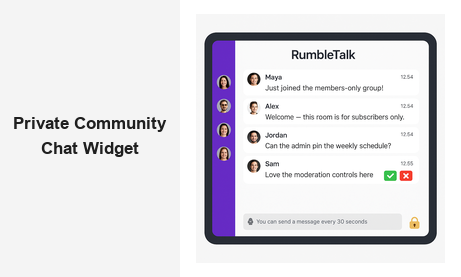
If you are building a gated membership platform, subscription community, or exclusive professional network, a private community chat widget is the real-time engagement layer your members expect. Unlike open chat rooms accessible to any visitor, a private community chat ensures that only verified, authenticated members can join and participate. RumbleTalk’s private community chat solution gives platform owners and B2B operators a ready-to-embed widget that transforms any web page into a live, moderated, members-only hub — with no server infrastructure to manage and no backend development required.
What Is a Private Community Chat Widget?
A private community chat widget is an embeddable real-time chat tool designed specifically for exclusive, access-controlled groups. While public chat rooms let any website visitor join the conversation, a private community chat widget requires verified authentication or an invitation before a user can participate. This access restriction makes it the preferred solution for premium membership sites, paid communities, closed professional networks, and internal platforms where conversation quality and privacy are non-negotiable.
At its core, a private community chat widget combines the immediacy of live chat with the exclusivity of a gated space. Key capabilities include:
- Login-gated access — only authenticated members can enter the chat room
- Real-time messaging — synchronous live conversation, not asynchronous forum threads
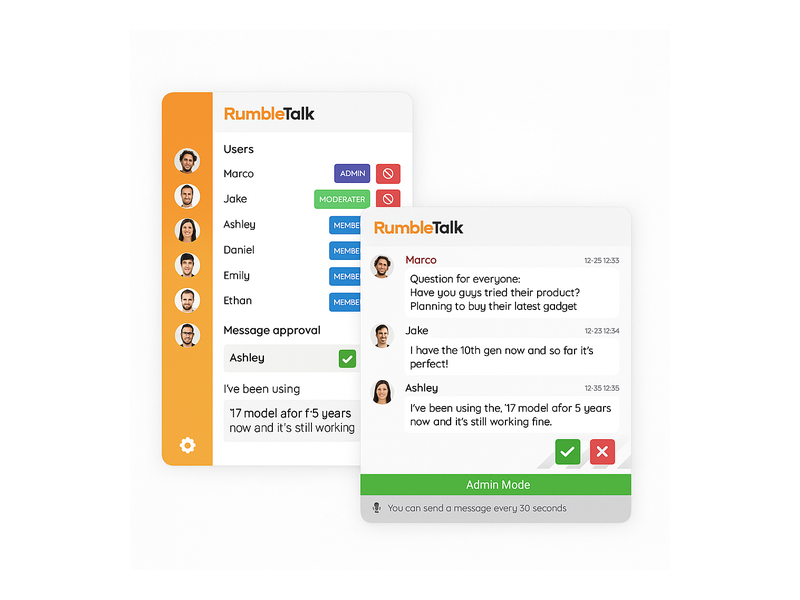
- Full moderation control — admins approve messages, mute users, and remove disruptive participants
- Branded interface — customizable colors, fonts, and header text to match your platform design
Why Your Community Needs a Private Community Chat Widget
Online communities thrive on connection. While static content and email newsletters serve a purpose, they cannot replicate the energy and immediacy of synchronous, real-time interaction. A private community chat widget bridges the gap between your content and your members — giving them a live space to ask questions, share insights, and build meaningful professional relationships without ever leaving your site.
For B2B platform owners, the business case for a private community chat widget is compelling across several dimensions.
Increase Member Retention
Members who actively engage in community discussions are significantly less likely to cancel their subscriptions. When your private community chat widget becomes the daily destination where members ask questions, receive expert answers, and connect with peers, your platform becomes embedded in their professional routine. RumbleTalk’s Members Chat is built precisely for this purpose — a gated, moderated space that belongs entirely to your brand, creating the kind of habitual engagement that dramatically reduces churn over time.
Drive Daily Active Use
A members-only chat room gives your audience a compelling reason to visit your platform every single day. Whether you schedule weekly expert sessions, host live Q&A events, or maintain an always-on community room, the private community chat widget becomes a recurring destination. Platforms that embed a private community chat widget consistently see higher session frequency, longer time-on-site, and stronger overall engagement metrics compared to platforms relying solely on content feeds.
Create Exclusive Value That Justifies Premium Pricing
For subscription and membership businesses, exclusivity is a core part of the product proposition. A private community chat widget reinforces the premium nature of your offering — when members know that live, expert-moderated conversations are available exclusively to paid subscribers, participation feels genuinely valuable. This exclusive access can serve as a standalone reason for members to maintain or upgrade their membership tier.
Key Features to Look for in a Private Community Chat Widget
Not every embeddable chat tool is built for private community use. When evaluating options for your platform, prioritize these essential capabilities:
Authentication and Single Sign-On Integration
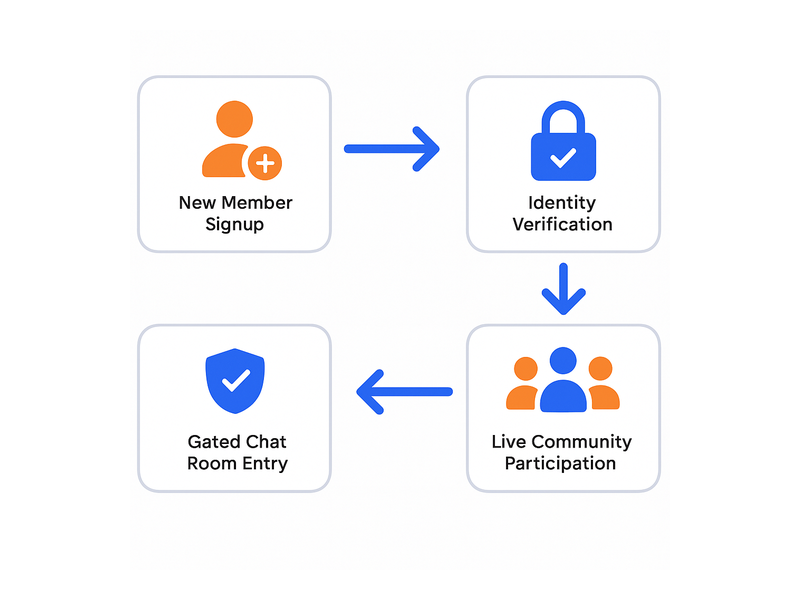
Your private community chat widget must support login-gated access natively. RumbleTalk integrates with SSO providers and popular membership plugins, so only users already authenticated on your platform can enter the chat room. This eliminates unauthorized access, ensures full accountability for every message, and creates a seamless single-login experience that members appreciate.
Robust Moderation Tools
Even in closed, curated communities, active moderation matters. The best private community chat widgets give administrators real-time control over the conversational environment: message approval queues, user muting and banning, admin-only broadcast mode, and configurable message rate limits to prevent flooding. RumbleTalk’s moderation suite covers all of these capabilities — community managers can take action instantly without disrupting the conversational flow for other participants.
Role-Based Permissions
As your community scales, you need to delegate moderation responsibilities without granting every trusted member full administrative access. RumbleTalk supports tiered permission levels, allowing you to designate experienced community contributors as moderators with specific, scoped capabilities. This makes the private community chat widget organizationally scalable — your core team is not the bottleneck for every moderation decision as the community grows.
Effortless Embedding and Mobile Responsiveness
The best private community chat widget is invisible in its integration — a lightweight snippet that drops into any page layout without requiring backend development work. RumbleTalk generates a self-contained JavaScript embed that works with any CMS, including WordPress, Webflow, Wix, Squarespace, and custom-built platforms. The widget loads asynchronously to avoid impacting page performance and includes built-in responsive breakpoints so it renders correctly on every screen size.
Custom Branding and Design Controls
Your private community chat should feel like a natural part of your brand experience, not an obviously third-party add-on. RumbleTalk provides full customization of the chat interface: accent colors, header text, font choices, background styles, and chat bubble design. Members encounter a cohesive branded interface that reinforces the quality and professionalism of your platform at every interaction.
How RumbleTalk’s Private Community Chat Widget Works
RumbleTalk’s Members Chat is purpose-built for private communities, delivering enterprise-grade functionality with a setup process accessible to any platform operator. Here is the practical workflow for getting a private community chat widget live on your site:
- Create a chat room — log in to the RumbleTalk admin panel and create a new Members Chat room with your preferred settings and room name.
- Configure access control — connect your SSO provider or use RumbleTalk’s built-in user management to define which members are authorized to enter the room.
- Customize the design — apply your brand accent color, upload your logo, set the header text, and configure the chat interface theme to match your platform’s visual identity.
- Embed the widget — copy the generated JavaScript snippet and paste it into your page template, WordPress widget area, or custom web application. No backend configuration required.
- Assign moderators — designate trusted community managers with the appropriate role-based permission level for the room.
- Go live — announce the private community chat to your members and invite them to join the exclusive space you have built for them.
The entire setup process typically takes under an hour. RumbleTalk manages all real-time messaging infrastructure on its end, so your team focuses entirely on building community engagement rather than maintaining servers or monitoring uptime. For a detailed walkthrough of configuration options and access control setup, visit the getting started guide in the RumbleTalk knowledge base.
Use Cases for a Private Community Chat Widget
Private community chat is a versatile solution that adds measurable engagement value across a wide range of B2B platforms and industries. Here are the most impactful real-world applications:
Paid Membership and Subscription Platforms
Subscription-based platforms — professional communities, niche content hubs, expert networks — use the private community chat widget as the live engagement layer that transforms passive content consumption into active community participation. Members who pay for access expect more than articles and video libraries; they want synchronous interaction with experts and like-minded peers. Embedding a private chat room directly on your platform delivers exactly this, providing a compelling daily reason to log in and engage with the community.
Online Learning and E-Learning Platforms
E-learning platforms use private community chat to create cohort discussion channels, instructor office hours, and peer study groups. Students can ask questions in real time during live sessions, continue discussions after class, and form study networks entirely within the learning platform. Instructors monitor conversations, provide immediate answers, and moderate off-topic content — resulting in measurably higher course completion rates and stronger student satisfaction scores.
Professional Networks and Industry Associations
Industry associations, trade communities, and professional networks rely on private community chat widgets to facilitate member-to-member networking, live committee discussions, and exclusive expert panels available only to association members. RumbleTalk’s infrastructure handles hundreds of simultaneous participants without degradation — making it suitable for large professional organizations that run regular live sessions and virtual conferences.
Internal Enterprise and HR Platforms
Private community chat widgets are equally effective for internal use cases. HR portals, corporate intranet platforms, and employee engagement tools embed private chat rooms to give distributed teams a real-time communication layer directly within their existing workflow environment. The login-gated design ensures all conversations stay within the organization, maintaining confidentiality without additional access management overhead.
Live Events, Webinars, and Virtual Conferences
During live events, a private community chat widget transforms passive registered attendees into active, vocal participants. Event-goers join a gated chat room, ask questions, share real-time reactions, and network with fellow attendees — all within the event platform itself, not a disconnected third-party app. After the event ends, the community room stays open for continued peer networking, extending the event’s value and deepening community ties. For a broader look at how community chat drives long-term audience loyalty, see our guide on turning website chat into a loyal community.
How to Embed a Private Community Chat Widget on Your Website
Adding a private community chat widget to your site requires no developer expertise when you use RumbleTalk. The embed flow is designed for non-technical platform operators and community managers who want results quickly:
Step 1: Choose the Right Chat Type
RumbleTalk offers multiple chat types suited to different use cases. Members Chat is the recommended choice for fully private, access-controlled community rooms — it enforces authenticated membership by design. Group Chat works well for moderated semi-open community rooms where light access control is sufficient, while Social Chat enables community-style interaction with a more relaxed moderation footprint suitable for public-facing brand communities.
Step 2: Configure Room Settings
Inside the RumbleTalk admin dashboard, define the room name, configure access control rules, apply your brand theme, and set moderation policies. Options include per-user message rate limiting, admin-only broadcast mode for announcements, and automatic profanity filtering. Every setting is adjustable via the dashboard interface — no code editing required at any point.
Step 3: Paste the Embed Code
Copy the generated JavaScript embed snippet from your RumbleTalk dashboard and paste it into any HTML page, WordPress page template, Webflow component, or custom web application. The private community chat widget loads asynchronously and includes built-in responsive breakpoints, rendering correctly across all screen sizes and devices without any additional CSS customization.
Step 4: Test and Launch
Before going live, run through the complete access control flow: confirm that unauthenticated visitors are blocked from entering the room, verify that admin moderation tools function correctly in real time, and test the widget across multiple browsers and screen sizes. Once satisfied, announce the exclusive community chat to your members and monitor the initial engagement wave closely.

Measuring Success: Engagement Metrics for Your Private Community Chat
A private community chat widget generates rich engagement data that directly informs your community strategy. RumbleTalk’s admin dashboard provides real-time and historical metrics including active user count, message volume per session, peak engagement hours, and moderator activity logs. Use this data to schedule live expert sessions during peak engagement windows, identify your most active community contributors for recognition programs, and measure the concrete impact of community initiatives on overall participation rates.
For subscription businesses specifically, community chat engagement data correlates strongly with retention outcomes. Members who participate frequently in the private community chat are your most loyal subscribers and your best candidates for referral and upsell programs. Members who go silent in the chat room are early churn signals — identifying them early gives your community team the opportunity to re-engage them before they cancel.
Get Started with a Private Community Chat Widget Today
RumbleTalk makes it straightforward to add a fully featured private community chat widget to any website — with no server infrastructure to maintain, no backend development required, and enterprise-grade moderation built in from day one. Whether you are operating a paid membership platform, a professional association network, an online learning environment, or a live events community, RumbleTalk’s private community chat solution delivers the real-time engagement experience your members expect and the administrative control your team needs to keep the community healthy and growing.
Ready to build a more connected, more engaged community? Start your free RumbleTalk trial today and embed your first private community chat widget in under an hour.