
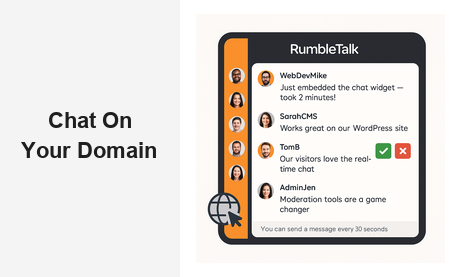
Adding chat on your domain is one of the most powerful ways to transform passive website visitors into active, engaged participants. Whether you run a media outlet, an e-learning platform, a membership community, or a live events site, embedding a real-time group chat directly on your own domain keeps your audience where they belong — on your property, under your brand, in your ecosystem. RumbleTalk makes it straightforward to deploy a fully hosted, fully customizable chat widget on any website in minutes, with no coding experience required.
Why You Should Add Chat on Your Domain
Modern audiences expect more than static content. A one-way publishing model — write an article, publish it, wait for page views — no longer generates the loyalty and return visits that sustain a digital business. When you put chat on your domain, you give visitors a reason to stay longer, return more frequently, and feel emotionally connected to your platform.
The business case is straightforward. Longer session durations reduce bounce rate, which signals quality to search engines and improves organic rankings. Return visitors build habit loops, which increases lifetime value. And communities — real communities with ongoing conversations — create network effects that are nearly impossible for competitors to replicate. A chat on your domain is not just an engagement tool; it is a competitive moat.
There is also an ownership argument. When your community lives on a third-party social platform — a Facebook Group, a Discord server, a Twitter thread — you are at the mercy of that platform’s algorithm, moderation policies, and business decisions. Platforms change their terms, throttle organic reach, or disappear entirely. When you run chat on your domain, you own the conversation. Your audience data, your moderation rules, your brand, your control.
Engagement That Compounds Over Time
A chat on your domain creates micro-communities around your content. People return not just for what you publish, but for the conversations happening around it. Over time, regulars become advocates. They answer questions from newcomers, share the chat room with their networks, and generate user content that enriches your platform without any additional effort on your part. This compounding engagement is one of the most underrated benefits of building community chat directly into your website.
How RumbleTalk Puts Chat on Your Domain
RumbleTalk is purpose-built for websites and live events that need a reliable, scalable, and moderated group chat experience. The setup process is genuinely fast: create an account, choose a chat type, copy a two-line embed code, and paste it into your site. The widget renders as a responsive iframe or JavaScript component and works on any CMS or custom-built platform — WordPress, Webflow, Wix, Squarespace, Shopify, or raw HTML.
Within minutes of embedding, your branded chat on your domain is live. Visitors see your colors, your logo, and a chat interface that feels native to your site — not a generic third-party widget bolted on as an afterthought.
Group Chat for Live Events and Communities
The core Group Chat product handles audiences of any size, from a niche community of 30 members to a live event with thousands of concurrent users. When you run chat on your domain during a webinar, product launch, sports broadcast, or online conference, every participant shares one real-time conversation thread. The result is a shared event experience that keeps viewers engaged and emotionally invested in what is happening on screen.
Members Chat for Subscription and Gated Platforms
If your website has registered users, a paywall, or a subscription tier, Members Chat restricts access to verified participants only. Users authenticate via SSO, OAuth, or your existing user database, and their verified display name appears in the chat. This eliminates anonymous trolling and builds a trusted, name-based community environment — all within your own domain chat, without sending members to an external platform.
Moderated Q&A for Professional Sessions
Moderated Q&A is the right tool for webinars, executive town halls, investor briefings, and panel discussions where the quality of questions matters. Audience members submit questions that go into a private queue. Moderators review each submission and publish only the ones that meet the standard. The audience only sees approved content, keeping the session professional, on-topic, and legally safe. For organizations that need chat on your domain without the risk of inappropriate public messages, Moderated Q&A is the solution.
Queued Chat for One-on-One Conversations
Queued Chat turns your domain chat into a structured support or consultation channel. Visitors enter a waiting queue, and an available agent or expert picks them up for a private one-on-one session. This model works well for customer support desks, financial advisory platforms, healthcare consultations, and virtual job fair booths — any scenario where personalized attention needs to be delivered at scale through a chat on your domain.
Private Chat for Networking and Direct Messaging
Alongside any public group room, you can enable Private Chat so participants can initiate one-on-one direct messages with each other. This is especially valuable at virtual conferences and networking events, where attendees want to follow up on a conversation without leaving the chat environment. Private Chat operates entirely within your domain — no external messaging app required.
Key Features of RumbleTalk’s Chat on Your Domain
Robust Moderation Tools
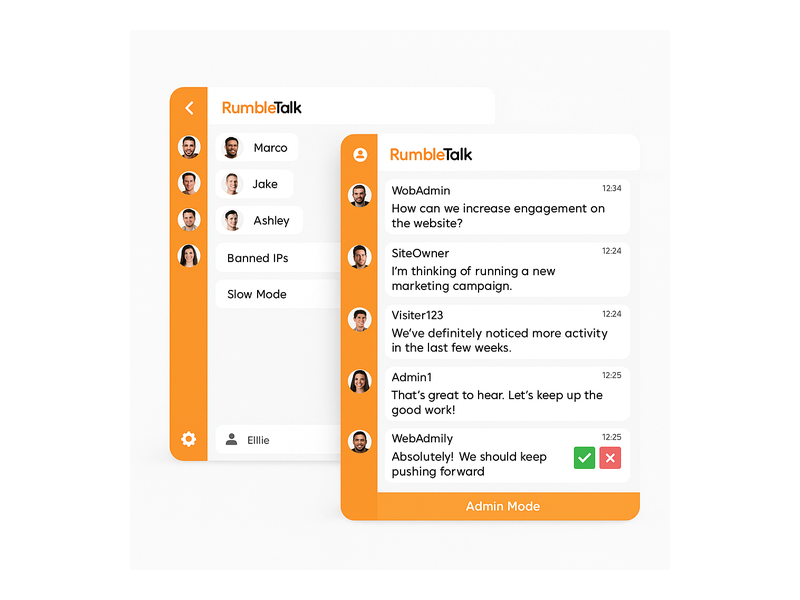
Running an open chat on your domain without strong moderation is a liability, not an asset. RumbleTalk gives administrators a comprehensive set of moderation controls: mute individual users, ban accounts or IP addresses, delete specific messages, activate a keyword-based profanity filter, and switch the room into Admin-only broadcast mode with a single click. During high-traffic live events, a configurable slow-mode cooldown — for example, one message every 30 seconds — prevents message floods and keeps the conversation readable for everyone.
The moderation dashboard is accessible from any browser, so your team can manage the chat room from a laptop backstage while a speaker is presenting live on screen. Real-time moderation is what separates a professional community experience from an uncontrolled free-for-all.
Full Custom Branding
A chat on your domain should look like it belongs there, not like a white-labeled tool from a different company. RumbleTalk’s design editor lets you change colors, fonts, header text, chat bubble shapes, background images, and the overall color theme — all through a visual interface, with no CSS required. For enterprise clients, a white-label option removes all RumbleTalk branding entirely, creating a seamless on-brand experience for end users.
Persistent Chat History
Many live chat tools vanish when a session ends. RumbleTalk stores chat history by default, so users who join late can scroll up and read the full conversation from the beginning. For community pages and evergreen content, this means your chat on your domain accumulates value over time — a searchable archive of discussions, questions, and shared resources that enriches the experience for every new visitor who discovers your site.
Rich Media, Polls, and File Sharing
Text-only chat is a limiting format for engaged communities. RumbleTalk supports image sharing, file attachments, live polls, emoji reactions, and YouTube video embeds directly inside your domain chat. Course instructors can drop a PDF syllabus mid-session. Trading community members can share a chart screenshot. Event organizers can run a live audience poll between speakers. These features make the chat experience richer and more interactive without requiring any additional tools or integrations.
Scalability for Any Traffic Volume
One of the most common concerns about adding chat on your domain is whether the widget will hold up when traffic spikes. A viral article, a celebrity guest, or a product launch announcement can send thousands of concurrent users into your chat room in minutes. RumbleTalk is cloud-hosted with auto-scaling infrastructure specifically designed for event-level traffic. The platform manages load balancing, server resources, and connection management automatically — you focus on the event, not the infrastructure.
Analytics and Audience Insights
Every message sent through your domain chat is a data point. RumbleTalk’s admin dashboard provides real-time and historical analytics: concurrent user counts, peak engagement windows, total message volume, active user trends, and more. These insights help you schedule live sessions at optimal times, identify your most engaged community members for ambassador programs, and measure the direct impact of chat on key business metrics like session duration and return visit rate.
Use Cases: Who Benefits from Chat on Your Domain?
Media Publishers and Content Creators
News sites, sports media brands, and entertainment platforms use domain-hosted chat to transform one-way publishing into two-way dialogue. Readers comment in real time during a breaking news liveblog. Fans react during a championship game stream. Subscribers debate a long-form investigative piece. All of this activity happens inside a moderated, on-brand environment on your site — keeping traffic, data, and community value with you instead of leaking to Twitter or Reddit.
Online Educators and Course Platforms
E-learning platforms that embed chat on your domain see measurable improvements in course completion rates. Students ask questions during recorded lessons, form study groups in dedicated chat rooms, and receive real-time guidance from instructors or teaching assistants. Unlike a separate Discord server or a Facebook Group, a chat widget built into the learning platform keeps learners inside the educational environment — reducing distraction and reinforcing the value of the subscription.
Event Organizers and Conference Platforms
Virtual and hybrid event platforms need a reliable, moderated audience chat that integrates with their streaming setup without requiring attendees to open a separate app. With RumbleTalk embedded directly on the event page, participants stay in one tab for the entire session. Sponsors can be featured in the chat header, session-specific rooms can be created for breakouts, and the Moderated Q&A product ensures that speaker Q&A sessions remain focused and professional.
Financial Communities and Trading Platforms
Trading education platforms and financial communities use gated group chat to deliver real-time value to paying subscribers. Members share trade ideas, discuss market conditions, and post live alerts — all within a private, verified environment on the platform’s own domain. The Members Chat authentication layer ensures that only active subscribers access premium rooms, protecting the value of the community and the platform’s revenue model.
Healthcare and Telehealth Services
Healthcare providers and telehealth platforms need secure, controllable communication channels for patient communities and professional education sessions. A moderated chat on your domain — with admin controls, user verification, slow mode, and the ability to restrict posting — creates a safer environment for sensitive discussions than any open social media platform. Patient support groups, CME webinars, and provider Q&A sessions all benefit from the structure and control that a professional domain chat solution provides.

Getting Started: Add Chat on Your Domain in Minutes
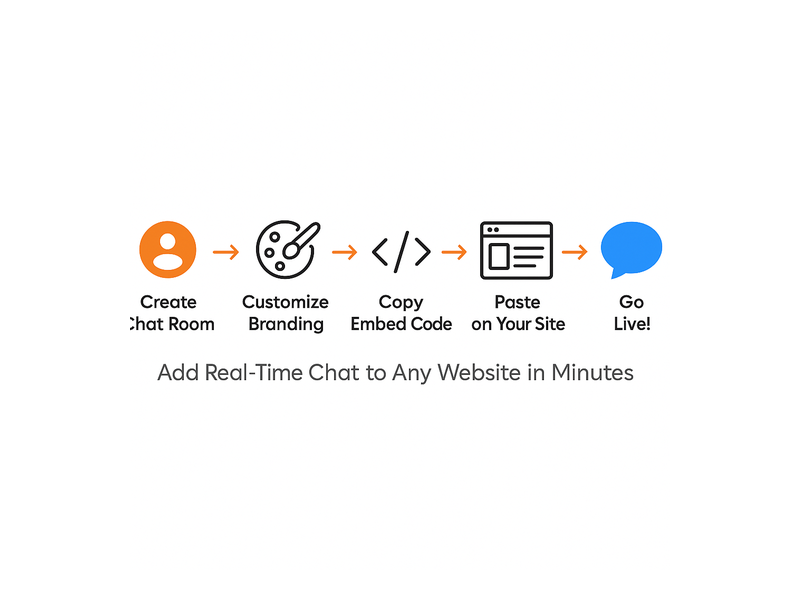
Deploying RumbleTalk on your website follows a simple, repeatable process regardless of your technical background or CMS platform:
- Create your chat room — Sign up at RumbleTalk, name your room, and select the chat type that matches your use case: Group Chat, Members Chat, Moderated Q&A, Queued Chat, or Private Chat.
- Customize the design — Use the visual editor to match your brand colors, upload your logo, set a background, and configure room permissions such as who can post, who can upload files, and whether chat history is visible to newcomers.
- Copy the embed code — A two-line HTML snippet is generated automatically. Paste it into any page on your website — a WordPress post, a Webflow section, a custom HTML block, or a landing page template.
- Configure admin settings — Set up moderators, enable the profanity filter, configure slow mode if needed, and connect your user authentication system for gated rooms.
- Go live — Your chat on your domain is active immediately. Announce it to your audience, promote it before your next live event, and start collecting engagement data from day one.
For teams with more complex requirements — SSO integration, REST API access, white-label branding, multi-room management, or enterprise SLAs — RumbleTalk offers business and enterprise plans with dedicated onboarding support. You can explore step-by-step setup instructions in the RumbleTalk Getting Started knowledge base article, which walks through embedding the widget, managing users, and running your first moderated session.
If you’re evaluating platforms, the post Why Do Websites Choose RumbleTalk? provides a detailed breakdown of the features and use cases that make RumbleTalk the preferred choice for businesses that need a scalable, embeddable group chat solution.
Why RumbleTalk Is the Right Choice for Chat on Your Domain
Most chat tools on the market are designed for one of two purposes: customer support live chat (agent-to-visitor, one-on-one) or internal team messaging (Slack, Teams). RumbleTalk occupies a different and underserved category — audience and community chat — the kind that powers a live event room, a gated membership forum, a trading community, or a live Q&A session on a media platform.
That focus shapes every product decision. Moderation tools are built for public-facing rooms, not just internal Slack channels. Scalability targets event-level traffic spikes, not just day-to-day office messaging. The embed model is designed for websites, not enterprise intranets. When you add chat on your domain with RumbleTalk, you get a platform optimized for exactly the challenges you face.
Key differentiators that set RumbleTalk apart:
- No app download required — participants join in any browser, no account or installation needed for public rooms
- Multi-room support — create separate channels for different topics, sessions, or audience segments, all embedded on the same domain
- White-label availability — remove RumbleTalk branding entirely for a fully seamless on-domain experience
- Cross-platform compatibility — works on every major CMS and custom-built site without plugin conflicts
- Enterprise-grade uptime — cloud infrastructure with auto-scaling, designed for peak event loads
Discover how RumbleTalk’s Social Chat can power open community conversations directly on your website, giving your visitors a branded, moderated space to connect in real time.
Conclusion
If there is one feature that reliably increases visitor engagement, session duration, and community loyalty, it is real-time chat embedded directly on your site. A chat on your domain — fully branded, moderated, and optimized for your specific use case — turns your website from a content destination into a living, breathing community hub. RumbleTalk gives you every tool you need to build that experience, from simple open group chat rooms to advanced moderated Q&A, private messaging, and queued support sessions.
The setup takes minutes. The impact lasts for the lifetime of your platform. Ready to add chat on your domain? Get started with RumbleTalk for free and have your first live chat room running today — no long-term contract, no coding required, and full customization from the moment you sign up.