
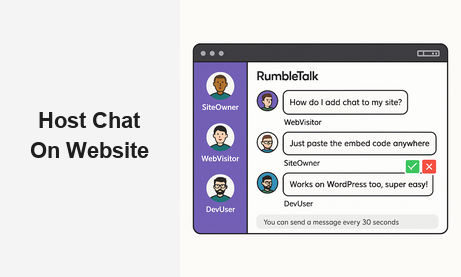
When you decide to host chat on your website, you unlock one of the most powerful engagement tools available to digital businesses today. Real-time conversation transforms passive visitors into active participants, turns live events into memorable shared experiences, and creates the kind of community loyalty that no email sequence or social ad can replicate. Whether you run a membership platform, a media site, a virtual event series, or an e-commerce community, a well-implemented website chat room is a direct line between your brand and your audience.
Why Host Chat on Your Website?
The case for adding live chat to your site goes far beyond convenience. When audiences can interact with each other and with your brand in real time, they stay longer, come back more often, and develop a genuine sense of belonging. That sense of belonging is the foundation of every sustainable online community.
Static content — articles, videos, podcasts — still matters, but audiences who can chat, react, and connect with each other develop peer-to-peer relationships that keep them anchored to your platform. Regular users start recognizing familiar usernames, develop inside references, and help newcomers get oriented. The community begins to sustain itself.
For organizations running live events, the ability to host chat on a website during a webinar, virtual conference, or live stream is not a nice-to-have — it is the backbone of the experience. Speakers get instant audience feedback. Organizers can surface the best questions. Attendees feel like participants rather than viewers. The difference in post-event satisfaction scores between events with and without live audience chat is significant and consistent.
Beyond engagement, hosting your own chat room gives you a first-party data asset. You own the conversation history. You can analyze trending topics, identify your most active community members, and understand what your audience actually cares about — without depending on a third-party algorithm to surface it for you.
What to Look for in a Website Chat Platform
Not every platform that lets you host chat on a website delivers the same experience. Before committing to a provider, evaluate candidates against this checklist:
- Ease of embed: Can you add it to any page with a single JavaScript snippet? Non-technical teams should not need a developer every time they want to deploy a new room.
- Moderation controls: Can admins mute, ban, approve messages, and freeze the room? Public chat without robust moderation quickly becomes a liability.
- Scalability: Does the platform handle thousands of concurrent users without degraded performance? This is non-negotiable for live events.
- Multiple room types: Does it support open group chat, members-only rooms, moderated Q&A, private messaging, and queued one-on-one sessions? Different use cases demand different formats.
- Custom branding: Can you match the chat widget’s colors, fonts, and layout to your site’s visual identity?
- SSO integration: Can authenticated users from your platform carry their identity into the chat room without creating a separate account?
- Analytics: Are you getting data on active users, peak engagement times, and message volume to inform your community strategy?
RumbleTalk is purpose-built to meet every item on this list, which is why thousands of organizations choose it when they want to host chat on their website without building or maintaining custom real-time infrastructure.
How to Host Chat on Your Website with RumbleTalk
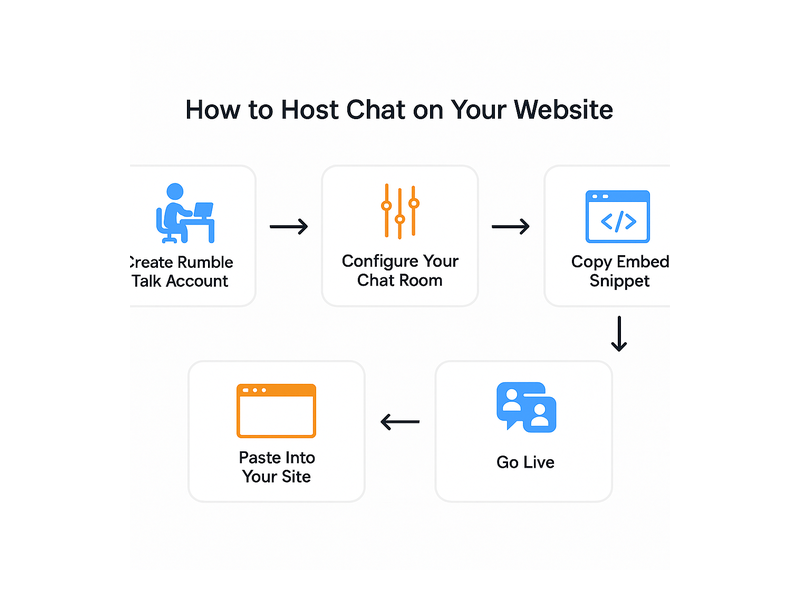
RumbleTalk is a fully managed group chat platform that makes it possible to host chat on your website in under 30 minutes. There is no server to configure, no database to provision, and no WebSocket infrastructure to maintain. You create an account, configure your chat room in the admin panel, copy a two-line JavaScript embed snippet, and paste it into any HTML page. The chat room goes live immediately.
Embed in Minutes
The embed process is deliberately minimal. After configuring your room — choosing the type, setting the color scheme, enabling or disabling features — you copy the embed code from the admin dashboard. That snippet works in any HTML context: a WordPress post, a Webflow section, a React component, a custom-coded landing page. Resizing, repositioning, and style adjustments are handled in the admin panel without ever touching the embed code again.
WordPress users get an additional shortcut: RumbleTalk’s official plugin lets you host chat on your WordPress website using a simple shortcode. Install the plugin, authenticate with your RumbleTalk account, and drop [rumbletalk] anywhere on a page or post. No theme customization required. For a detailed walkthrough, see the RumbleTalk Getting Started guide in the knowledge base.
Moderation and Admin Controls
The biggest concern most site owners have when they decide to host a chat room on their website is keeping the conversation safe, on-topic, and free of spam. RumbleTalk’s moderation suite addresses this comprehensively:
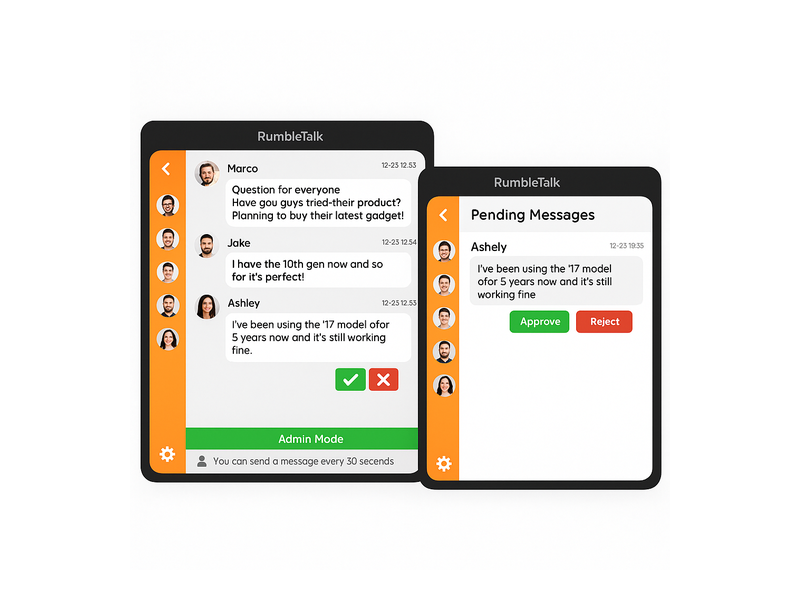
- Admin Mode: Freeze all participant messages so only admins can post. Use this for announcements, structured Q&A segments, or any moment where you need the floor to yourself.
- Message approval queue: Hold incoming messages for admin review before they appear publicly. Every message that reaches your audience has been explicitly approved.
- Slow mode: Limit posting frequency per user — for example, one message every 30 seconds — to prevent flooding during high-traffic events.
- Mute and ban: Silence a disruptive user for a defined period or permanently, with a single click from the admin toolbar.
- Profanity filter: Automatically block or flag messages containing prohibited words before they reach the audience.
- Multiple admins: Grant moderation rights to team members with role-based permissions, so you always have coverage without sharing master credentials.
These controls mean you can confidently host public chat on your website — even during high-traffic live events — without worrying the room will spiral out of control.
Multiple Room Types for Every Use Case
One of the most practical reasons to choose RumbleTalk when you want to host chat on a website is the variety of room formats available. Different audiences and different contexts call for different interaction models:
- Group Chat: Open room for authenticated or anonymous participants. The default format for live events, watch parties, and open community hubs.
- Moderated Q&A: Audience submits questions privately; admins curate and approve the best ones. The cleanest format for panel discussions, webinars, and AMAs.
- Members Chat: Restricted to logged-in members, connected via SSO. Ideal for premium communities, gated learning platforms, and professional networks.
- Social Chat: Lightweight public room with social login support (Facebook, Google). Zero registration friction — ideal for media sites and high-traffic public events.
- Private Chat: One-on-one private messaging between members within your platform, adding a social layer without routing users to a third-party app.
- Queued Chat: Structured 1-on-1 sessions where users join a queue to speak with an expert, advisor, or support agent. Essential for platforms where personalized access is a premium offering.
Use Cases: Who Benefits Most from Hosting Chat on a Website
Understanding how other platforms host chat on their websites can clarify the right setup for your own. Here are the four verticals where RumbleTalk delivers the greatest impact.
Live Events and Virtual Conferences
Event organizers who host chat on a website during live streams see dramatically higher attendee satisfaction scores compared to stream-only formats. Attendees who can ask questions, react to presentations, and connect with peers feel invested in the outcome — not just passive consumers of content.
Moderated Q&A is the ideal room type here: questions queue privately, the moderator surfaces the strongest ones, and the public feed stays curated and on-topic. For multi-session conferences, deploy separate rooms per session page so attendees can carry parallel conversations across tracks — the digital equivalent of hallway discussions. Learn more about how RumbleTalk powers virtual events and conferences.
Membership and Community Platforms
Membership sites that host chat on their website give members a daily reason to log in. Whether the community is built around fitness, professional development, investing, or creative work, a live chat room creates the social glue that reduces churn and increases lifetime value.
SSO-connected Members Chat is the right format here. Members log in once to your platform and are automatically authenticated in the chat room, carrying their membership username and profile. Accountability improves, content quality rises, and the community builds a shared identity anchored to your brand — not a third-party Discord server you don’t control.
Media Sites and Radio Stations
Radio stations and podcast networks that embed a live chat room on their website transform a one-way listening experience into an active community conversation. Listeners share song requests, debate topics raised on air, and build the kind of peer relationships that create habitual tuning-in behavior. For a detailed breakdown of this use case, see our post on Radio Show Chat: Engage Your Live Audience in Real Time.
Social Chat, with its support for social login, is the best fit for media audiences where registration friction must be near zero. A first-time visitor can join the conversation with their existing social account in two clicks — no email verification, no password creation required.
Trading and Finance Platforms
Investors, traders, and finance communities rely on real-time information exchange. Platforms that host chat on their website give users a place to share market calls, trading signals, and portfolio updates without routing the conversation to an external forum where competitors can observe.
Queued Chat adds a premium layer: users book a 1-on-1 session with an analyst or portfolio advisor through the queue. The structured format prevents chaos while ensuring every user gets their turn — a far better experience than a chaotic open thread during a volatile market session.
Best Practices When You Host Chat on Your Website
Embedding the widget is only the beginning. To get maximum return from your decision to host a chat room on your website, follow these operational best practices.
Publish Clear Community Guidelines
Post your rules as a pinned message in the chat room and as visible text near the widget. Specify prohibited language, spam rules, how to report abuse, and the consequences for violations. Users behave significantly better when expectations are explicit and enforcement is consistent. Revisit and update the guidelines as your community grows and new edge cases emerge.
Staff Moderation During Live Events
During high-traffic live sessions, assign a dedicated moderator whose sole responsibility is managing the chat room. They should be actively surfacing strong questions, muting disruptive users, and keeping the conversation on-topic — not also running the slide deck or managing the event platform. For quieter periods, a community manager who checks in several times per day is sufficient to maintain quality.
Connect Your Authentication System
If your site has a login system, integrate it with RumbleTalk via SSO. Authenticated users are more accountable, post higher-quality content, and are significantly less likely to churn. SSO also enables rich profile data in the chat — display names, avatars, membership tier badges — that reinforces your brand identity within the conversation.
Actively Promote the Chat Room
Do not assume visitors will discover the chat room on their own. Announce it in your email newsletter, feature it prominently on your homepage during live events, and include a direct link in event registration confirmation emails. The more users who know you host chat on your website, the faster the community reaches critical mass — the tipping point where the community sustains itself through organic participation.
Review Analytics and Iterate
Examine your chat data regularly. Which sessions generate the most messages? What time of day is engagement highest? Who are your top contributors? Use this intelligence to schedule live events at peak hours, recognize and reward your most active members publicly, and identify the topics your audience cares about most. Communities that feel seen and valued grow faster than communities left to run on autopilot.

Getting Started: Host Chat on Your Website Today
The technical barrier to hosting a professional-grade chat room on your website has never been lower. RumbleTalk handles all the infrastructure — servers, real-time message delivery, authentication, storage — so your team can focus entirely on community management rather than DevOps.
If you are just getting started, Social Chat is the most flexible entry point for media and community sites. It supports social logins, scales to large concurrent audiences, and requires no authentication setup on your end. As your community matures and your needs become more specific, you can add Members Chat rooms for premium subscribers, Queued Chat for expert access sessions, and Moderated Q&A rooms for structured live events — all from the same RumbleTalk account.
The setup process is straightforward. Create your account, select your room type, customize the chat window to match your brand colors and fonts, enable the moderation settings appropriate for your audience, and copy the embed snippet. Paste it into your site and your visitors can start chatting within minutes. There is no trial period with hidden limitations — the full feature set is available from day one.
As your audience grows, RumbleTalk scales with you. Whether you are hosting 50 members in a private professional community or 15,000 concurrent attendees at a flagship virtual conference, the platform handles the load without requiring infrastructure changes, capacity planning, or emergency DevOps calls at 2 a.m.
Conclusion
The decision to host chat on your website is one of the highest-leverage investments you can make in audience engagement and community retention. A well-configured, actively moderated chat room extends session duration, builds the kind of peer relationships that reduce churn, and gives your brand a real-time feedback loop that no other tool can match. RumbleTalk makes the entire process — from first embed to a thriving, moderated community — straightforward, scalable, and fully within your control.
Ready to add live chat to your site? Visit rumbletalk.com to create your free chat room and embed it on your website today. No credit card required, no long-term contract, and no infrastructure headaches.