
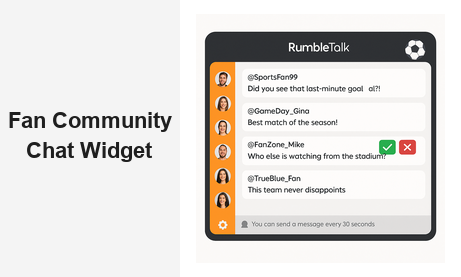
Adding a fan community chat widget to your website is one of the most effective ways to transform passive visitors into an active, engaged audience. Whether you run a sports fan site, a music community, a gaming platform, or any media brand with a dedicated following, giving fans a real-time space to connect is no longer optional — it is expected. A fan community chat widget creates the live social layer your website is missing, turning every article, broadcast, and event page into a conversation hub where your audience stays longer, comes back more often, and becomes genuinely invested in your brand.
Why Fan Communities Need a Dedicated Chat Widget
The difference between a website with a fan community chat widget and one without it is simple: one has a community, and the other has visitors. Comment sections, social media links, and forum threads all have their place — but none of them deliver the real-time, synchronous energy that fans crave, especially during live events, game nights, or content drops.
A dedicated fan chat widget solves this by embedding live group conversation directly on your website. Fans do not need to leave your domain to connect with each other. They do not need to open Twitter or Discord. The conversation happens where you control the experience, where your brand is front and center, and where you capture all the engagement data.
For B2B operators — brands, agencies, media companies, and event platforms — this is especially valuable. When fans are chatting on your platform, you own the relationship. You see what they are excited about, what questions they are asking, and what topics drive the most activity. That intelligence belongs to you, not a social media giant.
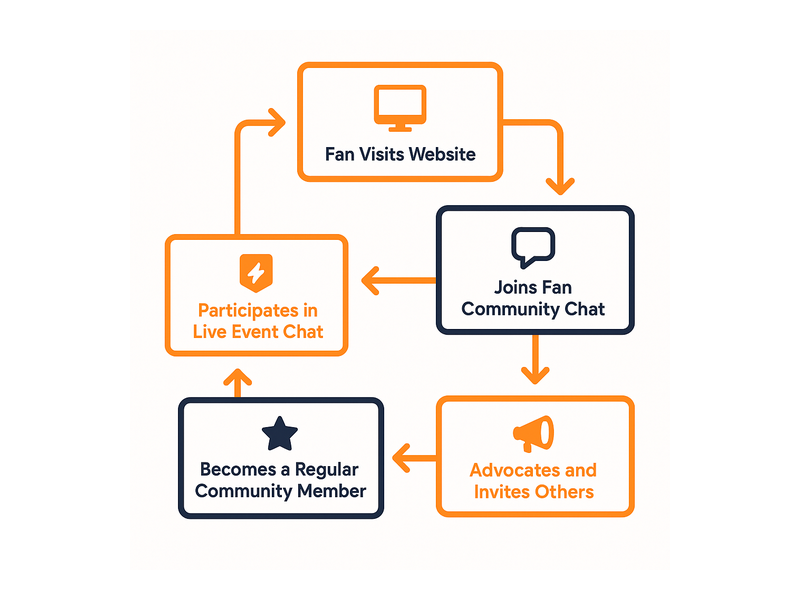
Fan communities also have a compounding effect on traffic. When users know they can find active, real-time conversation on your site, they return more frequently and stay longer per session. A fan community chat widget becomes a retention engine — and for publisher and media business models, session depth directly impacts ad revenue, subscription conversion, and brand partnership value.
What a Fan Community Chat Widget Should Deliver
Not every chat tool is built for fan communities. The right fan community chat widget needs to handle volume, energy, and moderation simultaneously — because fans are passionate, and passionate users generate both great conversations and management challenges.
Here is what to look for when evaluating a community chat solution:
- Real-time messaging with minimal latency — fans want instant reactions, not a ten-second delay
- Moderation tools that let admins manage high-traffic conversations without drowning in noise
- Custom branding so the chat looks like part of your website, not a third-party bolt-on
- Mobile-responsive design — a large percentage of fans engage from their phones during live events
- Role-based access — admins, moderators, VIP fans, and general users should all have different permissions
- Scalability — your fan community chat widget needs to handle hundreds or thousands of simultaneous users during peak events
- Easy embedding — no heavy development lift to get it live on your pages
The platforms that deliver on all of these points are rare. RumbleTalk is built specifically for high-engagement, live-event environments, making it one of the strongest options for media brands and fan site operators.
How RumbleTalk’s Fan Community Chat Widget Works
RumbleTalk is a group chat platform purpose-built for websites and live events. Setting up a fan community chat widget takes minutes: create your chat room, customize the design to match your brand, and embed a single JavaScript snippet on any page of your website. No backend development is required and no server infrastructure needs to be managed.
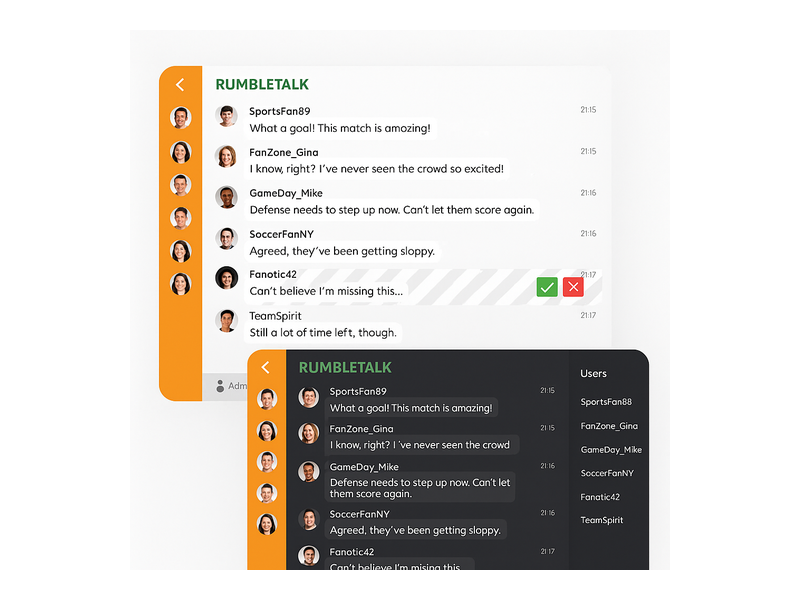
Once embedded, the fan community chat widget creates a persistent, moderated group chat room that your audience can join and participate in immediately. Each user gets an avatar and a display name. Admins can monitor conversations in real time, pin important messages, mute disruptive users, and enable moderated Q&A mode for structured sessions like press conferences or fan meet-and-greets.
One of the most powerful features is Admin Mode, which places every incoming message into a moderation queue before it goes live. This is ideal for live events where you want to ensure only appropriate, on-topic content gets published. Moderators can approve or reject messages with a single click — a green checkmark to publish, a red X to discard.
The widget is fully customizable. You can match colors, fonts, and layout to your website’s design system. Display it as a sidebar panel, a full-page chat room, or a floating pop-up widget — whatever fits your site’s user experience. For fan communities that need an open, public-facing social space where members can register, build profiles, and participate in ongoing group conversations, RumbleTalk’s Social Chat product is the natural fit.
Use Cases: Where a Fan Community Chat Widget Drives Engagement
The versatility of a fan community chat widget means it works across a wide range of media and entertainment contexts. Here are the most common and highest-impact deployment scenarios.
Sports Fan Sites and Match Threads
Sports fans want to react in the moment — a goal, a controversial call, a stunning comeback. A fan community chat widget embedded directly on your match thread or live blog gives them a place to do that without leaving your site. Real-time chat during live sports keeps fans engaged throughout the full event, dramatically reducing bounce rates and extending session duration. When the game ends, the conversation continues — and so does your traffic.
Gaming Communities and Esports Platforms
Gaming communities are some of the most active online groups. Whether you are streaming, hosting tournament brackets, or running a game wiki, a community chat widget gives your gaming audience a persistent home base. Players can coordinate strategies, celebrate wins, and build relationships — all inside your platform rather than a third-party Discord server you do not control.
Music and Artist Fan Clubs
Music fan clubs are built on passion and personal connection. When an artist drops new music, announces tour dates, or goes live on your platform, a fan community chat widget becomes the virtual venue where fans celebrate together. You can use Moderated Q&A mode for structured artist listening parties or exclusive fan sessions, giving members a premium, controlled interaction experience that deepens loyalty to both the artist and your platform.
TV and Entertainment Recap Sites
Second-screen experiences are a growing format for entertainment publishers. If you run a TV recap or entertainment news site, embedding a fan chat widget on episode pages lets fans discuss plot twists, share theories, and debate character decisions in real time. This keeps them on your site for the duration of a conversation instead of heading to Reddit — and creates organic, user-generated content that enriches your pages.
News and Media Communities
News publishers with loyal readerships can use a fan community chat widget to give regular readers a members-only space to discuss current events. This deepens reader loyalty, differentiates your platform from generic news aggregators, and provides a valuable community benefit that supports subscription models and premium tier offerings.
For a deeper look at how to structure and grow your online community, the post on Community Building Playbooks: How to Turn Your Website Chat into a Loyal Audience provides proven strategies and frameworks that work across all of these use cases.
Moderation at Scale: Keeping Your Fan Community Chat Safe
Fan communities can get heated. Sports rivalries, controversial content drops, and high-traffic live events all create conditions where moderation becomes critical. A fan community chat widget without proper moderation tools quickly becomes unusable — or, worse, a reputational liability for your brand.
RumbleTalk takes moderation seriously and gives admins a full suite of controls to manage community chat at any scale:
- Message queue (Admin Mode): Every message must be approved before it appears in the chat. Ideal for live events, press Q&As, and high-stakes community sessions.
- User muting and banning: Disruptive users can be silenced or removed instantly without interrupting the flow of conversation for everyone else.
- Profanity filters: Automatic filtering blocks inappropriate language before it ever reaches the public chat stream.
- Slow mode: The built-in rate limiter prevents spam floods during high-activity moments, keeping the conversation readable and civil.
- Role-based permissions: Assign moderator roles to trusted community members who can help manage conversations alongside your internal team.
These tools make it possible to run a fan community chat widget at scale — whether you have fifty users in the room or five thousand. The moderation infrastructure scales with your audience so that your team never loses control of the conversation, even during your biggest events.
For step-by-step guidance on configuring your moderation settings and managing the admin panel, visit the RumbleTalk Knowledge Base: Getting Started guide.
Easy Embedding and Integration for Any Website
One of the biggest barriers to adding a fan community chat widget is perceived technical complexity. Many platforms appear to require custom server infrastructure, API integrations, or engineering resources that small and mid-size media companies simply do not have. RumbleTalk eliminates that barrier entirely.
The embed process is straightforward:
- Create your chat room in the RumbleTalk dashboard
- Customize your branding — colors, chat name, avatar styles, and layout
- Copy the embed snippet
- Paste it into any page of your website
The fan community chat widget works on WordPress, Squarespace, Wix, Webflow, custom HTML sites, and virtually any other web publishing platform. There is no database to manage, no server to maintain, and no developer required for initial setup. Most media brands and fan site operators are live within an hour of signing up.
If your use case requires deeper customization — such as SSO login integration, CRM sync, or API-level control over user permissions — RumbleTalk provides full developer access. But for the vast majority of fan community deployments, the no-code embed is all you need to launch a professional, fully featured community chat experience.
The widget is also designed to load fast and perform reliably under high concurrent usage, so your fan community chat widget will not slow down your site or fail during the peak traffic moments that matter most — the final minutes of a match, a new album drop, or a major announcement.

Measuring Engagement in Your Fan Community Chat
A fan community chat widget is not just a social feature — it is a data source. Every conversation your audience has inside the chat tells you something valuable: which topics drive the most engagement, when your most active users are online, which events generate the highest message volume, and which content formats spark the most discussion.
RumbleTalk provides built-in analytics for chat room activity. You can track message volume over time, monitor peak usage periods, and identify which rooms or event threads are most active. This data feeds directly into your content and programming strategy. If fans light up the community chat during live streams but go quiet on static editorial pages, you know where to invest your production budget.
Fan communities that leverage these insights grow faster and retain members more effectively. They know when to schedule events, how to structure their content calendar around peak engagement windows, and which fan segments are most active and most valuable to retain. Over time, a fan community chat widget becomes not just a product feature, but an engine for audience intelligence and strategic decision-making.
The data is also useful for sponsor and partner conversations. Brands want to reach engaged, passionate audiences — and being able to demonstrate thousands of active chat messages per event is a compelling proof point for sponsorship packages, branded activations, and co-marketing deals.
Start Building Your Fan Community Today
Your fans are already talking. The only question is whether they are doing it on your platform — where you control the experience, own the data, and build the relationship — or on someone else’s.
RumbleTalk’s fan community chat widget gives you everything you need to make your website the hub of your fan community: real-time group chat, powerful moderation tools, seamless embedding, deep customization, and a scalable infrastructure that grows with your audience. Whether you are launching a new fan site or adding a community layer to an established media property, the fan community chat widget is the fastest path from visitors to community members.
Ready to bring your fan community to life? Visit rumbletalk.com to start your free trial and have your fan community chat widget live on your site today.