
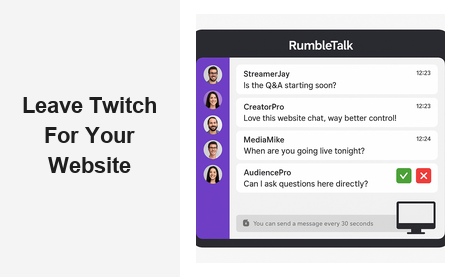
Why More Creators Are Ready to Leave Twitch for Their Website
The decision to leave Twitch for your website is one of the smartest moves a creator, media brand, or event organizer can make in 2026. Twitch built its reputation as a go-to streaming hub, but for businesses and professionals who rely on live audience interaction, the platform’s limitations have become impossible to ignore. Algorithm changes, sudden policy shifts, zero data ownership, and a complete lack of branding control have pushed countless creators to ask the same question: what if the community lived somewhere I actually own? This post walks you through exactly why the move makes sense, what you gain, and how RumbleTalk makes the transition straightforward.
The Real Cost of Staying on Twitch
When you build your live community entirely on Twitch, you are building on rented land. The platform can change its rules overnight — revenue share adjustments, content restrictions, account suspensions, or simply burying your channel in a new algorithmic ranking. You have no recourse and no safety net.
Beyond platform risk, there is the data problem. Every viewer who watches your stream on Twitch is Twitch’s user, not yours. You cannot email them, segment them, retarget them, or build a loyalty program around them. The moment you decide to leave Twitch for your website, you reclaim that relationship entirely.
Then there is brand consistency. On Twitch, every channel looks broadly the same. Your logo sits in a corner, your brand colors are an afterthought, and your chat is surrounded by Twitch’s own navigation, ads, and competitor recommendations. A website chat puts your brand front and center, every single session.
Platform Dependency Is a Business Risk
Any business that has watched a social platform deprecate a key feature overnight understands platform dependency risk. Twitch has already restructured its partner program multiple times, removing income streams creators had built entire businesses around. Choosing to leave Twitch for your website is not just a preference — it is sound risk management. Owning your live chat infrastructure means no third party can pull the rug from under your community.
What You Gain When You Leave Twitch for Your Website
The benefits of moving your live chat to your own website go far beyond simply avoiding Twitch’s downsides. You gain a set of capabilities that are simply not available on any third-party platform.
Full Moderation Control
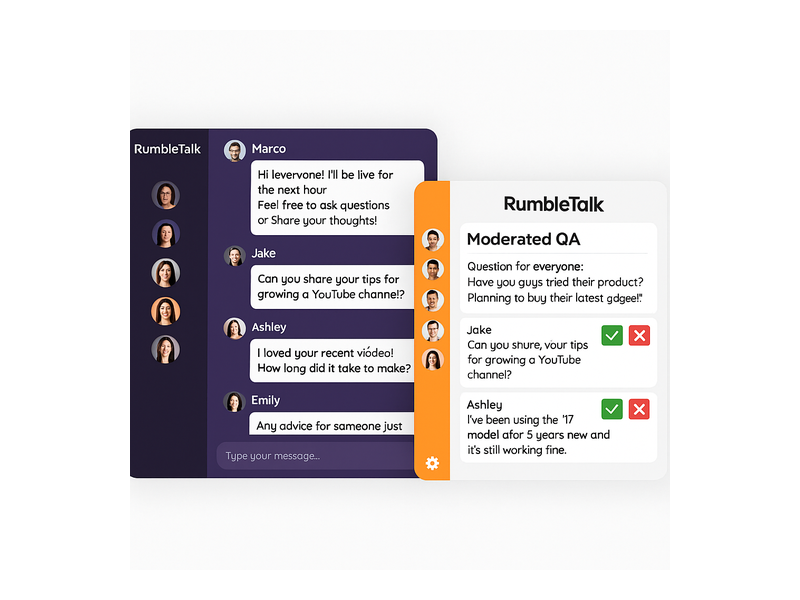
Toxic chat ruins live events. On Twitch, moderation tools are limited and reactive. When you leave Twitch for your website and embed RumbleTalk, you get a full Moderated Q&A mode where every message sits in a queue before it reaches the public feed. Admins approve or reject questions with a single click. You can also enable slow mode, ban users instantly, mute the entire audience, or switch to broadcast-only mode — all in real time, without needing a team of moderators watching a chaotic feed.
Owned Audience Data
When your community chats on your website, you control the registration, the login, and the data. With RumbleTalk’s Members Chat, you can require users to authenticate with your own membership system before they can participate. That means every active chatter is a known contact in your database — not an anonymous Twitch handle you will never see again.
Branded, Professional Experience
RumbleTalk chat rooms are fully customizable. Colors, fonts, logos, and chat themes match your website’s identity. When viewers arrive at your live event page, they see your brand everywhere — not a purple Twitch header with competitor ads nearby. This professionalism matters enormously for media companies, corporate event organizers, and education platforms where trust and brand equity are non-negotiable.
RumbleTalk Features Built for Creators Who Leave Twitch for Their Website
RumbleTalk is not a generic chat widget. It is an engagement platform purpose-built for live events, broadcasts, and online communities. Here is how each product maps to the needs of someone making this move.
Group Chat
Group Chat is the foundation. Embed it on any page of your website and it instantly becomes your live audience hub. Multiple participants can chat in real time, admins have full control, and the experience works on desktop and mobile without any app download. This is the direct replacement for Twitch’s chat sidebar — except it lives on your domain, under your rules.
Moderated Q&A
One of the biggest pain points for creators on Twitch is managing question floods during live sessions. RumbleTalk’s Moderated Q&A solves this by holding all incoming questions in a private queue. The host or moderator reviews each question and chooses which ones appear publicly. This is indispensable for panel discussions, expert interviews, town halls, and any session where the quality of questions matters. It is a capability Twitch simply does not offer.
Members Chat
For subscription communities and membership sites, Members Chat integrates with your existing login system via SSO. Only paying or verified members can join the conversation. This creates an exclusive, high-value space that strengthens your membership proposition — something completely impossible to replicate on Twitch where anyone with an account can join your chat.
Social Chat
Social Chat allows participants to log in using their social media accounts, reducing friction for new visitors while keeping your chat populated with real, identifiable people rather than anonymous handles. For creators who want an open but accountable community, this strikes the right balance.
Private Chat
Live events often involve VIP tiers — sponsors, premium subscribers, or backstage guests who deserve a separate, exclusive conversation space. Private Chat creates one-on-one or small-group chat rooms alongside your main public feed. Twitch has no equivalent feature for this kind of tiered access.
Queued Chat
Queued Chat enforces a structured, turn-based conversation where each participant gets a defined time slot to speak or type. This is ideal for high-volume events where everyone deserves a fair chance to contribute — product launches, community AMAs, or large-scale virtual conferences where chat chaos would otherwise derail the session.
For creators in the broadcast and podcast space, RumbleTalk’s broadcast and podcast chat solution brings all of these tools together in a single platform designed specifically for live audio and video content.
Who Should Leave Twitch for Their Website Right Now
Not every Twitch user is in the same situation, but several categories of creators and organizations have the most to gain by making this move immediately.
Media Companies and News Broadcasters
News outlets and media brands that run live Q&A segments, audience call-ins, or interactive broadcasts cannot afford to send their audience to a third-party gaming platform. When you leave Twitch for your website, your live chat becomes a direct extension of your editorial brand. Viewers stay on your domain, consume your content, and interact in an environment you control completely.
Education Platforms and Online Course Creators
E-learning providers need structured, distraction-free environments. A Twitch chat full of emotes and gaming culture is the wrong context for serious learning. RumbleTalk’s moderation tools — especially Moderated Q&A and Members Chat — create the focused, respectful discussion space that online education requires. Students engage more when they know their questions will be seen and answered, not buried in a flood of reactions.
Event Organizers and Conference Producers
Virtual conferences, product launches, trade shows, and corporate events all need professional chat infrastructure. The decision to leave Twitch for your website is particularly obvious here: no corporate sponsor wants their brand associated with a gaming streaming platform, and no enterprise client wants their attendees routed off-domain.
Membership Communities and Creator Subscription Models
If you run a paid community — whether it is a Patreon-style subscription, a private mastermind group, or a professional network — your premium members deserve a premium experience. Hosting their live chat on Twitch sends exactly the wrong signal. Your own website, with RumbleTalk embedded, tells members they are in an exclusive, professionally managed space.
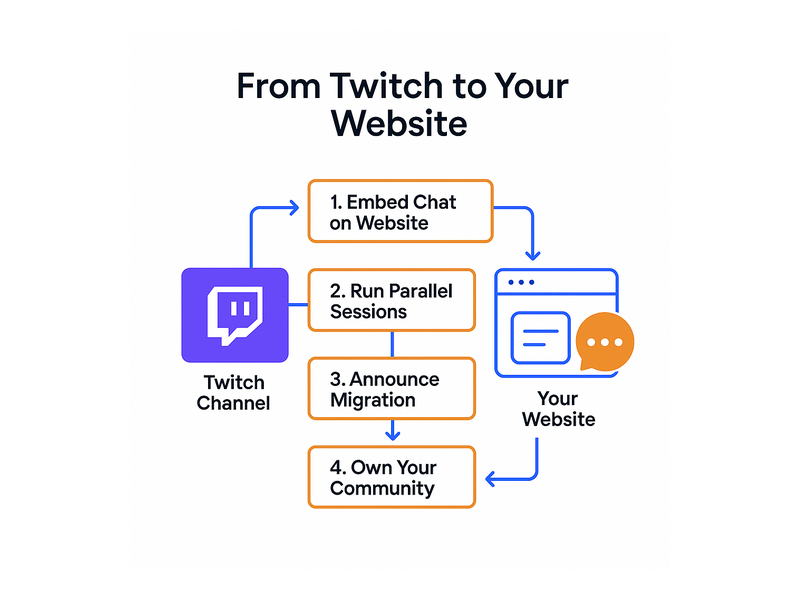
The Migration Playbook: 4 Steps to Leave Twitch for Your Website
The practical question for most creators is not whether to make the move but how. Here is a proven four-step playbook.
Step 1: Set Up Your Website Chat First
Before you announce anything to your audience, get RumbleTalk running on your website. Embed the chat on your dedicated live events page, customize the appearance to match your brand, and test the moderation tools. The getting started guide in the RumbleTalk knowledge base walks you through the setup process in minutes. Do not rush the migration while your chat infrastructure is still being configured.
Step 2: Run Parallel Sessions
For two to four weeks, run your live sessions on both Twitch and your website simultaneously. Keep your Twitch stream active but begin directing the highest-value interactions — Q&A, exclusive conversations, member-only rooms — to your website chat. Let your audience experience both and feel the difference in quality and control. This parallel phase also gives you time to work out any technical issues before you make the full switch.
Step 3: Announce the Transition
Be transparent with your audience about why you are making the move. Explain that your website chat gives them a better experience: no algorithm, no ads for competing channels, a cleaner moderation environment, and exclusive features like private rooms or members-only sessions. Most loyal community members will follow you anywhere if you communicate the value clearly. Frame it as an upgrade, not a departure — because when you leave Twitch for your website, that is exactly what it is.
Step 4: Make Your Website the Primary Hub
Wind down your Twitch activity and fully commit to your website as the home of your live community. Update your social media profiles, email newsletters, and video descriptions to direct people to your website chat. Consider making your website chat a cornerstone of a broader content strategy — live events, replays, community forums, and membership tiers all anchored to a single domain you own.

The Long-Term Value of Owning Your Community
The compounding benefit of choosing to leave Twitch for your website is community equity. Every member who registers on your platform, every conversation that happens in your chat, every Q&A session you moderate — all of it builds an asset that belongs to you. Compare that to years of streaming on Twitch, where the audience relationship is mediated entirely by a third-party platform that can change the terms at any moment.
Brands that own their audience have a measurable competitive advantage. They can launch new products to a warm, known audience. They can run exclusive events that drive membership upgrades. They can build loyalty programs informed by real engagement data. None of this is possible when your community lives on someone else’s platform.
RumbleTalk also grows with you. A solo creator can start with a simple Group Chat embed and scale up to a full suite of Moderated Q&A, Members Chat, and Queued Chat as their events get larger and more complex. The platform handles audiences of any size without any infrastructure management on your part.
For a real-world example of how this community ownership model plays out in practice, read about how live audio creators are building loyal audiences in Radio Audience Chat: Turn Listeners Into a Community — the same principles apply directly to any creator making the move from a third-party platform to their own website.
Start the Move: Leave Twitch for Your Website Today
The window to build a truly owned, truly branded, truly moderated live community is open right now. Every week you spend building on Twitch is another week of audience data, engagement history, and community equity handed to a platform you do not control. The tools to leave Twitch for your website are ready and proven — RumbleTalk’s full suite of Group Chat, Moderated Q&A, Members Chat, Social Chat, Private Chat, and Queued Chat gives you everything you need to run professional live sessions on your own domain.
The move is simpler than you think, the audience will follow, and the long-term value of owning your community compounds from day one. There has never been a better time to take control.
Ready to make the switch? Visit RumbleTalk to explore the platform, set up your first chat room, and start bringing your audience home.