
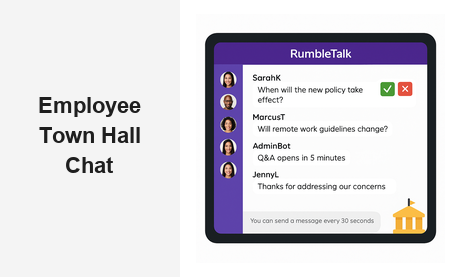
An employee town hall chat is one of the most direct ways to connect leadership with the entire workforce in real time — but only if you have the right platform to make it interactive, organized, and scalable. Whether your company has 50 employees or 50,000, running a productive town hall requires more than a video stream. It requires a live chat solution that handles high-volume conversations, enforces structure, and ensures every voice gets heard without derailing the agenda.
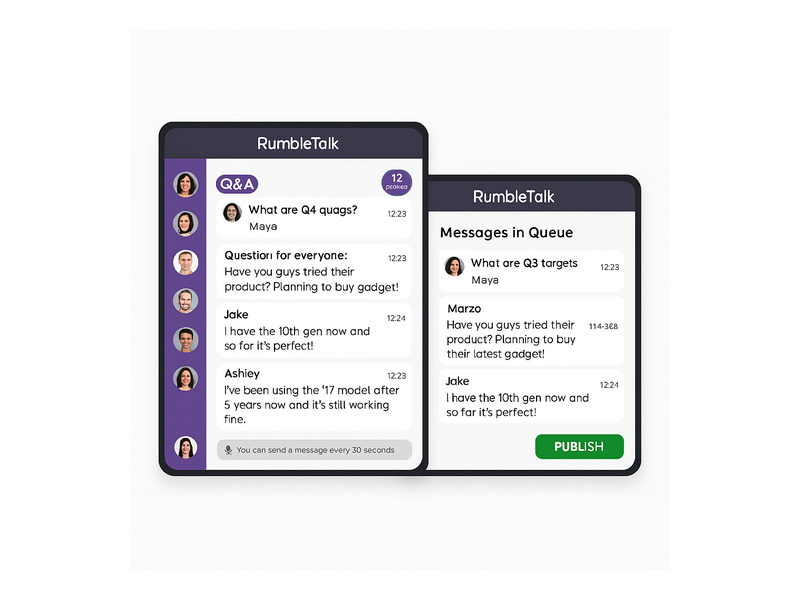
RumbleTalk is purpose-built for exactly this kind of high-stakes, large-audience live communication. From moderated Q&A to authenticated group messaging, RumbleTalk gives HR teams, internal communications managers, and executive teams the tools to run a town hall that employees actually engage with — not just another all-hands meeting where nobody speaks up.
Why Employee Town Hall Chat Changes the All-Hands Dynamic
The traditional town hall format — a presenter talks, employees listen, a handful of pre-screened questions get answered — leaves most of the room voiceless. When you add an employee town hall chat layer, the dynamic shifts entirely. Employees can ask questions in real time, see their peers reacting, and watch leadership respond to live input without waiting for a designated Q&A window that runs out of time.
This creates a fundamentally different kind of engagement. Research consistently shows that employees who feel heard during company meetings report higher satisfaction and stronger trust in leadership. A live town hall chat gives every employee — regardless of seniority, location, or confidence level — an equal opportunity to participate. Junior staff who wouldn’t raise their hand in a room full of executives will type a question. Remote workers in different time zones can follow along and contribute without feeling like an afterthought. Global teams stop experiencing the all-hands as something that happens to them and start experiencing it as something they’re part of.
But raw participation is only half the picture. Structure matters just as much. Without moderation, a live chat during a 500-person all-hands can dissolve into noise within minutes. That’s why the most effective employee town hall chat platforms combine open discussion with controlled moderation — giving leadership the confidence to open the floor without losing the thread of the conversation.
What to Look for in an Employee Town Hall Chat Platform
Not every chat tool is built for the demands of a large-scale internal meeting. Before committing to a platform for your next company-wide event, evaluate it against these non-negotiable criteria:
- Scalability: Can it handle hundreds or thousands of simultaneous participants without lag, dropped messages, or UI breakdown?
- Moderation controls: Can admins approve messages before they go live, mute individuals, pause the entire chat, or queue questions for the presenter?
- Authentication: Can you restrict access to verified employees only — with no anonymous outsiders observing or interfering?
- Embed flexibility: Does it integrate cleanly with your existing intranet, company website, or virtual event platform?
- Mobile support: Can employees join and participate from any device without installing a dedicated app?
- Admin visibility: Do moderators get a real-time view of the message queue and pending submissions before they go public?
RumbleTalk checks every one of these boxes. It’s a fully embeddable virtual events chat solution that scales from small leadership briefings to company-wide broadcasts — and it gives administrators granular control over who can say what, and when, without requiring any engineering support to configure.
How RumbleTalk Powers Your Employee Town Hall Chat
RumbleTalk offers several purpose-built chat modes that map directly to the different formats a town hall can take. Understanding which mode fits your agenda is the first step to running a session that feels effortless for both organizers and attendees.
Group Chat for Open Discussion
RumbleTalk’s Group Chat is the foundation of any employee town hall chat setup. It supports large numbers of concurrent users, each identified by username or profile photo, and enables the full group to see and respond to messages in real time. During a town hall, this mode works best for open discussion phases — when leadership wants unfiltered, spontaneous input from the audience.
Admins can monitor the conversation live and remove off-topic or inappropriate content immediately. The chat room can be set to read-only mode during the main presentation, then opened for live interaction during designated segments. This gives presenters full control over the event flow without sacrificing the energy that comes from real participation.
Moderated Q&A for Structured Questioning
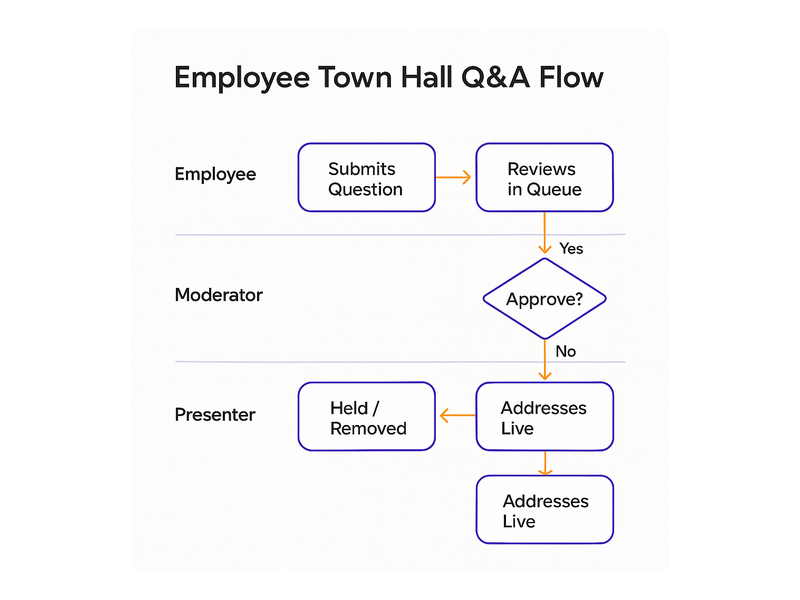
For larger town halls where unfiltered chat would overwhelm the conversation, RumbleTalk’s Moderated Q&A mode is the right tool. Every message submitted by an employee is held in an admin queue before being published to the room. The moderator — typically someone from HR or internal communications — reviews each submission and decides which ones go live for the presenter to address.
This setup is essential for sensitive topics like company restructuring, executive transitions, financial results, or policy changes. It ensures the conversation stays productive and that leadership isn’t blindsided by inappropriate or off-topic submissions. Employees still feel heard because they can see their questions submitted and tracked — they’re not typing into a void with no acknowledgment.
The RumbleTalk knowledge base guide on admin mode covers muting, queue management, and moderator permissions in detail — a useful read before configuring your first moderated event.
Members Chat for Authenticated Employees
Internal security matters in a company town hall. You don’t want external parties observing — or worse, participating in — a confidential all-hands session. RumbleTalk’s Members Chat solves this by requiring authenticated login before a user can join the room. Employees sign in with their corporate credentials via SSO or a custom integration, and the system verifies identity before granting access.
This means only verified employees can join the employee town hall chat. No anonymous guests, no accidental public access. It’s particularly critical for regulated industries — finance, healthcare, legal — where internal communications carry compliance implications and sensitive disclosures must remain strictly internal.
For a practical overview of how SSO authentication integrates with RumbleTalk chat rooms, see the post on Chat SSO Integration for Websites — the same authentication approach applies directly to secure internal employee chat rooms.
Queued Chat for Orderly Live Q&A
When your town hall includes a segment where the presenter speaks answers aloud, you need a queue — not a simultaneous flood of messages. RumbleTalk’s Queued Chat mode lets employees submit questions that are placed into a visible, ordered queue. The presenter works through submissions one at a time, creating a structured and fair process where no single department or individual monopolizes the floor.
This format works exceptionally well for executive AMA sessions, post-earnings briefings with staff, or onboarding town halls where new hires submit questions to department heads. It brings the discipline of a formal Q&A to the accessibility of live chat.
Best Practices for Running an Employee Town Hall Chat
Even the best platform won’t save a poorly planned event. A successful employee town hall chat depends as much on preparation and facilitation as it does on technology. These are the practices that separate forgettable all-hands meetings from ones employees actually reference weeks later.
Before the Town Hall
- Set expectations in advance: Tell employees in your pre-event communications exactly how the chat will work — what mode you’re using, what questions are appropriate, and how moderation will function. Employees who understand the format engage more confidently.
- Configure and test early: Set up moderator accounts for your HR or communications team at least 48 hours before the event. Test the embed on your intranet or event page from multiple devices and browsers. Don’t discover the mobile view is broken five minutes before the CEO starts speaking.
- Seed the conversation: Prepare three to five opening questions or prompts that moderators can inject early to warm up the room and signal to quieter employees that participation is genuinely welcome.
- Authenticate attendees: Use RumbleTalk Members Chat to restrict access to verified employees. This also gives you an accurate participation count — useful for internal reporting and to demonstrate engagement metrics to leadership.
During the Town Hall
- Assign dedicated moderators: Never ask the presenter to monitor the chat while speaking. Assign at least one moderator — two for events over 300 people — to manage the queue, approve messages, and surface the most relevant questions to the presenter via a private channel.
- Pace the interaction deliberately: Use read-only mode during dense presentation segments and open the chat at planned intervals. This prevents distraction while preserving the energy that comes from real-time participation windows.
- Verbally acknowledge the chat: Have the presenter or a co-host regularly reference what’s coming through — “We’re seeing a lot of questions about the Q3 roadmap in the chat” — to reinforce that the conversation is being read, not just logged.
- Moderate proactively: In a large employee town hall chat, the message volume can spike fast. Moderators should be positioned to act within seconds — removing off-topic content before it derails the thread.
After the Town Hall
- Share the transcript: Export and distribute the chat log to employees who couldn’t attend live. This creates an accessible record of what was discussed, what questions were raised, and what commitments leadership made — valuable for accountability and future reference.
- Follow up on unanswered questions: If moderation meant some submissions didn’t receive a live answer, publish a written FAQ response within 48 hours. Employees notice when their questions disappear without acknowledgment. Closing that loop builds trust.
- Measure and improve: Track participation metrics — how many employees submitted at least one message, peak concurrent users, most-discussed topics — and use a brief post-event survey to gather qualitative feedback on the chat experience.

Employee Town Hall Chat Use Cases Across Industries
The employee town hall chat format applies well beyond the traditional corporate all-hands meeting. Here are the real-world scenarios where organizations are using live, moderated chat to run more effective internal events:
Post-Acquisition Integration Briefings
When two companies merge, uncertainty runs high and rumors spread fast. A live all-hands with an embedded town hall chat gives leadership a real-time channel to address employee concerns, while moderation ensures the conversation stays constructive. Employees from both legacy organizations can participate equally, and the chat transcript becomes an official record of the messaging shared during the integration period — reducing the risk of conflicting narratives spreading through informal channels.
Quarterly Business Reviews with All Staff
Finance and operations leaders presenting quarterly results can use the Queued Chat mode to field structured questions from employees across every department. Rather than cutting the Q&A window short due to time constraints, the queue ensures every submission is visible and tracked — and any question not addressed live gets a written follow-up in the post-event document.
Global All-Hands for Distributed Workforces
For organizations with employees across multiple time zones, a live employee town hall chat runs alongside the video stream and gives remote participants an equal voice. An engineer joining from London and a designer calling in from Singapore both have the same ability to submit a question, react to leadership responses, and engage with colleagues — without the awkwardness of talking over a video call with 400 people on it.
Executive AMA Sessions
Ask Me Anything sessions with the CEO or senior leadership work exceptionally well in the Queued Chat format. Employees submit questions — optionally anonymously — and the executive works through the queue in order. The format generates meaningful goodwill because it signals genuine openness. There’s no perception that only friendly questions are being answered when employees can see the full queue and the order in which submissions are addressed.
HR Policy Announcements
When announcing significant policy changes — return-to-office guidelines, benefits updates, restructuring plans — HR teams can use Moderated Q&A to field employee questions in a controlled environment. Moderation prevents misinterpretation from snowballing in real time, and HR gets the opportunity to correct misconceptions before they calcify into workplace rumors.
Why RumbleTalk Is the Right Platform for Your Next Town Hall
Many organizations default to the chat features built into their video conferencing tools — but these were designed for small-team meetings, not company-wide broadcasts. They lack robust moderation queues, authenticated access controls, and the ability to embed into a custom intranet or event page. When you scale a standard video chat to 500 or 1,000 employees, the experience breaks down fast.
RumbleTalk was designed from the ground up for live, moderated, large-audience interaction. Its admin controls are intuitive enough for non-technical HR teams to manage without IT involvement. Its embed options satisfy enterprise IT requirements — from simple iframe embeds to API-driven integrations. It performs consistently at scale, works on any device, integrates with SSO systems, and gives event organizers a real-time view of everything happening in the room.
Most importantly, RumbleTalk transforms the town hall from a one-way broadcast into a genuine two-way conversation. That shift is what employees actually want — and it’s what drives the engagement, retention, and trust metrics that matter to HR and leadership alike.
Start Your Employee Town Hall Chat With RumbleTalk
If your organization is ready to move beyond passive all-hands presentations and build a genuinely interactive employee town hall chat experience, RumbleTalk is the platform to do it on. Set up your first chat room in minutes, choose the mode that fits your event format, and give your workforce a voice they’ll actually use — in every town hall, from now on.
Visit rumbletalk.com to explore plans, request a live demo, or start a free trial today. Your next all-hands doesn’t have to be a monologue.