
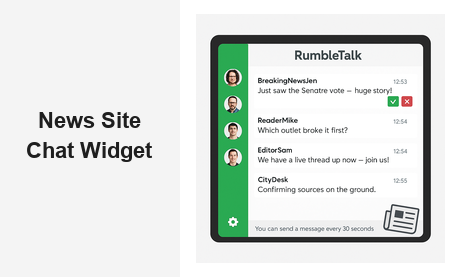
If you run a digital publication or online newsroom, adding a news site chat widget to your platform can fundamentally change how readers interact with your content. Instead of consuming articles passively and moving on, your audience can discuss breaking stories, ask editors questions, and build a loyal community — all in real time, directly on your site. In an era when reader loyalty is harder to earn than ever, a live chat widget gives your publication a competitive edge that no algorithm or ad spend can replicate.
Why a News Site Chat Widget Transforms Reader Engagement
The modern news landscape is fiercely competitive. Readers have dozens of sources available at any moment, and loyalty is earned by publications that make audiences feel heard and connected. A news site chat widget creates that connection by turning your articles into living conversations.
Consider a regional news outlet that embeds a chat room on its election night coverage page. As vote counts roll in, readers discuss candidates, share local observations, and ask reporters live questions. The editorial team uses a moderated queue to surface the most substantive reader contributions on-air. That single feature keeps visitors on-page four times longer than a static article — and signals strong user intent to both advertisers and search engines.
A live chat room also reduces the gravitational pull of social media. When readers want to react to your stories, they often leave your domain to post on Twitter or Reddit. A news site chat widget keeps that conversation on your property, building first-party community data that belongs to your publication — not to a third-party platform.
The Business Case for Live Chat on News Sites
News publishers face pressure from multiple directions: declining ad revenues, subscription fatigue, and platform dependency. A well-deployed chat widget addresses all three simultaneously.
- Longer session times: Live discussion anchors readers to your page well beyond the article itself, improving engagement metrics that matter to advertisers.
- Return visits: Readers come back to follow conversations, check moderated Q&A answers, or participate in the next scheduled live coverage event.
- First-party data: With member registration, you capture authenticated user profiles far more valuable than anonymous impressions for ad targeting or subscription upsells.
- Community differentiation: Your chat room becomes a feature no competitor can replicate simply by publishing more articles.
Key Features to Look for in a News Site Chat Widget
Not all chat solutions are built for the demands of a newsroom environment. When evaluating a news site chat widget, prioritize the following capabilities before making a decision.
Real-Time Moderation Controls
Breaking news attracts strong opinions — and sometimes bad actors. Your chat widget must give editorial teams granular moderation tools: approve messages before they appear publicly, mute disruptive users, ban accounts, set message cooldown timers, and apply profanity filters automatically. For high-stakes coverage such as live political debates or contentious local hearings, a pre-moderation queue is essential. Every incoming message should sit in a staging area until an editor approves it — preventing misinformation from reaching your audience even for a few seconds.
Scalability During Traffic Spikes
News sites experience dramatic traffic surges. A major breaking story can bring ten times normal visitor volume within minutes. Your news site chat widget must scale elastically without requiring your team to provision servers or manage infrastructure. Cloud-hosted solutions handle thousands of simultaneous participants automatically, so your team can focus on journalism rather than DevOps during peak news moments.
Multiple Room Types for Different Contexts
Different editorial situations call for different chat configurations. A live election broadcast needs a fully moderated Q&A where anchors control which reader questions appear. A sports live blog might use an open group chat where fans banter freely. A premium subscriber community might require an authenticated members-only room. Look for a news site chat widget that offers multiple room modes switchable from a single admin panel — without requiring separate software for each use case.
Simple Embed for Any CMS
Editorial and product teams at news organizations move fast. Your live chat widget should embed with a single JavaScript snippet — no complex backend integrations, no lengthy CMS plugin configurations. A clean iframe or script tag that drops into WordPress, Drupal, or a custom newsroom platform in minutes is the standard to expect.
Custom Branding
Your chat room should feel like a native feature of your publication, not a third-party tool bolted on. Look for a widget that lets you customize the header, background color, font, and accent colors to match your editorial brand identity precisely.
How RumbleTalk Powers the News Site Chat Widget
RumbleTalk is purpose-built for high-traffic, high-stakes live engagement. Here is how its core room types map directly to newsroom use cases, making it the most versatile news site chat widget available for digital publishers today.
Moderated Q&A for Live Journalism
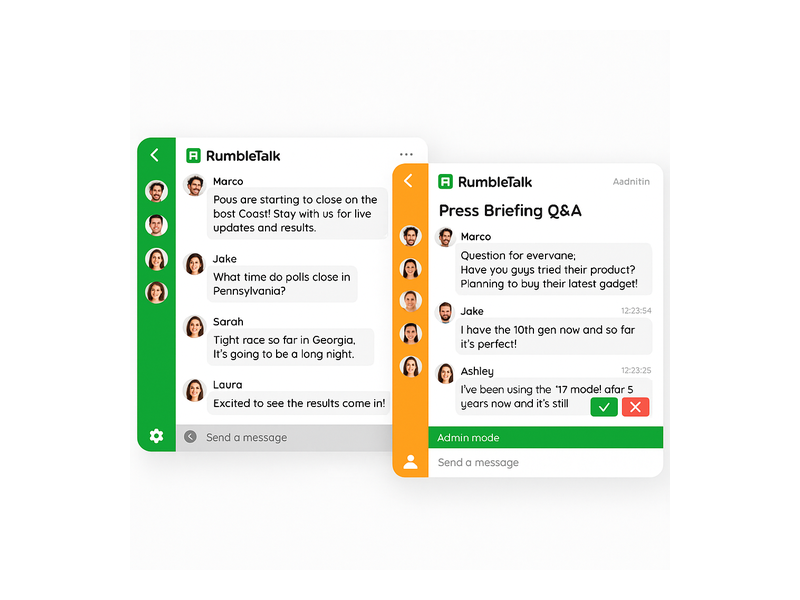
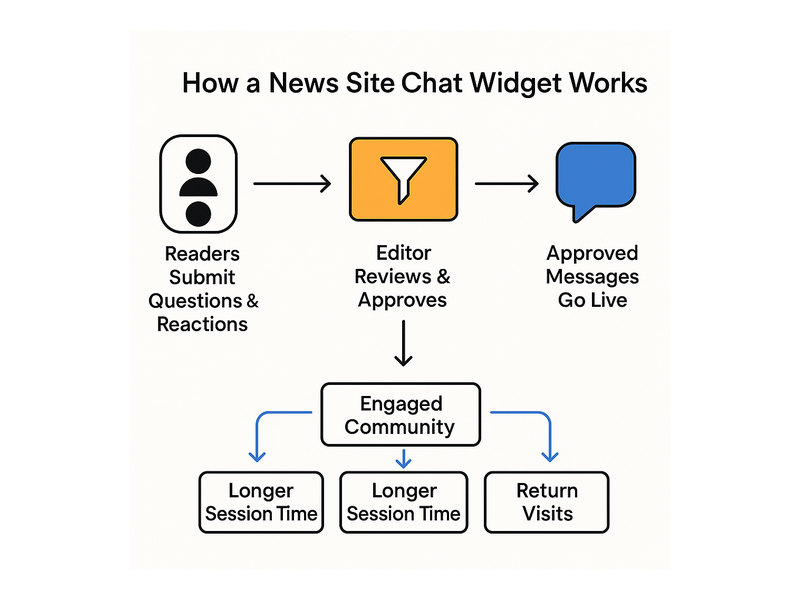
When a prominent politician holds a town hall on your site, or a CEO answers subscriber questions during a live earnings session, RumbleTalk’s Moderated Q&A puts your editorial team in full control. Incoming reader questions stack in a private moderation queue. Editors pick the most newsworthy submissions, discard off-topic or abusive content, and release approved messages to the public feed. The audience only ever sees a curated, professional conversation — protecting your brand while elevating the quality of reader contributions.
Group Chat for Breaking News Coverage
For fast-moving stories — a verdict announcement, a championship game, a product keynote — RumbleTalk’s open Group Chat creates a live pulse alongside your coverage. Readers react in real time, editors pin important updates at the top of the feed, and administrators can grant moderator badges to trusted community contributors. As part of your news site chat widget setup, you can create multiple rooms simultaneously: one per article, one per editorial beat such as politics or sports, or a central community hub that readers return to every day.
Members Chat for Subscriber-Only Communities
Subscription revenue is the lifeblood of independent journalism. RumbleTalk’s Members Chat lets you gate your chat rooms behind a paywall or registration system so only verified subscribers can enter. This raises the quality of conversation and gives paying readers a tangible community perk beyond ad-free articles. Integrate it with your existing authentication system via SSO so subscribers land in the members chat automatically upon login — no separate credential required.
Social Chat for Open Reader Hubs
If you want to build a broad, free reader community — think a comments section, but genuinely engaging — RumbleTalk’s Social Chat creates an open room where registered users engage under their real identities. Social login support means readers can join with a Google or Facebook account in seconds, reducing friction and accelerating community growth from the moment you launch your news site chat widget.
Queued Chat for Expert Interview Sessions
When a subject-matter expert — an economist, a climate scientist, a government official — agrees to answer reader questions live, the Queued Chat mode creates an orderly, structured interview feel. Readers submit questions; the moderator selects the order; the expert answers one at a time. This turns your chat widget into a serious editorial format, not merely a comments box, and gives your publication a recurring live programming format that differentiates your brand.
Private Chat for Sensitive Source Engagement
Investigative journalists sometimes need to communicate privately with sources or tip providers through a secure channel. RumbleTalk’s Private Chat can be deployed alongside your public coverage rooms, giving your newsroom a versatile, all-in-one platform that covers both community engagement and confidential editorial communication.
Setting Up Your News Site Chat Widget: Step by Step
Getting a news site chat widget live on your publication takes less time than writing a feature story. Here is the typical setup workflow using RumbleTalk:
- Create your account: Sign up at rumbletalk.com and select the plan that matches your expected audience size and room requirements.
- Choose a room type: Decide whether your first room will be Group Chat, Moderated Q&A, Members Chat, or another mode. You can change this at any time or run multiple room types in parallel.
- Customize your appearance: Set your publication’s brand colors, upload a logo, and configure the header text to match your editorial identity.
- Copy the embed code: RumbleTalk generates a JavaScript snippet. Paste it into your article template, sidebar widget area, or a dedicated community page in your CMS.
- Configure moderation settings: Set profanity filters, message cooldown timers, and assign moderator roles to editorial staff members.
- Announce and go live: Promote your chat room to readers via email newsletter, social media, or an in-article callout — and watch the community form in real time.
For detailed guidance on managing your room settings and moderating participants, the RumbleTalk Chat Admin Knowledge Base walks through every administrative option in plain language.

Real-World Use Cases: The News Site Chat Widget in Action
Election Night Live Rooms
A regional news outlet embeds a news site chat widget on its election results page. As vote counts update, readers discuss candidates, share local polling station reports, and send questions to anchors. The editorial team uses Moderated Q&A to surface the most substantive questions. Average session time on that page runs four times the normal article dwell time — and the live room becomes a destination in itself, driving social sharing as readers screenshot memorable exchanges.
Sports Live Blogs
A sports section adds a group chat to every live blog. Fans react to goals, fouls, and halftime scores in real time. The sports editor pins key game moments as highlighted messages. The chat room becomes a feature readers bookmark and return to game after game, building a loyal sports community directly on the publication’s own domain rather than ceding that conversation to Reddit threads or sports apps.
Business and Markets Coverage
A financial news site deploys a news site chat widget during earnings season. When a major company reports quarterly results, a live chat room opens where analysts, investors, and engaged readers exchange instant reactions. The moderation team filters spam and off-topic posts, keeping signal-to-noise ratio high. For context on how similar tools serve financial communities, see RumbleTalk’s guide to the Trading Chat Widget and the engagement patterns it supports.
Podcast and Video Companion Rooms
News organizations increasingly produce audio and video alongside text. Embedding a news site chat widget beside a podcast player or live-streamed interview creates a synchronized companion experience: listeners and viewers type their real-time reactions into the chat, creating a shared viewing room that social platforms charge subscription fees to replicate — and that keeps your audience on your property throughout the entire broadcast.
Subscriber Lounges and Membership Communities
Subscription-first publications use Members Chat to create an exclusive reader lounge. Subscribers access an ongoing community room where editors share story tips, respond to reader feedback, and host informal AMAs. This exclusive access becomes a compelling membership perk that drives subscription conversions and measurably reduces churn by deepening the reader-journalist relationship.
Moderation Best Practices for News Chat Rooms
Running a chat widget on a news site comes with genuine editorial responsibility. These best practices help you maintain a healthy community while protecting your brand.
- Pre-moderate high-stakes events: For politically sensitive coverage or rapidly developing breaking news, switch to Moderated Q&A mode so no message goes public without editorial review.
- Assign trained moderators: Designate editorial staff or vetted community members as chat moderators with a published community guidelines document they enforce consistently.
- Set message cooldown timers: Requiring a wait period between messages — the standard “you can send a message every 30 seconds” setting — adds friction that discourages bots and compulsive spammers without inconveniencing genuine readers.
- Apply keyword filters: Automatically flag or withhold messages containing hate speech, slurs, or terms that violate your editorial standards before they ever reach the moderation queue.
- Archive chat transcripts: Save logs from major coverage events. These transcripts can become primary sources for recap articles, reader response pieces, or editorial post-mortems on community engagement.
Measuring the ROI of Your News Site Chat Widget
A news site chat widget is not just a reader experience feature — it is a measurable business investment. Track these key performance indicators to quantify its editorial and commercial impact:
- Average session duration on pages with an active chat room versus pages without
- Pages per session for registered chat participants versus anonymous readers
- Return visitor rate for users who have participated in at least one chat room in the past 30 days
- Subscription conversion rate from readers who engage with Members Chat previews or gated community features
- Newsletter sign-up rate from CTA prompts embedded inside the chat widget itself
Most digital publications that deploy a live chat widget report measurable improvements in dwell time and return visit frequency within the first 90 days — without any changes to content production volume or editorial staffing.
Start Building Your News Community with RumbleTalk
The right news site chat widget is the difference between a publication readers visit and one they belong to. RumbleTalk’s full suite — Group Chat, Moderated Q&A, Members Chat, Social Chat, Private Chat, and Queued Chat — gives editorial teams every tool needed to run professional, scalable, beautifully branded live conversations alongside their journalism, all from a single platform.
Whether you are a solo newsletter operator launching your first community feature or an enterprise newsroom managing simultaneous chat rooms across dozens of live coverage pages, RumbleTalk scales to meet your needs without requiring dedicated engineering resources. Visit rumbletalk.com to start your free trial and embed your first news site chat widget today — your readers are already looking for a place to talk.