
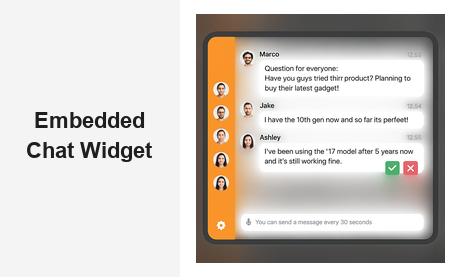
An embedded chat widget is one of the highest-leverage tools a website owner can add to turn passive visitors into an active, engaged community. Whether you run a live event platform, an online community, a media brand, or a trading site, placing a real-time group chat directly on your web pages changes the entire dynamic — from one-way content delivery to live, two-way conversation that keeps your audience on-site and coming back for more.
RumbleTalk is built precisely for this purpose. It gives businesses a fully featured embedded chat widget that installs on any website with a short code snippet, requires no backend infrastructure, and ships with professional-grade moderation tools, six distinct chat modes, and complete design customization — all managed from a simple admin panel.
What Is an Embedded Chat Widget?
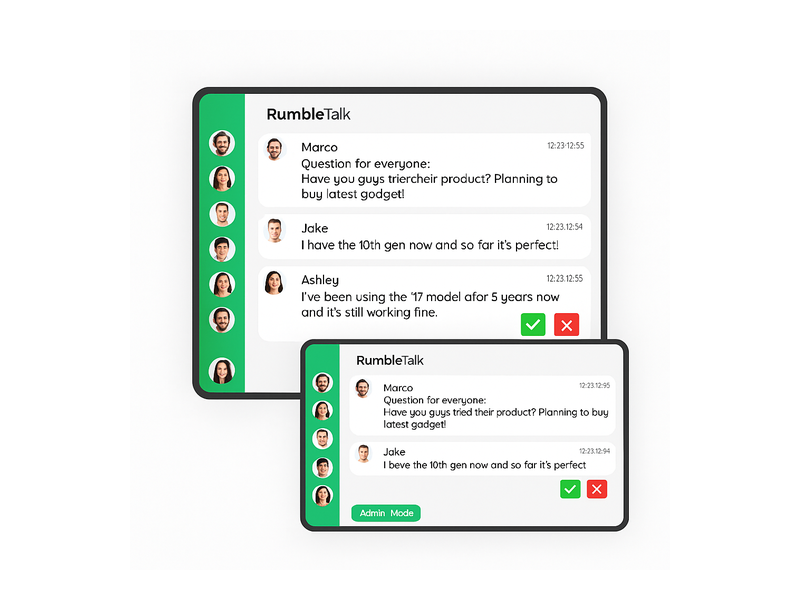
An embedded chat widget is a self-contained live chat interface installed directly on a web page — not a pop-up window, not a redirect to a separate URL, but a real-time conversation panel woven into your site’s own layout. Visitors participate without leaving the page, without creating a separate account on a third-party platform, and without any friction.
For B2B platforms and media companies, that distinction matters enormously. Every redirect or extra click is an opportunity for a user to drop off. An embedded chat widget keeps the conversation exactly where the content is, extending session time, boosting engagement metrics, and giving your audience a compelling reason to return. When chat is native to your page rather than a bolted-on external tool, participation rates go up and community depth grows faster.
The best embedded chat solutions also support moderation — the ability for admins to approve messages before they appear, mute disruptive users, or switch the room into broadcast mode where only designated speakers can post. RumbleTalk ships all of these controls as standard features, not premium add-ons.
Why Businesses Choose an Embedded Chat Widget Over Standalone Tools
Many platforms start with standalone chat tools — a Discord server, a Facebook Group, or a Slack workspace. These work well for internal teams but pull your audience off your own platform and onto someone else’s. You lose your analytics, lose branding control, and lose the ability to set and enforce your own community rules.
An embedded chat widget solves all three problems simultaneously:
- Your branding, your rules: Customize colors, fonts, sidebar design, and chat modes to match your site identity and community standards — not Discord’s.
- Your analytics: Measure engagement directly in your own dashboards rather than trying to infer community health from Discord activity logs.
- Your audience, on your domain: Visitors stay on your site, improving SEO signals like session duration, pages-per-visit, and return visit rate — metrics that matter for organic growth.
RumbleTalk’s embedded chat widget adds a fourth advantage: multiple conversation formats in a single embed. Instead of locking your community into one static format, you can switch between Group Chat, Moderated Q&A, Members Chat, Social Chat, Private Chat, and Queued Chat — without touching your embed code.
Key Features of the RumbleTalk Embedded Chat Widget
Six Chat Modes in One Embedded Widget
Not every event or community needs the same conversation format. RumbleTalk’s embedded chat widget ships with six purpose-built modes that you switch between from the admin panel:
- Group Chat: Open, real-time conversation for all participants — the default mode for communities, live streams, and watch parties.
- Moderated Q&A: Attendees submit questions and admins approve which ones appear. Ideal for webinars, AMAs, and panel discussions where signal-to-noise ratio matters.
- Members Chat: Restrict the room to verified members, subscribers, or logged-in users via SSO. Keeps your premium community exclusive.
- Social Chat: Light-touch participation for broad audiences at virtual events or high-traffic media pages where frictionless access is the priority.
- Private Chat: One-to-one messaging within the same widget, letting participants connect directly without leaving the main room.
- Queued Chat: Messages are held in a moderator queue and released in a controlled sequence — ideal for high-stakes live events where host control is non-negotiable.
Switching modes takes a single click and applies instantly. This flexibility makes RumbleTalk’s chat widget suitable for an unusually wide range of industries and event formats within a single platform subscription.
Deploy in Minutes on Any Website Stack
One of the biggest practical advantages of an embedded chat widget from RumbleTalk is how quickly it goes live. After creating your room in the admin panel, you receive a short JavaScript snippet that you paste into your page — that is the entire integration for basic use. No server to configure, no database to provision, no DevOps work required.
The widget is compatible with WordPress, Webflow, Wix, Squarespace, Shopify, and any custom HTML or React-based site. If your page can render a JavaScript tag, you can run RumbleTalk’s embedded chat widget on it. For teams that need tighter integration — SSO login, user role syncing, or CRM data passthrough — RumbleTalk exposes a full REST API and SDK so developers can go as deep as the use case demands.
Real-Time Moderation Built Into the Widget
A chat panel without moderation is a liability, especially on public-facing pages. RumbleTalk was designed from the ground up with moderation as a first-class feature. Admins get a full control panel accessible from within the widget itself — no separate dashboard required during a live event:
- Approve or reject messages before they appear on screen (Moderated Q&A mode)
- Mute or ban individual users in real time with a single click
- Enable Admin Mode, restricting the floor to designated speakers only
- Set message cooldown timers to prevent spam in high-volume chats
- Pin important announcements to the top of the chat window
These controls operate in real time, which is critical when you are managing hundreds or thousands of concurrent users during a live event. Your moderation team stays in the flow without ever leaving the page.
Full Design Customization and White-Label Options
A chat widget that looks like a generic third-party tool undermines your brand. RumbleTalk’s embedded chat widget is fully themeable: adjust background colors, bubble styles, sidebar color, fonts, avatar shapes, and header content. For enterprise customers, RumbleTalk offers white-label deployment that removes all RumbleTalk branding entirely, delivering a seamless experience that looks native to your platform. Visitors see your brand — not ours.
Use Cases: Where an Embedded Chat Widget Delivers Real B2B Value
Live Events and Virtual Conferences
Virtual and hybrid events are one of the fastest-growing use cases for embedded chat widgets. Attendees expect to interact with speakers and with each other in real time. Embedding a chat room directly on your event page keeps all that energy on your platform — not scattered across attendee Twitter threads or unofficial Slack channels you cannot moderate or measure.
RumbleTalk’s Queued Chat and Moderated Q&A modes are particularly powerful here. Speakers can run a live Q&A where questions are filtered by admins before appearing on screen, ensuring only high-quality questions reach the stage. The audience still feels heard — their messages go into the queue and the best rise to the top.
Online Communities and Membership Sites
Membership platforms need a chat layer that respects their access tiers. With RumbleTalk’s Members Chat mode and SSO integration, you tie the embedded chat widget directly to your existing user accounts. Only paying members enter the room. Admin roles carry over automatically. The chat becomes a genuine part of your membership value proposition rather than an afterthought.
Discover how RumbleTalk supports online communities on the Social & Communities solution page.
Media, Broadcasting, and Podcasting
Radio stations, podcast networks, and live streaming platforms use RumbleTalk’s embedded chat widget to transform passive listeners into active participants. A chat panel running alongside an audio or video player creates a second-screen experience that dramatically increases session length and listener loyalty. Hosts can read out chat messages on air, run live polls, and build a community that returns episode after episode.
For more on this use case, see Radio Show Chat: Engage Your Live Audience in Real Time.
Trading Platforms and Financial Communities
Trading communities require fast, reliable chat with strong access controls. RumbleTalk’s embedded widget supports high message volumes, lets admins badge verified expert contributors, and integrates with existing login systems so only credentialed traders can participate. The result is a high-signal community chat room that adds real value to your platform without the noise of open anonymous access.

How to Set Up Your Embedded Chat Widget With RumbleTalk
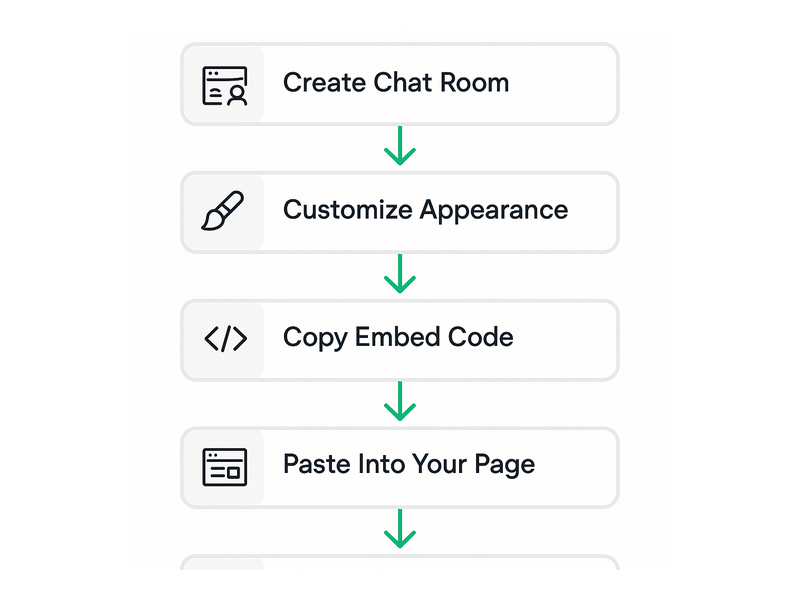
Getting your embedded chat widget live with RumbleTalk takes under ten minutes for most websites:
- Create your chat room in the RumbleTalk admin panel and select your starting chat mode.
- Customize the appearance — set colors, fonts, and sidebar style to match your site’s branding.
- Copy the embed code (a short JavaScript snippet) from your dashboard.
- Paste the snippet into your page — in your CMS editor, page builder, or directly in HTML.
- Configure moderation settings — assign admin roles, set cooldown timers, and define message approval rules before you go live.
For a complete step-by-step walkthrough, the RumbleTalk Getting Started guide covers every configuration option from initial room setup through advanced admin features.
Technical Considerations When Deploying an Embedded Chat Widget at Scale
Before rolling out your embedded chat widget to high-traffic pages or large live events, a few technical points are worth addressing upfront.
Page Performance and Core Web Vitals
A poorly optimized chat widget can slow your page load times and damage your Core Web Vitals scores. RumbleTalk’s widget loads asynchronously — it does not block page rendering, so your site’s initial load time stays clean even with the chat panel active. The widget only fully initializes when it enters the viewport, keeping resource usage lean on long pages.
Mobile Responsiveness
A significant share of your audience accesses your site on smartphones and tablets. RumbleTalk’s embedded chat widget is fully responsive by default, adapting to any screen size without additional configuration. You can also set custom height and width constraints to control exactly how the widget fits your layout across different device breakpoints.
Security and Spam Prevention
Open chat panels on public-facing websites attract spam and bad-faith actors. RumbleTalk includes layered spam prevention — rate limiting, message cooldown timers, user banning, and IP blocking — so you can welcome anonymous participants while still maintaining quality control. For higher-security environments, Members Chat with SSO authentication ensures only verified users can type a single word.
Scalability for Large Audiences
RumbleTalk’s infrastructure is engineered for large concurrent audiences. Whether you are running a 50-person community room or a 10,000-attendee live event, the embedded chat widget scales automatically — no additional configuration, no infrastructure planning required on your side. This is a critical differentiator from self-hosted chat solutions, which demand significant DevOps investment to handle traffic spikes without degradation.
Measuring Success After You Embed Chat
Once your embedded chat widget is live, the metrics that matter most depend on your goals. Here are the key numbers to track:
- Messages sent per session: A direct proxy for engagement depth. More messages mean a more invested audience.
- Active chatters vs. lurkers: Even read-only participants benefit from the presence of live conversation. Track both groups to understand your community’s participation curve.
- Session duration uplift: Compare average time-on-page for pages with the embedded chat widget versus equivalent pages without it. Most teams see a meaningful lift within the first few weeks.
- Return visit rate: Communities built around live chat tend to generate significantly higher return visit rates than purely content-driven sites. This metric reveals whether your chat is building lasting loyalty.
Taken together, these numbers tell you whether your embedded chat widget is delivering genuine community value or just adding visual complexity. The goal is a chat room that your audience actually uses — and misses when it is gone.
Start Engaging Your Audience With RumbleTalk
Adding an embedded chat widget to your website is one of the most effective moves you can make to grow audience engagement, build community loyalty, and differentiate your platform from static competitors. RumbleTalk gives you a production-ready, fully moderated, and deeply customizable embedded chat widget that works on any website stack and scales to any audience size — without requiring a dedicated engineering team to maintain it.
Whether you need a simple open group chat for a niche community, a tightly controlled moderated Q&A for your next live webinar, or a fully white-labeled chat experience for your SaaS platform, RumbleTalk has a mode that fits. Get started with RumbleTalk today and turn your website visitors into an engaged, loyal community that keeps coming back.