
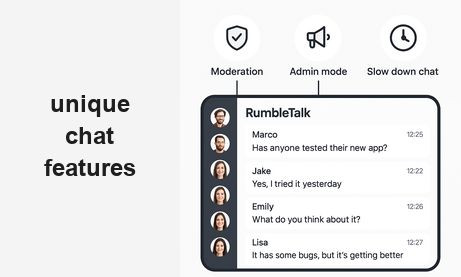
A chat widget with message moderation is more than a comment box on your website. It is a real-time group conversation tool that gives you complete control over what gets published, who can speak, and at what pace — before your audience ever sees a single word.
Most websites add a chat widget and immediately face the same problem: no control over what gets posted. Spam, off-topic comments, and disruptive users turn a community tool into a liability. The question is not whether to add chat to your website — it is whether the chat widget you choose can handle a real audience without falling apart.
RumbleTalk was built from the ground up with moderation at its core. It is not a generic chat box with a report button bolted on. It is a group chat platform designed for websites, live events, and communities that need control, flexibility, and scale. Here is what sets it apart.
What a Chat Widget With Message Moderation Really Means
Most chat widgets offer moderation as an afterthought — a delete button, maybe a ban option. True message moderation means something different: every message passes through an admin review queue before the rest of the room ever sees it.
This is pre-moderation. It is the difference between reacting to a problem after it has already been seen by hundreds of people, and preventing it from appearing at all. For brands, live event hosts, educational platforms, and community managers, this distinction matters enormously.
A chat widget with message moderation protects your brand, keeps conversations on topic, and gives your audience a better experience. RumbleTalk offers three specific moderation features that no other generic chat widget provides.
The 3 Moderation Features No Other Chat Widget Has
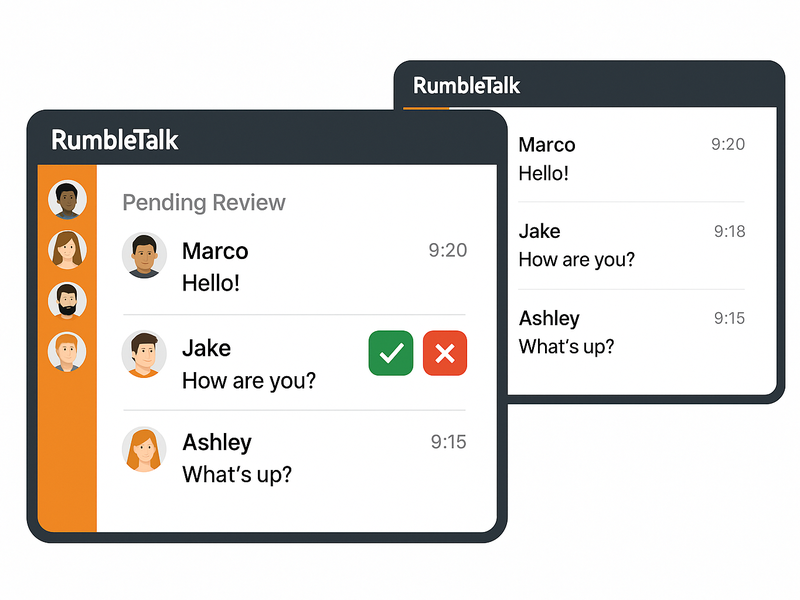
1. Approve Before It Goes Live
In RumbleTalk’s moderated chat mode, every message submitted by a user lands in an admin queue first. The moderator sees it, reviews it, and either approves it — pushing it live to the room — or rejects it, keeping it invisible to everyone else.
This is ideal for sensitive topics, brand-owned events, Q&A sessions with executives, or any situation where the cost of a bad message appearing in public is high. The audience sees a clean, curated conversation. The moderator sees everything.
2. Admin Mode — Silence the Room, Own the Stage
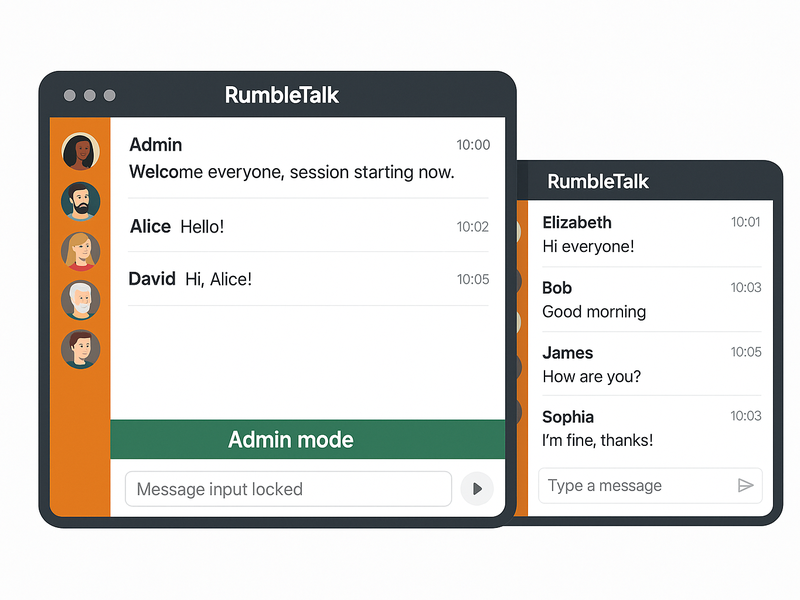
Admin Mode is a single-click feature that freezes all user messages instantly. When Admin Mode is active, only admins and moderators can post to the chat. Every other user’s input bar is locked.
This is invaluable during live events. When a keynote speaker is presenting, when an important announcement is being made, or when a situation needs to be reset, Admin Mode gives the host total authority over the conversation — without removing or banning a single user. The moment the host is ready to open the floor again, one click restores normal chat.
3. Slow Down Chat — Throttle the Pace
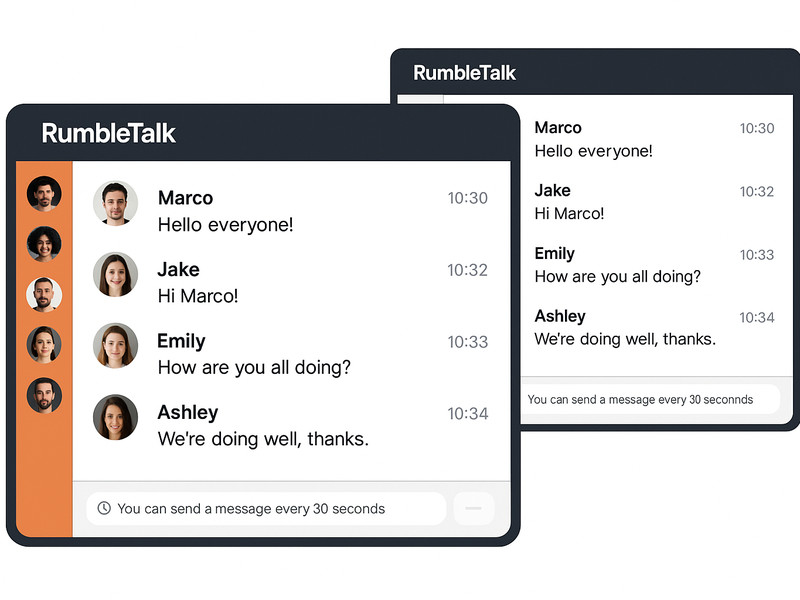
In high-traffic chat rooms, messages can scroll past faster than anyone can read them. Slow Down Chat lets admins set a minimum time interval between messages from the same user — for example, one message every 30 seconds.
This single setting transforms a chaotic flood of overlapping messages into a readable, manageable conversation. It prevents spam, stops any one user from dominating the room, and keeps the overall quality of discussion high. Users see a clear countdown timer so they know when they can post again.
Who Needs a Chat Widget With Message Moderation?
These moderation tools are not just for large enterprises. Any website that hosts a real audience benefits from them:
- Live event hosts — webinars, virtual conferences, sports broadcasts, and online summits where the conversation must stay on track
- Community managers — always-on chat rooms where tone and quality matter for member retention
- Educational platforms — courses and training sessions where instructors need to moderate student questions
- Website owners embedding chat for the first time who want control from day one
Beyond Moderation — Multiple Chat Modes for Every Use Case
RumbleTalk is not a single chat format. It offers six distinct chat modes, each designed for a specific context:
- Group Chat — open real-time conversation for any audience
- Moderated Q&A — structured question and answer with full moderation control
- Members Chat — restricted to authenticated or registered users only
- Social Chat — open chat with social login
- Private Chat — one-to-one conversations between users
- Queued Chat — messages delivered in a controlled queue format
Every mode supports the three moderation features described above. Whether you are running a members-only community or an open public event, the same tools are available to keep the conversation under control.
Embed Anywhere — No Dev Team Required
RumbleTalk embeds into any website with a single code snippet. It works out of the box with WordPress, React, Angular, and any standard HTML page. There is no complex backend integration, no third-party redirect, and no dependency on an external platform’s design or branding.
You own the chat room. You control the experience. Your users stay on your website.
Trusted at Scale
RumbleTalk powers more than 180,000 customer-created chat rooms. The moderation tools described in this article are not experimental features — they have been tested and refined across industries including sports broadcasting, online education, fintech communities, live events, and faith organizations.
At that scale, the difference between a chat widget that works and one that falls apart under pressure is exactly what separates RumbleTalk from generic alternatives.
The Bottom Line
Any website can add a chat box. Not every chat box gives you the tools to run it properly. A chat widget with message moderation — one that lets you approve messages before they go live, silence the room when you need to, and throttle the pace of conversation — is what makes the difference between a chat tool and a real community platform.
RumbleTalk is built for website owners, event hosts, and community managers who cannot afford to lose control of their audience. If that sounds like your use case, the next step is simple.
Try RumbleTalk free and embed your first moderated chat room today.