
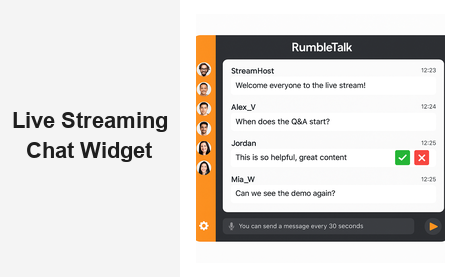
When you embed live chat on your website for live streaming, you transform a passive broadcast into a thriving community experience. Live streaming has become a cornerstone of modern B2B strategy — from virtual conferences and product launches to online training sessions and live trading rooms. But a stream without real-time interaction is just a video. The difference between a passive viewer and an engaged community member is the ability to participate: ask questions, react to content, and connect with other attendees as the event unfolds.
RumbleTalk gives brands, event organizers, media companies, and platform owners the tools to embed live chat directly into any live streaming page — with enterprise-grade moderation, seamless embedding, and the audience engagement features that modern viewers expect and demand.
Why Live Streaming Demands Real-Time Chat Integration
Live streaming without chat is a one-way street. Research consistently shows that interactive broadcasts generate significantly higher watch times, lower drop-off rates, and stronger brand loyalty. When your audience can ask questions, react to speakers, and connect with peers in real time, they stop being spectators and start becoming stakeholders invested in your content and your brand.
But not all live chat solutions are designed for the unique pressures of live streaming. A widget built for standard website support may buckle under the demands of thousands of simultaneous viewers, coordinated spam floods, or off-topic disruption during a high-stakes keynote. That is why choosing the right platform when you decide to embed live chat on your streaming website matters as much as the quality of the stream itself.
The challenges live streaming publishers face are distinct from general chat use cases:
- High-concurrency audience surges — live events can spike from dozens to thousands of simultaneous users in seconds
- Real-time content moderation — a single inappropriate message during a live broadcast can become a brand crisis within minutes
- Audience segmentation — VIP attendees, moderators, general viewers, and anonymous participants all require different access and permission levels
- Cross-platform embedding flexibility — the chat widget must load seamlessly on your website regardless of where the video stream is hosted or which CMS you use
- Mobile responsiveness — a growing share of live stream viewers participate on mobile devices, requiring a widget that adapts perfectly to smaller screens
RumbleTalk was architected with every one of these challenges in mind, making it the platform of choice for organizations that treat live audience engagement as a core part of their streaming strategy.
How to Embed Live Chat on Website for Live Streaming
One of the biggest hesitations brands face when adding real-time interaction to a streaming page is perceived technical complexity. With RumbleTalk, the process of embedding live chat on a live streaming website is straightforward enough for a marketing manager to complete without developer support — yet flexible enough for engineering teams to build deeply integrated, custom experiences on top of.
Here is how the embedding process works in practice:
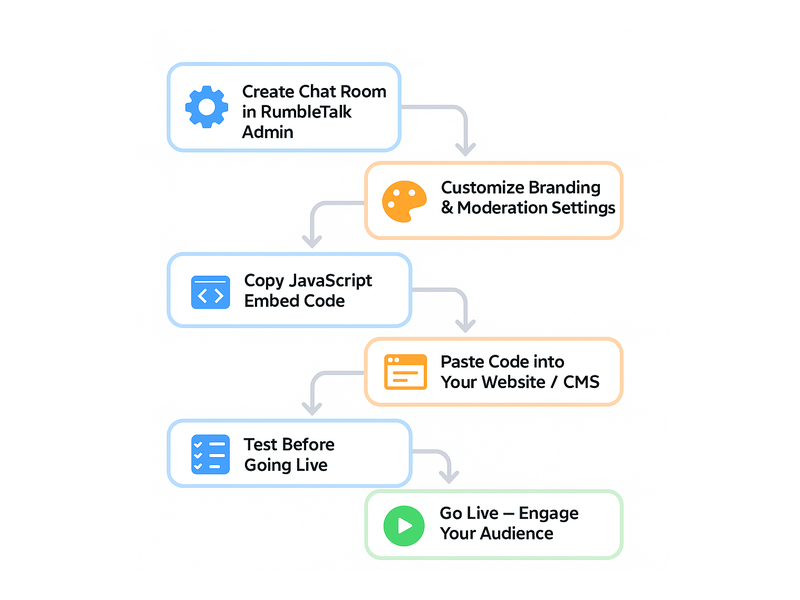
- Create your chat room in the RumbleTalk admin panel — choose your room type based on your event format
- Customize the appearance — match colors, fonts, logo, and layout to your brand identity
- Configure moderation settings — set message cooldowns, enable admin approval mode if required, and assign moderator accounts to team members
- Copy the auto-generated embed code — a short, self-contained JavaScript snippet that handles everything
- Paste it into your page — works with WordPress, Wix, Squarespace, Webflow, Drupal, or raw HTML
- Go live — the chat room activates the moment your stream begins and scales automatically with your audience
The embed code is platform-agnostic. You can position the live chat widget alongside your video player, in a collapsible sidebar, as a tab overlay, or as a floating window at the bottom of the page. This layout flexibility means you can embed live chat on your website for live streaming without disrupting your existing page structure or design system.
For platforms with user authentication, RumbleTalk supports token-based Single Sign-On (SSO), meaning registered users are automatically recognized in the chat room the moment they log into your site — no separate chat login required, no friction for your audience.
Key Features to Look for When You Embed Live Chat on Website for Live Streaming
Not every chat widget is ready for the intensity of a live streaming event. When evaluating platforms to embed live chat on your streaming website, prioritize these capabilities:
Moderation-First Architecture
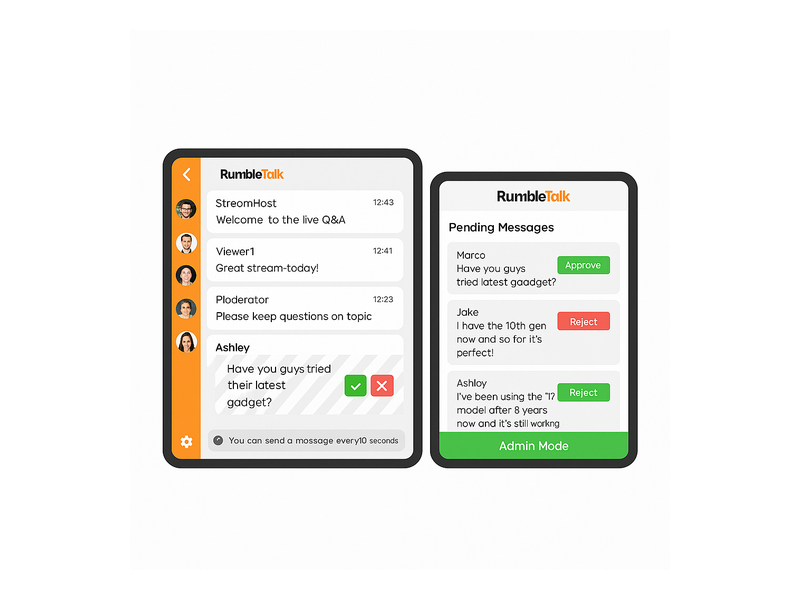
A single toxic comment during a live product launch or investor call can spiral fast. RumbleTalk’s moderation suite gives admins real-time control: ban users, mute individuals, delete messages instantly, and activate Admin Only mode to pause all audience input with a single click. The Moderated Q&A room type is purpose-built for live events where you need to screen questions before they appear publicly — essential for panel discussions, executive Q&As, and educational webinars.
Scalable Cloud Infrastructure
Whether you are expecting 50 attendees or 50,000, your chat infrastructure needs to scale without performance degradation. RumbleTalk’s cloud-based architecture handles high-concurrency events natively, so you are never scrambling for capacity when a stream unexpectedly goes viral or a big-name guest drives a traffic spike.
Fully Branded Chat Experience
Your live stream has a visual identity — your chat widget should too. RumbleTalk lets you customize every visual element: colors, fonts, background, avatar styles, and your company logo in the chat header. The result is a cohesive, branded experience that reinforces audience trust rather than feeling like a third-party bolt-on.
Multiple Room Types for Different Streaming Formats
Different live streaming scenarios call for different interaction models. RumbleTalk offers a suite of room types to match:
- Group Chat — open audience discussion, ideal for webinars, live shows, and community streams
- Moderated Q&A — admin-screened questions for structured panels and executive sessions
- Members Chat — gated rooms for subscribers, paying customers, or registered attendees
- Social Chat — light-auth or anonymous participation for broad public audiences
- Queued Chat — one-on-one conversations with speakers or support staff during live events
- Private Chat — direct messaging between attendees for networking within your event platform
Moderation at Scale: The Backbone of Live Streaming Chat
When you embed live chat on your website for live streaming, moderation becomes mission-critical — not an afterthought. A live audience with no guardrails is an open invitation for spam, coordinated disruption, and off-brand content that can permanently damage the perception of your event.
RumbleTalk’s moderation tools were designed specifically for high-stakes live events. Admin Mode requires every incoming message to pass through moderator review before appearing publicly — invaluable for investor calls, press briefings, and educational webinars where content quality is non-negotiable. Multiple moderators can be assigned to a single room, each with their own login, so large events with thousands of participants have adequate coverage without bottlenecks.
The message slowdown feature limits how frequently individual users can post — configurable from 5 seconds to several minutes. This single control can dramatically reduce spam flooding during high-traffic moments without requiring constant manual intervention. When a known bad actor appears, ban and mute controls remove or silence them instantly and silently, without alerting the broader audience.
Post-event, moderation logs give you a full record of all actions taken during the stream — valuable for compliance documentation, speaker briefings, and continuous improvement of your moderation workflows.
Real-World Use Cases: Industries Embedding Live Chat for Streaming
The range of organizations that embed live chat on websites for live streaming spans nearly every sector of the modern digital economy.
Media and Broadcasting
Streaming platforms and broadcasters embed live chat on their websites to keep viewers engaged throughout live coverage. Sports networks use it for match commentary; music platforms deploy it during concert streams; news organizations activate it for breaking coverage events. The chat becomes as much a part of the viewing experience as the content itself. Learn how RumbleTalk powers this use case through its dedicated broadcast and podcast chat solution, built specifically for live media environments.
Online Education and eLearning
EdTech platforms stream live classes, expert workshops, and tutoring sessions at scale. When instructors embed live chat on their teaching websites for live streaming lessons, students ask questions in real time, collaborate on problems in group rooms, and form study communities — recreating the social energy of a physical classroom in a fully digital format. For structured courses, Moderated Q&A ensures questions reach instructors in a controlled, prioritized order.
Corporate Events and Virtual Conferences
From global all-hands meetings to international trade shows, enterprises run virtual events that require professional-grade audience engagement infrastructure. Event producers embed live chat on conference websites to facilitate networking between sessions, host breakout room discussions, and run live polls that feed directly into the main stage presentation. The ability to segment attendees — VIPs in members rooms, general attendees in open group chat — adds a layer of exclusivity that drives registration value.
Finance, Trading, and Fintech
Investment platforms and trading communities use live chat during market hours, earnings calls, and analyst stream sessions. Members-only rooms create premium community value, with RumbleTalk’s access controls ensuring only verified, paying subscribers can participate in high-signal discussions. The message history feature means late joiners can catch up on earlier analysis without the host needing to repeat information.
E-Commerce and Live Shopping
Brands hosting live product reveals, unboxing streams, and shoppable demos use chat to collect real-time audience feedback, answer purchase questions instantly, and create community momentum that drives conversion. A well-moderated, high-energy chat during a product launch communicates social proof to every viewer — creating FOMO that passive video alone cannot replicate.

Setting Up RumbleTalk for Your Live Streaming Page
Getting RumbleTalk configured for a live streaming event is faster than most teams expect. Here is what a professional setup looks like from start to finish:
Step 1 — Choose your room type. Select Group Chat for open stream interaction, Moderated Q&A for structured panel discussions, or Members Chat for subscriber-gated events. Your choice here determines the default moderation posture and user experience.
Step 2 — Configure moderation and access settings. Set your message cooldown timer, enable admin approval mode if your event requires it, and assign moderator credentials to everyone on your live event team. Test that each moderator can log in and exercise their controls before the event begins.
Step 3 — Brand the widget. Upload your logo, configure your color palette, set the background style, and preview the widget inside the RumbleTalk admin panel. The goal is a chat widget that looks native to your site — not an obvious third-party embed.
Step 4 — Embed the code. Copy the JavaScript snippet from your admin panel and paste it into your website page. For WordPress users, RumbleTalk integrates directly via the WordPress members chat plugin, making embedding a matter of minutes. For custom HTML or other CMS platforms, the snippet drops into any page template.
Step 5 — Run a pre-event test. Schedule a rehearsal session with your team to confirm the chat loads correctly, moderation controls respond as expected, SSO authentication works for registered users, and the widget renders properly across desktop, tablet, and mobile. Issues caught in rehearsal never reach your audience.
Step 6 — Go live and engage. As your stream begins, your moderation team monitors the chat in real time, keeps conversation on-topic, and surfaces the best audience questions for your speakers to address. Post-event, review the moderation log and chat transcript to gather insights for your next broadcast.
For full configuration guidance, the RumbleTalk getting started knowledge base article walks through every admin panel setting step by step.
Measuring the Business Impact of Live Streaming Chat
Embedding live chat on your streaming website is not just a viewer experience improvement — it generates measurable business outcomes that compound over time.
- Session duration: Viewers who participate in chat stay significantly longer. Interactive broadcasts report average session times two to three times higher than passive broadcasts of equivalent length.
- Return attendance: Audience members who connected with peers in chat are substantially more likely to register for future events, subscribe to your content, or follow your brand.
- Lead generation signals: Chat conversations surface buyer intent in real time — questions about pricing, integrations, implementation, and comparisons that your sales team can follow up on directly after the event.
- Brand perception: A professionally moderated, branded chat communicates organizational competence and care. An unmoderated chat communicates the opposite — and those impressions are formed in seconds during a live event.
- Community compounding: For organizations running recurring live streams — weekly webinars, monthly product updates, daily trading sessions — each event adds members to a growing community. The value of that community accumulates across every future broadcast.
For a real-world look at how live chat transforms audience engagement in broadcast contexts, see our in-depth post on Radio Show Chat: Engage Your Live Audience in Real Time — the same principles apply directly to any live streaming format.
Why RumbleTalk Is the Right Platform to Embed Live Chat on Website for Live Streaming
There is no shortage of chat widgets available, but most were designed for customer support or asynchronous messaging — not the real-time, high-stakes environment of a live stream. RumbleTalk was built from the ground up for live audience engagement, which means every product decision reflects the actual pressures of broadcast-scale interaction: sudden audience spikes, moderation urgency, brand sensitivity, and the need for zero-friction participation.
The combination of flexible room types, enterprise moderation controls, fully branded embedding, SSO integration, and cross-platform compatibility makes RumbleTalk the platform that media companies, event agencies, EdTech platforms, financial services brands, and corporate AV teams trust when the stakes are highest and the audience is watching.
Whether you are running a weekly podcast stream with 200 loyal community members or a global product launch with 20,000 simultaneous viewers, RumbleTalk scales to fit the moment — without requiring infrastructure changes, developer intervention, or compromises on moderation quality.
Conclusion: Turn Your Live Stream Into a Two-Way Experience
The best live streams are not broadcasts — they are conversations. When you embed live chat on your website for live streaming, you give your audience a seat at the table: a way to participate, connect, and feel that their presence matters. That shift from passive viewer to active participant is what separates forgettable content from communities people return to again and again.
RumbleTalk gives you everything you need to make that shift: powerful moderation that protects your brand, flexible room types that fit any event format, simple embedding that works on any platform, and the scalability to handle whatever your audience brings.
Ready to embed live chat on your website for live streaming and upgrade every broadcast you run? Visit rumbletalk.com to start your free trial, embed your first chat room in minutes, and see the difference real-time audience engagement makes — live, in the moment, together.