
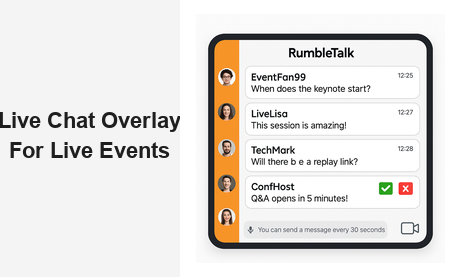
A live chat overlay for live events website is the single most effective tool for transforming a passive broadcast into a two-way conversation. Whether you are running a virtual conference, a live webinar, a product launch, or a corporate town hall, your audience does not just want to watch — they want to participate. Adding a real-time chat layer directly to your event page keeps attendees engaged, increases session duration, and creates the kind of social energy that makes events worth attending again. RumbleTalk’s group chat platform is purpose-built for exactly this use case, giving event organizers a fully featured, embeddable chat overlay that works with any website stack, any audience size, and any event format.
Why Every Live Events Website Needs a Live Chat Overlay
Live streaming without interactivity is a one-way broadcast. Viewers who cannot ask questions, react to key moments, or connect with other attendees tend to drop off early. Research consistently shows that interactive live streams generate significantly longer watch times than passive ones. A live chat overlay for live events website changes that dynamic entirely — and the difference is immediately measurable.
When attendees can send messages, get responses, and see that others share their reactions in real time, the event feels alive rather than recorded. This social layer is what separates a forgettable webinar from a must-attend experience. For B2B event organizers, the stakes are high: engaged attendees convert better, refer more, and return for your next event. The chat is not a feature — it is the engine of audience retention.
RumbleTalk’s live chat overlay integrates directly into your event page. There is no need to redirect users to a third-party app or ask them to open a separate tab. The chat sits alongside your video stream or as a floating overlay on top of it, keeping the experience unified and professional. Attendees can join anonymously or log in as registered members depending on your setup, giving you full control over who participates and how they appear.
The Business Case for Adding Chat to Live Events
A live chat overlay for live events website is not just about audience entertainment — it drives measurable business outcomes:
- Higher session completion rates — attendees who are actively chatting stay significantly longer than passive viewers
- Better lead qualification — questions in chat reveal attendee intent and buying signals in real time
- Instant feedback loops — organizers can gauge audience reaction and adapt the session on the fly
- Post-event community growth — the chat room becomes the starting point for an ongoing audience relationship
- Sponsor and partner visibility — branded chat rooms give sponsors a live presence that goes far beyond banner ads
- Data and insights — chat transcripts give marketing teams rich qualitative data about what resonates with their audience
Core Features to Look for in a Live Chat Overlay for Live Events Website
Not all chat tools are designed for the demands of a live event. When evaluating a live chat overlay for live events website, these are the capabilities that determine whether your event runs smoothly or descends into chaos.
Moderated Q&A Mode
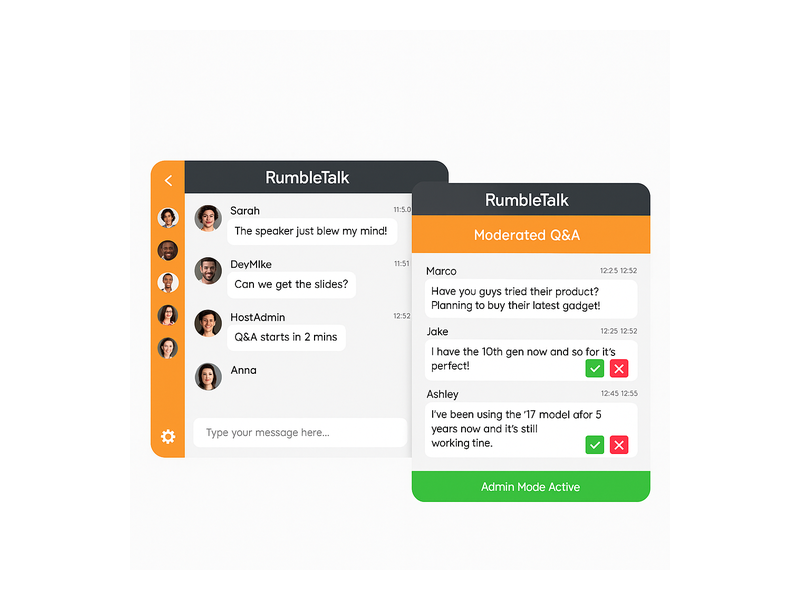
Large events generate hundreds of messages per minute. Without moderation, the chat quickly fills with noise, off-topic commentary, and occasionally disruptive content. RumbleTalk’s Moderated Q&A mode lets admins review every message before it appears publicly — ensuring only relevant, appropriate questions reach the audience. This is essential for corporate webinars, investor briefings, regulatory hearings, and any event where brand reputation or legal sensitivity is a concern. Moderators see a live queue of pending messages and can approve or reject each one with a single click.
Queued Chat for Structured Conversation
For events where audience members should effectively speak one at a time, the Queued Chat mode creates a structured, turn-based conversation. This is ideal for panel Q&A sessions, virtual town halls, and any format where you want every voice heard without the chaos of simultaneous messages overwhelming the moderators.
Group Chat for Open Discussion
For product launches, festivals, community events, and entertainment streams, an open group chat overlay creates real-time buzz. Attendees see each other’s reactions, build connections, and feel part of a shared moment. RumbleTalk’s Group Chat supports hundreds of simultaneous users with no performance degradation — the experience stays smooth whether you have 50 attendees or 5,000.
Social Login and Member Authentication
Reducing friction to join the chat is critical. RumbleTalk’s Social Chat mode lets attendees log in with their existing social accounts, removing the barrier of creating yet another account. For events with registered attendees, Single Sign-On (SSO) integration means participants appear in the chat under their real names automatically — no extra login step required — making the live chat overlay feel like a native part of your event website.
Real-Time Admin Controls
Every live event has unexpected moments. RumbleTalk’s admin panel lets moderators mute, ban, or remove disruptive users in real time without interrupting the event. Green checkmark and red X moderation buttons make split-second decisions fast and intuitive. Rate-limiting controls prevent any single user from flooding the chat, and the Admin Mode bar lets moderators broadcast pinned messages to all participants instantly.
Setting Up a Live Chat Overlay on Your Live Events Website
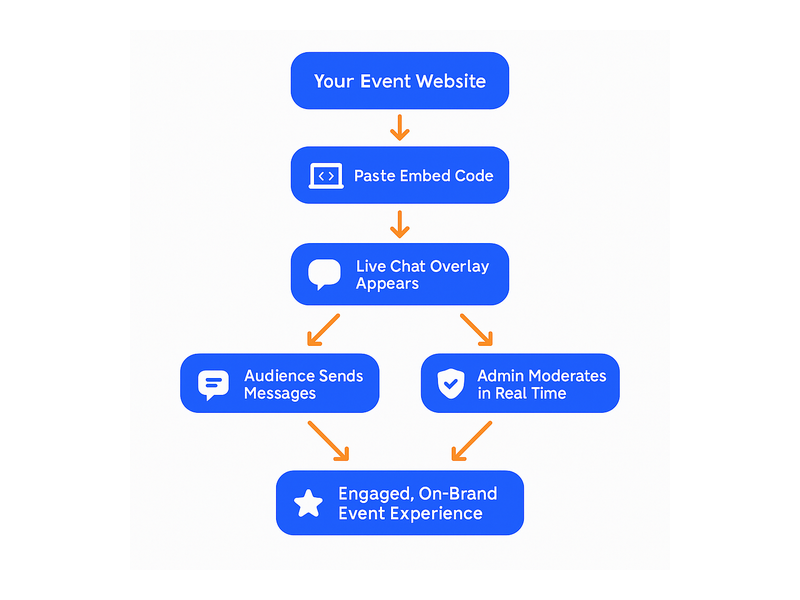
One of the biggest barriers to adding interactive features to an event website is technical complexity. Most event organizers are not developers — and even when development resources are available, building a custom real-time chat system from scratch is a multi-week project with significant maintenance overhead. RumbleTalk’s live chat overlay for live events website solves this with a simple, copy-paste embed code approach.
After creating your chat room in the RumbleTalk admin panel, you receive a short JavaScript snippet. Paste it into any page on your website — WordPress, Squarespace, Webflow, custom HTML, or any other platform — and the chat overlay appears immediately. No server infrastructure to manage, no real-time database to configure, no WebSocket API to build and maintain. The entire backend is handled by RumbleTalk’s infrastructure.
You can customize the chat’s visual appearance to match your event branding: accent colors, fonts, header logo, border radius, and layout all adapt to your design system. For live events with a video player, RumbleTalk can be placed in a sidebar next to the player or configured as a floating panel that overlaps the video — giving you full layout flexibility without any custom CSS work.
If your team is setting up the chat for the first time, the getting started guide in the RumbleTalk knowledge base walks through room creation, admin configuration, moderator assignment, and your first embed in under 30 minutes. Most teams are fully configured and ready for a live event well before the day of the show.
Multi-Room Architecture for Multi-Track Events
Large conferences often run concurrent sessions across multiple tracks. RumbleTalk supports multi-room architecture, where each session has its own dedicated chat room with its own moderation settings, admin team, and branding. Attendees can switch between rooms as they move between sessions, and event organizers get a centralized dashboard to monitor all active rooms simultaneously. This makes the live chat overlay scalable from a single-session webinar all the way up to a multi-day, multi-track virtual summit.
Use Cases: How Different Industries Use Live Chat Overlays at Events
The live chat overlay for live events website use case spans a wide range of industries and event formats. Here is how RumbleTalk delivers measurable value across the most common scenarios.
Virtual Conferences and Summits
Multi-session virtual conferences need a chat infrastructure that scales across hundreds or thousands of concurrent attendees without degrading performance. RumbleTalk’s virtual events and conferences chat solution gives each session its own dedicated chat environment, with per-session moderation controls and per-session admin teams. Speakers can answer audience questions live during their sessions; event staff can monitor all rooms from a unified dashboard. For sponsors, dedicated branded chat rooms create premium sponsorship inventory that is genuinely valuable to their audience.
Webinars and Online Training
B2B webinars benefit enormously from a live chat overlay. Attendees can ask questions throughout the presentation without interrupting the speaker’s flow, and moderators can surface the best questions at designated Q&A segments. The Moderated Q&A mode ensures presenters never have to wade through irrelevant or off-topic messages — only the questions that matter to the majority of the audience reach the panel. For online training programs, the chat becomes a peer learning channel where participants share notes, ask clarifying questions, and support each other’s understanding.
Live Product Launches
Product launch events are high-stakes moments where audience sentiment is as important as the content being presented. A live chat overlay lets your audience express excitement, ask product questions in real time, and see that they are part of something bigger than themselves. Organizers can pin key announcements at the top of the chat, use admin broadcast mode to amplify critical moments, and monitor sentiment signals throughout the presentation. Chat transcripts from launch events are goldmines for product and marketing teams analyzing early adopter interest.
Corporate Town Halls
Town halls present a unique moderation challenge: leadership wants open dialogue, but the organization also needs to manage sensitivity around unannounced decisions, personnel matters, and regulatory disclosures. RumbleTalk’s Moderated Q&A mode allows HR and communications teams to pre-screen questions before they reach the executive panel, ensuring the conversation stays productive and on-topic. Employees can ask questions candidly knowing their submission will be reviewed — without fear that an unmoderated moment will derail the entire session.
Sports Broadcasts and Entertainment Streams
Fan engagement during live sports and entertainment streams is one of the most natural fits for a chat overlay. Viewers react to plays, debate outcomes, and connect with other fans in real time — creating the social energy of a stadium from anywhere in the world. For broadcasters and media companies, the chat room becomes a dwell-time engine: fans who are chatting stay on the stream longer and are more likely to return for the next broadcast.

Moderation at Scale: Keeping Your Live Event Chat Professional
The most common concern event organizers raise about adding a live chat overlay to their live events website is moderation capacity. What happens when someone posts something inappropriate? How do you manage hundreds of simultaneous messages? Can a two-person moderation team handle a session with 800 attendees?
RumbleTalk is engineered specifically with these realities in mind. The platform provides multiple layered moderation controls that work together to keep any event chat professional and on-brand:
- Pre-moderation queue — no message appears publicly until an admin approves it, available in Moderated Q&A mode
- Profanity and keyword filters — automatically suppress messages containing specified words or phrases before they even reach the moderation queue
- Rate limiting — restrict how frequently any single user can post (for example, one message every 30 seconds) to prevent flooding during high-volume moments
- Instant ban and mute — remove or silence disruptive users with a single click, effective immediately across all devices
- Multi-admin support — assign multiple moderators across different rooms or time zones for long-running or multi-track events
- Message pinning — surface critical announcements at the top of the chat feed so all attendees see them regardless of chat volume
These layered controls mean that even a large-scale event with thousands of concurrent chatters can be managed effectively by a small, focused moderation team. The live chat overlay remains a positive, on-brand experience from the first message to the last, regardless of audience size or event duration.
Building Community That Outlasts the Live Event
The live event is the spark — but the community is the fire. One of the most underappreciated advantages of adding a live chat overlay for live events website is what becomes possible after the event ends. Attendees who connected through your event chat room are warm leads: they have already demonstrated interest, social engagement, and brand affinity.
RumbleTalk allows you to keep the chat room active after the event concludes, turning it into a persistent community hub. Attendees can return to continue conversations, share resources from the session, and stay connected to your brand between events. For organizations that run recurring event series — monthly webinars, quarterly summits, annual conferences — this is the mechanism that builds a loyal, returning audience rather than a one-time crowd.
Members Chat extends this further by creating a private, persistent space for registered members that remains active year-round. Private Chat rooms allow one-on-one follow-up conversations between speakers and high-value attendees, or between your sales team and leads identified during the event through their chat activity. The event is the entry point; the chat community is the long-term relationship.
As explored in Community Building Playbooks: How to Turn Your Website Chat into a Loyal Audience, the chat experience is often the decisive factor in whether attendees become long-term community members or one-time visitors. Events that invest in a quality real-time chat experience consistently outperform those that treat audience interaction as an afterthought.
Getting Started: Add a Live Chat Overlay to Your Live Events Website
A live chat overlay for live events website is no longer a nice-to-have feature reserved for large enterprise event platforms — it is the baseline expectation for any professional online event in 2026. Audiences expect to interact. Event organizers who deliver that experience see higher engagement metrics, stronger conversion from attendee to customer, and sustained community growth between events. Those who deliver a passive broadcast-only experience leave significant value on the table.
RumbleTalk makes it straightforward to add a fully featured, moderation-ready live chat overlay to any live events website — in minutes, not months, with no development resources required. Whether your next event has 50 attendees or 50,000, the platform scales with you. With support for group chat, moderated Q&A, queued discussions, social login, SSO, multi-room architecture, and persistent member communities, RumbleTalk is the complete toolkit for event-driven audience engagement.
Ready to make your next live event genuinely interactive? Visit RumbleTalk to explore plans, watch live demos of the chat overlay in action, and get your first event chat room running today. Your audience is already expecting it.