
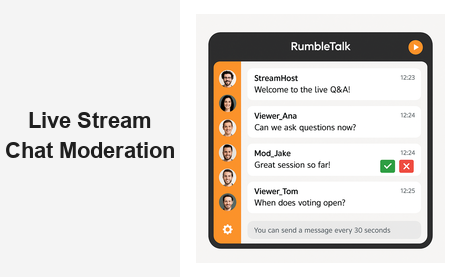
Live stream chat moderation is the difference between a thriving online event and an unmanageable, brand-damaging comment feed. As more businesses, event organizers, broadcasters, and educators turn to live streaming to reach their audiences, the need for robust, real-time chat moderation tools has never been greater. Whether you are hosting a virtual conference, a product launch webinar, a live radio broadcast, or a weekly training session, keeping your live stream chat clean, focused, and on-brand is essential for protecting your reputation and maximizing audience engagement.
Why Live Stream Chat Moderation Is Non-Negotiable
When hundreds or thousands of viewers join a live stream simultaneously, the chat can become overwhelming within minutes. Without proper moderation, spam, offensive language, and irrelevant tangents quickly take over — driving away legitimate participants and undermining the value of your content. Effective live stream chat moderation gives hosts and administrators complete control over what appears in the public chat feed, ensuring that the conversation always serves the event.
For B2B organizations, the stakes are especially high. A single inappropriate comment during an investor Q&A or a product demo can surface on social media in seconds. Conversely, a well-managed chat session signals professionalism, builds audience trust, and encourages deeper participation. Research consistently shows that viewers who actively engage in moderated live chats are significantly more likely to return for future events and convert into paying customers.
The business case for strong chat moderation extends well beyond basic safety:
- Surface the best questions from your audience for speakers to address live
- Eliminate spam and inappropriate content before it reaches other viewers
- Shape the conversation around your event goals and key messages
- Protect your brand from the reputational risks of an unfiltered comment feed
- Build a safer community where all participants feel welcome and respected
Core Features of a Strong Live Stream Chat Moderation Platform
Not every chat tool is built to handle the demands of live streaming at scale. The best platforms for live stream chat moderation combine automated safeguards with powerful human controls, giving your moderation team the speed and flexibility to manage high-volume conversations in real time.
Admin Mode and Pre-Approval Queues
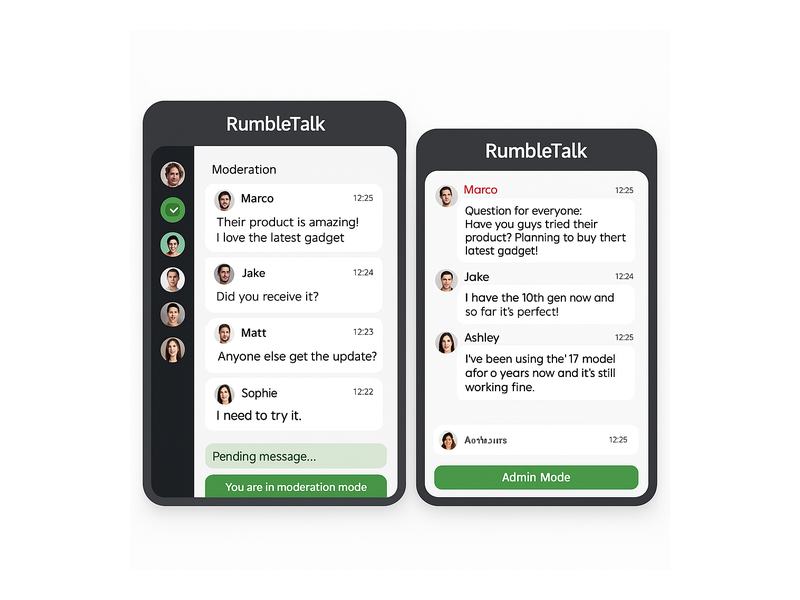
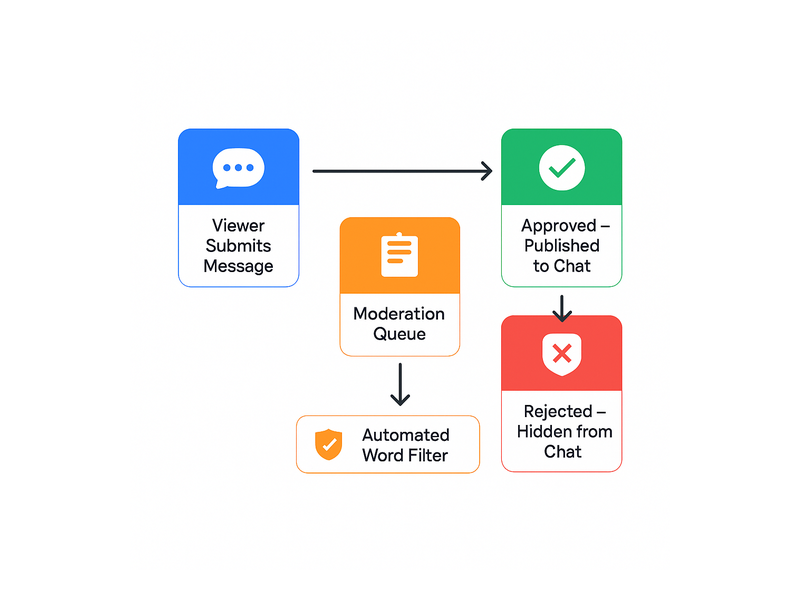
Admin mode is the cornerstone of any serious chat moderation setup for live streaming. When activated, every message a viewer submits enters a private moderation queue before it is published to the public chat. Moderators review each message and approve or reject it with a single click. Nothing gets through unless your team signs off on it. RumbleTalk’s virtual events chat solution includes a real-time moderation queue built for exactly this scenario, supporting multiple concurrent moderators during high-traffic broadcasts without performance degradation.
Rate Limiting and Cooldown Periods
Spam floods are among the most disruptive challenges in any moderated live stream chat environment. Rate limiting — which restricts how frequently a single user can post — is a simple but highly effective countermeasure. By setting a cooldown period such as one message every 30 seconds, you prevent any individual from dominating the queue while still enabling genuine, valuable engagement from the rest of your audience.
Instant User Banning and Muting
Even with preventive measures in place, disruptive users will occasionally slip through. Moderators need the ability to ban or mute them instantly — with a single click, without interrupting the flow of the session. RumbleTalk makes this seamless. For a step-by-step walkthrough, see the RumbleTalk knowledge base guide on banning a user.
Automated Word and Phrase Filters
Human moderators cannot catch everything, especially at scale. Automated filters block messages containing prohibited terms before they ever reach the moderation queue. This reduces moderator workload, minimizes response time, and ensures consistent enforcement of your community standards throughout the entire event, even during peak activity windows when message volumes spike.
How RumbleTalk Powers Live Stream Chat Moderation
RumbleTalk was designed from the ground up with live event professionals in mind. Its portfolio of chat products — Group Chat, Moderated Q&A, Members Chat, Social Chat, Private Chat, and Queued Chat — each offer distinct moderation capabilities suited to different live streaming use cases.
Moderated Q&A for Structured Events
The Moderated Q&A product is purpose-built for live stream chat moderation in webinar, panel discussion, and town hall formats. Every question submitted by an audience member lands in a private queue visible only to moderators and hosts. The team reviews, approves, and forwards selected questions to the speakers, ensuring the on-stage conversation stays focused and valuable. This format is especially popular for corporate webinars, investor calls, and educational sessions where maintaining a structured, professional tone is non-negotiable.
Group Chat with Full Admin Controls
When you want open audience discussion with oversight rather than full pre-approval, RumbleTalk’s Group Chat delivers robust live moderation features without friction. Administrators can toggle admin mode on or off in real time, pin important announcements, respond directly to audience messages, and remove content instantly. The platform supports multiple simultaneous moderators — critical for large-scale broadcasts where a single person cannot keep up with the message volume.
Queued Chat for High-Volume Streams
For events with very high chat volumes, RumbleTalk’s Queued Chat gives moderators complete control over the message stream. Messages enter a queue, moderators approve and release them at a controlled pace, and the public chat feed stays clean and readable throughout the event. This is the ideal tool for broadcasts with thousands of simultaneous viewers, where even a few seconds of unfiltered content could create problems for your brand or your speakers.
Role-Based Access and Multi-Moderator Support
RumbleTalk allows event organizers to assign granular moderator roles to their team. A junior moderator might be authorized to mute or delete messages, while a senior admin can ban users, adjust room settings, and override decisions. This tiered access model scales elegantly to match the size and complexity of any live event, from intimate webinars to major virtual conferences with dozens of breakout sessions running in parallel.
Best Practices for Effective Live Stream Chat Moderation
The right tools are only half the equation. Consistent, effective live stream chat moderation also requires a clear strategy and a well-prepared team. These are the practices that consistently produce the best outcomes for live event professionals across industries.
Brief Your Team Before Every Event
Before you go live, hold a quick pre-event briefing with all moderators. Cover the agenda, the expected audience size and demographics, any sensitive topics that might arise, and the specific chat rules for this session. Define what constitutes a flagged message and establish escalation procedures so every team member knows exactly how to handle edge cases without slowing down.
Prepare Message Templates in Advance
Create a library of standard messages your moderation team can deploy instantly during the stream — welcome greetings, reminders about chat guidelines, engagement prompts to spark discussion, and closing thank-you messages. Having these ready dramatically reduces friction and lets your moderators focus on what matters: curating the best possible conversation experience for your audience.
Display Clear Community Guidelines
Pin your chat community guidelines at the start of every event and display them prominently in the chat interface. When viewers understand what behavior is expected, incidents of rule violations drop significantly. A brief house rules message at the beginning of each session sets the right tone and reduces the moderation burden throughout the entire broadcast.
Use Real-Time Analytics to Stay Ahead
Advanced moderation platforms provide real-time analytics on chat activity — message volume, engagement rates, peak activity windows, and approval ratios. Use these insights to adjust your live stream chat moderation approach on the fly. If engagement drops during a particular segment, prompt the conversation with a targeted question or surface a particularly insightful audience comment to re-ignite participation.
Live Stream Chat Moderation Across Industries
The challenges of live stream chat moderation vary significantly by sector. Different industries face different risks and operate under different audience expectations. Here is how RumbleTalk’s moderation tools serve B2B clients across major verticals.
Media and Broadcasting
Radio stations, TV networks, and podcast producers use live chat to create a two-way connection with their audience during broadcasts. For high-listener events, real-time stream chat moderation keeps the conversation on-brand and filters out inappropriate or off-topic messages before they reach the public feed. For a deeper look at how broadcast teams use chat to engage live audiences, see our post on Radio Show Chat: Engage Your Live Audience in Real Time.
Corporate Events and Webinars
Enterprise clients hosting quarterly earnings calls, product launches, or company all-hands meetings need airtight moderated chat controls. A single controversial comment can go viral in seconds. RumbleTalk’s full pre-approval queue ensures only vetted, relevant messages appear in the public chat, protecting your brand and keeping the discussion productive from start to finish.
Education and E-Learning
Online instructors and corporate training platforms depend on moderated live chat to maintain a respectful, distraction-free learning environment. Whether you are running a live coding bootcamp, a compliance training session, or a university lecture streamed to thousands of students, your moderation team can approve questions, remove off-topic noise, and highlight contributions that genuinely add value to the session.
Virtual Conferences and Large-Scale Live Events
Multi-session virtual events require a scalable, distributed approach to stream chat moderation. With multiple simultaneous rooms, dozens of speakers, and potentially thousands of attendees, you need a platform that supports parallel moderation teams operating independently across sessions. RumbleTalk’s multi-room architecture and role-based permissions make it the platform of choice for professional conference organizers who cannot afford to leave any chat room unmanaged.

Embedding a Moderated Chat Widget on Your Website or Stream
One of RumbleTalk’s standout advantages is how simple it is to deploy a fully moderated chat widget on any website, streaming platform, or event landing page. Integration requires a single JavaScript embed snippet — no developer required. The widget drops directly into any page, with all live stream chat moderation features enabled from day one. You can configure admin mode, set rate limits, assign moderators, and customize the widget appearance entirely from the RumbleTalk admin dashboard.
For WordPress users, RumbleTalk offers a dedicated plugin that makes embedding a moderated chat experience even more seamless — no code required, with direct site integration and full access to the platform’s complete moderation toolkit from within the WordPress admin interface.
Scaling Live Stream Chat Moderation for Growing Audiences
As your audience grows, so does the complexity of managing your live chat. An event with 500 attendees requires a fundamentally different approach from one with 50,000 simultaneous viewers. RumbleTalk is engineered to scale, supporting thousands of concurrent users per chat room without latency or performance issues.
At scale, the most effective live stream chat moderation strategy layers automated word filters with a trained team of human moderators and smart queue management through tools like Queued Chat. Brands running recurring live events — weekly webinars, monthly town halls, or daily broadcasts — consistently find that investing in a dedicated moderation workflow pays off quickly: teams become more efficient with each event, and regular audiences begin to self-moderate as community norms become established over time.
Measuring the ROI of Your Chat Moderation Strategy
How do you know whether your investment in live stream chat moderation is delivering results? Track these indicators across your events:
- Audience retention rates — viewers who engage in well-moderated chats consistently stay longer than those in unmoderated sessions
- Message approval ratios — track the percentage of approved versus rejected messages over time to measure community quality and filter effectiveness
- Repeat attendance — a well-run moderated event builds a loyal audience that returns consistently
- Post-event satisfaction scores — survey your audience about their chat experience after each event and track trends over time
- Conversion rates from live events — engaged chat participants convert to customers at measurably higher rates than passive viewers
Organizations that prioritize professional chat moderation for their live streams consistently report stronger audience retention, higher satisfaction scores, and better event ROI compared to those who leave their chat feeds unmanaged. It is not just a safety measure — it is a competitive differentiator that sets your events apart.
Get Started with Live Stream Chat Moderation on RumbleTalk
If your live events deserve a professional, fully controlled chat experience, RumbleTalk has the tools to deliver it. From Moderated Q&A for structured webinars to Group Chat for open engagement and Queued Chat for high-volume broadcasts, RumbleTalk’s live stream chat moderation features are purpose-built for the demands of modern live events at any scale.
Don’t let an unmoderated chat feed undermine the value of your live content. Give your team the tools they need to deliver a safe, engaging, and on-brand experience every time you go live. Visit rumbletalk.com to start your free trial and discover how RumbleTalk can transform your approach to live stream chat moderation — turning it from a headache into a genuine competitive advantage for your business.