
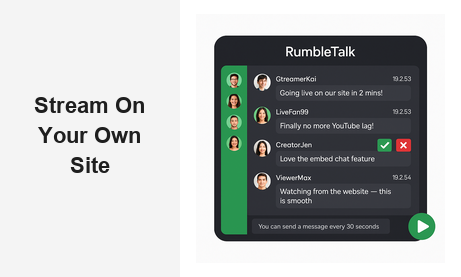
When you decide to stream on your own site, you take back control of your audience experience — no algorithm, no competitor ads, no platform that can demonetize your content overnight. But live video alone is only half the equation. Without real-time interaction, even the most polished self-hosted stream leaves viewers as passive observers. This guide explains how RumbleTalk’s embeddable chat widget adds the engagement layer that turns your stream into a thriving community — all hosted on your own domain.
Why Stream on Your Own Site Instead of Third-Party Platforms
Platforms like YouTube Live and Twitch are powerful distribution tools, but they come with serious trade-offs. Your brand competes with their interface. Your audience data flows to their servers. Your content sits next to recommendations for your competitors. When you stream on your own site, you eliminate all of that noise and own every part of the viewer experience.
Here is what self-hosting your live stream actually gives you:
- Full brand control — No third-party sidebars, watermarks, or interface elements diluting your brand identity.
- First-party audience data — Email sign-ups, member registrations, and chat accounts all live on your domain, not someone else’s database.
- Monetization freedom — Charge for access, run sponsored segments, or upsell memberships without platform revenue splits.
- Analytics you own — Track viewer behavior, session length, and engagement metrics directly in your own analytics stack.
- Community stickiness — When your chat, your content, and your community all exist on one site, viewers build a habit of returning to your property rather than a platform’s homepage.
The challenge is that most CMS platforms and website builders do not include a native live chat solution built for broadcasting contexts. You can embed a video player, but the engagement layer is missing. That gap is precisely what RumbleTalk was built to fill for anyone who wants to stream on their own site professionally.
The Engagement Problem When You Stream on Your Own Site
Live streaming without interaction is just television. Modern audiences expect to participate: to ask questions, react to moments, connect with other viewers, and feel like they are part of something bigger than a recording. When you stream on your own site without a live chat component, you are leaving that participation untapped — or worse, pushing viewers to open a separate Twitter tab or Discord server just to talk about your content.
That fragmentation destroys retention. Every viewer who opens a second app is a viewer whose attention is split and who may not return to your stream. The solution is straightforward: bring the conversation directly into the page where your stream lives.
RumbleTalk’s embeddable group chat widget sits right next to your video player. Viewers log in with social authentication or as guests, and the chat becomes part of the stream experience — not a separate destination. For creators, educators, and businesses that want to stream on their own site, this is the engagement layer that transforms passive watchers into an active, loyal community.
How RumbleTalk Works Alongside Your Self-Hosted Stream
RumbleTalk is a hosted chat platform you embed on any website with a single code snippet. You do not need to run a chat server, manage WebSocket infrastructure, or hire a developer to keep it running. The platform handles real-time messaging, user management, moderation tooling, and scalability automatically — so you can focus entirely on your content.
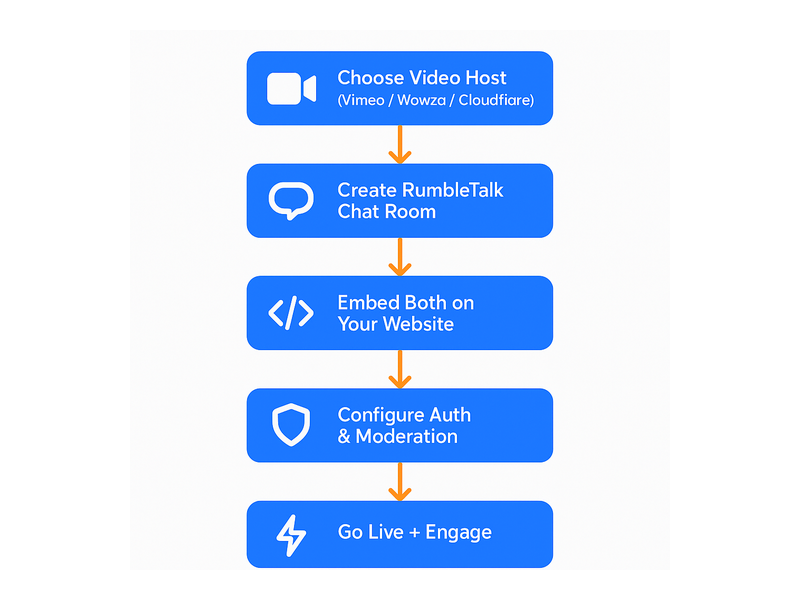
Here is how a typical setup works when you stream on your own site with RumbleTalk:
- Create your chat room — Set up a group chat room in the RumbleTalk admin panel. Configure the theme, accent colors, and permissions to match your brand identity.
- Embed the widget — Copy the embed code and paste it into your website page layout, positioned alongside your video player. It works with WordPress, Webflow, custom HTML, Squarespace, and any CMS that allows embed codes.
- Configure authentication — Choose open guest chat, social login via Google or Facebook, or SSO with your existing membership system. Members Chat and Social Chat modes give you flexible options depending on whether your audience is gated or open.
- Go live — Start your broadcast and watch the chat fill with viewer messages, questions, and reactions in real time alongside your video feed.
- Moderate as you broadcast — Use admin mode, individual moderation buttons, or assign trusted moderators to keep the conversation constructive and on-topic throughout the event.
Key Chat Features Built for Broadcasters Who Stream on Their Own Site
Moderated Q&A for High-Volume Audiences
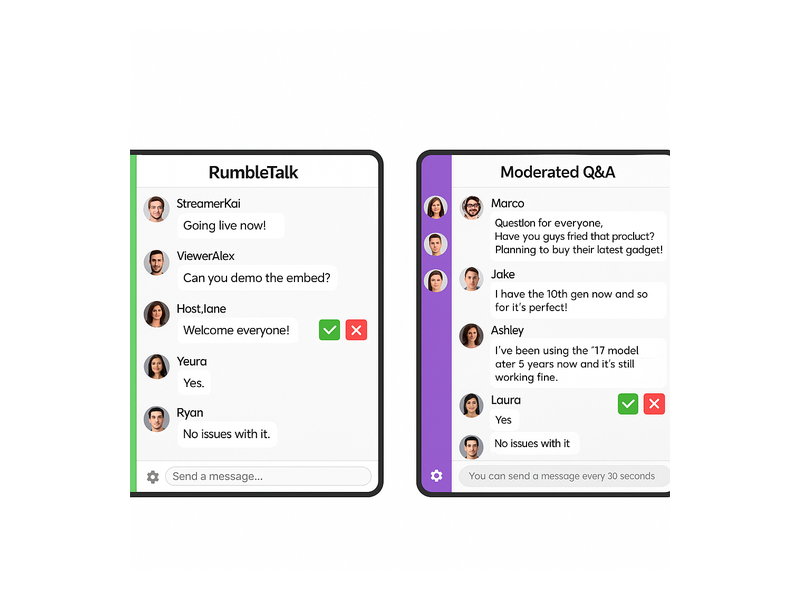
One of the biggest operational challenges when you stream on your own site to a large audience is managing chat volume. Hundreds of messages per minute make it impossible to surface the most relevant questions. RumbleTalk’s Moderated Q&A mode solves this by holding all incoming messages in a queue before they are visible to the audience. Moderators review each submission and approve or reject it, so only the highest-quality questions appear in the public feed. This is ideal for webinars, product launches, expert interviews, and any format where signal-to-noise ratio determines the quality of the experience.
Queued Chat for Orderly Conversations
For live events where every audience member deserves a fair turn, Queued Chat manages the conversation flow automatically. Messages are released in sequence, preventing any single user from dominating the thread and giving moderators a structured pipeline to work through. It is particularly effective for live radio streams, talk shows, and panel discussions embedded on a website, where pacing and fairness matter as much as speed.
Admin Mode and Rate Limiting
When excitement spikes — during a product reveal, a surprise guest announcement, or a live contest — the chat can flood in seconds. Admin mode lets you lock the chat so only administrators can post, keeping the experience professional during critical moments. Rate limiting (the “you can send a message every 30 seconds” cooldown) prevents spam and maintains a readable chat pace without requiring constant manual moderator intervention between message bursts.
Private Chat for Premium Subscribers
If you stream on your own site and offer a paid membership tier, Private Chat enables exclusive one-on-one or small-group conversations that premium subscribers access during the live event. This adds tangible value to an upgrade and keeps VIP interactions — direct questions to the host, backstage commentary, early access previews — completely separate from the general public chat.
Social Chat for Open Community Streams
For creators building open communities, Social Chat allows anyone to join the conversation with minimal friction. Viewers authenticate with their social accounts, maintain consistent usernames across sessions, and build a recognizable presence in your community over time. This is the mode that most closely mirrors the social energy of a Twitch or YouTube chat — but living entirely on your own domain, under your brand, and within your control.
Use Cases: Who Benefits From Streaming on Their Own Site With Live Chat
Content Creators and Influencers Building Owned Audiences
Creators who want to reduce dependency on platform algorithms are the most natural fit for self-hosted streaming. By choosing to stream on their own site, they control monetization, collect first-party audience data, and build a community that does not evaporate if a platform changes its rules. RumbleTalk’s chat widget provides the interactive social layer that keeps that community engaged during every broadcast and gives viewers a reason to show up live rather than watch the replay later.
Online Educators and Course Platforms
E-learning platforms running live classes, instructor office hours, or cohort-based courses need a structured way to handle student questions at scale. Rather than juggling a Zoom Q&A and a Slack channel simultaneously, educators can stream on their own site and use RumbleTalk’s Moderated Q&A to surface the best student questions without chat chaos. The result is a cleaner, more professional learning experience that stays inside the platform the student already paid for — reinforcing the perceived value of the course.
B2B Businesses Running Webinars and Product Demos
B2B companies increasingly use live streaming to run product demos, customer onboarding sessions, and thought leadership webinars. When these events happen on the company’s own website — rather than a generic Zoom link or a YouTube channel — they reinforce brand authority and keep attendees in an environment built to convert. RumbleTalk’s embedded chat transforms the webinar from a one-directional presentation into a genuine conversation, which measurably increases attendee engagement, post-event follow-through, and pipeline quality.
Radio Stations and Podcast Networks
Radio stations that stream on their own site already have a loyal listening audience. Adding live chat alongside the audio player creates an interaction channel that digital-native listeners actively look for. Hosts can read out listener messages on air, run live polls through the chat, and build the kind of community energy that keeps audiences choosing your stream over a music algorithm. For a detailed look at how broadcasters use this model, see our post on Radio Show Chat: Engage Your Live Audience in Real Time.
Live Event Organizers and Esports Operators
From corporate conference streams to amateur esports tournaments, event organizers who stream on their own site can use RumbleTalk to recreate the energy of a physical crowd. Fans react in real time, celebrate key moments, and debate outcomes together — creating a social viewing experience that generic platforms cannot replicate with your branding and your community identity intact. When the event ends, the chat history and the community relationships remain on your platform, not on someone else’s.

Setting Up Your Stream on Your Own Site: A Practical Checklist
Ready to launch a self-hosted stream with live chat? Here is a streamlined checklist for getting everything running before your first broadcast:
- Choose your video infrastructure — Use a service like Vimeo Livestream, Wowza, Cloudflare Stream, or Mux to generate a video embed code. Any player that produces an iframe or JavaScript embed will work alongside RumbleTalk.
- Create your RumbleTalk chat room — Sign up, create a new room, and customize the appearance — colors, fonts, permissions — to match your site’s brand style.
- Design your stream page layout — Place the video player and chat widget side by side on desktop and stacked on mobile. Most page builders handle this with a two-column block or simple CSS flexbox layout.
- Test before going live — Run a private test broadcast with a small team to verify chat performance, authentication flow, and moderation tools under realistic conditions. The RumbleTalk getting-started guide walks through the initial configuration step by step.
- Brief your moderators — Assign admin roles, configure rate limits, and align on which chat mode (open group, moderated Q&A, queued) fits the event format and expected audience size.
- Promote the chat experience pre-event — Let your audience know there will be a live, interactive chat alongside the stream. Viewers who know they can participate are significantly more likely to tune in live rather than wait for the recording.
Why RumbleTalk Is Built for Anyone Who Wants to Stream on Their Own Site
RumbleTalk was designed specifically for the use case of embedding professional-grade live chat on any website — not as a feature bolted onto a larger platform, but as the core product. That focus shows in the details: the moderation toolset is deeper than most alternatives, the infrastructure handles sudden audience spikes without degradation, and the embed process is genuinely simple even for non-technical site owners who have never integrated a chat widget before.
The platform scales from a solo creator streaming to a few hundred loyal subscribers all the way up to enterprise webinars with thousands of concurrent participants. As your self-hosted stream grows, RumbleTalk grows with it — without requiring a migration to a new tool or a rebuild of your chat infrastructure. RumbleTalk’s Broadcast and Podcast Chat solution is specifically tuned to the demands of live audio and video streaming environments, with features like admin mode, queued messages, and moderated Q&A designed for broadcasters, not just casual chatters.
The Long-Term Advantage of Owning Your Stream and Your Community
The most important reason to stream on your own site is not technical — it is strategic. Every viewer who watches your content on YouTube is a viewer that platform can serve a competitor’s video to next. Every viewer who watches on your site is a viewer you can re-engage with email campaigns, membership offers, and future live events. The difference compounds dramatically over time.
Community is the moat that matters most in content and media businesses. When you stream on your own site and pair that broadcast with a persistent, embedded chat community, you are building something third-party platforms cannot take away: a direct relationship with your audience, on your terms, in an environment you control. Regular viewers become familiar faces in the chat. Chat regulars become moderators. Moderators become community leaders who promote your next stream to their own networks. That entire flywheel starts with a chat layer that gives your audience somewhere to gather, react, and connect — and it all lives on your site.
Get Started Streaming on Your Own Site Today
If you are ready to stream on your own site with a professional live chat experience that keeps your audience engaged from intro to sign-off, RumbleTalk makes it fast to embed, simple to customize, and powerful enough to scale. Whether you are running a weekly webinar, a daily live radio show, a monthly virtual event, or a membership community stream, the platform has the moderation tools, authentication options, and real-time infrastructure to power your audience engagement from day one.
Visit rumbletalk.com to explore plans, see live demos, and get your first chat room running in minutes. Your audience is already expecting to participate — give them the space to do it, right on your own site.