
A radio listener chat transforms the one-way nature of traditional broadcasting into a two-way conversation that keeps your audience coming back show after show. Whether you run an online radio station, a podcast with live streams, or a traditional AM/FM broadcast with a companion website, adding a real-time listener chat gives your audience a place to connect — with you and with each other. RumbleTalk’s group chat platform is purpose-built for this kind of live audience engagement, and embedding it on your radio website takes just minutes.
Why Every Radio Show Needs a Radio Listener Chat
The shift from passive consumption to active participation is reshaping every media category, and radio is no exception. Listeners who can type a comment, vote on a topic, or ask the host a question are far more invested in the show than those who simply tune in and tune out. A dedicated radio listener chat creates a persistent community layer around your broadcast — one that builds loyalty, generates real-time feedback, and gives your show a distinct social identity.
Platforms that add interactive elements to live content consistently see session times increase significantly. When someone is chatting with other fans during a live show, they are not going to switch stations — they are going to stay engaged, participate, and come back the following week. That is the core B2B value of integrating a listener chat solution into your radio station’s website or app.
Beyond retention, a radio listener chat also creates a direct audience intelligence pipeline. You can see in real time which topics resonate most, which segments spark the biggest conversations, and what your listeners genuinely care about. This kind of qualitative data is impossible to extract from traditional broadcast metrics like reach or impression counts. For station managers and program directors, the chat transcript from a live show is a goldmine of editorial insight.
There is also a sponsorship and advertising dimension. Brands are increasingly interested in live, engaged audiences rather than passive reach. A station that can demonstrate thousands of active chat participants during a broadcast is offering something fundamentally more valuable to advertisers than raw listener numbers alone. Listener chat activity is proof of engagement — and engagement is what media buyers are buying.
What RumbleTalk Offers for Radio Listener Chat
RumbleTalk is a group chat platform designed for websites and live events. It was built with high-traffic, real-time use cases in mind — exactly the kind of audience spike that happens when a popular radio show airs. Here is a breakdown of the products most relevant to radio broadcasters and station operators:
Group Chat
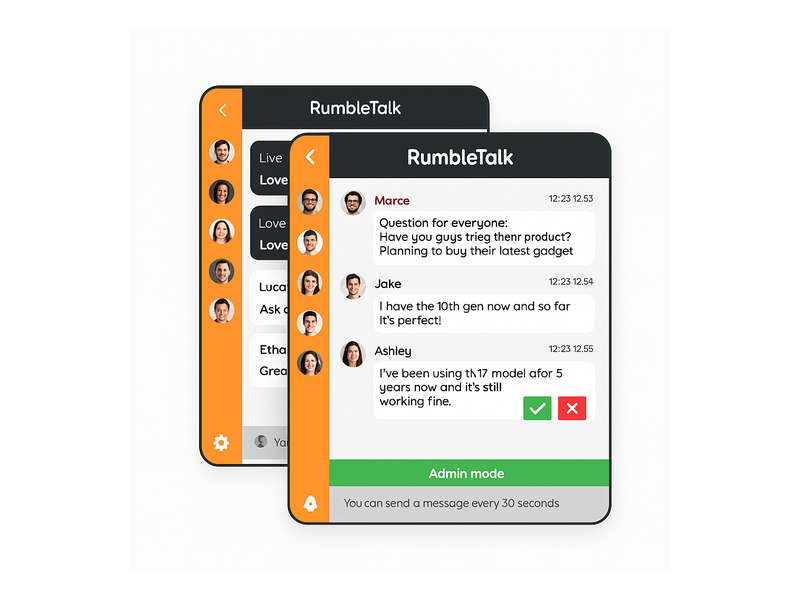
The Group Chat product is the backbone of any radio listener chat setup. It creates an open, real-time chatroom that any visitor on your website can join instantly. Listeners can post comments, share reactions, and talk to each other during the live show. The host or a producer can join the chat to respond to listener messages directly, creating an interactive experience without the logistical overhead of a traditional phone call-in segment.
Group Chat supports thousands of concurrent users, making it suitable for large radio audiences during popular programming. Messages stream in real time with minimal latency, so the chat feels genuinely live rather than sluggish or delayed. The widget embeds directly on your broadcast page, your station’s homepage, or a dedicated community tab.
Moderated Q&A
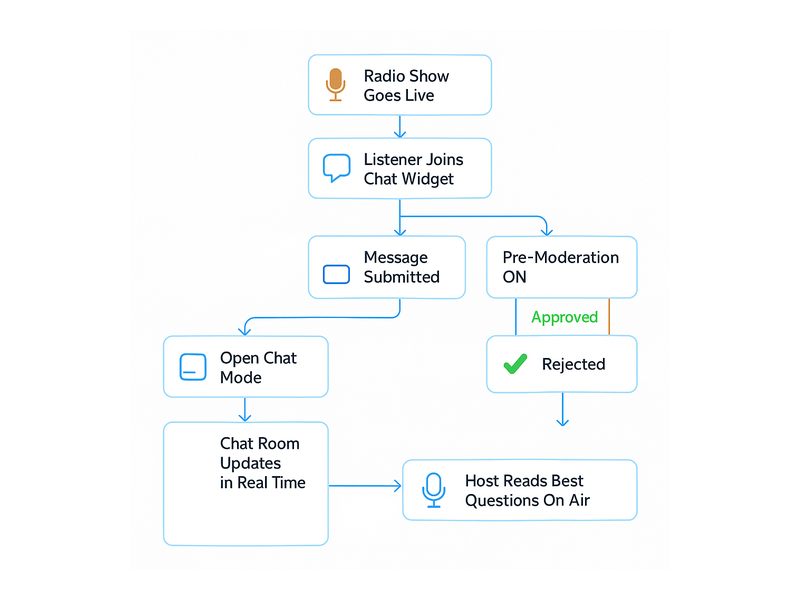
The Moderated Q&A product is ideal for structured listener interaction — a digital version of the classic call-in segment. Listeners submit questions and a moderator — producer, host, or station staff — reviews them before they appear in the chat. Only approved questions go live. This is especially valuable for interview segments, expert guest appearances, or politically sensitive content where brand safety and editorial control are non-negotiable.
For radio programs that cover finance, health, legal topics, or breaking news, the Moderated Q&A turns your radio listener chat into a curated editorial experience rather than a free-for-all. Your brand reputation stays intact while listeners still get the participation experience they want.
Members Chat
For subscription-based radio stations or premium listener programs, the Members Chat product restricts access to verified, logged-in users. This creates an exclusive chatroom for paying subscribers, Patreon supporters, or loyalty tier members. A premium listener chat room is a compelling monetization hook — people pay for access to a private community space, backstage conversations with the host, and priority question slots during live broadcasts.
Social Chat
The Social Chat product lets listeners log in using existing social media accounts — Facebook, Twitter/X, Google, and others. This removes the registration friction that causes drop-off in open chatrooms. When a first-time visitor can click “Continue with Google” and be chatting within seconds, your radio listener chat participation rate climbs dramatically compared to platforms that require a dedicated account creation flow.
Queued Chat
The Queued Chat product manages high-volume message flows by queuing submissions for display. During moments of peak chat activity — a controversial segment, a celebrity guest, a live giveaway — the queue prevents the chatroom from becoming unreadable. Messages are displayed at a controlled pace, keeping the experience legible and enjoyable for all participants.
Setting Up a Radio Listener Chat on Your Website
Getting started with RumbleTalk is a straightforward process that requires no developer resources. Here is how a typical radio station sets up a listener chat from scratch:
- Create a RumbleTalk account — Sign up at rumbletalk.com and select the chat product that fits your use case: Group Chat for open live broadcasts, Moderated Q&A for structured interview shows, Members Chat for premium subscriber tiers.
- Customize the chat room — Set your station’s brand colors, upload your logo, configure moderation rules, and set message cooldown timers. Profanity filters and admin controls are available directly from the dashboard.
- Embed the widget — Copy the embed code snippet and paste it into your website’s HTML. RumbleTalk works with WordPress, Wix, Squarespace, and custom-built sites. The widget is fully responsive and adapts to any screen size, including mobile devices where a growing share of listeners consume radio content.
- Assign moderators — Add producers, social media managers, or community staff as moderators. They access the admin panel to approve messages, mute users, and manage the chat flow in real time during broadcasts.
- Go live — When the show airs, the chat room activates. Listeners join from your website and the conversation runs alongside the broadcast.
The entire setup process typically takes under 30 minutes. There is no backend infrastructure to manage — RumbleTalk handles hosting, scaling, and message delivery. For station teams without a dedicated technical department, this zero-ops approach is a significant advantage over self-hosted solutions.
Moderation Controls That Protect Your Brand
One of the most common concerns radio station operators raise about adding a live audience chat is moderation risk. Open chatrooms can attract spam, offensive language, and disruptive users — particularly for shows covering controversial topics like politics, sports commentary, or financial advice.
RumbleTalk addresses this with a comprehensive moderation layer. Admins can enable pre-moderation (every message is reviewed before posting), post-moderation (messages post immediately but can be removed after the fact), or a hybrid mode. Profanity filters automatically flag or block messages containing banned terms. Individual users can be muted, banned temporarily, or permanently removed. Rate limiting prevents any single user from flooding the chat during peak broadcast moments.
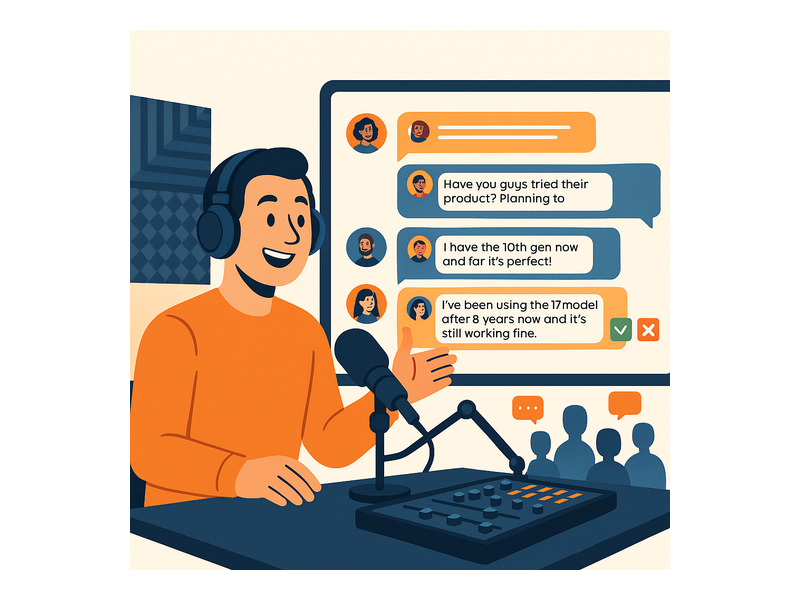
For moderators working in the admin interface, RumbleTalk provides green checkmark (approve) and red X (reject) buttons directly in the chat panel. A single click approves or rejects each message, making it practical to manage high-volume listener chats in real time without slowing down the production workflow.
Radio Listener Chat Best Practices for Maximum Engagement
A high-performing radio listener chat does not just happen by accident — it requires intentional design, consistent promotion, and active moderation. Here are the strategies that produce the strongest results for broadcasters using RumbleTalk:
Promote the Chat Before Every Show
Announce the listener chat across your social media channels, email newsletter, and on-air during the program leading into your broadcast. Tell listeners where to find it — your website URL — how to sign in using social login, and what they can do in the chat: ask questions, chat with other fans, participate in giveaways. Pre-show promotion is the single biggest driver of chat room participation volume.
Keep a Moderator On-Shift During Live Broadcasts
The fastest way to undermine engagement in a radio chat is to let spam or abuse go unaddressed for even a few minutes. Assign a dedicated moderator during every live show — this can be a producer doubling as a chat manager. Their job is to keep the room clean and flag the best listener questions for the host to address on air.
Integrate Chat Into the On-Air Content
Read listener chat messages on air. Ask questions of the chat audience and report back the reactions live. Acknowledge participants by their username during the broadcast. When listeners hear their handle called out during a live show, it creates a memorable personal moment that drives word-of-mouth and long-term loyalty. The radio listener chat becomes part of the show’s format, not just a sidebar feature that nobody notices.
Use Cooldown Timers for High-Traffic Shows
For shows with large concurrent audiences, a message cooldown timer — for example, “You can send a message every 30 seconds” — keeps the chatroom readable and prevents any single user from dominating the conversation. RumbleTalk’s Group Chat product supports configurable cooldown timers directly in the admin panel. This feature is especially important during giveaway segments or controversial topics where chat volume spikes sharply.
Archive and Analyze After Every Broadcast
Review the chat transcript after each show. Which topics generated the highest message volume? Which segments drove the most listener activity? What questions came up repeatedly that the host never addressed? This post-show analysis feeds directly into content planning, segment selection, and long-term audience development strategy. The chat transcript is primary research data — treat it accordingly.
Use Cases: How Radio Stations Use Listener Chat in Practice
The radio listener chat use case spans a wide range of formats and broadcast styles. Here are the scenarios where RumbleTalk delivers the most measurable impact:
Talk Radio and Political Commentary
Talk radio audiences are highly opinionated and motivated to participate. A Moderated Q&A chat allows listeners to submit their perspectives, challenge guest positions, and respond to host arguments — all with editorial control to keep the conversation on-brand. The host can pull the strongest listener questions from the chat queue to address on air, effectively crowdsourcing the call-in segment without any phone infrastructure.
Music Radio and Countdown Shows
For music stations, a Group Chat during a weekly top-40 countdown creates a real-time communal listening experience. Listeners chat about their favorite tracks, debate rankings, and share memories tied to specific songs. The chat becomes a companion layer to the music itself, transforming the show from a playlist into a live event.
Sports Radio and Live Game Coverage
Sports radio audiences spike sharply during live game coverage. A radio listener chat during a game broadcast gives fans a place to react in real time — celebrating scores, debating referee calls, and predicting outcomes. The energy of a stadium can be replicated digitally through a fast-moving group chat running alongside the commentary.
Online Radio and Internet Broadcasting
Internet-only radio stations often lack the production budget for traditional call-in infrastructure. A listener chat widget solves this elegantly — no phone lines, no call screening staff, no audio editing required. The chat handles all listener interaction digitally at a fraction of the cost, making it accessible even for independent broadcasters and niche streaming stations.
Podcast Livestreams and Premiere Events
Many podcast creators now release episodes as live streams before the recorded version drops. Adding a radio listener chat to the livestream creates an interactive premiere event. Listeners who tune in live get an exclusive participatory experience — they can ask questions that end up shaping the conversation, and they feel like insiders compared to those who listen to the recording later.
Why RumbleTalk Is the Right Platform for Listener Chat
There are several live chat tools on the market, but RumbleTalk is built specifically for the demands of live media at scale. Unlike general-purpose customer service chat tools, RumbleTalk’s architecture is optimized for many-to-many conversations at high concurrency — exactly what happens when a popular radio show airs and thousands of listeners arrive simultaneously.
- High concurrency — handles thousands of simultaneous participants without performance degradation
- Real-time delivery — sub-second message latency keeps the radio listener chat feeling genuinely live
- Multiple chat types — Group Chat, Moderated Q&A, Members Chat, Social Chat, Private Chat, and Queued Chat for different broadcast formats
- Simple embedding — works with any website platform via a copy-paste code snippet
- Full moderation suite — pre-moderation, post-moderation, user banning, profanity filters, and rate limiting
- Social login — listeners authenticate with Google, Facebook, or Twitter/X, eliminating registration friction
- Mobile-responsive — the widget adapts to phones and tablets, where the majority of younger radio listeners access content
Start Your Radio Listener Chat Today
Audience engagement is no longer optional for radio broadcasters competing in a digital-first media landscape. Listeners who participate in a radio listener chat are more loyal, more likely to recommend your show to others, and more valuable to sponsors than passive audiences who never interact. The technology to add this capability to your station’s website requires no technical expertise, no backend infrastructure, and can be live the same day you sign up.
RumbleTalk’s platform is trusted by broadcasters, event organizers, and live media companies worldwide. If you are ready to turn your listener audience into an active, invested community, visit rumbletalk.com to explore your options and start a free trial. Your next broadcast could be the one where your audience finally gets a voice — and can’t stop talking about it.