Using Elastic Chat to Engage Your Audience in Big Way

People typically access chat rooms on small laptop computer screens and monitors, but RumbleTalk elastic chat enables users to expand the chat window up to any size.

You may be wondering, why is this helpful?

Well, when only one user is logged into a chat from their laptop, the size of the window may not be of great concern. Typically an individual is sitting close enough to the chat that it can be easily read. However, having the ability to make the chat window larger can better facilitate conversation among a larger group of people.

There are many reasons why your business, organization, or group may want to have access to elastic chat rooms. Some reasons may include:

  1. Online group gaming sessions
  2. Business meetings and professional events
  3. Educational settings

Let’s look out why elastic chat can be so helpful in the scenarios listed above.

Online Group Gaming Sessions

Video gaming culture has never been more popular. While gamers may still enjoy playing solo games, more and more players are becoming interested in MMO games, or massive multiplayer online games.

MMO games are extremely interactive in nature. Rather than one player moving through a game by themselves and only interacting with computer-generated characters, players can interact with avatars created by actual individuals  who are logged into the game at the same time. These players may be completely anonymous or players may choose to play with their real life friends. There are a number of ways that players can communicate to each other during gameplay. Some gaming consoles allow for players to have headsets, enabling them to speak to their friends and other players.

Another option would be using an elastic chat. For someone who is playing a game from their computer or laptop, they could login to their RumbleTalk account to chat with other players. The elastic chat capability would allow players to minimize or maximize the chat window at their convenience.

Some players may have dual monitors, allowing them to play the game on one monitor and drag their chat window to the other monitor. With elastic chat, the chat window could easily fill up the entire monitor screen, making is simple for players to quickly glance over to see if anything interesting is happening in the conversation or if any new strategies are being developed.

Business Meetings and Professional Events

Many of us may have attended a conference or business meeting that was supposed to be interactive. The speaker would ask an open-ended question with hopes of receiving a lot of feedback from the audience or their co-workers. However, more often than not, people seem to be hesitant to offer their perspective or ask any questions.

Whether this lack of feedback is due to anxiety, an unwillingness to engage, or the fear of looking foolish in front of a crowd, the speaker is often left waiting in awkward silence.

Incorporating an elastic chat into one of these such meetings could easily solve this problem. Participants and attendees in meetings and conferences could all log on to the same RumbleTalk chat room. The speaker or chair person of the meeting could also log on to the chat, maximize the chat room window using the elastic chat feature, and project it onto a large screen in the front of the room. Attendees could then offer their feedback or answer audience-directed questions,  with the option of remaining anonymous. This option allows people who  don’t like speaking in front of others the ability to actively participate in the meeting.

Educational Settings

Many classrooms, educational groups, and collegiate clubs actively encourage participation from their members and students.

For example, a professor teaching a course on business ethics may present students with a hypothetical scenario. They may then ask students for feedback as to what the ethical course of action would be in that scenario. If the professor and students  logged into the chat room at the same time, students could submit their responses. They could respond to other students’ suggestions and share their perspectives. With elastic chat, the chat window size could be increased so that the entire classroom could see it and participate.

Educational groups and clubs may also benefit from elastic chat. While they may use elastic chat in the way described above to  facilitate discussion, they could also be more creative.

Many clubs and groups plan events for their members.  With an elastic chat room, a club would set up a chat for its members specifically. They could play icebreaker games within the chat as a fun and low-pressure way for members to get to know each other.

There are many ways elastic chat can be utilized for the benefit of your group, friend circle, or company. RumbleTalk offers the perfect chat room solution, offering a number of impressive features and benefits in addition to elastic chat.

Introducing the RumbleTalk Admin Panel!

Here at RumbleTalk, we’ve been busy working behind the scenes to bring you something really special—an overview of the admin panel!

While we regularly release new front-end features such as moving and resizing the private chat window or even deleting messages in a private chat, today, we would like to look back at our admin panel. You’ve guessed it right—we’re here to give you a quick tour!

The admin panel has a variety of new settings including options, features, advanced settings, and more. Read on to see what’s included and if what you’re looking for is present.

Quick overview of the admin panel

1) Clean and Sleek Look

First things first, when it comes to back-end settings, we think it’s important not only to be functional but also to look great! The updated design is an all-in-one admin panel. It packs everything into one easy-to-use screen. Unlike the previous one that looked boxy and a bit cluttered, now it looks sleek and clean. With the new white and green colors, it represents RumbleTalk as a user-friendly interface.

chat membership

In the updated design, you can just click on any of the individual settings and you’ll be redirected. For example, see “Chat type” right there? If you click it, the other chat types will pop-up and you can immediately change it.

admin panel
admin panel

2) The Admin Panel Has Super Fast Load Times

In our previous admin panel, we can see that the interface was less responsive. Therefore, we’ve upgraded and loading time is quick as it can get. Now, the biggest benefit provided by the admin panel is its fast response. In just a click, you’ll be almost immediately redirected to the settings page. Finally, you don’t have to wait that much longer!

In addition, once you’re in the admin panel, you’ll see every setting on one page. So, if you decide to change one, the loading time it will take is not slow. This gives you a fast and easy-to-use admin panel.

3) You Can Export Your Users into a CSV File

If you want to export your users, it’s now possible with the admin panel. This option exports your users in a spreadsheet and is particularly handy if you want to take note of attendees. For those who use more advanced CRM programs, by exporting users in a CSV file, you can then upload and integrate the chat users with your other systems. This is the simplest way to do that.

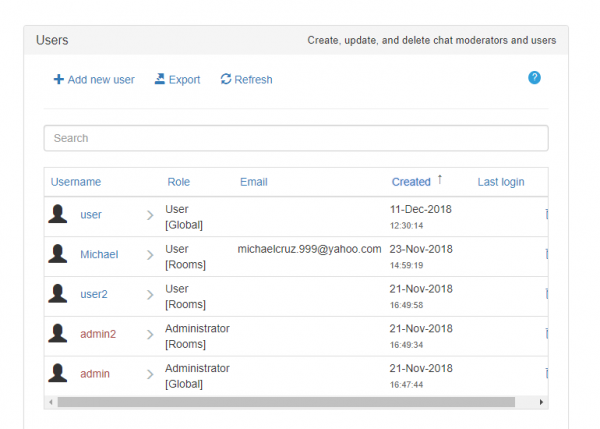
4) New Search Option to Look for Users in the Users Tab

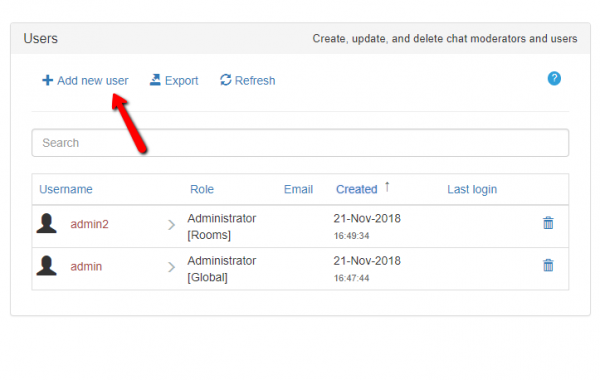
Are you having trouble looking for a specific user in your users list? Well, now you can search for that user using the search option. This is great for chat owners who just have too many users in one chat. By taking advantage of this option, you don’t have to scroll through a long list just to find an individual chatter. Just search his/her name and let the admin panel do all the work for you. The search option is simultaneous, meaning it searches while you type.

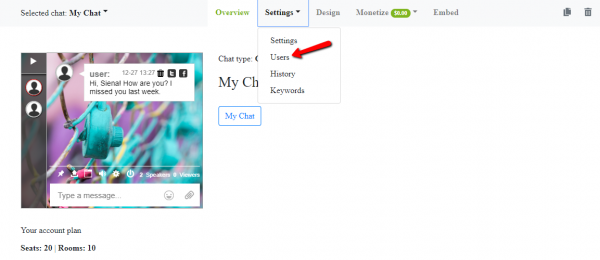
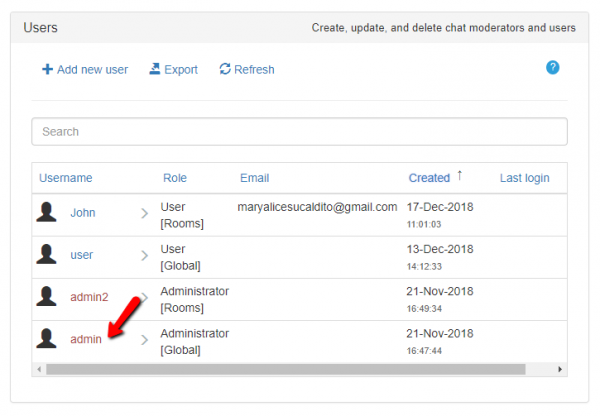
To do a quick search through your database of users, first, click on the “Users” tab. Then, simply type a name into the “Search” box. As a result, the user you’re looking for will pop right up.

admin panel

Here’s an example of searching for a user. In here, we searched for “admin.”

That’s how the search option works! If you have too many users in one place, then you can just search and arrange them. You can change their names or even delete them.

5) New Archive Settings and Icons Added

Lastly, we’ve added an option to enable or disable the archive settings. What does this mean? This means that you can turn on or off the chat history. It can be seen by everyone or only the admin. Also, there’s an added option where you can export the transcripts of a chat.

To do this, you need to go to “History” in the admin panel. You will see the aforementioned features.

admin panel

In the previous example, you can export transcripts through the following:

  • as HTML,
  • as CSV,
  • and as Word (although this is still in beta mode).

Choose what works best for you.

6) An Admin Panel for Every Chat Room

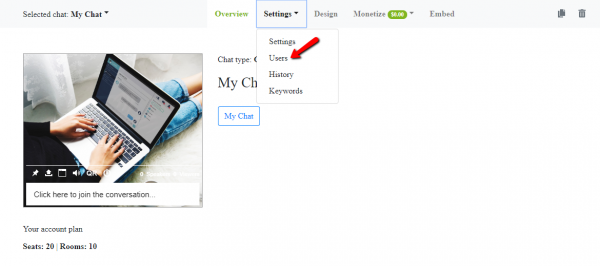
Previously, all the chat rooms were displayed on one page. Now, for a cleaner look, each chat room has its own admin panel. For example, if you have multiple rooms, you can customize the settings of each one. In addition, we even added the option of duplicating chat rooms.

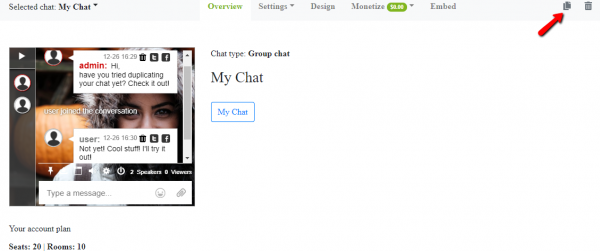
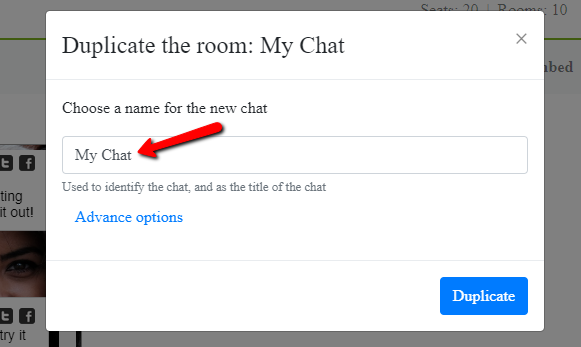
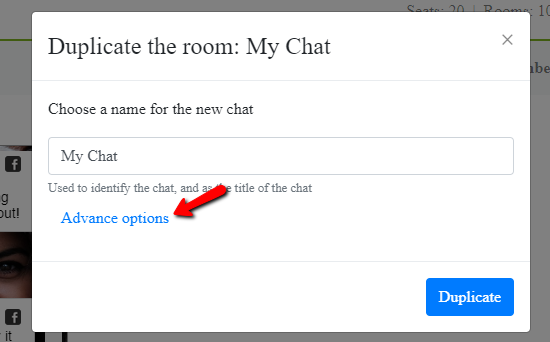
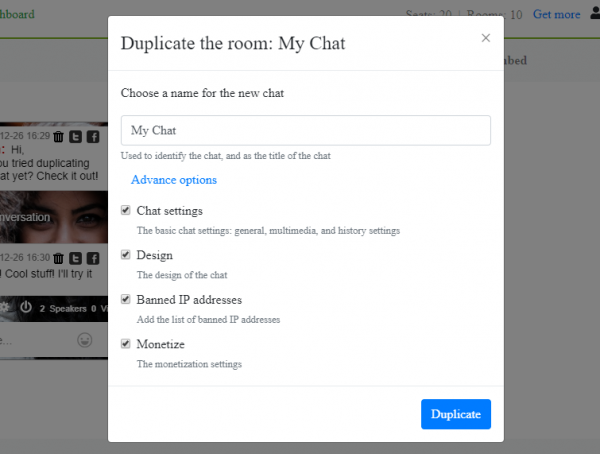
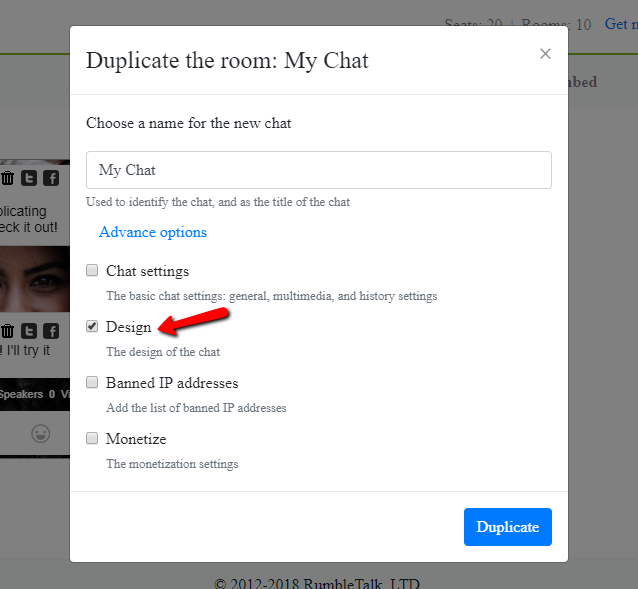
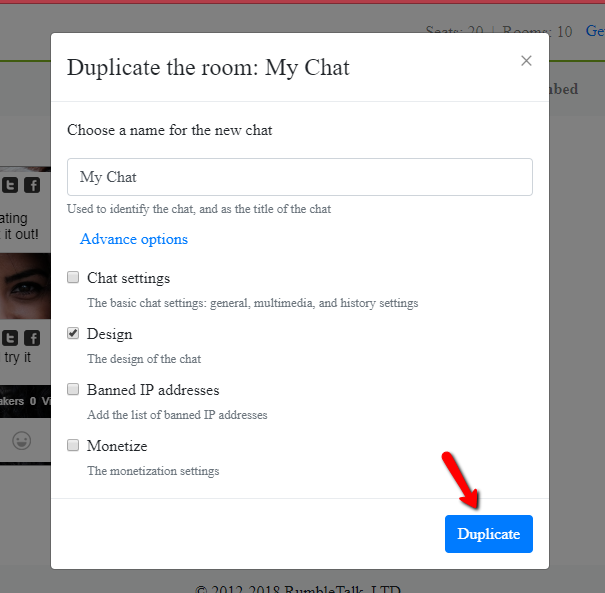
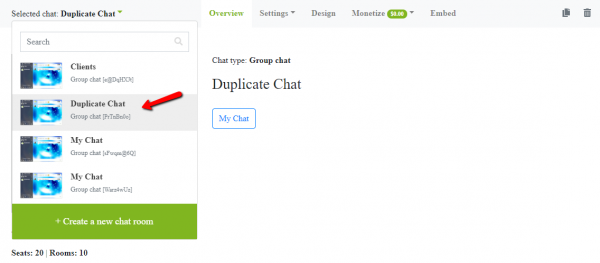
To do this, you can click the “Duplicate chat” button on the top right corner. You can select what you want to duplicate, from settings to the actual design. You will now see the duplicated chat on the list of your chat rooms. Beside it is the option to delete your chat, which is also a feature that wasn’t available in the old admin panel.

duplicate
duplicated chat

As a customizable chat room, you can also try out different themes for every chat room. Every chat room has a purpose. For each one, you can find what theme and background suits it best. You no longer have to stick with only one when you can have different designs.

design

Want to know more about us?

For those who are already used to the previous settings, the updated admin panel already incorporated everything in the old one. Users don’t have to worry about not understanding the admin panel. You can always check out the knowledge base if you’re having a hard time looking for something.

On our end, we are very excited to bring these developments and look forward to hearing your feedback. To contact us about the admin panel, you can also do so by clicking on your profile. Choose “Support” and a page will pop-up. We’d love to know how we can help and how we can improve our platform. If you’re not yet a user but you want to know more about our platform, contact us on Facebook or Twitter. We’ll do our best to accommodate your concerns and questions about us.

Moving Towards Mental Health Chat in Patient-Psychologist Relationships

Talking with a therapist through mental health chat is becoming more common, though for many people the idea is probably still a strange one.

Traditionally, when an individual is seeking to counsel, they must set up an appointment at a therapy office. Sometimes it may not be possible to see a therapist or psychologist for several days or weeks. Some potential clients may not have a close family or friend group, so they have no one else to talk to. For individuals who are really struggling with mental health issues, like feelings of depression or extreme anxiety, waiting for the appointment could be agonizing. They may make poor choices and decisions in the meantime, decisions that could potentially include self-harm.

For all of these reasons and many more, a greater number of psychologists and therapists are moving their services online. Through mental health chat, they are able to provide counseling and therapy to clients at anytime, from anywhere, at a moment’s notice.

From the Therapy Couch to Mental Health Chat

People seek out counseling for a variety of reasons. While some individuals may have a lifelong history of mental illness, others may be going through a particularly traumatic event. They may need help developing coping mechanisms and strategies. Some individuals may be having marital or family problems and want to know how to improve their relationships. Other individuals may wake up every day with crippling depression, making it almost impossible to get through their day.

Regardless of the reason why people seek counseling and therapy, it generally is a very private affair to them. As a psychologist, it is your responsibility to maintain a strict privacy policy and develop a trusting relationship with clients. The goal is for clients to know they can open up to you and generally feel comfortable.

For some, the idea of traveling to a therapist’s office may make them uncomfortable and prevent them from seeking help. However, if you were able to offer in-home counseling services via a chatroom, they may be more interested.

Clients would be able to simply login to the mental health chat, possibly even anonymously, to seek help. After connecting with a therapist or counselor, they would begin developing a relationship with you, hopefully growing more comfortable and open over time. They may want to continue setting up regular meetings and sessions with you, without ever having to leave their home.

Benefits of an At-Home Practice

It may initially seem odd to work from home as a psychologist or therapist. However, around 20% of Americans are working from home in today’s time. There is no reason why the psychology and counseling field cannot also move to a work from home environment.

chat depression solved with mental health chat

As a field that relies heavily on developing relationships with clients and interpersonal communication, it may initially seem impossible to do so without actually sitting in the same room.

However, with today’s advanced chatroom technologies, it would still be possible to hear people’s voices and see their faces as they were speaking. While you may initially start a conversation via normal chat, you could transition to in-chat calling and in-chat video-calling as well to get to know clients better.

Video calls would also allow you to replicate some of the more standard in-office counseling experience. You would be able to see client’s body language and facial expressions to gauge their emotions and feelings. If you working with more than one person, like a couple or family members, you would be able to see how they interacted with one another.

Making the Transition

From the counselor’s point of view, working from home may also provide you with more flexibility. You could truly set your own schedule, spend more time with your family, and be able to work from the comfort and convenience of your own home.

Having an at-home practice may also help you cut back on costs, as you would not have to rent an office space. You could potentially offer counseling services at a reduced rate and make them more accessible to all people.

If you are considering the transition from a traditional counseling and therapy practice to a virtual one, there are several online counseling services that employ psychologists and therapists. Customer service reps work to connect clients to new counselors around the clock. Working with one of these services may be appealing, as it would be a relatively simple transition process.

Another option would be to begin to offer virtual counseling services in addition to standard in-person counseling. Some or your existing clients may be interested in this idea. It would allow them to continue going to counseling from anywhere. They may go on vacation, be out of town for work, or move to a different city. Throughout it all, they would be able to continue talking with the same psychologist.

You may also be able to solicit new clients by offering a non-traditional virtual counseling service. These individuals may have always wondered about counseling, but been too nervous to walk into an actual therapy office. The online option may be the tipping point for them to seek help.

Get your own chat in here.